About Us
 Careers
 Leadership
 Board
Board Newsroom
Google review management keeps you on top of every review on your Google Business Profile: you catch each new one, reply within 48 hours, ask finished customers for more, and report the ones that break Google’s rules.
You can run it by hand inside Google, or hand the daily checking to reputation and review software built for local businesses.
Grow reviews, boost visibility, and uncover insights with AI
TL;DR
- Google counts reviews toward local prominence: More reviews and positive ratings can help your local ranking, Google says.
- A fixed routine beats occasional cleanups: Monitor daily, reply within 48 hours, request reviews at every job close, and flag only clear policy breaches.
- Vendasta’s AI Reputation Specialist drafts and automates replies: It writes replies in the reviewer’s language for your approval. You can try Vendasta with a 14-day free trial, no credit card required.
What Is Google Review Management
Google review management covers four jobs on your Google Business Profile (formerly Google My Business): monitoring, responding, requesting, and flagging. It applies to the reviews customers leave on your profile in Google Search and Maps.
Running these jobs on a schedule protects your online reputation through managing your Google reviews.
Before You Start: Google Business Profile Access and Verification
You need a verified profile to reply. Google’s owners and managers help page gives reply access to owners, including the primary owner, and to managers. Approved replies post publicly under the customer’s review as a reply from the business.
Google’s review management page says replies usually take up to 10 minutes to review, though some take up to 30 days.
If your profile is unclaimed, find it on Google Maps, follow the claim prompts, and verify. If someone else controls it, use Request Access at business.google.com/add; Google’s access request guidance gives the current owner three days to respond.
Add staff as owners or managers under People and access with their own Google Accounts, so no one has to share a password.
5 Ways to Manage Google Reviews Successfully
Run five jobs on a fixed cadence: catch every review the day it posts, reply within 48 hours, send the review link when a job closes, flag only named policy breaches, and appeal with evidence.
Step 1: Set Up Fast Review Monitoring
Turn on Customer activity notifications, which Google’s notifications help page describes as alerts when customers leave new reviews or add photos.
In Search, open your profile and select More, then Notifications; in the Maps app, tap Business, then the Notifications icon. Google says alerts can arrive through email, Search, or Maps, so route them to one inbox checked every morning and glance at the profile itself too.
Vendasta Reputation AI monitors 100+ review sources, including the other review sites your customers use. It handles review monitoring without anyone refreshing Maps between jobs.
Step 2: Respond on a Repeatable Cadence
Give one person, say whoever invoices on a four-person HVAC crew, a 48-hour reply window, with the owner as backup. Google’s review tips ask for brief, direct replies that address the reviewer by name, respond to their specific feedback, and avoid deals or promotions. Sign off with your name or initials.
- 5-star: Name one job detail: “Thanks, Dana. Glad the furnace is heating evenly again. Mike.”
- 1-star: Own it and invite a call: “Sorry the tech was late, Raj. Please call so I can fix it. Mike.”
- No text: Google’s guidance doesn’t cover ratings-only reviews, so invite detail: “Thanks for the rating, Sam. How did the job go? Mike.”
Vendasta’s guide to a response to a negative or critical review has worked examples.
Vendasta’s AI Reputation Specialist, one of Vendasta’s AI Employees that handle customer work for local businesses, drafts replies in the reviewer’s language.
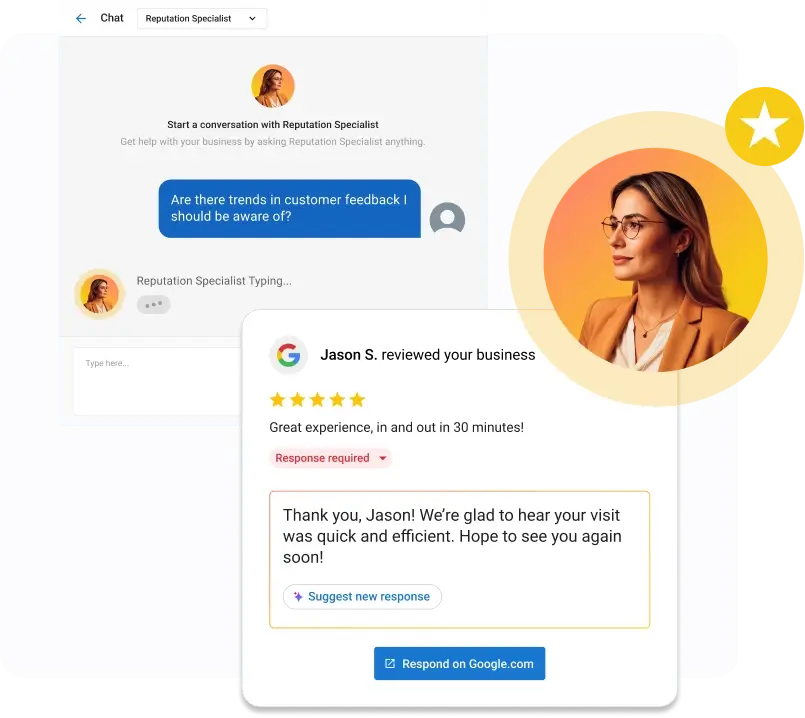
Start by approving its drafts before they post, then let it send under rules you set, such as rating thresholds and delays, once you trust the results.
If you’d rather not configure it yourself, Vendasta offers an AI Reputation Specialist setup service.
Step 3: Earn More Reviews Within Google’s Rules
Google’s review link help page explains the Business Profile path: select Read Reviews, then Get more reviews, then select Copy to get the link. Paste it into every job-close email and text to build a steady stream of reviews. Include it on invoices too.
Google’s local ranking help page ties reviews to prominence and says more reviews and positive ratings can help your local ranking. Search Engine Land’s Google reviews guide adds that review velocity is considered one of the top 20 Local Pack ranking factors and that a steady stream beats sudden bursts.
Competitors who keep collecting can pull ahead in the local pack and take the calls, so steady requests protect your local search engine optimization (SEO).
To improve Google reviews safely, never:
- Buy reviews
- Offer a discount, free service, or other incentive for a review
- Ask only happy customers
- Set staff quotas
- Pressure customers on the premises
For more ideas, see how to ask customers to review you on Google.

Step 4: Flag Reviews That Violate Google’s Policies
Flag only reviews that break a named rule in Google’s Maps content policy, which prohibits:
- Fake engagement that isn’t based on a real experience
- Reviews incentivized with payment, discounts, or free goods or services
- Conflicts of interest, including current or former employment, competitors, and family relationships
- Spam such as email addresses, phone numbers, or links
- The same content posted multiple times
- Off-topic political or social commentary and personal rants
To report:
- Open the Reviews Management Tool and confirm the email linked to your profile. Select the business, then Continue, Report a new review for removal, and Continue.
- Select Report next to the review, choose a reason, and Submit.
Google’s review reporting page says evaluation typically takes several days. Fixing the causes of repeat complaints, using the patterns in your negative reviews, does more over time than flagging.
Step 5: Appeal When a Flag Is Rejected
A rejected flag shows “Report reviewed – no policy violation.” Google allows a one-time appeal: select Appeal eligible reviews, choose up to 10 reviews, and submit the form. Reviews that violate policy are removed; the rest stay live with the status “Escalated – check your email for updates.”
Sterling Sky’s policy violations guide notes that Google won’t accept LinkedIn profiles or employment agreements as proof. Name the policy the review breaks and describe your evidence in the appeal text:
- A reviewer saying they work or worked for you
- What screenshots show for coordinated reviews
Google sets no turnaround. Search Engine Land reports that an appeal triggers an email with a case ID and a final decision within a few weeks, and Sterling Sky’s review removal guide has seen reviews sit in “Decision Pending” much longer. If you’re denied, post the case ID in the Google Business Profile Help Community, where Product Experts can sometimes escalate.
Sterling Sky reports these outcomes:
| Violation | Likely Outcome |
|---|---|
| Reviewer states they are a current or former employee | Removable |
| Review gating reported with evidence | Google removes all reviews left during the gating period |
| Plain negative review with no policy breach | Stays |
| Text-less one-star | Rarely removed |
Gating and Incentives: What Google and the FTC Prohibit
Google’s Maps policy bars businesses from discouraging or prohibiting negative reviews and from selectively soliciting positive ones. It also bars incentives such as payment, discounts, or free goods or services in exchange for reviews.
The Federal Trade Commission (FTC) Consumer Reviews and Testimonials Rule bans these practices in the FTC’s rule text:
- Buying reviews the business knew or should have known were fake or misrepresented the reviewer’s experience
- Incentives conditioned on a particular sentiment, positive or negative
- Reviews by officers or managers that don’t clearly disclose their relationship to the business
The FTC’s December 2025 warning letters release cites civil penalties of up to $53,088 per violation.
The FTC also warns against review gating. The FTC’s marketer guide lists tips to avoid potentially deceptive conduct that may violate the FTC Act, including: “Don’t ask for reviews only from customers you think will leave positive ones.”
Outsourcing doesn’t transfer responsibility. The FTC’s rule Q&A says a business can still be liable for reviews it knew or should have known were false, even when an agency or reputation management company does the work. Choose a provider that sends the same request to every customer and logs what goes out in your name.
Reviewing Your Google Review Software Options
Start with Google’s built-in tools for replies, reports, and the review link. Its Performance report covers views, searches, calls, directions, and website clicks, but not review count, average rating, response rate, or reply time. Once alerts get missed or replies slip past 48 hours, Vendasta’s guide to review management software lays out the options.
Vendasta’s option is Reputation AI, built so replies keep going out while you’re on a job.
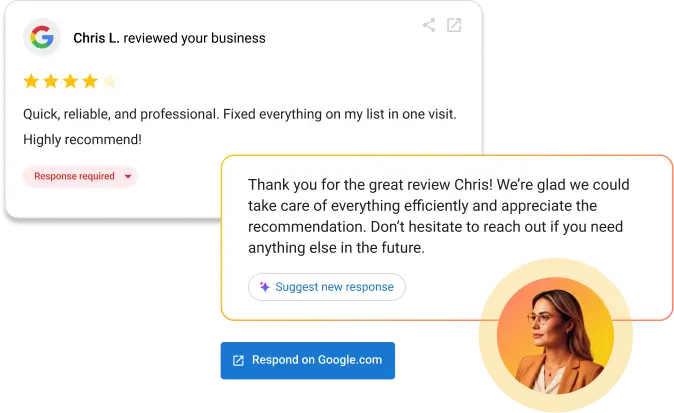
Google’s built-in tools and Reputation AI differ mainly in where they watch for reviews and who writes the reply.
| Option | Intended User | Primary Strength | Meaningful Limitation | Pricing | Best Fit |
|---|---|---|---|---|---|
| Google’s built-in tools | Owners managing their profile in Search or Maps | Reply, report reviews, and copy the review link inside the profile | Covers Google only; Performance report omits review count, average rating, response rate, and reply time | Included with your Business Profile | Owners who check Search or Maps daily and reply within 48 hours |
| Vendasta Reputation AI | Owners whose replies slip while they run jobs, or who get reviews on other sites | Monitors 100+ review sources; the AI Reputation Specialist drafts multilingual replies or sends them under rules you configure | Full response automation requires the Premium edition | Free entry option; 14-day free trial, no credit card required | Owners who miss alerts or let replies pass 48 hours |
If you hire an agency to run reviews for you, you still answer for review requests sent in your name.
Metrics to Track Your Google Review Performance
Track five numbers monthly:
- Total review count
- Average rating
- New reviews per month
- Response rate
- Median time to reply
Use rising count and rating to check whether Step 3 helps you build up more positive reviews; check for near-100% response and sub-48-hour replies to assess whether Steps 1 and 2 work.
If you run more than one location, track the same five numbers for each location side by side, in one sheet or one tool. That makes a location with slowing reviews or late replies stand out at a glance. Each location needs its own verified profile. Google’s bulk verification page allows bulk verification for 10 or more storefront profiles from the same business; service-area businesses aren’t eligible.
To see where most small businesses fall behind, Vendasta’s guide to reputation management for small businesses breaks down 2026 data on the gap between knowing the routine and running it.
For how review count and rating feed your search visibility, see how reviews affect local rankings.
Make Google Review Management an Always-On Routine
Put Google review management on a calendar and monitor daily through alerts routed to one inbox. Reply within 48 hours using the reviewer’s name and one job detail, and send Google’s review link the day a job closes.
Flag only named policy violations. Use your one-time appeal to name the specific policy and describe your evidence in the text; expect plain negative reviews to stay.
The reply cadence is the step that slips, usually because the person assigned is also running jobs. Vendasta’s AI Reputation Specialist drafts replies for your approval or sends them under your rules (automatic sending requires the Premium edition of Vendasta Reputation AI), and every action is logged so you can see what went out and when.
To put it to work, start a 14-day free trial with no credit card, or book a Vendasta demo to see the workflow first.
Google Review Management FAQs
1. How do I get access to my Google Business Profile without the old marketer’s password?
Select Request Access at business.google.com/add. The current owner has three days to respond; if they don’t, you may be able to claim the profile through Google’s follow-up email. Then invite staff under People and access, each with their own Google Account.
2. Can I get an unfair negative review removed from Google?
Only if it breaks a Maps content policy, such as conflict of interest, spam, or off-topic content.
Report it through the Reviews Management Tool and name the specific policy. Plain negative reviews stay, and a text-less one-star is rarely removed.
3. Is it safe to let AI auto-reply to my Google reviews?
It can work if you set rules first. Vendasta’s AI Reputation Specialist drafts multilingual replies or sends them under rules you configure; full automation requires Reputation AI Premium. Start by approving its drafts before they post, and Google still reviews each reply before it appears.
4. Is review gating allowed on Google?
No. Google’s Maps policy prohibits discouraging negative reviews and selectively soliciting positive ones, and the FTC says not to ask only customers you expect to be happy. Sterling Sky reports that when gating is reported with evidence, Google removes all reviews left during that period.
5. What metrics should I report for Google reviews each month?
Report total review count, average rating, new reviews per month, response rate, and median time to reply. Google’s Performance report omits them, so pull them from the reviews list or a tool. Aim for near-100% response and replies under 48 hours.
6. Should I manage Google reviews natively or with software?
Start natively, since Google’s built-in tools already handle replies and reports. You can get the review link there too.
Move to software when alerts get missed, or replies lag past 48 hours. Some software tracks response rate and reply time, which Google’s Performance report omits.
7. How fast should I respond to a Google review?
Set a 48-hour reply window and assign one named person to it, with a backup for when that person is out on a job. Google’s moderation usually takes up to 10 minutes, though some replies take up to 30 days to appear.
8. Should I reply to a Google review that has no text?
Yes. Google’s documentation doesn’t address ratings-only reviews, but replying requires only a verified profile. A one-line reply invites the customer to add detail; sign it with your name or initials. A text-less one-star is rarely removed, so replying works better than flagging.
9. How long does a Google review appeal take?
Google states no turnaround. Search Engine Land reports a final decision within a few weeks, and Sterling Sky has seen reviews stay in “Decision Pending” much longer. After a denied appeal, post the case ID in the Google Business Profile Help Community for escalation.
10. Can I offer a discount for a Google review?
No. Google’s Maps policy prohibits incentives such as payment, discounts, or free goods or services in exchange for reviews.
The FTC rule bars incentives conditioned on a particular sentiment, with civil penalties of up to $53,088 per violation. Send every finished customer the same link, with nothing attached to it.