About Us
 Careers
 Leadership
 Board
Board Newsroom
AI for small business is now mainstream: the Federal Reserve’s survey of employer firms found 46% now use AI, and 71% of those users report higher productivity.
Local businesses use AI to answer missed calls, qualify and follow up with leads, request and reply to reviews, publish social posts and blogs, keep the customer relationship management (CRM) system updated, and automate admin tasks like scheduling and data entry.
For an owner-operator, that’s capacity you can’t hire for: the call you miss on a ladder, the review request after the job, the weekly post. For a three-person crew, that work waits until 9 p.m. or never happens. Vendasta, an AI customer acquisition and engagement platform for local businesses, provides AI Employees that handle these tasks and log every action.
This guide to AI for small business covers 10 use cases with named tools, a vendor-neutral comparison of general-purpose chatbots and CRM-native AI, real costs, a five-step rollout for owners without a technical team, a worked ROI example, data-safety rules, and the claims to ignore.
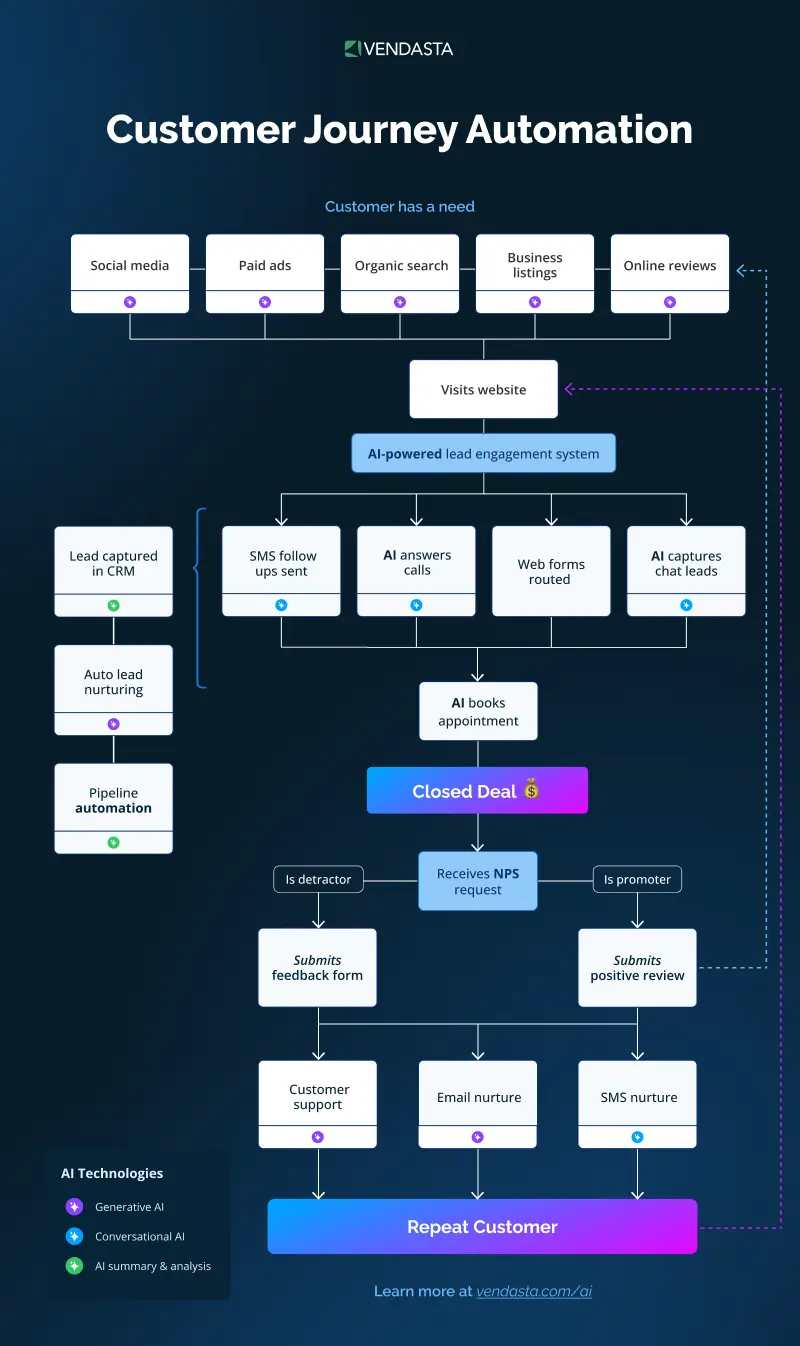
Automate the entire customer journey from first touch to repeat business
TL;DR
- Never miss a call: Vendasta’s AI Receptionist answers the calls, texts, and web chats your team can’t get to, 24/7. It qualifies the lead and books the job, so after-hours calls stop going to voicemail.
- 71% of AI users report higher productivity: The Federal Reserve’s survey also found 31% saw higher sales, so the same crew gets more done.
- AI Receptionist qualified 778 leads: Elite Web Professionals’ deployment for a car rental client handled 1,017 calls and produced a 76% conversion rate over four months.
What AI for Small Business Actually Means
Artificial intelligence is software that learns from data and acts on it. Generative AI creates new content, such as a draft post, while predictive AI forecasts outcomes, such as how predictive scores rank leads to decide who to call. For structured data like spreadsheets, traditional machine-learning methods tend to outperform generative models, so predictive insights suit lead prioritization.
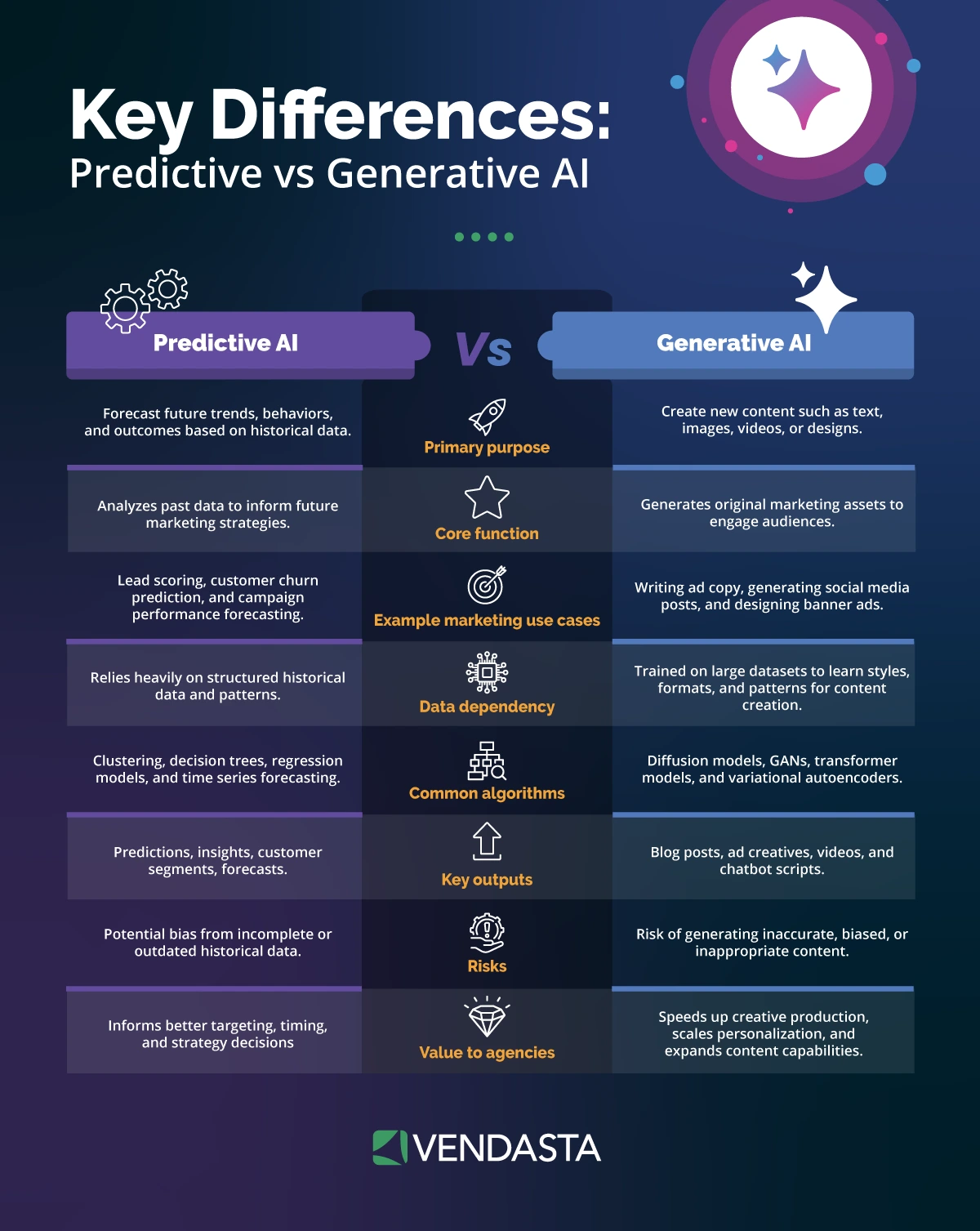
Vendasta’s AI Employees go a step further: they complete defined workflows with your business’s own data instead of waiting for prompts.
10 Smart Ways to Use AI for Small Business Growth
Start where revenue leaks first: the missed call. It’s the gap AI agents for small businesses are built to close, and the first job most owners hand to an AI Employee. Then add reviews and content before automating admin. Each use case below includes a practical tip you can apply with any tool.
1. Capture and Qualify Every Lead
Vendasta’s AI Receptionist answers calls, web chats, texts, and messages 24/7, qualifies leads, and can book appointments.
Vendasta Conversations AI logs each conversation to your CRM. Each logged after-hours call becomes a CRM record your team can follow up on.
Neighborly, a home services franchisor, used this approach to cut unanswered leads from roughly 30% to nearly zero, with a 372% year-over-year increase in leads converted to revenue.
Tip: Start by having AI cover the calls your team can’t take, such as after-hours and on-the-job calls, so people still answer first when they can. Then track how many after-hours leads it captures each week.
2. Automate Review Generation and Responses
Vendasta Reputation AI monitors reviews across 100+ sources. Its Premium edition adds full automation: the AI Reputation Specialist replies to Google and Facebook reviews under the rules you set, such as rating thresholds or approval before posting, and suggests responses for other review sites.
Reputation AI Premium also sends review requests by email and SMS, along with net promoter score (NPS) surveys. Review requests can be triggered by completed jobs in Jobber or QuickBooks Online. Our review-response automation and AI reputation management guides show how to set reply rules.
Tip: Ask for the review within a day of finishing the job, while the experience is fresh, and reply to every review, good or bad. Blue River Digital’s auction-house client earned 21 five-star reviews in 30 days after automating its requests.
3. Publish Social and Blog Content
Vendasta’s AI Social Media Manager learns your brand’s voice and visuals, then generates, schedules, and publishes posts across Google Business Profile, Facebook, Instagram, and more. AI Blogger researches what your customers search for, then writes and publishes one FAQ-style WordPress article each week, built for search engine optimization (SEO).
AI Blogger then hands each article to AI Social Media Manager to become a week of social posts, so your business stays visible without you writing a word. You can review content before it goes live or let it publish automatically.
Tip: Build posts and articles around the questions customers ask you on the phone. Those are the same questions they type into Google and ChatGPT.
4. Keep the CRM Updated Automatically
Vendasta CRM AI is a sales CRM that updates itself. Its AI Sales Assistant pulls outcomes from meetings and sales activity into your records, enriches contacts and companies with web research, and answers plain-language questions about your opportunities.
Sales Coaching in CRM AI Pro scores your sales calls and can show why leads don’t close. The Xcite Group used AI sales coaching to lift a construction client’s close rate from 15% to 50%.
Tip: Log every job and quote in the CRM, even small ones, so the AI has a full picture of your pipeline to work from.
5. Improve Local Search Visibility
Vendasta Local SEO keeps your core business listings accurate and shows how you rank in local search. Local SEO Pro adds rank tracking on a map grid and the AI Search Specialist, which can optimize your business profiles across Google, Bing, Apple Maps, and Facebook. It also reports how your business appears in ChatGPT, Gemini, and Perplexity answers, now the top discoverability concern for local businesses.
Tip: Keep your business name, address, phone number, and hours identical on every listing. Then ask ChatGPT or Gemini to recommend a business like yours in your area to see whether you show up.
6. Automate Repetitive Admin
In the Federal Reserve’s survey, 38% of AI-using firms use AI for administrative tasks. That makes admin a common starting point for task automation, and four jobs are worth checking first: data entry, scheduling, transcription, and reporting.
AI Sales Assistant updates the CRM from sales activity, so jobs and contacts don’t need retyping. AI Receptionist books appointments, as covered above, and CRM AI also includes scheduling, tasks, and automations. For transcription, Conversation Intelligence in CRM AI Pro records and analyzes Google Meet and Microsoft Teams meetings, so call notes land in your records without typing. Business App, the client-facing portal, logs every AI Employee action, and its executive reporting shows what got done.
Tip: Give one admin task to an AI virtual assistant for small business first. Once it’s measured, automate workflows around it.

7. Run Email and SMS Campaigns
Email remains one of the highest-ROI marketing channels, but most SMBs underutilize it. AI changes that by handling segmentation, personalization, and send-time optimization automatically. AI analyzes engagement patterns, predicts the best times to send messages, and tailors content for each recipient, increasing open and click-through rates. SMBs no longer need to guess what works; the data does the heavy lifting.
For SMBs looking for a platform purpose-built around this approach, Flodesk combines multi-trigger automations, advanced segmentation, and brand-first email design in one tool — so small businesses can send polished, personalized campaigns without a designer or technical team.
Vendasta Campaigns Pro runs email and SMS marketing automation from your CRM records. Its AI email builder drafts copy and imagery from one prompt, like a fall tune-up reminder to last year’s furnace customers.
Tip: Segment by the service each customer last bought and when, and measure repeat bookings rather than open rates.
8. Build Websites and Internal Tools Fast
Vendasta Vibe, currently in beta, builds websites and apps from plain-language instructions, such as an estimate calculator for your site. It already knows your business: it pulls your logo and services from your business profile and sends every lead form straight to your CRM.
Tip: Build first for the question you answer most on the phone, such as price ranges or service areas.
9. Support Customers 24/7
AI Support Agent is a no-code Custom AI Employee, available with any paid Vendasta AI product and built from your standard operating procedures. It answers existing customers’ after-hours questions about appointments, policies, and order status, and hands anything it can’t resolve to your team with full context. It’s a practical layer of customer engagement that doesn’t need staff on call.
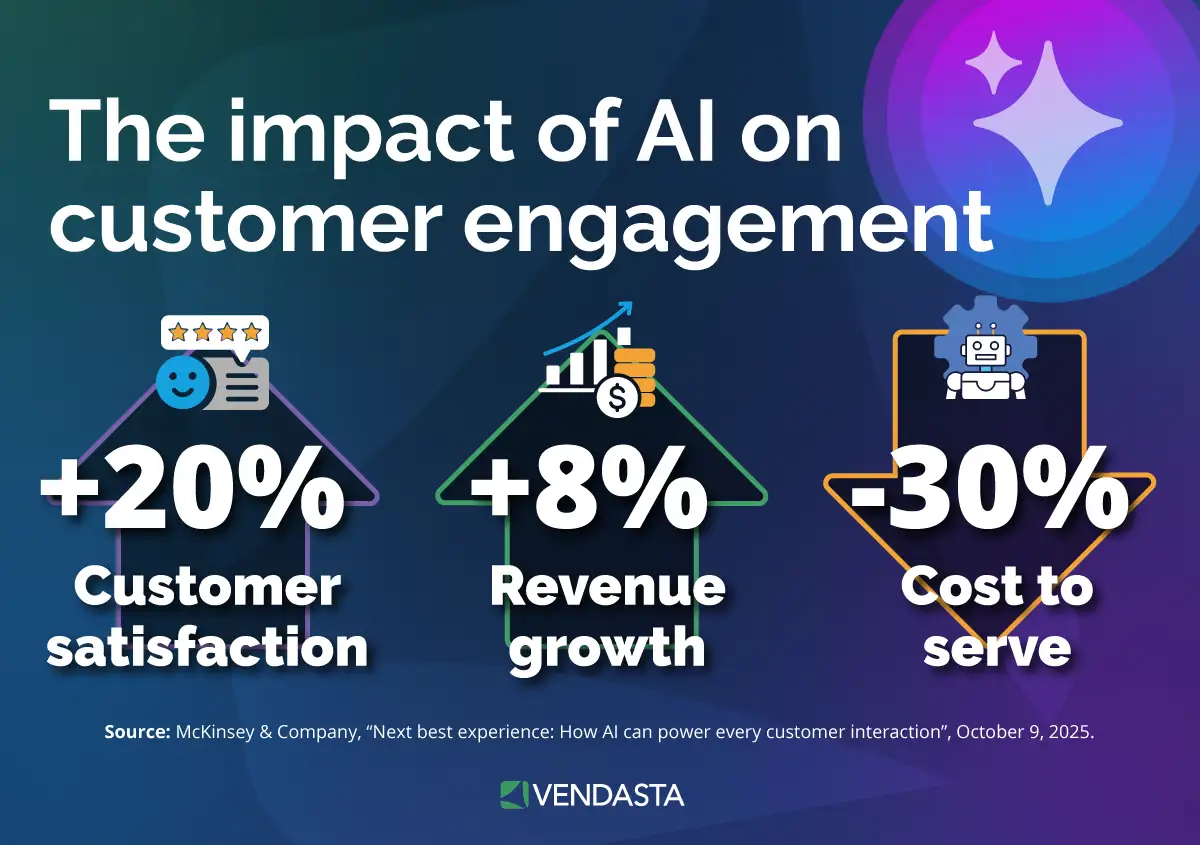
Gartner’s survey found 87% of customers consider an option to reach a human essential. Build an escalation path into any customer journey automation.
Tip: Train it on your 10 most common customer questions first, then expand once it answers them reliably.
10. Turn Business Data Into Decisions
AI Data Analyst, a Custom AI Employee, turns CRM, review, and social data into briefings that end in a next step, while Business App dashboards show results. For inventory management, Custom Capabilities let an AI Employee check stock levels or order status in your own systems.
Tip: Pick one weekly number to watch, such as booked jobs or lead response time, and ask the AI to explain what changed instead of building reports by hand.
Which AI Tool Should You Start With?
Use general AI tools for text drafting and CRM-native AI for tasks that use your data:
| Tool | Limitation | Pricing |
|---|---|---|
| ChatGPT (OpenAI) | Separate from your CRM records | Free $0; Business $25/user monthly, $20 annual (2-seat minimum) |
| Microsoft Copilot | Needs a Microsoft 365 Business plan | $21/user/month annual, $25.20 monthly |
| Google Gemini | Separate from your CRM and job records; full Gemini in all apps starts at Business Standard | Business Starter $7/user/month annual, $8.40 flexible |
| CRM-native AI (Vendasta CRM AI) | Works best as your system of record | 14-day free trial, then monthly subscription |
If missed calls and unrequested reviews cost you most, start CRM-native. If drafting time does, a $7–$25 business seat covers it, though Copilot also needs a Microsoft 365 Business plan.
What AI for Small Business Costs
Free tiers cover drafting, but their training defaults differ from paid business tiers:
| Tool | Free tier | Trains on inputs by default |
|---|---|---|
| ChatGPT | Free $0 | Free: yes; Business: no |
| Microsoft Copilot | Copilot Chat with eligible Microsoft 365 subscription | Consumer: mostly yes; Microsoft 365 Copilot: no |
| Google Gemini | Gemini app | Consumer: yes; Workspace: no |
Vendasta’s AI Employees run on a monthly subscription that covers work a free chatbot can’t do on its own: answering calls, sending review requests, and updating your CRM. Local businesses can get them directly from Vendasta, with done-for-you setup, or through a marketing agency that manages them. Start a 14-day free trial with no credit card required, or book a demo to see pricing for your business.
A Five-Step Rollout for Non-Technical Owners
Goldman Sachs’ survey found most non-users don’t know where to start:
- Assess processes: Count a week of missed calls and billable-work interruptions.
- Pick one use case: Choose the costliest task, usually the missed call.
- Prepare data: Connect your website and Jobber, Housecall Pro, or ServiceTitan.
- Train staff: The Small Business Administration’s AI guide advises starting small and having another person review all AI output. For AI skills training, Grow with Google offers free AI training built for small businesses, and its AI Essentials course takes about 10 hours.
- Measure: Compare 30 days of booked jobs and after-hours leads with that week.
Once AI Receptionist covers its cost, our AI adoption guide and AI marketing strategy guide help you pick the second product.
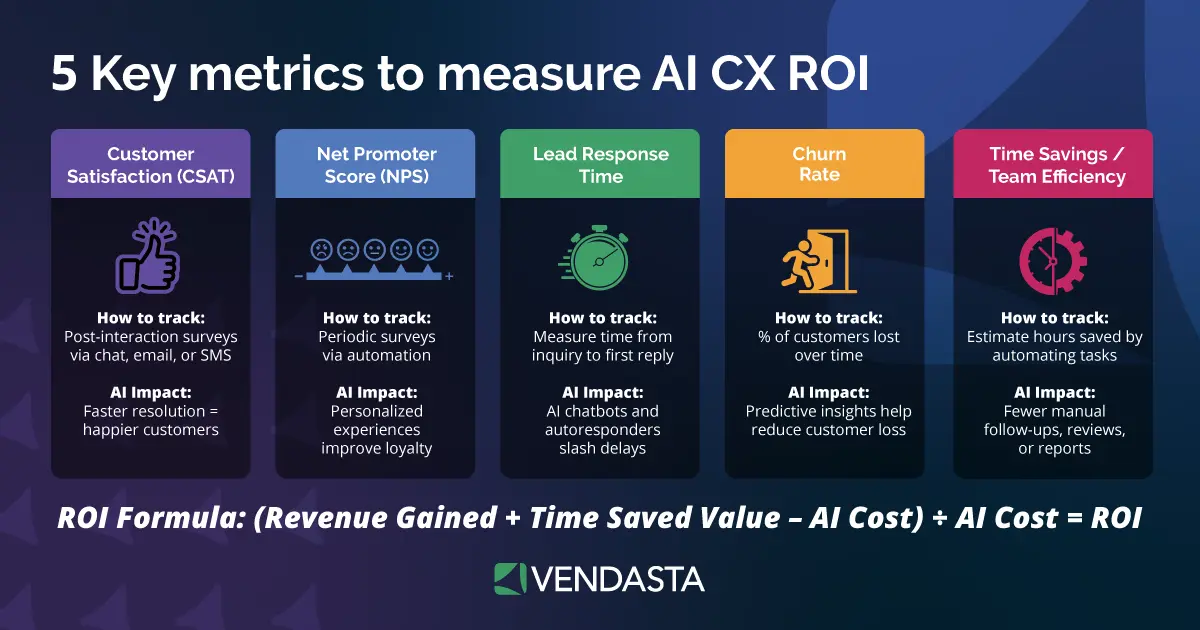
Measuring the Payoff With a Worked ROI Example
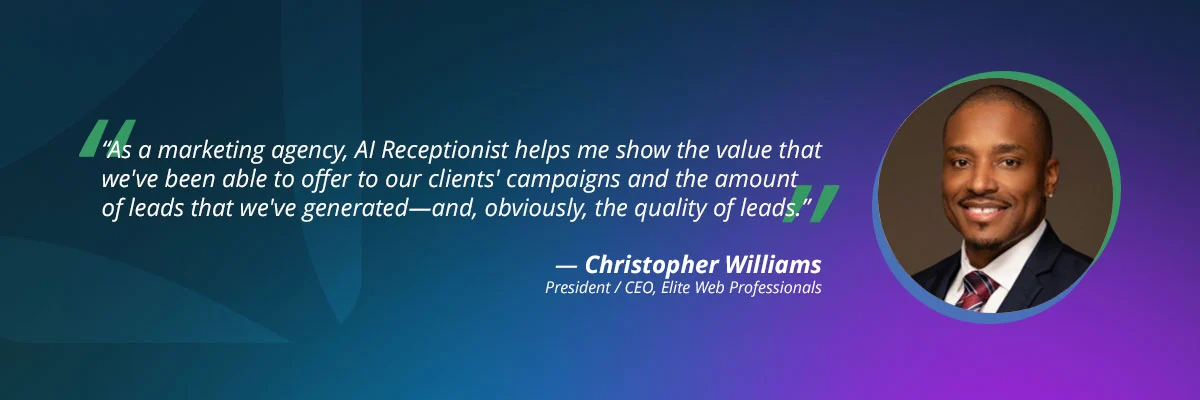
Here’s what return on investment (ROI) looked like in one real deployment. Elite Web Professionals deployed AI Receptionist for Choice Signature Luxury Car Rental, which was losing callers who wouldn’t answer callbacks from an unfamiliar number. The AI asked each caller what they needed and screened ride-share renters for a chauffeur’s license before staff stepped in. Over four months, it handled 1,017 calls, qualified 778 leads, and produced a 76% conversion rate.
For a contractor with the same volume, the math works like this (minutes, close rate, and job margin are illustrative assumptions, not case results):
- Hours saved: about 254 calls a month at an assumed four minutes each is about 17 hours of call handling the crew no longer does mid-job.
- Booked jobs: the case’s 76% conversion rate reflects the car rental client’s results. A contractor assuming a more conservative 20% of the roughly 194 monthly qualified leads would book about 39 jobs.
- Dollar value: at an assumed $300 margin per job, that is about $11,700 a month.
- Payback: divide your monthly AI subscription by your margin per job to see how many booked jobs cover it, then compare that number against the roughly 39 jobs above.
Swap in your own baseline-week numbers before buying.
Keeping Customer Data Safe
OpenAI’s data page states that OpenAI does not train on ChatGPT Business or Enterprise data by default. On consumer accounts, turn training off in ChatGPT’s Data Controls and Gemini’s Keep Activity setting. Offices handling patient data also need a signed business associate agreement, since Department of Health and Human Services (HHS) guidance treats a third-party chatbot handling protected health information as a business associate.
A one-page staff AI policy keeps responsible AI use simple:
- Use business accounts, never personal AI logins, for company work.
- Never paste card numbers, passwords, health details, or customer files into a consumer chatbot.
- Have a person review anything customers will read before it’s sent or posted.
- Tell customers when they’re talking to an AI assistant.
- Name one person who approves new AI tools.
The Claims to Ignore About AI for Small Business
The Federal Trade Commission (FTC) brought five actions against AI-hype schemes under Operation AI Comply. One, Ecommerce Empire Builders, promised clients $10,000 a month; the FTC alleged no evidence backed it, and the case ended in a $9,786,124 judgment, partly suspended.
The 30 percent rule has no authoritative origin, and versions conflict; the common one gives AI about 70% of a task and a human the final 30%.
Content Marketing Institute’s article describes a similar split for first drafts. Pair AI’s speed with human review on anything customers read.
Where AI Fails and What It Doesn’t Change
Common adoption mistakes include:
- Buying a tool before defining the workflow
- Skipping human review of public replies
- Handing the crew a login before training them
What AI usually doesn’t change is headcount. In the National Federation of Independent Business (NFIB) technology survey, 98% of AI-using small employers reported no change in employee count, and most Federal Reserve respondents saw no labor-cost change.
Why AI for Small Business Is Worth Starting Now
Start with your costliest leak, usually the missed call that goes to voicemail while you’re on a job. For a plumbing or HVAC shop, that is often the evening emergency call; for a law office, it is the intake call that rings during a hearing.
Deploy one AI Employee on it, then measure 30 days of booked jobs and after-hours leads against your baseline week. If the numbers beat that baseline week, add a second workflow; if they don’t, fix the setup before buying more.
Business App logs and reports every AI Employee action, including calls, bookings, and review replies, so the 30-day comparison uses recorded results instead of estimates. Use that record to choose the next workflow.
Start a 14-day free trial with no credit card required, or book a Vendasta demo to see how AI Employees can handle this workflow in your business.
AI for Small Business FAQs
1. What is the best AI for a local service business?
The best AI handles your costliest task. ChatGPT, Copilot, or Gemini can handle drafting, while Vendasta’s AI Receptionist handles missed calls: it answers 24/7, qualifies leads, and books appointments.
2. Can you make $10,000 a month with AI?
No evidence supports it as a typical outcome. Under Operation AI Comply, the FTC alleged Ecommerce Empire Builders’ $10,000-a-month claim lacked backing. Measure gains as recovered leads and returned hours instead.
3. What is the 30 percent rule for reviewing AI output?
It is an informal heuristic with no official source, and versions conflict. The common split gives AI roughly 70% of the work and a person the final 30%, including sign-off.
4. How much does AI for small business cost?
Free ChatGPT and Gemini app tiers cover drafting but train on inputs by default. The business seats compared here range from $7 to $25 per user monthly, and Copilot Business also requires a Microsoft 365 Business plan. Vendasta’s AI Employees, which answer calls, request reviews, and update your CRM, run on a monthly subscription. Start with a 14-day free trial, no credit card required, or book a demo for pricing.
5. How do I start with no technical team?
Pick one costly task and connect your website with your field-service tool. Then deploy one AI Employee; most deploy in under 30 minutes after learning from your site. Done-for-you setup is available if you’d rather not configure it yourself.
6. Is my customer data safe with AI tools?
It depends on the tier. Business plans from ChatGPT and Copilot don’t train on your data by default. Gemini Workspace also does not train on your data by default, while most free consumer accounts do. Keep card numbers out of consumer chatbots.
7. How do I measure what AI saves?
Record a baseline week of missed calls and admin hours, then compare 30 days of logged AI Employee activity. For dollars, multiply qualified leads by close rate and job value, then subtract your monthly cost.
8. Does AI replace staff or help you grow without hiring?
Most AI users kept headcount steady: among AI-using small employers in NFIB’s survey, 98% reported no change in employee count. Instead, AI helps the same team handle more work. The Federal Reserve found that 71% of AI users reported higher productivity and 31% saw higher sales.
9. Can AI Receptionist work with Jobber, Housecall Pro, or ServiceTitan?
Vendasta’s platform integrates with Jobber, Housecall Pro, ServiceTitan, and QuickBooks Online, and AI Receptionist books appointments against real calendars. AI Receptionist is unlocked by Vendasta Conversations AI, which logs every conversation to the CRM. Most AI Employees deploy in under 30 minutes.
10. Can AI follow up after a job to get more Google reviews?
Yes. Vendasta Reputation AI sends review requests by email and SMS and can trigger them from completed jobs in Jobber or QuickBooks Online. AI Reputation Specialist replies to Google and Facebook reviews automatically under your rules and suggests responses for other review sites.