About Us
 Careers
 Leadership
 Board
Board Newsroom
Opening a second location means creating a second profile, and a Google Business Profile multiple locations setup follows one rule from Google: one profile per physical address, each added from the account that owns the first. You add the new location in Business Profile Manager, verify it (one at a time below 10 locations, in bulk at 10 or more), and give it its own phone number, hours, reviews, and landing page. Two or three locations are a solo job; 10 or more need business groups, clear roles, and a review workflow.
This matters most to the owner signing the lease on a second shop, and to the franchise or multi-location leader whose 50 profiles get edited by 50 different people. Each location needs verification and a city page that ranks, with clear control at head office and in each branch.
The payoff is local visibility that holds up branch by branch. Google ranks each Google Business Profile (GBP) on its own address, reviews, and links, so a profile that is set up correctly is one of the most direct ways of attracting more local customers to each new location. This guide covers setup, verification, location pages, consistency of name, address, and phone number (NAP), governance, and reporting, in the order a growing business usually meets them.
Acquire and serve 10x more clients with AI-powered software
TL;DR
- Every address gets its own Business Profile: Google allows one profile per location, and its sign-up guidance warns that an account may be suspended if Google finds multiple profiles for the same business in the same metropolitan area.
- Bulk verification starts at 10 locations: Google reviews a chain request filed through the Verifications tab in Business Profile Manager; below 10, each profile verifies on its own.
- Each address also needs its own landing page: the profile’s website field should point to that location’s page, with the same phone number and address, rather than to the homepage.
How to Add a Second Location to Your Google Business Profile
Add the second address as its own profile and resolve any existing-profile warning before creating a duplicate. Business groups let you share access across locations once you have more than one.
Yes, you can add a second location, and Google requires it as a separate profile. Google’s representation guidelines allow one profile per location, and Google’s sign-up guidance warns that an account may be suspended if Google finds multiple profiles for the same business in the same metropolitan area. The new shop does not get appended to the first profile; it becomes its own profile with its own address, phone, hours, and reviews.
Google manages multiple profiles in Business Profile Manager, and the sequence runs as follows.
- Sign in to Business Profile Manager with the Google account that owns the first profile. If you belong to several organizations, pick the right one first.
- Choose a business group, or create one with Create group if the account holds two or more profiles and you have never used one.
- Add the location and enter the business name exactly as the first location uses it. Google requires all same-country locations to share a name, its bulk upload rules cap names at 100 characters, and its guidelines do not allow fully capitalized words.
- Search for and select the primary category. Google requires every location of one business to share a category; up to nine additional categories are optional.
- Enter the street address of the staffed, signed location. Virtual offices and P.O. boxes are ineligible, and a co-working space qualifies only with clear signage, customers received during business hours, and your own staff on site during those hours.
- Enter that location’s own phone number and its location page URL. Google’s sign-up guidance recommends the individual phone number or store page for each location, rather than a remote call center.
- Finish the setup and start verification. Google decides which verification methods each profile can use.
Set hours after the profile is created through Edit profile, then Hours, which is also where special hours live. Search Engine Roundtable reported in January 2025 that accounts managing 100 locations or fewer get a Copy Hours control that pushes special hours to selected profiles, which spares you from editing each one when you update your Google Business hours for a holiday.
Fixing a Profile That Already Exists
If Google tells you a profile for the business already exists and someone else may manage it, check the address first. The same business at the same address is a duplicate, so claim the existing profile instead of creating a new one. A different address for a new branch follows Google’s one-profile-per-location rule and gets its own profile.
To claim, request access to the profile through Google’s form. Google’s help page gives the existing owner 3 days to respond, and if nobody answers, you may be able to claim and verify the profile yourself. A service-area business owner has to contact support with “Transfer ownership of listing” instead.
If you already created a duplicate, an owner can remove it, and removal is permanent. Google’s removal page says user-generated content and reviews remain, while owner and manager posts, photos, videos, and review replies are permanently removed.
Before touching either profile, confirm which one is which by its Google Business Profile customer ID (CID) number, so you keep the profile with the reviews and history you want.
When both profiles represent the same business, the next step is merging GBP listings rather than deleting one.
If a profile has to go entirely, read up on how and when to delete a GBP account first, since that change cannot be undone.
Using Business Groups to Organize Multiple Locations
A business group is a set of profiles managed together, which Google describes as “like a shared folder for your profiles.” You can create one as soon as the account holds two or more profiles.
Create a group when a second person needs access to several profiles at once, because anyone added as a group owner or manager can access every profile in it, including profiles added later. That roll-up cuts both ways: with a single group, a branch manager can see and edit profiles that are not theirs, so a network with regional managers is better served by several groups with narrower access.
Groups are also harder to undo than to create. Only an owner can delete a group, the deletion cannot be reversed, and every profile has to be removed or moved to another group first.
Verifying Locations: One by One vs Bulk Verification
Below 10 locations, each profile verifies on its own; at 10 or more locations of the same business, you can request bulk verification for the group. Google decides which individual methods a profile can use, including phone or text message, email, live video call, postcard or video, and those options cannot be changed once offered.
Claudia Tomina, interviewed in a Search Engine Land guide to the 2025 verification changes, says video verification is the main option about 8 out of 10 times. She adds that multi-location enterprises are almost always bulk verified, which bypasses video verification entirely.
The two paths differ on eligibility, method, and timing:
| Individual verification | Bulk verification | |
|---|---|---|
| Who qualifies | Any profile; Google picks the method | 10+ locations of the same business; service-area businesses are excluded |
| Where to start | Business Profile Manager, Search or Maps | Business Profile Manager, Verifications, Chain, Start |
| Method | Phone, text, email, live video call, postcard, or video as offered | A chain verification form that Google reviews |
| Published review time | Up to 5 business days | None published |
| Common blockers | Editing name, address, or category while a code is pending | Duplicate, suspended, or disabled profiles don’t count toward the 10-profile minimum |
Individual verification has a few traps:
- Most postcard codes arrive within 14 days, and codes expire after 30. Requesting a new code invalidates the one already in the mail.
- Live video calls only run during the location’s business hours.
If the postcard route stalls, you can often verify your Google Business Profile without a postcard using another method Google offers.
The complete guide to verifying your Google Business Profile covers each method step by step.
Bulk verification has its own paperwork. Google’s bulk verification page states that uploading a spreadsheet doesn’t send a verification request and that the profiles in your account must accurately reflect the size of your business.
Google’s page on delays in bulk verification lists the usual causes: email addresses outside the business’s official domain, incorrect postal or country codes, call-center phone numbers instead of local ones, and redirect URLs instead of direct links. It also advises adding every location you manage before you upload the spreadsheet.
Google publishes no bulk verification timeline, so file the request well before new sites open rather than the week they do.
Why One Website Cannot Rank in Every City
Google’s local ranking help page names three inputs: relevance, distance, and prominence. Relevance is how well a profile matches the search, while prominence is how well known the business is, and distance is the input a single address cannot overcome.
For distance, Google considers how far each result sits from the location term in the search, or from the searcher when no term is given. Google adds that a farther business can outrank a closer one when it is a better match, and that there is no way to request or pay for a better local ranking.
A Dallas office can serve Fort Worth customers all day, but the Fort Worth Google map pack measures distance from the Dallas address, so the office struggles once it is competing against businesses with Fort Worth addresses. A service area does not change that: Google allows up to 20 service areas, does not allow a radius, and suggests the total area stay within about two hours of driving time.
That is the case for one profile and one landing page per city you have an address in. You compete in the map pack through a nearby profile with a location-specific URL to point to, and you also earn local links to that page and reviews for the location, both inputs to prominence. If you want to optimize your Google Business Profile before building pages, start with the categories and point the website field at the location page.
Building One Landing Page Per Location
Build a page with branch-specific details and keep it on the main domain. Reuse templates only when each city has useful local information, as the plumbing example below shows.
Location pages carry most of the weight in multi-location marketing, because they are where a profile’s website click lands and where local links point. A page that repeats the homepage with a new city name gives searchers nothing new, while a page with the branch’s own staff, services and directions answers the question a local customer is asking.
Each location page needs its own phone number, its own address, and enough local content that it could not be swapped for another city’s page. Google’s bulk verification delay list warns against call-center numbers and redirect URLs, and its sign-up guidance recommends the individual number or store page per location, so a shared toll-free number on every page works against verification.
The elements a location page should carry are concrete:
- Local phone number and street address: Match the Business Profile character for character, including suite number and ZIP code.
- Embedded Google Map and directions: Pin the exact storefront so customers see the same business location on the page and the profile.
- Location-specific hours: Include holiday hours where they differ from other branches.
- Named local staff: The branch manager, lead technician, or attorney who works at that address, with photos taken there.
- City-specific services: The services, permits, or pricing that differ at this branch, written in that branch’s terms.
- Testimonials from that location’s customers: Reviews that name the city or the staff member, not a brand-wide quote block.
- A link to the location’s Business Profile: Set the profile’s website field to this page, not the homepage.
Site Architecture: Subfolders, Subdomains or Separate Domains
Put location pages in subfolders on the main domain, as /locations/state/city/, and skip subdomains and separate domains unless a legal or franchise contract forces them. Google’s prominence definition counts links to the business.
Our recommendation follows from that: keep location pages on the main domain, where existing links and brand mentions already point, rather than on plano.brand.com or planobrand.com, which would split future links across properties. The subfolder path also keeps one site to crawl, one analytics property, and one place to fix a suite number.
The structure scales as far as the content does. Build the folder for cities where you have an address or real demand, not for every town in the county, because a page for each town with nothing local to say is the pattern Google’s spam policies describe.
Keeping Templated City Pages Out of Doorway-Page Territory
Google’s spam policies define doorway abuse as sites or pages created to rank for specific, similar search queries, and one named example is multiple pages targeted at specific regions or cities that funnel users to one page.
Keyword stuffing includes blocks of text that list cities and regions a page is trying to rank for, and scaled content abuse covers many pages generated mainly to manipulate rankings, no matter how they are created.
When a site owner asked about building 1,300 city landing pages, Google’s John Mueller replied, “That sounds like doorway pages, not something I’d recommend.”
Templates themselves are allowed when each page carries information that exists only at that address. Google sets no word count for this, and Search Engine Journal quotes Mueller: “There is no universally ideal content length.”
The copy should cover staff, services, directions, and customers that exist only at that branch. Our recommendation is to build the five or ten most important cities first rather than 50 pages at once, then add cities as each one has enough local detail to stand on its own.
A Worked Example of One Location Page
Take a fictional plumbing company, Northgate Plumbing, opening its third branch in Plano, Texas. The page lives at /locations/texas/plano/, with the title tag “Plumber in Plano, TX | Northgate Plumbing” and the H1 “Northgate Plumbing in Plano.”
The copy names the branch manager, lists the water-heater and slab-leak work the Plano crew does, gives drive directions from the Coit Road exit, embeds the map pin for 1420 Coit Road, Suite 110, and quotes two Plano customers by name.
Google’s LocalBusiness structured data documentation requires name and address and recommends geo (at least five decimal places), telephone with country and area code, openingHoursSpecification and a working url; pointing that url at the specific location’s page keeps the markup and the profile aligned. Google also asks for the most specific LocalBusiness subtype possible, and Schema.org’s parentOrganization property (which supersedes branchOf) ties the branch to the brand.
The block below drops into the page’s head and gets cloned per location:
{
  "@context": "https://schema.org",
  "@type": "Plumber",
  "name": "Northgate Plumbing Plano",
  "url": "https://www.northgateplumbing.com/locations/texas/plano/",
  "telephone": "+1-972-555-0143",
  "address": {
    "@type": "PostalAddress",
    "streetAddress": "1420 Coit Road, Suite 110",
    "addressLocality": "Plano",
    "addressRegion": "TX",
    "postalCode": "75075",
    "addressCountry": "US"
  },
  "geo": {
    "@type": "GeoCoordinates",
    "latitude": 33.03841,
    "longitude": -96.76911
  },
  "openingHoursSpecification": [
    {
      "@type": "OpeningHoursSpecification",
      "dayOfWeek": ["Monday", "Tuesday", "Wednesday", "Thursday", "Friday"],
      "opens": "07:00:00",
      "closes": "18:00:00"
    }
  ],
  "parentOrganization": {
    "@type": "Organization",
    "name": "Northgate Plumbing",
    "url": "https://www.northgateplumbing.com/"
  }
}
Leave aggregateRating out. Google’s review snippet rules state that when the entity being reviewed controls the reviews about itself, its pages using LocalBusiness or other Organization markup are ineligible for star review features. Structured data helps Google read the page; it does not replace the reviews and links that drive local ranking.
Targeting Cities Where You Have No Address
You can rank a city page in organic results without an address there, but Google measures map-pack distance from the verified address, so the pack in that city is close to out of reach. Service-area settings do not move that address.
- Google requires service-area business owners to hide the address if they do not serve customers there and allows up to 20 service areas, with no radius option.
- Search Engine Roundtable reported in June 2025 that Google’s help documentation now says not to add countries or states as a service area.
Hiding the address carries its own cost. Sterling Sky’s near-me ranking study across 8,186 businesses in 200 cities found that being a service-area business and hiding the address both correlated negatively with ranking in the local pack.
The pin itself can also work against you. Search Engine Land documented a moved business whose map pin reverted to the old city as soon as the owner toggled the address to hidden, so proximity was measured from a location it had left.
For the owner deciding whether to open in the next city, the arithmetic is: a page gets you organic visibility there, while an address with signage and staff gets you a real shot at the map pack.
Avoiding Cannibalization Between Nearby City Pages
Two city pages start competing when their cities are close enough that the same searches return both, and Dayna Lucio summed up the symptom in a March 2026 Search Engine Land article: “sometimes it’s not the page you intended” that ranks.
Other tells include near-duplicate pages that stay unindexed and Google choosing a different canonical than the one you declared. If a keyword flips between two of your pages week to week without any change on your side, the pages are fighting.
Merge pages when the second location sits inside the first city’s search area. Sterling Sky’s guidance on expanding in a large city is direct: “If you create a second Charlotte page, Google likely won’t rank it.” I
n that client case, both locations kept their own Business Profiles and linked to one city-wide Charlotte page, and the business went on to rank across its new market for its primary keyword.
In an illustrative setup, before: /locations/nc/charlotte/ and /locations/nc/charlotte-south/, each with a half-empty page and a split share of links. After: one /locations/nc/charlotte/ page listing both addresses, both phone numbers, and both maps, with the second URL redirected to it. The test is whether each page has something a searcher in that city needs that the other page lacks.
Keeping NAP, Citations and Listings Consistent at Scale
Keep the business name identical on the Business Profile and the location page. Do the same for the address and phone number, and make sure every directory matches. A single wrong suite number entered once gets copied to every site that pulls from the same source.
The US aggregators that feed those directories include Data Axle and Foursquare, along with TransUnion Digital Business Profile, whose April 2026 announcement says updates are automatically distributed across more than 80 directories, maps, apps and social platforms. That reach is an argument for accuracy rather than volume: fix the source record once and let distribution carry it.
Two Google rules decide what “consistent” means for a chain:
- All same-country locations must share a name (sub-brands such as a Supercenter and an Express format are allowed if applied to every location consistently).
- All locations must share a category.
Changing a verified name may trigger re-verification, and moving a verified business to a new address requires verifying it again. Google says edits usually take up to 10 minutes to review but can take up to 30 days.
Make changes one at a time. Search Engine Land’s guidance on service-area verification advises against more than one major edit at a time and suggests waiting 24 to 48 hours between significant edits to reduce the risk of suspension, advice that applies to every profile in a network.
Also watch suggested edits: Google gives you 4 days to review a public suggestion, after which it may publish the change on its own if other public information supports it. Building the master record from specific information to source and verify local listings before syndicating saves a round of corrections.
Syndication tools exist to push that master record out. Vendasta Listing Sync Pro synchronizes and protects listings in real time across 50+ sites, with a premium United States tier covering 70+, and Vendasta Citation Builder submits business data to the Data Axle, Neustar/Localeze, and Foursquare aggregator networks to reach 300+ platforms. Both are add-ons to Vendasta Local SEO.
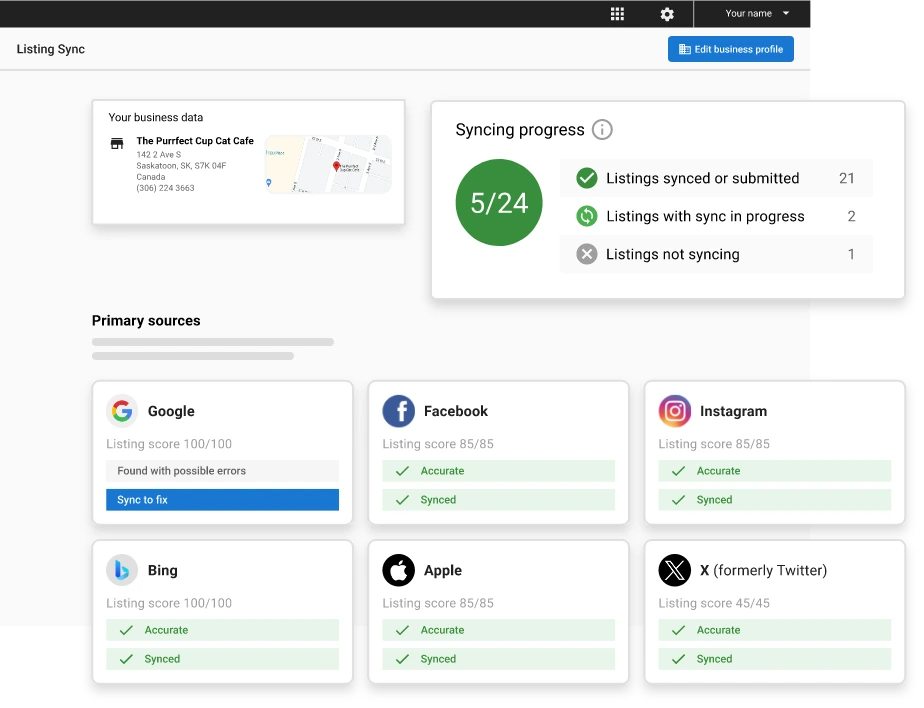
For the wider process behind those tools, see this overview of local listing management.
Reviews, Local Links and City-Level Signals
Reviews accrue per profile. Google’s own ranking page says more reviews and positive ratings can help local ranking, and Search Engine Journal reports that reviews carried more weight in Whitespark’s 2026 Local Search Ranking Factors survey than in 2023, rising from 16% to 20%. These are survey estimates from local search practitioners, not measured shares of Google’s algorithm.
Review volume takes time to build in competitive markets, which is why collection has to run continuously at every branch rather than in occasional pushes.
Fred Astaire Dance Studios, a Vendasta franchise case, averaged 50 reviews per store alongside 37% search-traffic growth and 2.5 times more net-new leads, which is what a per-store review program looks like when it runs network-wide. Prospective customers also check on their own, since customers go directly to Google to read reviews before calling.
Replies belong to the location too. Treat replies as a conversion signal that each branch owes its own customers. Vendasta Reputation AI monitors reviews across 100+ sources and analyzes sentiment, and the AI Reputation Specialist, part of the Vendasta AI Workforce, responds to Google and Facebook reviews in the reviewer’s language under configurable rules (rating thresholds, delays and approval workflows) and suggests responses for other review sources, which keeps replies consistent across a network.
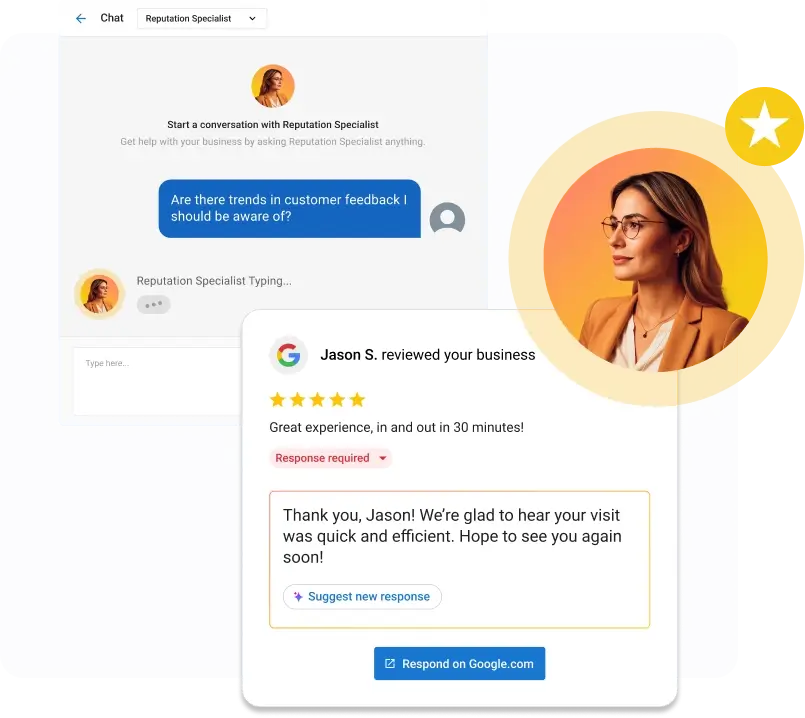
Posts and links round out the city-level signals. Search Engine Land reported that Google Posts gained scheduling and multi-location publishing, so a branch promotion no longer means posting 40 times; the mechanics of GBP posts stay the same per location.
Links to the location page from locally relevant domains, such as a youth league sponsorship, a chamber directory, or a local news mention, feed the prominence Google describes. For the relevance side, see this guide on using the right keywords on your GBP in the services and description fields.
Governance: Corporate Control vs Local Managers
Google offers two main roles, Owner and Manager, and a Manager can edit almost everything, including the name, address, and hours. The actions Google reserves for Owners include adding and removing users and removing the profile, and a profile can have many owners but only one primary owner.
That means any Manager on a listing can change core details without corporate seeing it first, which is why a franchise network needs written rules about who edits what.
The permission split, from Google’s roles page:
| Action | Owner | Manager |
|---|---|---|
| Add or remove users | Yes | No |
| Remove the profile | Yes | No |
| Edit name, address, phone, category, hours, website | Yes | Yes |
| Reply to reviews, publish posts, edit photos and services | Yes | Yes |
When a franchisee edits NAP, the edit may sit pending for up to 30 days, and an address change on a verified profile always means verifying again. A rejected or risky edit can also put the profile at risk of suspension, so keep the guide to GBP account suspensions bookmarked and give NAP edits to one named person per region.
Who should be the primary owner is a contract question. Ben Fisher’s Google community guide states there is no universal rule saying the franchisor, franchisee, or marketing agency should always be the primary owner, and that franchise ownership depends on the franchise agreement.
A workable split: corporate holds primary ownership of a per-region business group, the franchisee is a Manager of their own profile, and corporate publishes brand posts while the franchisee replies to reviews. Grant access to more than one trusted person so a single departure cannot lock the network out, and note that new owners and managers wait 7 days before they can manage some profile features, such as removing users or transferring primary ownership.
Agencies managing client profiles rarely need primary ownership; Fisher’s guide notes that an agency can technically become primary owner but should rarely need to. An agency that wants to offer Google Business Profile management as a service line can work as a Manager on each client’s group.
Vendasta’s Partner Center includes account templates for multi-location governance, plus automations and reporting, and Business App‘s multi-location view rolls up listings, reviews, and reporting for brands and franchises.
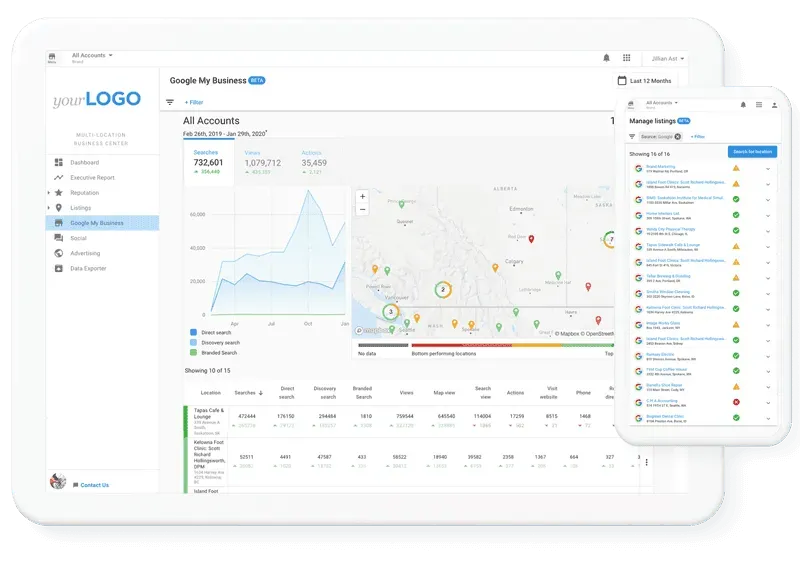
Neighborly, a Vendasta franchise case, cut unanswered leads from roughly 30% to nearly zero and saw a 372% increase in leads converted to revenue year over year after deploying AI centrally across its network.
Tracking, Reporting, Cost and Timeline
Track each location on a geo-grid, not a single ranking, because the map pack result changes block by block. A grid scan checks rank at a set of points around the address, so a 5×5 scan returns 25 positions for one keyword, and a Google Maps rank checker run on a set schedule shows how each branch’s coverage shifts.
Vendasta Local SEO provides geolocation rank tracking on a map grid, keyword tracking, and competitor analysis alongside Google Business Profile insights.
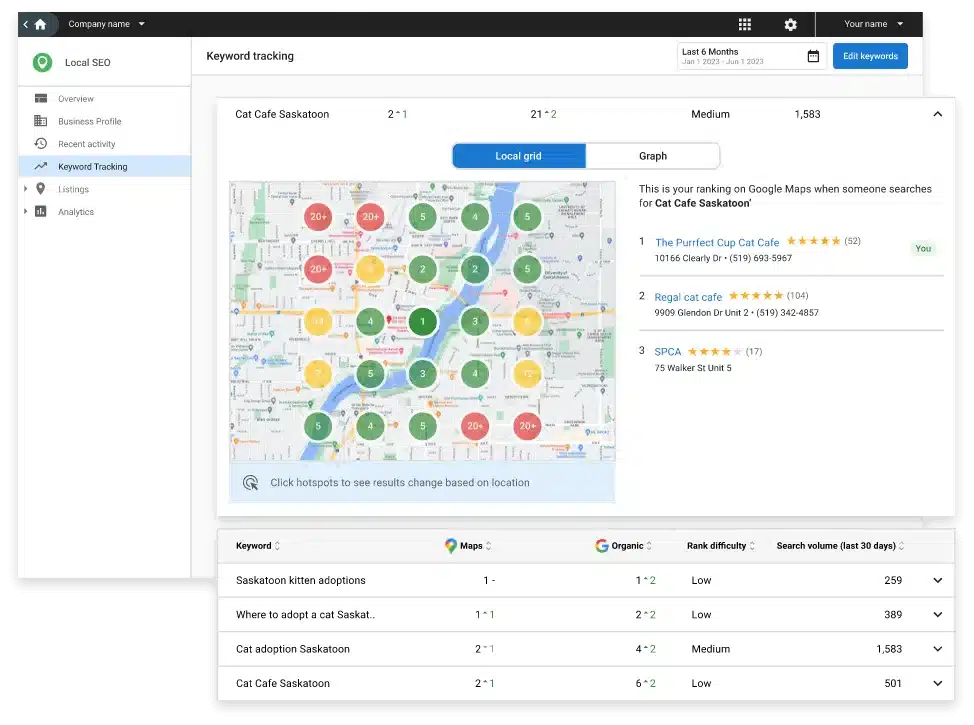
Pair that grid with Google Business Profile insights to keep you and your clients updated on what each profile produced.
Google’s Business Profile Performance application programming interface (API) exposes the per-location metrics worth charting: impressions split by desktop and mobile and by Maps and Search, direction requests, call clicks, website clicks, messaging clicks and bookings, plus monthly search-keyword impressions. Pull that data into your reporting tool next to Google Analytics 4 sessions for each /locations/ URL, report by location, and report it to the person who owns that location.
Costs come in two layers. Ahrefs’ SEO pricing survey, based on 2023 data, found local search engine optimization (SEO) averaging $1,557 per month, with agencies typically charging $1,819 for local SEO. Ahrefs does not break fees out by location count, so a 10-location fee and a 100-location fee are negotiated rather than benchmarked.
Listing and rank-tracking software is priced in different ways, by location, by credits, or by listing tier. Work through a local SEO checklist to scope what each location needs before you compare quotes.
For a Vendasta quote at your location count, request a demo.
Fold both numbers into the digital marketing strategy budget per location, since the cheapest listing is the one nobody updates.
On timing, Bruce Clay writes in Search Engine Land that it typically takes several months up to a year to see measurable SEO results. Google’s five-business-day verification review is the only published clock; everything after it depends on reviews arriving and the page earning local links.
Google Business Profile Multiple Locations Setup Pays Off When Each Branch Owns Its Signals
The owner opening a second shop and the leader running 200 have the same job at different scale: one profile, one page and one phone number per address, and reviews that each branch earns.
Google handles the mechanics, from the add-location flow to bulk verification at 10 locations and groups that scope who sees what. What breaks at scale is the human part: 50 managers with edit rights, review replies that go unanswered for days, and a suite number typo copied to 80 directories.
Vendasta Reputation AI, with the AI Reputation Specialist in the Vendasta AI Workforce responding to reviews under rules you set, and Vendasta Listing Sync Pro, protecting NAP across 50+ sites (70+ in the United States), cover the two tasks. Partner Center’s account templates and reporting, plus Business App’s multi-location view, give head office and each branch the same listing and review data.
To see how Vendasta can address this workflow, book a Vendasta demo.
Google Business Profile Multiple Locations FAQs
1. Can I add a second location to my Google Business Profile?
Yes, as a separate profile in the same account. Google allows one profile per physical location, and its sign-up guidance warns that an account may be suspended if Google finds multiple profiles for the same business in the same metropolitan area. Add it through Business Profile Manager, enter the new address, phone, and category, then verify it.
2. How does local SEO work for multiple locations?
Google weighs relevance and prominence alongside distance from each branch’s address. Google calculates distance per profile, so every branch needs its own Business Profile and location page to appear in that city’s map pack. Each branch needs reviews and local links; categories also matter per profile.
3. Can a business rank in a city where it has no address?
In organic results, yes, through a well-built city page. In the map pack, rarely, because Google measures distance from the verified address, and Sterling Sky’s study found that hiding the address correlated negatively with local pack rank. Service areas do not move the address, and Google says not to add countries or states as service areas.
4. Should location pages use subfolders or subdomains?
Subfolders, as /locations/state/city/, unless a contract forces otherwise. Google counts links to the business toward prominence, and keeping pages on the main domain keeps links and mentions pointed at one property instead of splitting them. One domain also means one crawl, one analytics property and one place to correct an address.
5. How do I make 50 location pages unique without writing 50 essays?
Give each page the facts only that branch has: named staff, services and pricing specific to the city, directions from a local landmark, and customer quotes from that address. Google sets no word count, and John Mueller has said there is no universally ideal content length. Build the five to ten most important cities first.
6. How do I know if two city pages are cannibalizing each other?
A keyword that flips between two of your pages without any change on your side is the main symptom, along with pages that stay unindexed or a canonical Google overrides. If the second location sits inside the first city’s search area, list both addresses on one page and redirect the weaker URL.
7. What is the 80/20 rule in multi-location local SEO?
A heuristic, not a measured finding. Practitioners apply it to say a small share of locations produce most conversions, or that most of a location page template can be shared while a smaller part is customized per city. No study presents it as data, so use it to prioritize, never to set a uniqueness target.
8. How long until a new location shows in the map pack?
Verification review takes up to five business days, and that is the only published clock. After that, Search Engine Land notes that measurable SEO results typically take several months up to a year, and competitive markets take longer because review volume and local links take time to build.
9. What does managing profiles for many locations cost?
Ahrefs’ survey data puts local SEO at about $1,557 per month on average, with agencies typically charging $1,819, but it does not break fees out by location count. Software pricing varies by model, whether per location, by credits, or by tier, and Vendasta provides quotes through a demo request.
10. How should a franchisor split control with franchisees?
Follow the franchise agreement, since Google sets no rule on who is the primary owner. A common split gives corporate primary ownership of a regional business group, makes each franchisee a Manager of their own profile, assigns brand posts to corporate and review replies to the branch, and routes NAP edits through one named person.