 About Us
 Careers
 Leadership
 Board
Board Newsroom
Every business strives to boost productivity and maximize ROI—and today, that means harnessing the power of technology and automation. Customer journey automation enables you to reach those goals faster by using data and personalized communication to drive meaningful engagement.
In a competitive digital landscape, staying relevant isn’t just an advantage—it’s essential. That’s why forward-thinking businesses are adopting AI-powered automation to streamline and enhance every stage of the customer journey.
If you haven’t embraced automation yet, now’s the time. In this article, we’ll walk you through the fundamentals of customer journey automation, share best practices, and introduce the must-have tools to help you stay ahead.
Automate every step of the customer journey with AI employees
TL;DR
Customer journey automation uses AI and data to deliver personalized, timely interactions at every stage from first click to loyal advocate, helping businesses boost revenue, reduce manual work, and scale without adding headcount.
- Map the journey: 5 stages — awareness, consideration, purchase, retention, and advocacy
- Key benefits: Consistent branding, better customer experience, higher operational efficiency, and improved ROI
- Essential tools: Customer data platforms (CDPs), AI chatbots, marketing automation platforms, and predictive analytics
- Top use cases: Lead nurturing, onboarding workflows, review requests, re-engagement campaigns, and cross-sell/upsell triggers
What is Customer Journey Automation?
Customer journey automation is the use of technology—often powered by AI and automation tools—to deliver personalized, timely messages and actions across every stage of the customer journey.
In today’s fast-paced digital world, modern customers have higher expectations, such as personalized interactions, prompt responses, and timely, proactive services. Automation enables you to meet these expectations efficiently, allowing you to focus on building stronger relationships with your customers.
Traditional marketing often relies on a broad marketing approach that can be less effective in engaging individual customers. In contrast, customer journey automation uses data to understand each customer’s behavior and preferences, enabling highly targeted and personalized marketing efforts.
Here’s an example of real-life customer journey automation with Vendasta’s AI Employees.
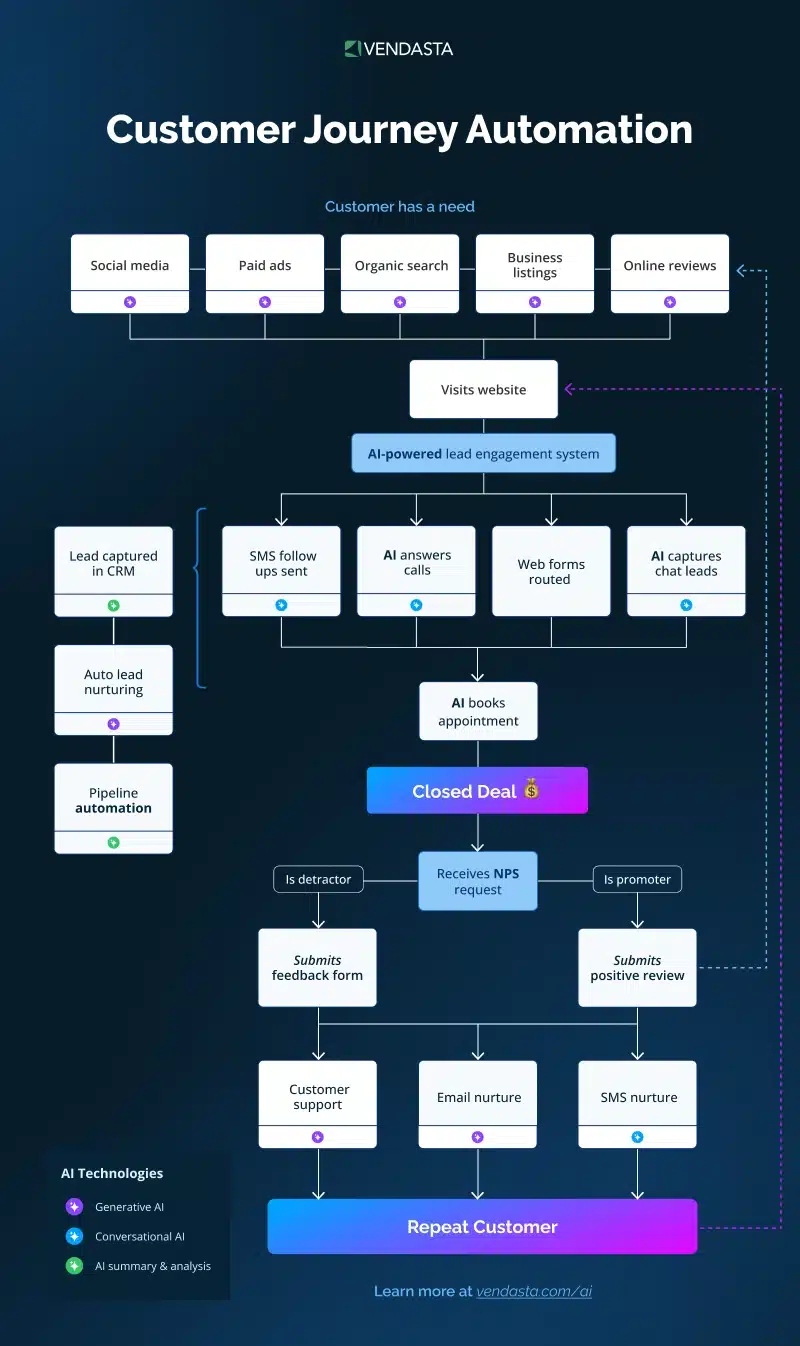
AI and machine learning are the engines powering customer journey automation. These technologies analyze vast amounts of data to uncover patterns and insights about customer behavior. By doing so, they enable businesses to:
- Predict customer needs and preferences.
- Deliver personalized content and offers.
- Optimize the timing and channels of communication.
- Continuously learn and improve from customer interactions.
Customer Journey Automation vs. Email Marketing Automation: What’s the Difference?
These two terms get used interchangeably in a lot of marketing conversations, and it’s easy to see why. Both involve automation. Both use customer data. Both can include email. But treating them as the same thing is one of the most common reasons businesses underinvest in automation and leave significant revenue on the table.
The difference isn’t cosmetic. It’s structural. And understanding it changes how you build your entire marketing and sales operation.
Email Marketing Automation: One Channel, One Job
Email marketing automation is exactly what it sounds like — automation applied to email. You build a sequence of emails, set the timing, define the trigger, and the platform handles delivery. Done well, it’s genuinely useful. A welcome sequence for new subscribers, an abandoned cart reminder, a post-purchase follow-up — these are all examples of email automation working as intended.
The limitation is built into the definition. Email automation lives inside one channel. It can only do what email can do. It can’t update your CRM when a lead visits your pricing page, it can’t trigger an SMS when someone misses an appointment, it can’t assign a task to your sales team when a high-value prospect goes cold, and it can’t answer a phone call at 11pm when a customer needs help.
Email automation is a single instrument. A useful one, but still just one instrument.
Customer Journey Automation: The Full System
Customer journey automation operates across every channel, every team, and every stage of the customer lifecycle simultaneously. It uses behavioral data from your website, CRM, email platform, social channels, phone system, and payment history to build a complete picture of where each customer is in their journey and responds accordingly, across whatever channel makes the most sense at that moment.
Where email automation asks “what should we send next in this sequence?”, customer journey automation asks “what does this specific customer need right now, and what is the best way to deliver it?”
The result is a system that doesn’t just send messages on a schedule. It responds to real behavior in real time, across the full arc of the customer relationship.
A Side-by-Side Comparison
| Factor | Email Marketing Automation | Customer Journey Automation |
|---|---|---|
| Scope | Single channel (email) | All channels: email, SMS, social, phone, chat, ads |
| Triggers | Email actions: opens, clicks, time delays | Any customer behavior: page visits, purchases, inactivity, calls, reviews |
| Personalization | Name, list segment, email history | Full behavioral profile across every touchpoint |
| Coverage | Top of funnel, nurture sequences | Entire lifecycle: acquisition through advocacy |
| Team impact | Marketing team only | Marketing, sales, support, and operations |
| Data used | Email engagement data | CRM, website, purchase history, support tickets, calls |
| Output | Emails sent on a schedule or trigger | Coordinated actions across channels and teams |
| Best for | Newsletter lists, drip campaigns | End-to-end customer experience management |
Where Email Automation Falls Short
Email automation works well when customers behave predictably and stay inside a single channel. In practice, they rarely do. A customer might discover you through a social ad, visit your website three times, call your office with a question, and then finally convert through an email link. Email automation only sees that last step. Customer journey automation sees the whole picture.
This gap becomes costly in a few specific scenarios that most businesses recognize immediately:
Leads who go cold between touchpoints. Email automation can send a follow-up email on day three. But if that lead visited your pricing page on day five and didn’t convert, email automation has no way of knowing. Customer journey automation detects that signal and can trigger an immediate, relevant response — a personalized SMS, a sales team alert, or a retargeted ad — before the opportunity disappears.
Post-purchase experience. Most email automation stops at conversion. The sale is made, the sequence ends. Customer journey automation treats the purchase as the beginning of the next phase — triggering onboarding workflows, review requests, loyalty sequences, and upsell campaigns based on what the customer actually does after buying.
Customers who don’t engage with email. A significant portion of your customer base either ignores email, prefers SMS, or primarily interacts with your business through other channels. Email automation has no answer for these customers. Customer journey automation meets them wherever they are.
Do You Need Both?
Email is still one of the highest-ROI marketing channels available, and strong email automation is a core component of any customer journey strategy. The question isn’t whether to use email automation — it’s whether to limit your entire automation strategy to email alone.
For businesses just starting out with automation, a well-built email sequence is a reasonable first step. But for any business serious about growing customer lifetime value and delivering a consistent experience across every interaction, email automation alone will always leave gaps that competitors can exploit.
Customer journey automation doesn’t replace email automation. It absorbs it — making email one powerful channel within a broader, more intelligent system.
What This Looks Like in Practice
Consider a local home services company running both approaches side by side.
With email automation alone, a new lead gets a welcome email, a follow-up three days later, and a promotional offer a week after that. If they don’t open any of them, the sequence ends, and the lead goes cold. The business has no visibility into whether that person visited their website again, called and hung up, or booked with a competitor.
With customer journey automation, that same lead triggers a welcome email and an SMS with a booking link. When they visit the services page two days later without booking, a follow-up email goes out within the hour with a relevant case study. When they call the office and reach the AI Receptionist, their inquiry is logged, a quote is sent automatically, and the sales team gets an alert to follow up personally. After they book and the job is completed, a review request goes out automatically 24 hours later. Sixty days of inactivity trigger a re-engagement offer.
Same lead. Completely different outcome.
Platforms like Vendasta are built to run this kind of end-to-end automation — combining email, SMS, AI-powered voice and chat, reputation management, and CRM into a single connected system. For agencies and businesses that want to move beyond email sequences and automate the full customer journey, it removes the need to stitch together multiple tools and delivers everything from one platform.
How Customer Journey Automation Works
Customer journey automation works by connecting three core components: behavioral data, decision logic, and automated actions. When a customer does something — or stops doing something — the system detects that signal, evaluates it against a set of rules, and delivers the right response automatically, without anyone on your team having to lift a finger.
Think of it as an always-on system that watches how customers interact with your business and responds in real time. Here’s how each layer works together:
1. Data Collection: The System Watches Customer Behavior
Everything starts with data. Every time a customer visits a page, opens an email, fills out a form, makes a purchase, or goes quiet for 30 days — the system logs it. This behavioral data is pulled from every channel your business operates on: your website, CRM, email platform, social media, SMS, and live chat.
The richer your data, the smarter your automation. A customer who visits your pricing page three times in one week is sending a very different signal than one who signed up for a newsletter six months ago and hasn’t engaged since. Your automation system reads both.
2. Triggers: The Event That Starts the Journey
A trigger is the specific action (or inaction) that kicks off an automated workflow. Triggers can be:
- Action-based: A customer submits a contact form, abandons a cart, books an appointment, or makes their first purchase.
- Time-based: A customer hasn’t logged in for 14 days, a subscription is 7 days from renewal, or it’s been 30 days since their last purchase.
- Behavior-based: A customer visits a specific product page more than twice, clicks a particular link in an email, or reaches a spend threshold.
Triggers are what separate true customer journey automation from basic email blasts. Instead of sending the same message to everyone on a schedule, the system responds to what each individual customer actually does.
3. Conditions and Branching: The Logic That Personalizes the Path
Once a trigger fires, the system evaluates conditions to determine which path the customer takes next. This is where personalization at scale happens.
For example, a trigger fires when someone downloads a free guide. The system then checks — are they an existing customer or a new lead? What industry are they in? Have they visited the pricing page? Based on those answers, the customer is routed down a different branch with messaging tailored to their specific situation.
A new lead in professional services gets a nurture sequence focused on ROI and case studies. An existing customer gets a sequence focused on upsell opportunities. Same trigger, completely different journeys.
4. Automated Actions: What Gets Delivered
An action is the actual output the customer receives — or that happens behind the scenes. Actions include:
- Sending a personalized email or SMS
- Assigning a lead to a sales rep in the CRM
- Displaying a targeted ad on social media
- Triggering a chatbot conversation on your website
- Scheduling a follow-up task for your team
- Sending an automated review request after a completed job
Actions can be customer-facing or internal. Both matter. An automated CRM update that alerts a sales rep the moment a lead visits your pricing page is just as valuable as the personalized email that lead receives minutes later.
5. Continuous Learning and Optimization
The final layer is what makes modern customer journey automation genuinely intelligent. AI-powered platforms don’t just execute fixed workflows — they analyze performance data over time and surface insights that help you improve. Which email subject lines drive the most opens? At which stage are leads most likely to drop off? Which trigger-to-action sequences produce the highest conversion rates?
Over time, the system gets smarter, and so does your strategy. Automation stops being a set-and-forget tool and becomes a continuously improving engine for customer engagement.
A Real-World Example: From First Click to Repeat Customer
Here’s what customer journey automation looks like end-to-end for a local service business:
- A prospect searches for a service, finds your website, and fills out a contact form. (Trigger fires.)
- The system checks: new lead, no prior purchases, came from organic search. (Conditions evaluated.)
- An instant confirmation email is sent, a lead is created in the CRM, and the sales rep is notified. (Actions executed.)
- Over the next 5 days, the lead receives a nurture sequence with testimonials, a special offer, and a booking link.
- The lead books and completes the service. (New trigger fires.)
- 24 hours later, an automated review request goes out. 7 days later, a follow-up email asks if they’d like to rebook.
- After 60 days of inactivity, a re-engagement sequence triggers automatically with a returning customer discount.
No manual follow-up. No missed opportunities. Every step happens automatically, at exactly the right moment — because the system is always listening, always responding, and always working to move customers forward.
Why Is Customer Journey Automation Important?
When potential customers visit your website, it’s essential to make them feel at ease at every interaction. By automating key touchpoints throughout the customer journey, you can ensure consistent brand experiences, improve customer satisfaction, streamline operations, and ultimately boost revenue.
Let’s dig deeper to understand the importance of customer journey automation:
Ensure Consistent Brand Messaging
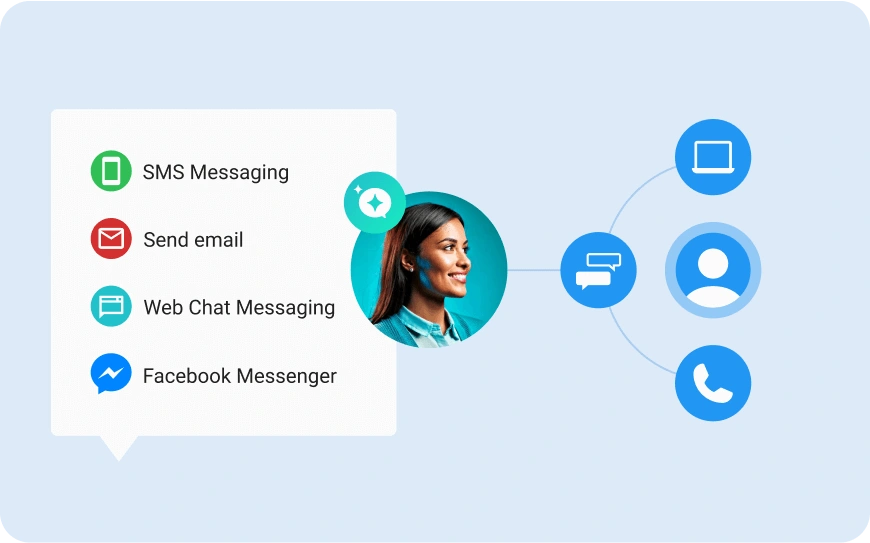
One of the biggest challenges businesses face as they scale is maintaining consistent communication across multiple channels. With automation, messaging can be aligned across all customer touchpoints—email, SMS, live chat, social media, and more.
This ensures that no matter how or where a customer interacts with your brand, they receive a unified experience that reflects your voice, values, and identity.
Big franchises like McDonald’s or Starbucks are great examples of this in action. Whether you’re interacting with them online, on mobile apps, or in-store, the tone, visuals, and messaging are always on-brand.
That consistency is powered in part by automation tools that ensure marketing communications, like promotional emails or mobile push notifications, adhere to brand guidelines across all locations and touchpoints.
Similarly, a new customer might receive a series of automated welcome emails that mirror the brand’s friendly tone and value proposition, followed by follow-up messages tailored to their product interests. This alignment shows customers they’re in good hands every step of the way.
Improve Customer Experience and Satisfaction
Automation helps businesses deliver the right message at the right time, creating more personalized and timely interactions. Instead of generic campaigns, automated workflows respond to customer behaviors—like sending a thank-you after a purchase or re-engagement emails when interest drops off—making customers feel understood and valued.
This responsiveness leads to a smoother experience, higher satisfaction, and stronger loyalty. When customers feel your brand truly “gets” them, they’re more likely to come back—and bring others with them.
Increase Operational Efficiency
Manually managing every step of the customer journey is time-consuming and prone to error. Automation takes over repetitive, low-impact tasks like lead routing, follow-ups, and appointment scheduling, freeing up your sales and marketing teams to focus on strategic, high-impact work.
With automation in place, your team spends less time chasing leads and more time closing deals. It also reduces human error, ensures timely communication, and often leads to measurable cost and time savings—making it not just a smarter choice, but a more scalable one.
Drive More Revenue Through Better Timing and Personalization
When done right, automation is a revenue-driving engine. It ensures that customers receive the right message at the moment they’re most likely to act—boosting engagement, conversions, and average order value.
For instance, if a customer adds an item to their cart but doesn’t check out, an automated reminder email—perhaps with a limited-time discount—can nudge them back toward purchase.
Customer journey automation was once a luxury reserved for large enterprises with big budgets. Now, with Vendasta’s AI-powered tools, like Social AI and AI Receptionist, agencies can empower small businesses to implement automated journeys and scale effortlessly—at a fraction of the cost.
What Is Customer Journey Mapping and Why Does It Matter?
Customer journey mapping is the process of visually documenting every interaction a customer has with your business — from the moment they first discover your brand to the point where they become a loyal advocate. It’s not just a diagram. It’s a strategic tool that forces you to see your business through your customer’s eyes, at every single stage.
Imagine you’re planning a road trip. You wouldn’t just get in the car and drive aimlessly; you’d map out your route, highlight key stops, and anticipate any potential detours. A customer journey map works the same way — it outlines the exact path your customers take when interacting with your business, helping you identify where the road is smooth, where there are potholes, and where people are most likely to turn around and leave.
This map isn’t just a straight line. It’s a detailed, step-by-step depiction of every touchpoint and interaction a customer has with your company — capturing their needs, emotions, and frustrations at each stage. And when it’s built correctly, it becomes the foundation that makes customer journey automation actually work.
What a Customer Journey Map Includes
A well-built customer journey map goes beyond listing touchpoints. It captures the full picture of the customer experience across five key dimensions:
- Stages: The phases a customer moves through, from awareness to advocacy.
- Touchpoints: Every interaction point — ads, website visits, emails, sales calls, support tickets, invoices, and post-purchase follow-ups.
- Customer goals: What the customer is trying to accomplish at each stage.
- Pain points: Where friction, confusion, or frustration occurs that could cause them to disengage or leave.
- Emotions: How the customer feels at each touchpoint — excited, confused, frustrated, delighted, or indifferent.
When you map all five dimensions together, patterns emerge that are invisible when you look at individual channels in isolation. You might discover that customers consistently drop off after the second email in your onboarding sequence, or that the gap between a completed purchase and the first follow-up is long enough to cool interest entirely. These are the insights that drive smarter automation.
Why Customer Journey Mapping Matters for Automation
Customer journey automation without a journey map is like setting up street signs before you’ve built the roads. The map is what tells your automation platform where customers are, where they’re headed, and what they need at each step to keep moving forward.
Specifically, journey mapping enables you to:
- Identify exactly where automation should trigger. Instead of guessing which touchpoints to automate, the map shows you precisely where manual processes are slowing things down or where customers are falling through the cracks.
- Build workflows that match real customer behavior. Automation built around actual customer paths performs significantly better than automation built around what you assume customers do.
- Spot revenue leaks before they cost you. Journey maps reveal the moments where customers are most likely to churn, disengage, or choose a competitor — giving you the opportunity to intervene automatically before the loss happens.
- Personalize at every stage, not just at the top of the funnel. Most businesses over-invest in automating lead acquisition and under-invest in post-purchase journeys. A complete map ensures your automation covers the full lifecycle.
- Align your entire team around the customer experience. A journey map gives sales, marketing, and support a shared view of the customer — making automation decisions faster and cross-functional collaboration easier.
The Difference Between a Touchpoint and a Journey
One of the most common mistakes businesses make is confusing individual touchpoints with the full customer journey. A touchpoint is a single interaction — an email open, a website visit, a support call. A journey is the complete sequence of those interactions and the experience they create together over time.
Think of touchpoints as individual stars in the night sky. Each one matters on its own. But when you connect them, they form a constellation — a clear, complete picture of your customer’s experience with your brand. Journey mapping is the act of drawing those lines between the stars so you can see the full picture and act on it.
This distinction matters for automation because the most powerful triggers aren’t always single events. A customer who has visited your pricing page three times, opened your last two emails, but hasn’t converted is sending a much stronger signal than any one of those actions in isolation. Journey mapping helps you see the pattern — and automation lets you respond to it.
How to Create a Customer Journey Map: A Simple Framework
You don’t need a complex tool or a full research budget to build a useful journey map. Start with these four steps:
- Define your customer persona. Who are you mapping? A first-time buyer behaves very differently from a returning customer or a high-value enterprise client. Build a separate map for each major segment.
- List every touchpoint. Document every place your customer interacts with your brand — both the touchpoints you control (emails, website, ads) and the ones you don’t (reviews, word of mouth, social mentions).
- Identify the emotion at each stage. For each touchpoint, ask: what is the customer trying to do here, and how do they feel? Interview real customers, review support tickets, and analyze behavioral data to get accurate answers rather than assumptions.
- Mark the gaps and friction points. Where does the experience break down? Where is the response time too slow? Where are customers asking questions that your content isn’t answering? These gaps are your highest-priority automation opportunities.
Once your map is built, it becomes a living document — updated as your product evolves, your customer base grows, and your automation stack matures. The businesses that treat their journey map as a one-time exercise miss most of its value. The ones that revisit it quarterly use it to continuously improve every automated workflow they run.
Customer Journey Mapping and Customer Journey Automation: How They Work Together
The relationship between mapping and automation is sequential and dependent. Mapping tells you what the journey should look like. Automation makes it happen at scale, consistently, for every customer — without your team manually managing each step.
Without a map, automation tends to be fragmented: a welcome email here, an abandoned cart reminder there, a re-engagement campaign when someone thinks to set one up. With a map, automation becomes a connected system where every workflow serves a specific purpose at a specific stage, and every gap in the customer experience has a response built for it.
For businesses using Vendasta’s automation platform, the journey map is the strategic input that determines how workflows are built, which triggers are set, and how leads are routed through the funnel. The platform handles the execution — the map determines the strategy behind it.
What Are the 5 Stages of the Customer Journey?
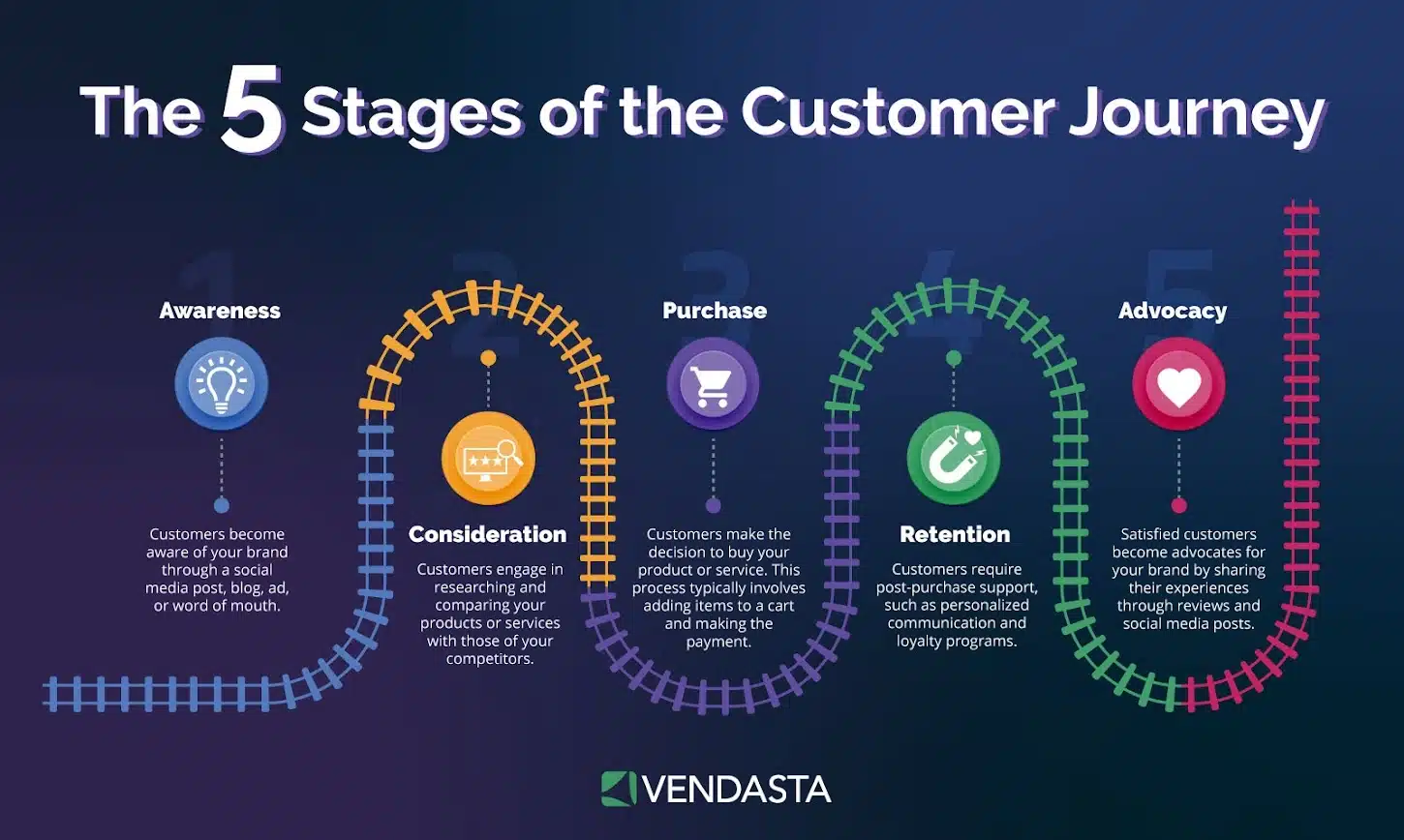
The following are the five stages of a typical customer journey:
1. Awareness
This is the first stage where customers learn about your brand. They might come across your brand through a social media post, a blog, an ad, or even word of mouth. In this stage, you must strive to make a strong first impression.
2. Consideration
At this stage, customers actively research and compare your product or service against competitors. Provide detailed and persuasive content that addresses your customers’ potential concerns and pain points.
3. Purchase
The decision-making stage is where the customer commits to buying your product or service. This could involve adding an item to a cart and completing the purchase online, or finalizing a deal in person.
4. Retention
After the initial purchase, this stage focuses on keeping customers engaged and satisfied with their purchase, encouraging repeat business. Provide exceptional post-purchase support and communication to foster loyalty.
5. Advocacy
At this stage, loyal customers become advocates who promote your brand to others. They write reviews, share their experiences on social media, and recommend your products to friends and family. Nurture advocacy through loyalty programs, exclusive discounts, and referral incentives.
You may wonder how these touchpoints relate to journey mapping. Think of touchpoints as the individual stars in the galaxy of your customer journey. Each one matters on its own, but when you connect them, they form a constellation—a clear picture of your customer’s experience.
By understanding and optimizing each stage, from awareness to advocacy, and focusing on key touchpoints, businesses can create a seamless, satisfying journey that not only meets but exceeds customer expectations.
Tip: Want to get more reviews from your customers? Automate review requests by using our Business App. Check out the video below to learn more!
Benefits of Implementing Customer Journey Automation
Customer journey automation leverages technology to streamline and enhance the way you interact with customers, delivering numerous benefits.
Here’s how it helps you achieve your business goals:
- Delivers personalized experiences: Automation allows you to analyze data on customer preferences and behaviors, enabling you to deliver highly personalized experiences that make customers feel valued and understood.
- Boosts efficiency and productivity: Automated processes handle tasks such as sending emails, scheduling social media posts, and managing customer follow-ups. This frees up your team to focus on strategic, creative work.
- Provides data-driven insights: The vast amounts of data collected during the automation journey offer valuable insights to guide decisions, refine marketing strategies, and anticipate customer needs.
- Enhances customer retention: Automated follow-up emails, birthday discounts, and personalized content show customers you understand and care—leading to stronger loyalty and increased lifetime value.
- Improves ROI and campaign effectiveness: By sending the right message at the right time, automation helps ensure your campaigns hit the mark—driving better engagement and a higher return on investment.
Key Components of Customer Journey Automation
Customer journey automation provides seamless, personalized experiences for your customers. To make the most of it, you need to understand its key components.
Data Collection and Integration
This part allows you to gather valuable information on customers’ behaviors and preferences from various sources such as websites, social media, emails, and purchase histories.
By integrating this data into a single, unified system, you get a 360-degree view of each customer. This comprehensive understanding is crucial for tailoring your interactions to meet their specific needs and desires. It’s like having all the pieces of a puzzle fall perfectly into place.
Customer Segmentation and Profiling
Once you’ve gathered all that data, the next step is to organize it. Customer segmentation and profiling involve categorizing your customers based on shared characteristics, such as demographics, buying behavior, and interests. Using this, you can create detailed profiles for different customer groups and target your marketing efforts more precisely.
Trigger-based Marketing Actions
Trigger-based marketing actions are like a friendly reminder system that automatically engages customers at the perfect moment. These are predefined actions or events that prompt specific marketing responses. For example, if a customer abandons their shopping cart, an automated email can remind them to complete their purchase.
Omnichannel Communication
Today’s customers interact with brands across multiple channels—email, social media, websites, and more. Omnichannel marketing automation ensures that your message is consistent and cohesive across all these touchpoints, creating a unified customer experience.
Analytics and Reporting
To continuously improve your customer journey, you need to understand what’s working and what’s not. Analytics and reporting provide the insights you need to make data-driven decisions. By analyzing the performance of your campaigns and customer interactions, you can identify trends, measure success, and pinpoint areas for improvement.
Steps to Automate the Customer Journey
Let’s dive into the steps to implement customer journey automation that’s both effective and engaging.
Step 1. Assess Current Customer Journey and Identify Pain Points
Start by mapping out each touchpoint from the initial contact to post-purchase interactions. This will help you see the entire customer experience from their perspective. Engage with your customers through surveys, interviews, or feedback forms to understand their challenges and frustrations.
Step 2. Define Automation Goals and KPIs
Once you’ve pinpointed the pain points, set clear and measurable goals for what you want to achieve with your marketing automation journey. Establish key performance indicators (KPIs) that will help you track progress towards these goals. For instance, you might measure the reduction in cart abandonment rates or the increase in customer lifetime value.
Step 3. Choose the Right Automation Tools and Platforms
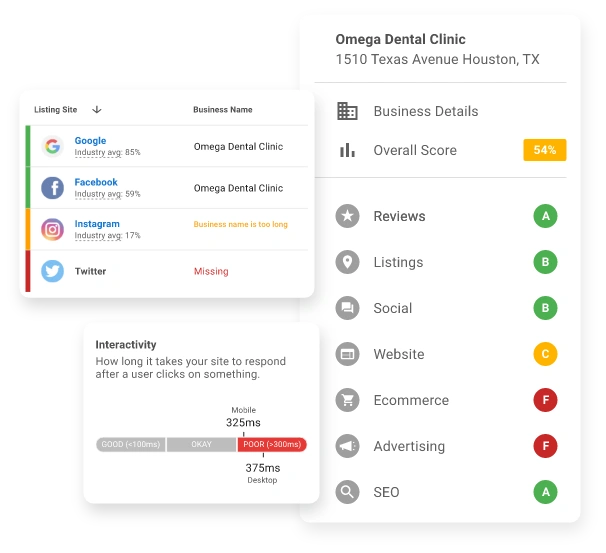
Look for solutions that integrate well with your existing systems and offer the functionalities required to streamline your customer journey. Popular tools like Vendasta’s CRM software help nurture leads and move through the funnel faster.
Step 4. Develop a Data Strategy and Integrate Data Sources
Data is the backbone of effective automation. Ensure you have a robust data strategy in place that allows you to collect, store, and analyze customer data seamlessly. This will enable more personalized and relevant interactions.
Step 5. Create Automated Workflows and Campaigns
Think about the different scenarios where automation can enhance the customer experience. For example, set up automated email sequences to welcome new customers, follow up on abandoned carts, or re-engage inactive customers. Use triggers and conditions to ensure these automated actions are timely and relevant.
Step 6. Test, Measure, and Optimize
Before fully rolling out your automation, conduct thorough testing to ensure everything works smoothly. Test different scenarios and make sure the automated workflows perform as expected.
Once implemented, continuously monitor the performance against your KPIs. Gather insights from the data and customer feedback to identify areas for improvement.
Tip: Cut manual labor and save over $10,000 with these two simple automations outlined in this video. You don’t need to be an expert coder to implement this.
Best Practices for Customer Journey Automation
Here are some best practices you can follow in your customer journey automation to engage your current and potential customers and grow your business:
- Focus on providing value at each touchpoint: Personalize your communications to address the unique needs and preferences of your customers. Whether it’s a helpful email tip, a timely reminder, or a special offer, ensure every touchpoint delivers something of genuine value.
- Maintain a balance between automation and human touch: Some interactions, especially those involving complex issues or sensitive topics, are better handled by a real person. Use automation to handle routine tasks. Striking this balance is the key.
- Update and refine customer profiles: As customers interact with your brand, gather data on their preferences, behaviors, and feedback. Use this data to refine their profiles and ensure your automated communications remain relevant and personalized.
- Ensure data privacy and compliance: Adhere to data privacy regulations like GDPR or CCPA, and be transparent about how you collect, store, and use customer information. Implement robust security measures to protect data and build trust with your customers.
- Review and optimize automated processes: Analyze the data to identify any bottlenecks or areas for improvement. Test different approaches, gather feedback, and make necessary adjustments to optimize your workflows.
Common Challenges and How to Overcome Them
Let’s explore some common challenges in customer journey automation and practical ways to overcome them.
1. Data Silos and Integration Issues
Data silos occur when customer data is scattered across different systems, making it difficult to get a unified view of the customer journey. This fragmentation can hinder your ability to create cohesive and personalized experiences.
Solution: Invest in integrating your data sources into a single platform or using a Customer Data Platform (CDP) to centralize your data. Ensure your chosen tools and systems can seamlessly share information. Regularly audit your data flow to identify and eliminate silos.
2. Resistance to Change Within the Organization
Implementing customer journey automation often requires changes in workflows, tools, and mindsets. Team members might resist these changes due to fear of the unknown or concerns about job security.
Solution: Foster a culture of change by involving your team early in the automation process. Provide thorough training and emphasize the benefits, such as reducing repetitive tasks and allowing them to focus on more meaningful work.
3. Maintaining Personalization at Scale
As your customer base grows, maintaining a high level of personalization can become challenging. There’s a risk that automated messages might start feeling generic.
Solution: Leverage advanced segmentation and dynamic content features in your automation tools. Use customer data to create detailed segments and tailor your messaging accordingly. Implement AI and machine learning to analyze customer behavior and preferences, allowing for more precise personalization.
4. Keeping Up with Evolving Customer Expectations
Customer expectations are constantly changing, driven by new technologies and shifting market trends. Staying ahead of these changes can be difficult.
Solution: Regularly review and update your customer journey maps to reflect new insights. Experiment with emerging technologies like chatbots, AI, and augmented reality to enhance your automation efforts. Engage with your customers directly to better understand their needs and expectations, and be agile in adapting your strategies.
5. Measuring the Impact of Automation Efforts
Determining the ROI of your automation efforts can be complex, especially when attributing specific outcomes to automated processes.
Solution: Define clear metrics and KPIs aligned with your automation goals from the start. Use analytics tools to track these metrics and regularly review performance reports. A/B test your automated workflows to understand their impact better and identify areas for improvement.
How to Measure the ROI of Customer Journey Automation
One of the most common reasons businesses delay investing in customer journey automation is the difficulty of proving its return. Unlike a paid ad campaign where spend and conversions are directly linked, automation works across multiple channels, multiple touchpoints, and multiple timeframes simultaneously. Attributing revenue to a specific workflow can feel like guesswork.
It doesn’t have to be. When you set up measurement correctly from the start, the ROI of customer journey automation becomes one of the clearest numbers in your entire marketing operation.
Start With a Baseline Before You Automate
The biggest measurement mistake businesses make is launching automation without documenting where they started. Without a baseline, you have no way to quantify improvement. Before turning on any automated workflow, record your current numbers across the metrics that matter most to your business:
- Lead-to-customer conversion rate
- Average response time to new inquiries
- Customer acquisition cost
- Average deal size or order value
- Customer retention rate at 30, 60, and 90 days
- Repeat purchase rate
- Review volume and average rating
- Revenue per customer over 12 months
These numbers become your benchmark. Every improvement you measure after automation goes live is directly attributable to the change you made.
The Metrics That Actually Reflect Automation Performance
Not all marketing metrics are equally useful for measuring automation ROI. Open rates and click-through rates tell you how individual emails are performing. They don’t tell you whether your automation is moving customers through the journey and generating revenue. These are the metrics that do:
Conversion rate by journey stage. Track the percentage of customers who move from one stage to the next — from lead to qualified prospect, from prospect to first purchase, from first purchase to repeat customer. When automation is working, these rates improve because no customer falls through the cracks between stages.
Speed through the funnel. How long does it take a lead to convert after their first interaction? Automation reduces the time between touchpoints and ensures follow-up happens immediately rather than when someone on your team gets around to it. A measurable reduction in sales cycle length is a direct ROI signal.
Customer lifetime value (CLV). This is the most meaningful long-term measure of automation’s impact. Automated retention sequences, post-purchase follow-ups, and re-engagement campaigns all contribute to increasing how much each customer spends with your business over time. Track CLV at 3, 6, and 12 months after automation goes live and compare it to the same periods before.
Churn rate and retention. For subscription businesses, service businesses, and any operation that depends on repeat customers, the reduction in churn rate is often where automation delivers its clearest financial return. Calculate the revenue saved by retaining customers who would have otherwise left.
Cost per acquisition. As automation handles more of the lead nurturing and follow-up work that previously required manual staff time, the cost of acquiring each new customer should decrease. Track this number quarterly.
Review volume and average rating. For local businesses, automated review requests have a direct and measurable impact on search visibility and inbound lead volume. More reviews mean better local rankings, which means more organic leads. This creates an ROI loop that’s straightforward to document.
Time saved per team member per week. Automation’s efficiency gains are real revenue. Calculate the hours your team previously spent on manual follow-ups, appointment scheduling, and lead routing — then multiply by their hourly cost. That’s money the business is no longer spending on low-value tasks.
How to Calculate Automation ROI
Once you have your baseline and your post-automation metrics, the calculation is straightforward:
ROI = (Revenue Generated by Automation — Cost of Automation) / Cost of Automation x 100
The challenge is accurately attributing revenue to automation rather than other factors running simultaneously. A few practical approaches that work in real business environments:
- Workflow-level tracking. Set up UTM parameters and conversion tracking for every automated workflow so you can see exactly which sequences are generating conversions and how much revenue they produce.
- Cohort comparison. Compare the lifetime value of customers who entered your funnel after automation was implemented against customers who entered before it. The difference reflects automation’s contribution.
- A/B testing specific workflows. For high-volume funnels, run a percentage of leads through the automated journey and a percentage through the manual process. The performance gap quantifies what automation is delivering.
- Time-saved calculation. Survey your team on how many hours per week automation has freed up, multiply by average salary cost, and add that to the revenue attribution side of the equation. Most businesses significantly undercount this number.
Benchmarks Worth Knowing
Real-world results from businesses that have implemented customer journey automation give useful context for what strong performance looks like. Thomson Reuters reported a 175% increase in revenue after implementing marketing automation across their email campaigns. PaperStyle, an e-commerce business, saw a 330% spike in revenue after introducing personalized automated messaging. Live 360 Marketing boosted ROI by 70% after integrating Vendasta’s AI Receptionist into their customer journey.
These aren’t outliers. They reflect what happens when automation is implemented strategically, measured consistently, and optimized over time rather than treated as a one-time setup.
Common Measurement Mistakes to Avoid
A few patterns consistently undermine accurate ROI measurement for automation:
Measuring too early. Customer journey automation compounds over time. Retention improvements, CLV increases, and referral growth take months to show up in the numbers. Evaluating ROI at 30 days will always understate the return.
Only counting direct conversions. Automation influences revenue indirectly as well as directly. A customer who converts because of a sales rep follow-up — triggered by an automation alert — is still a return on that automation investment, even if the final conversion doesn’t carry a UTM tag.
Ignoring cost savings. Revenue attribution gets most of the attention, but the efficiency gains from automation — reduced staff time on manual tasks, lower cost per acquisition, fewer missed follow-ups — represent real financial return that belongs in the ROI calculation.
Platforms like Vendasta make this measurement process significantly more manageable by centralizing analytics across every channel and workflow in one dashboard. Rather than pulling data from five different tools and reconciling it manually, you can track journey-level performance, customer lifetime value, and workflow conversion rates from a single view — giving you the visibility you need to prove ROI and continuously improve your results.
What Are the 5 A’s of the Customer Journey?
The 5 A’s of the customer journey — a framework popularized by marketing expert Philip Kotler — describe how modern customers move from passive awareness to active advocacy in a connected, social world.
- Aware: The customer is exposed to your brand for the first time, either through advertising, social media, or a recommendation from someone they trust.
- Appeal: Of the brands they encounter, the customer is drawn to yours. Emotional resonance, strong messaging, and consistent branding all drive appeal.
- Ask: The customer seeks more information — reading reviews, visiting your website, or asking peers. This is where content marketing and social proof do the heavy lifting.
- Act: The customer makes a purchase or takes a desired action. A seamless buying experience and timely automated follow-ups help close the deal.
- Advocate: A satisfied customer shares their experience with others, becoming an organic promoter of your brand through reviews, referrals, and social posts.
Unlike the traditional linear funnel, the 5 A’s acknowledge that today’s customers are influenced by their peers at every stage. Customer journey automation helps businesses stay present and responsive throughout this process — from first touchpoint to post-purchase advocacy.
What Are the Top 5 Customer Journey Automation Tools?
The top 5 customer journey automation tools cover the core functions businesses need to engage, convert, and retain customers at scale.
- Customer Data Platforms (CDPs): CDPs unify customer data from every channel — website, email, social, and CRM — into a single profile. This 360-degree view powers personalization across the entire journey.
- Marketing Automation Platforms: These tools automate email campaigns, lead nurturing sequences, and trigger-based workflows. They ensure the right message reaches the right person at the right time — without manual effort.
- AI-Powered Chatbots and Virtual Assistants: Chatbots handle customer inquiries 24/7, qualify leads, book appointments, and route complex issues to the right team — keeping engagement high at every hour.
- CRM Software: A CRM centralizes customer interactions and sales pipeline data, enabling automated follow-ups, deal tracking, and personalized outreach that moves prospects through the funnel faster.
- Predictive Analytics Tools: These tools use historical data and machine learning to forecast customer behavior — helping businesses anticipate churn, identify upsell opportunities, and optimize campaign timing.
Platforms like Vendasta combine all five of these capabilities into a single integrated solution, making it easier for businesses and agencies to automate the full customer journey from one dashboard.
Best Customer Journey Automation Tools and Platforms
Here are the tools and technologies that can supercharge your customer journey automation, making the process seamless and efficient:
1. Customer Data Platforms (CDPs)
CDPs are powerful tools that pull out and unify any customer data from various platforms to create a comprehensive customer profile. They help you gain a 360-degree view of your customers, enabling more personalized and effective marketing efforts.
Benefits:
- Data Unification: Combine data from multiple touchpoints for a holistic view.
- Improved Personalization: Use detailed profiles to tailor interactions and campaigns.
- Enhanced Analytics: Gain deeper insights into customer behavior and preferences.
2. AI-powered Chatbots and Virtual Assistants
AI-powered chatbots and virtual assistants provide instant, automated responses to customer inquiries, enhancing customer support and engagement.
Benefits:
- 24/7 Availability: Offer round-the-clock support without human intervention.
- Instant Responses: Quickly address customer questions and concerns.
- Cost Efficiency: Reduce the need for extensive customer support teams.
Vendasta has a suite of AI employees that let you automate every step of the customer journey—from initial engagement to post-service feedback—without lifting a finger.
- SEO Specialist and Content Creator drive visibility.
- AI Receptionist captures leads, books appointments, and ensures smooth communication.
- AI Sales Rep nurtures relationships with perfectly timed outreach.
- Reputation Specialist collects feedback, requests reviews, and manages responses.
From search to post-service engagement, Vendasta’s AI employees handle it all—so businesses can focus on delivering great service.
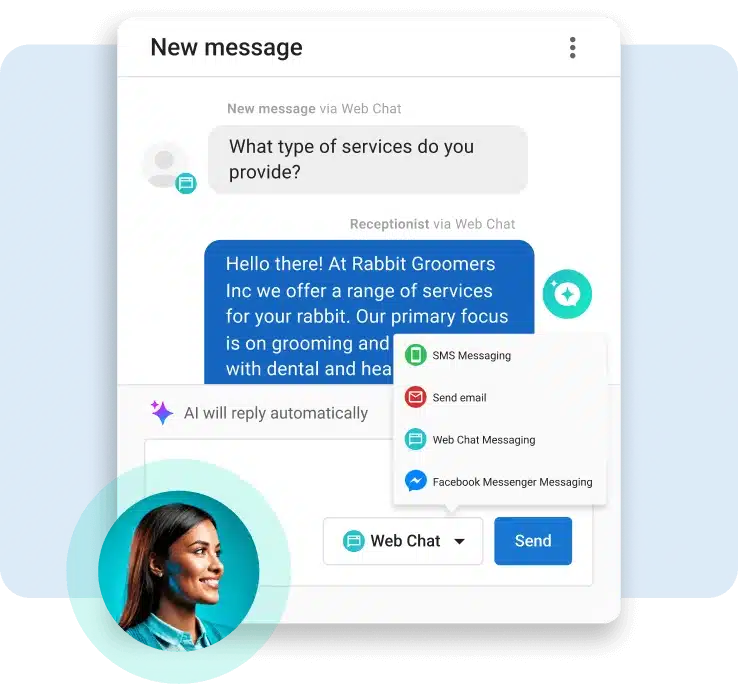
The best part? These powerful AI tools work seamlessly for both your business and the clients you serve.
3. Predictive Analytics Tools
Predictive analytics tools use historical data and machine learning to forecast future customer behavior, helping you make more informed decisions.
Benefits:
- Anticipate Needs: Predict customer needs and preferences to stay ahead.
- Optimize Campaigns: Identify which strategies are likely to yield the best results.
- Reduce Churn: Recognize signs of potential churn and take proactive measures.
4. Marketing Automation Platforms
These platforms streamline and automate your marketing activities, such as email campaigns, social media posts, and lead nurturing. They help you deliver the right message to the right person at the right time.
Benefits:
- Time Savings: Automate repetitive tasks to focus on strategy and creativity.
- Consistency: Ensure consistent communication across channels.
Tools like Vendasta’s marketing automation allow you to get personalized content at lightning speed and build smart automation to scale your marketing efforts.
How to Choose the Right Customer Journey Automation Platform
Choosing a customer journey automation platform is one of the most important technology decisions a business or agency can make. The right platform becomes the engine behind every customer interaction — from the first touchpoint to post-purchase follow-up. The wrong one creates more fragmentation, more manual work, and more cost than the problem it was supposed to solve.
With hundreds of tools on the market, the decision can feel overwhelming. But when you strip it back to what actually matters for driving real results, a handful of criteria separate the platforms worth investing in from the ones that will slow you down.
1. Does It Cover the Full Customer Journey — or Just Part of It?
Most automation tools are built to solve one specific problem. Email platforms handle email. CRMs manage contacts. Social tools schedule posts. Each does its job reasonably well in isolation, but when your customer journey requires all of them to work together, you end up stitching platforms together with integrations that break, data that doesn’t sync, and workflows that require constant manual oversight.
The platforms worth serious consideration are the ones that cover acquisition, engagement, and retention in a single connected system. Look for a platform that handles email, SMS, social media, reputation management, appointment booking, and reporting from one place — not six.
Vendasta is built around this principle. Rather than offering a single-function tool, it provides an end-to-end customer acquisition and engagement platform that covers every stage of the journey. Agencies and businesses using Vendasta manage their entire client lifecycle — from lead capture to loyalty — without switching between disconnected systems.
2. How Strong Is the CRM and Data Foundation?
Automation is only as good as the data behind it. A platform with weak CRM functionality produces generic, poorly timed outreach that customers tune out quickly. A platform with a strong data foundation enables precise segmentation, behavioral triggers, and personalization that actually moves people to act.
When evaluating platforms, ask these questions:
- Does it unify customer data from multiple sources into a single profile?
- Can you segment contacts based on behavior, lifecycle stage, and purchase history?
- Does it use your own business data to power automation — or does it rely on generic templates?
- How does it handle data from offline interactions, not just digital ones?
Vendasta goes a step further here. With 17 years of local business data informing its AI, the platform doesn’t just store customer information — it uses it to power the AI Workforce that predicts customer behavior, recommends next actions, and personalizes outreach in ways that generic automation tools simply can’t replicate.
3. What Are the AI Capabilities, and Are They Actually Useful?
Every platform claims to be AI-powered. Few deliver AI that makes a meaningful difference in day-to-day operations. There’s a big gap between a platform that uses AI to suggest subject lines and one that deploys AI Employees capable of answering phone calls, booking appointments, nurturing leads, and managing reputation — around the clock, without human intervention.
When evaluating AI capabilities, look beyond the marketing language and ask what the AI actually does:
- Can it handle inbound inquiries automatically, without a human in the loop?
- Does it proactively suggest optimizations, or does it only respond when prompted?
- Is it trained on data relevant to your industry and customer base?
- Can it be deployed quickly, or does setup require weeks of configuration and developer involvement?
Vendasta’s AI Employees are purpose-built for local businesses and the agencies that serve them. The AI Receptionist answers calls and books appointments within minutes of setup. The AI Sales Rep handles lead nurturing with personalized, perfectly timed outreach. The Reputation Specialist collects reviews and manages responses automatically. These aren’t chatbots with a coat of paint — they’re purpose-built employees that handle real work, powered by each business’s unique data.
4. Is It Built for Agencies and Multi-Location Businesses?
If you’re an agency managing automation for multiple SMB clients, or a franchisor overseeing dozens of locations, your platform needs to do more than automate a single business. It needs to support multi-client management, white-labeling, shared reporting, and the ability to deploy consistent workflows across locations while still allowing for local customization.
A platform built for individual businesses will hit a ceiling fast when you try to scale it across a portfolio. Look specifically for:
- White-label capabilities so the platform runs under your brand
- Multi-location or multi-client dashboards with consolidated reporting
- The ability to build automation templates once and deploy them across clients
- Role-based access so the right people see the right data
This is where Vendasta has a structural advantage over single-business tools like GoHighLevel. Vendasta was built from the ground up for partners — agencies, franchisors, ISVs, and MSPs — who need to deliver automation at scale on behalf of their clients. The platform is fully rebrandable, supports multi-client management natively, and gives partners shared dashboards and joint task management tools that make collaboration between agency and client seamless.
5. How Fast Can You Get It Running?
Time-to-value matters. A platform that takes three months to implement and requires a developer to configure is a liability for most small and midsize agencies. The platforms worth using are the ones your team can learn quickly, deploy for clients without heavy technical overhead, and start generating results in days, not quarters.
Ask vendors specifically:
- What does onboarding look like, and how long does it take?
- Does setup require developer resources, or can non-technical staff configure it?
- Are there pre-built workflow templates, or does everything need to be built from scratch?
- What does ongoing support look like after launch?
6. What Does the Reporting Actually Tell You?
Automation without visibility is a black box. You need to know which workflows are performing, where customers are dropping off, and what the automation is actually contributing to revenue. Platforms that bury reporting in difficult-to-navigate dashboards or only surface vanity metrics like open rates make it nearly impossible to improve over time.
Strong reporting should show you performance at the journey level — not just individual email or campaign metrics. Look for platforms that surface conversion rates at each stage, customer lifetime value trends, and the ability to A/B test workflows so you can continuously optimize based on real data.
A Quick Evaluation Checklist
Before committing to any platform, run it against these criteria:
- Does it cover the full customer journey in one platform, or will you need to integrate multiple tools?
- Is the CRM strong enough to support segmentation and behavioral triggers?
- Are the AI capabilities genuinely useful, or mostly cosmetic?
- Does it support multi-client or multi-location management if you need it?
- Can your team get it running quickly without heavy technical resources?
- Does the reporting give you journey-level visibility, not just campaign metrics?
- Is the pricing structured in a way that scales without punishing growth?
The platforms that check every box on this list are rare. Most tools are strong in one or two areas and weak in the rest. Vendasta was designed to check every box for the agencies and channel partners who need to deliver automation at scale — combining a unified platform, AI Employees powered by real business data, white-label flexibility, and multi-client management in a single solution built specifically for the partner ecosystem.
Customer Journey Automation for Small Businesses
Customer journey automation used to be the exclusive territory of large enterprises with dedicated marketing operations teams, six-figure software contracts, and months of implementation time. That’s no longer true. The tools available today make sophisticated automation accessible to small businesses operating with lean teams, limited budgets, and no in-house technical expertise.
For small businesses in particular, automation isn’t just a growth strategy. For many, it’s the only realistic way to compete with larger competitors who have more staff, more resources, and more capacity to stay in front of customers consistently.
Why Small Businesses Need Automation More Than Anyone
Small business owners wear more hats than anyone. They’re managing service delivery, handling customer inquiries, chasing invoices, trying to generate reviews, and somewhere in there, attempting to market their business and bring in new customers. Manual follow-up, lead nurturing, and customer communication are the tasks that consistently fall through the cracks — not because of carelessness, but because there genuinely aren’t enough hours in the day.
This creates a predictable set of problems that automation solves directly:
- Leads who inquire after business hours don’t get a response until the next morning, by which point they’ve already called a competitor
- Customers who had a great experience never get asked for a review, so the business’s online reputation doesn’t reflect the quality of its work
- Past customers who would happily return aren’t contacted because no one has time to run a re-engagement campaign
- New customers receive an inconsistent onboarding experience depending on who happens to be available when they sign up
Every one of these problems is solvable with automation. And solving them doesn’t require a marketing team, a developer, or an enterprise software budget.
The Customer Journey for a Typical Small Business
The customer journey for a small business — a dental clinic, a landscaping company, a local accounting firm, a boutique gym — looks different from an enterprise sales funnel, but the core stages are the same. Awareness, consideration, purchase, retention, and advocacy all still apply. What changes is the scale, the channels, and the types of interactions involved.
Here’s what an automated customer journey looks like for a local service business:
- A prospect finds the business through Google Search or a social ad. They land on the website and fill out a contact form or initiate a chat. An automated response goes out immediately — day or night — acknowledging their inquiry, providing basic information, and offering a booking link.
- If they don’t book right away, a follow-up sequence triggers automatically over the next few days: a reminder email, a text with a special offer, and a case study or testimonial relevant to their inquiry.
- Once they book, automated appointment reminders reduce no-shows. A pre-appointment email sets expectations and builds confidence in the service.
- After the job is done, a thank-you message goes out automatically, followed by a review request 24 hours later linking directly to Google.
- Thirty days later, a check-in message asks how everything is going and introduces a relevant complementary service.
- After 90 days of inactivity, a re-engagement campaign triggers with a returning customer offer designed to bring them back.
The business owner doesn’t manually manage any of these steps. The system handles all of it based on what each customer does — or doesn’t do — at every stage.
Where Small Businesses Should Start With Automation
Trying to automate everything at once is a reliable way to get overwhelmed and implement nothing well. For small businesses getting started, three workflows deliver the fastest and most measurable return:
Automated lead response. Responding to a new inquiry within five minutes makes a lead significantly more likely to convert than responding within an hour. For most small businesses, a five-minute manual response isn’t realistic. An automated response is instant, every time, regardless of when the inquiry comes in. This single workflow often produces the clearest and fastest ROI of any automation a small business can implement.
Automated review requests. Reviews drive local search rankings, and local search rankings drive inbound leads. A home services company that consistently asks for reviews after every completed job will accumulate more reviews in three months of automation than most businesses collect manually in three years. The impact on Google visibility — and the inbound leads that follow — compounds quickly.
Automated re-engagement campaigns. Past customers who already trust your business are far easier to win back than new leads are to acquire. A simple automated sequence targeting customers who haven’t returned in 60 or 90 days — with a personalized message and a relevant offer — generates revenue from a segment most small businesses are currently ignoring entirely.
What Small Businesses Should Look for in an Automation Platform
Not every automation platform is designed with small businesses in mind. Many enterprise tools are too complex to configure without technical support, too expensive to justify at SMB scale, and too rigid to adapt to the specific workflows of a local service business.
When evaluating platforms, small businesses should prioritize:
- Fast setup with no developer required. The platform should be operational in days, not months. If getting started requires a developer or a lengthy onboarding engagement, it’s the wrong tool for a lean team.
- All-in-one functionality. A small business doesn’t have the capacity to manage five different tools for email, SMS, reviews, CRM, and social media. One platform that handles all of these is worth significantly more than five specialized tools that require constant manual coordination.
- AI that handles real work. Not AI that suggests subject lines — AI that answers phone calls, books appointments, collects reviews, and nurtures leads without requiring human oversight for every interaction.
- Transparent, scalable pricing. Many enterprise platforms price small businesses out as soon as their contact list or workflow count grows. Look for pricing that scales proportionally rather than jumping dramatically at arbitrary thresholds.
This is where Vendasta makes a genuine difference for small businesses and the agencies that serve them. The platform is built to be deployed quickly — the AI Receptionist can be live and answering calls within minutes of setup, which is a significant advantage over tools that require weeks of configuration. Its unified platform covers the full customer journey without requiring integration between multiple systems.
And because Vendasta is designed for the partner channel, small businesses often access it through a local agency or reseller who handles the setup, strategy, and ongoing optimization on their behalf — giving them enterprise-grade automation without needing to become a marketing technology expert themselves.
The Competitive Reality for Small Businesses
Larger competitors in almost every local market are already using some form of customer journey automation. Franchise systems, regional chains, and well-funded independents are running automated follow-up sequences, review generation campaigns, and AI-powered chat on their websites. Small businesses competing against them manually — relying on memory, spreadsheets, and spare time — are playing the game at a structural disadvantage.
Automation levels that playing field. A two-person landscaping company running well-built automated workflows can deliver a more consistent, more responsive customer experience than a competitor three times its size that’s still managing follow-up manually. The technology isn’t the barrier it once was. The decision to implement it is.
For small businesses ready to stop losing leads after hours, start generating reviews consistently, and build the kind of customer relationships that drive referrals and repeat business, customer journey automation is the most practical tool available — and the gap between businesses that use it and those that don’t is widening every year.
Case Studies and Success Stories
More and more companies are now embracing customer journey automation to provide a better customer experience and boost sales.
Thomson Reuters, a renowned media agency, leveraged marketing automation to improve their email campaigns. This strategic move resulted in a 23% increase in leads, a 73% increase in conversions, and a 175% increase in revenue.
Similarly, PaperStyle, a popular e-commerce business specializing in personalized gifts, used marketing automation to send out personalized messages to their potential customers. The results were remarkable, with a 244% increase in open rates and a 330% spike in revenue.
Live 360 Marketing, a Pittsburgh-based digital marketing agency, boosted its ROI by 70% by integrating Vendasta’s AI Receptionist into the customer journey. By automating key touchpoints—like lead capture and initial response—the AI Receptionist ensured timely, personalized engagement with potential customers.
Apartments.com, a well-known multifamily housing provider, utilized Vendatasta’s suite of automation platforms and products for reputation management. As a result, the company could generate over 1.7 million reviews. Check out this case study for more details.
Customer Journey Automation Use Cases
Customer journey automation isn’t one-size-fits-all—it’s a powerful tool that can be applied at various stages of the funnel to engage, convert, and retain customers. Here are some practical, high-impact use cases:
Lead Nurturing Campaigns
When someone downloads a lead magnet, signs up for a webinar, or fills out a contact form, they’re showing interest—but they’re not ready to buy just yet. Automation helps businesses stay top of mind during this crucial phase by nurturing leads with targeted, helpful content.
Example: After someone downloads a guide or signs up through a contact form, an automated workflow can deliver a welcome email series introducing your brand, showcasing customer success stories, and offering valuable insights related to their interest.
By nurturing leads over time with timely and relevant content, businesses can build trust and guide prospects down the funnel—without relying on manual follow-ups. This helps sales and marketing teams prioritize hot leads while still engaging the rest consistently.
Customer Onboarding Workflows
The onboarding phase sets the tone for the entire customer relationship. Automation ensures that every new customer receives a consistent and positive first experience, reducing churn and encouraging early engagement.
Example: A local service business—like a spa, dental clinic, or HVAC provider—can trigger a series of onboarding emails after a customer books their first appointment. These emails might include what to expect, service tips, appointment reminders, or post-service check-ins.
This automated touchpoint ensures customers feel informed and cared for from day one, which leads to higher satisfaction and long-term retention.
Review Request Automation
Online reviews are critical for local businesses, but asking for them manually can be inconsistent or overlooked. With automation, businesses can systematically collect reviews and build their online reputation.
Example: A home services company can automatically send a review request 24 hours after completing a job, thanking the customer and linking to Google or another review platform.
This simple, hands-off approach not only boosts review volume and quality but also helps businesses stand out in local search—making it a must-have for SMBs looking to grow their credibility and customer base.
Re-Engagement Campaigns
It’s normal for some customers to go quiet—but that doesn’t mean they’re lost for good. Automation can re-engage inactive customers through personalized messages that reignite interest and drive them back into the funnel.
Example: If a customer hasn’t interacted in 60+ days, an automated workflow can send a personalized email offering a discount, a check-in message, or a reminder about new services.
These re-engagement campaigns support long-term retention, increase lifetime value, and show customers they haven’t been forgotten—all without adding to your team’s workload.
Cross-Sell and Upsell Triggers
Automation makes it easy to offer the right product or service at the right time based on actual customer behavior. This not only enhances the customer experience but also boosts revenue with minimal effort.
Example: If a client frequently books one service—say, monthly lawn care—they might automatically receive a recommendation for a complementary service like seasonal landscaping.
By using behavior-based triggers, businesses can offer more value to existing customers while increasing average order value and deepening loyalty.
Personalized Services and Support
Great support doesn’t always require a big team—just smart automation. By routing customers based on their needs and offering self-serve options, automation can streamline the support experience while keeping it personal.
Example: A chatbot on your website can answer common FAQs, offer relevant help articles, or connect the customer to the right department based on their query—all in real-time.
This reduces friction, saves time, and ensures customers feel supported, even if your business doesn’t have a full-scale support team. It’s especially impactful for SMBs looking to deliver enterprise-level service with limited resources.
Customer Journey Automation Trends to Watch in 2026 and Beyond
AI and machine learning are becoming central to customer journey automation, allowing businesses to analyze vast amounts of data and make smarter, faster decisions. They can analyze customer behavior patterns and preferences, enabling businesses to predict needs and tailor interactions accordingly.
Businesses will adopt hyper-personalization and predictive analysis using real-time data to provide individualized experiences. For example, an online retailer might use predictive analytics to identify when a customer is likely to need a refill of a consumable product and send a timely reminder or offer, enhancing convenience and driving repeat purchases.
Augmented Reality (AR) and Virtual Reality (VR) are already transforming how customers interact with products and services. They can make customer journeys more enjoyable and increase brand loyalty.
Voice-activated and conversational interfaces powered by AI are changing how customers interact with brands. They can handle complex queries and provide personalized assistance, mimicking human interactions.
Blockchain technology offers a secure and transparent way to handle customer data, building trust and ensuring privacy. Customers can have greater visibility into how their data is used and shared, fostering trust and compliance with regulations.
Looking to automate the customer journey? Book a demo with us here.
Customer Journey Automation FAQs
1. What is customer journey automation, and how does it work?
Customer journey automation is the use of technology to deliver personalized, timely interactions at every stage of the customer lifecycle — without requiring manual effort for each touchpoint. The system collects behavioral data from your website, CRM, email platform, and other channels, then uses triggers, conditions, and automated actions to respond to what each customer does in real time.
When a lead fills out a contact form, the system sends an instant response, creates a CRM record, and starts a nurture sequence — all automatically. When a customer goes quiet for 60 days, a re-engagement campaign fires without anyone on your team having to notice or act. The result is a consistent, personalized experience for every customer, at every stage, regardless of your team’s capacity on any given day.
2. Why do businesses need customer journey automation?
The honest answer is that most businesses are already losing revenue to gaps in their customer journey — they just can’t see exactly where. Leads that don’t get a fast enough response go elsewhere. Customers who had a great experience never get asked for a review. Past customers who would happily return never hear from the business again. These aren’t failures of effort. They’re failures of capacity.
Customer journey automation closes those gaps systematically. It ensures that every lead gets followed up with, every customer gets onboarded consistently, every happy customer gets asked for a review, and every lapsed customer gets a reason to come back. For growing businesses and agencies managing multiple clients, it also means scaling marketing and sales output without scaling headcount proportionally.
3. Who should use customer journey automation?
Any business that acquires, serves, and tries to retain customers can benefit from customer journey automation. That said, it delivers the clearest returns for businesses with:
- Multiple touchpoints before conversion — service businesses, B2B companies, and franchises where the path from inquiry to purchase involves several interactions
- Repeat purchase potential — businesses where retention and lifetime value matter as much as acquisition
- High lead volume relative to team size — businesses where manual follow-up is the bottleneck preventing conversion
- Multiple locations or clients — franchisors and agencies that need consistent customer experiences delivered at scale across many businesses simultaneously
For agencies in particular, customer journey automation is the difference between delivering one-off campaigns and building repeatable, scalable systems that drive measurable results for every client on the roster.
4. What tools do you need to automate the customer journey?
A complete customer journey automation stack typically includes five core components:
- A CRM to centralize customer data and track interactions across the lifecycle
- An email and SMS platform for multi-channel outreach and automated sequences
- A workflow builder to design trigger-based automations that respond to customer behavior
- An analytics and reporting tool to track performance at the journey level, not just the campaign level
- An AI layer to handle real-time interactions — answering inquiries, booking appointments, collecting reviews, and nurturing leads without human intervention at every step
The challenge with assembling these tools individually is that data rarely flows cleanly between them, integrations break, and your team ends up managing five platforms instead of one customer journey. Vendasta brings all five components into a single white-label platform, purpose-built for agencies and the SMBs they serve. Everything runs from one dashboard, under your brand, with customer data unified across every channel from day one.
5. How do I choose the best customer journey automation platform?
The right platform depends on your business model, team size, and the complexity of the journeys you need to automate. A few questions worth asking before committing to any tool:
- Does it cover the full customer journey, or just one channel like email?
- How strong is the underlying CRM and data infrastructure?
- What do the AI capabilities actually do — and are they genuinely useful or mostly cosmetic?
- Can it support multiple clients or locations if you need it to?
- How long does implementation take, and does it require developer resources?
- Does it offer white-label options if you’re delivering it under your own brand?
- What does the reporting show — campaign metrics or journey-level performance?
For agencies managing automation on behalf of SMB clients, the platform also needs to support multi-client management natively, not as an afterthought. Vendasta was built specifically for this use case — combining end-to-end journey automation, AI Employees, white-label flexibility, and multi-client management in a single platform designed for the partner ecosystem.
6. How do I know if my customer journey automation is working?
The metrics worth tracking depend on your goals, but these are the ones that most reliably reflect automation’s actual impact on the business:
- Conversion rate by journey stage — are more leads moving from inquiry to purchase, and from purchase to repeat customer?
- Speed through the funnel — has the time between first contact and conversion decreased?
- Customer lifetime value — are customers spending more over a 6 or 12-month period compared to pre-automation?
- Churn and retention rate — are fewer customers going inactive or leaving?
- Review volume and average rating — is automated review generation improving local search visibility?
- Time saved per team member — how many hours of manual work has automation replaced, and what is that worth in real dollars?
Vanity metrics like email open rates are useful for optimizing individual workflows, but they don’t tell you whether automation is moving the needle on revenue. Track performance at the journey level — what percentage of customers are completing each stage — and you’ll have a clear, defensible picture of what your automation is actually delivering.
7. How long does it take to see results from customer journey automation?
Some results show up quickly. Automated lead response workflows typically improve conversion rates within the first few weeks simply because inquiries get answered faster. Review generation campaigns produce measurable increases in review volume within 30 to 60 days of going live.
The deeper returns — improvements in customer lifetime value, retention rate, and overall revenue per customer — take longer to materialize because they compound over multiple interactions and months of customer relationships. A realistic timeline for seeing the full impact of a well-implemented automation strategy is three to six months, with results continuing to improve as workflows are tested and refined over time.
The businesses that see the strongest long-term results treat automation as a continuously improving system, not a one-time setup. They review performance quarterly, test variations in their workflows, and update their journey maps as their customer base and product offerings evolve.
8. Can small businesses afford customer journey automation?
Yes — and the more relevant question is whether small businesses can afford not to use it. The cost of missed follow-ups, slow lead response times, and inconsistent customer experiences compounds quietly over time into lost revenue that most small businesses never directly attribute to the absence of automation.
The barrier to entry for automation has dropped significantly. Platforms like Vendasta make sophisticated automation accessible to small businesses at a fraction of what enterprise tools cost, with setup times measured in days rather than months. Many small businesses access Vendasta through a local agency partner who handles implementation and ongoing optimization on their behalf — which means they get enterprise-grade automation without needing to become a marketing technology expert themselves.
For most small businesses, a single automated workflow — a faster lead response, a consistent review request, a re-engagement campaign for lapsed customers — pays for the platform many times over within the first few months.
This article was originally published in August 2024 and was updated in June 2026 to include the latest information and insights.
