About Us
 Careers
 Leadership
 Board
Board Newsroom
The best AI virtual receptionist for lead qualification has to beat the clock. Missed and slow-answered calls are costing you booked appointments, whether you run a home services company, law firm, real estate office, dental practice, or med spa, or you operate multiple franchise locations.
Vendasta’s AI Receptionist is our recommended overall pick among AI employees because it answers every call around the clock, qualifies the caller, books the appointment, and logs the record to CRM AI.
Smith.ai is strongest on fixed yes/no qualification gates and native CRM writeback; Retell AI suits developer-built workflows; Answering Legal specializes in law-firm intake; Goodcall suits solo operators; Dialzara handles simple prompt-based qualification; and Ruby provides live-human backup when you need it.
This comparison walks you through qualifying questions, scoring and routing, CRM writeback, what AI and human receptionists each handle best, setup time, and compliance for regulated intake — so you can choose the system that stops unqualified calls from eating your day and starts turning answered calls into booked work.
Capture, qualify, and convert leads 24/7 without lifting a finger
TL;DR
- The best AI virtual receptionist for lead qualification never lets a lead go cold: It answers calls, web chats, and texts around the clock, qualifies every caller, logs each conversation to your CRM, and texts back missed calls. Vendasta’s AI Receptionist does all four, with every conversation logged to Vendasta CRM AI.
- Vendasta vs. Smith.ai qualification depth: Smith.ai’s AI Receptionist gates each call with up to three yes/no questions and a pass/fail result. Vendasta’s AI Receptionist asks the qualifying questions you write in plain language, across calls, web chats, and texts, and logs every answer to CRM AI.
- AI Receptionist delivered a 76% conversion rate: For a luxury car rental business, Vendasta’s AI Receptionist handled 1,017 inbound calls and qualified 778 leads over four months.
How We Evaluated
We scored each tool on six criteria: question configuration, scoring and tagging, routing logic, CRM writeback, in-call booking, and setup time and what the business has to provide. We tested each platform’s documented behavior against one mystery-shopper lead call: a homeowner calling a roofing contractor at 9 p.m. for a full-replacement quote with a $15,000 budget, a two-week timeline, and a spouse co-signing. LiveTok’s benchmark measured Retell AI at 0.99 seconds, the only independent latency figure among the tools compared here.
Best AI Virtual Receptionist for Lead Qualification at a Glance
| Tool | Best For | Qualification Scripting | In-Call Booking | CRM Sync | Live Transfer | Channels (voice/chat/SMS) | Compliance |
|---|---|---|---|---|---|---|---|
| Vendasta AI Receptionist | Overall pick for local businesses and multi-location operators | Plain-language Role and Capability instructions | Yes, books against connected calendar during the call | Native Vendasta CRM AI; HubSpot and Zapier as platform integrations | Direct transfer | Voice, web chat, SMS, plus WhatsApp, Facebook, Instagram | SOC 2 Type 2; report available through the Vendasta Trust Center |
| Smith.ai AI Receptionist | Fixed yes/no qualification gates | 3 yes/no questions, pass/fail | Books after a qualified answer | Native HubSpot, Salesforce, Pipedrive | Attended warm, with summary | Voice, chat | Encrypted storage for recordings and transcripts; states it is not HIPAA compliant and cannot handle PHI |
| Dialzara | Simple prompt-based qualification | Prompt editor: budget, timeline, project type | Not documented | Webhook, Zapier, CRM | Blind on Lite | Voice | Claims HIPAA compliance; BAA on request |
| Answering Legal | Law firm intake | Full legal intake, live receptionists | Not documented | Legal CRMs direct; HubSpot via Zapier | Live receptionists; transfer not documented | Voice (live receptionists) | Not documented |
| Goodcall | Solo operators | Contact Forms, rule-based routing | Not documented | Sheets/email; CRM per 2026 page | To line or department | Voice | Claims HIPAA compliance; SOC 2 status not confirmed |
| Retell AI | Developer-built workflows | BANT-named typed post-call fields | Developer-built | Typed CRM fields via API | Warm, private debrief | Voice (developer-built) | SOC 2 Type 1 and Type 2, ISO 27001, HIPAA (self-serve BAA), GDPR (DPA) |
| Ruby | Hybrid human-led | Custom workflow, human-led | Not documented | Zapier only (HubSpot, Salesforce) | Announced transfer | Voice (live receptionists) | Opt-in HIPAA-compliant service with signed BAA, no extra charge |
Our Top Picks:
Vendasta AI Receptionist wins overall for local businesses and multi-location operators: it qualifies the caller, books the appointment against your live calendar, and writes the record to CRM AI in a single call, around the clock.
If your priority is fixed yes/no qualification gates with native HubSpot, Salesforce, or Pipedrive writeback and an attended transfer, Smith.ai handles that. If you have a developer on hand and want to build and maintain your own workflow, Retell AI offers typed post-call fields and a warm transfer with a private debrief.
Best Overall: Vendasta AI Receptionist
Vendasta’s AI Receptionist answers on the first ring, 24/7, across phone, website chat, SMS, and messaging. It qualifies the caller, books the appointment, and logs the record in a single conversation, so an after-hours call from a homeowner or a new-patient inquiry never reaches voicemail.
You configure qualification by writing plain-language instructions — no coding required. At the role level, your instructions shape how the receptionist behaves across every phone and digital channel. At the capability level, you target a single task, such as “Ask for the caller’s address” or “Do not promise a price.”
After every call, the recording, transcript, summary, lead source, and appointment activity are written automatically to CRM AI. The receptionist also books against your connected calendar during the conversation, so the slot is confirmed before the call ends.
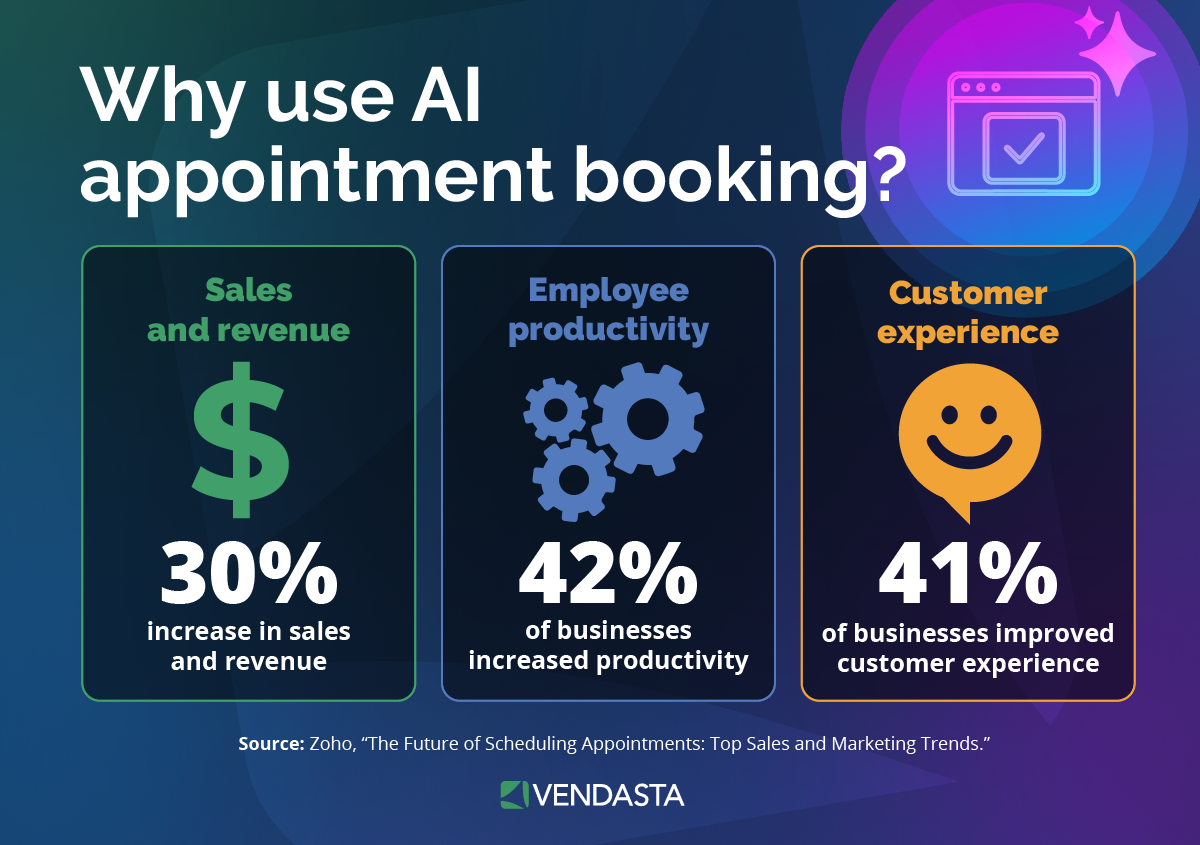
A luxury car rental business put this to the test: the AI Receptionist handled 1,017 inbound calls over four months and qualified 778 leads, producing a 76% conversion rate.
Vendasta has no structured BANT question builder, computes lead scores in a separate rule-based CRM engine rather than from the call, and hands off live calls directly with no whisper to the person receiving the call.
The Receptionist works alongside Vendasta’s wider AI Workforce.
Neighborly, a multi-location franchise network, had 30% of its leads go unanswered. After it deployed Vendasta’s AI Receptionist, that share fell to nearly 0%. The AI Receptionist handled 35.7K conversations, and 3.4K of them converted, while leads converted to revenue rose 372% year over year.
A luxury showroom built an estimated $200,000 monthly appointment pipeline. It came from 80 bookings averaging $2,500 each.
Best for Fixed Yes/No Qualification Gates: Smith.ai AI Receptionist
Smith.ai is the only general-purpose receptionist here that pairs configurable qualification with native writeback to HubSpot, Salesforce, and Pipedrive, plus an attended transfer. It fits a business that wants every caller screened against the same short checklist before anyone on the team spends time on the call.
Up to three yes/no questions gate the call. A wrong answer ends it and marks the caller unqualified. The attended warm transfer added in 2026 holds the caller, phones your rep, reads a summary, and waits for accept or decline. Scoring remains pass/fail, with no numeric score or documented intent field written to the CRM.
Best for Developer-Built Workflows: Retell AI
Retell AI is a developer platform rather than a ready-made receptionist: your team assembles the voice workflow, including text-to-speech, telephony, and the large language model, and connects it to your systems. That control suits a business that wants to define exactly how calls are handled and what data is captured.
The platform supports user-defined qualification criteria and typed post-call fields, with BANT named in its sales development documentation. It can also perform a warm transfer with a private debrief to the receiving person. The tradeoff is implementation: Retell AI suits a business with a developer on hand to build and maintain the call workflow, not an owner or office manager who needs a receptionist configured and answering calls within a day.
Other Options We Considered
Four buyer situations cover the remaining tools. Each can outperform the top picks when its intake model, qualification style, or human coverage matches the job more closely than general-purpose qualification.
- Best for law firm intake: Answering Legal runs every caller through a full legal intake with live receptionists. It connects directly to several legal case-management systems, while HubSpot requires Zapier. Public documentation does not state HIPAA support or confirm an attended transfer process.
- Best for solo operators: Goodcall uses Contact Forms and rule-based routing with no-code setup. It suits an owner who needs calls sent to a person, line, or department without a developer. Dialzara is the alternative for prompt-based qualification, though its Lite plan allows only blind transfer.
- Best for simple prompt-based qualification: Dialzara accepts budget and timeline criteria plus project type in its prompt editor. It returns a binary qualified or unqualified outcome and sends the call record, including summaries, transcripts, and lead fields, through several delivery methods such as webhook or CRM. Spanish requires Pro, and Dialzara’s public documentation does not confirm HIPAA support.
- Best for hybrid AI-plus-human: Ruby answers in under 10 seconds and provides a BAA at no extra charge. Human receptionists follow a custom workflow and announce callers before transfer. HubSpot and Salesforce connectivity relies on Zapier rather than native writeback.
How an AI Receptionist Qualifies a Lead
For a general primer, see how an AI receptionist works for a local business. The platforms use some or all of four qualification steps, depending on their documented capabilities:
- Question configuration: You write questions as plain-language instructions in Vendasta, Dialzara, and Retell AI, or set a fixed yes/no gate in Smith.ai. These can cover budget and timeline as well as service area, depending on the platform.
- Scoring and tagging: BANT, meaning budget, authority, need, and timeline, appears in Retell AI’s conversational AI sales development documentation. Developer platform Vapi’s schema returns a qualified flag with hot, warm, or cold priority, while Smith.ai returns pass/fail, and Vendasta uses a separate rule-based CRM scoring engine.
- Branching: A failed answer ends the Smith.ai call with the caller tagged unqualified; Vendasta can text back after a missed call. A pass can trigger the workflows that transfer during business hours or book after hours.
- In-call booking: Platforms with documented calendar support read live availability and create the event during the call. Public documentation does not confirm this capability for every tool in the comparison.
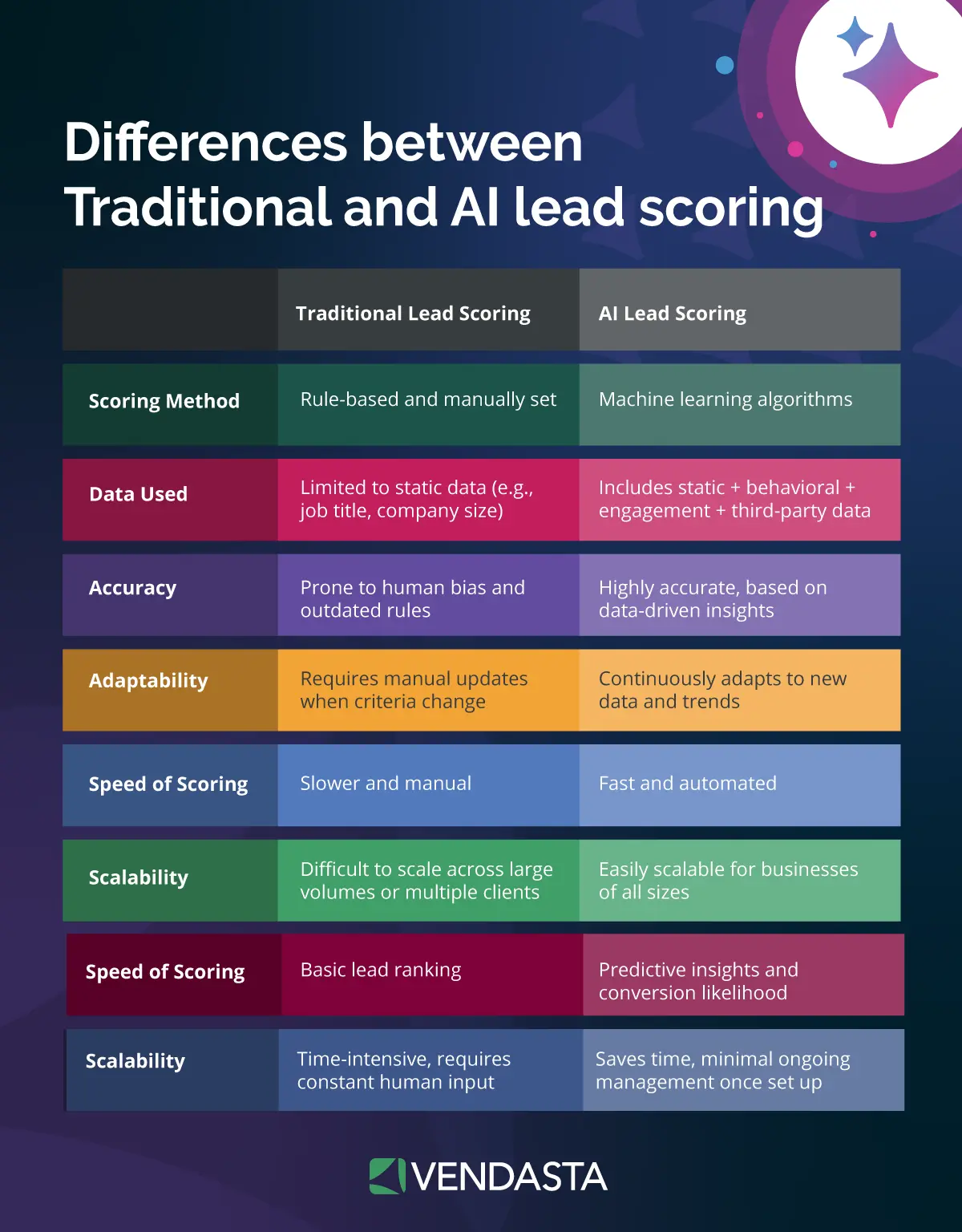
For scoring that follows a contact through the pipeline, see AI lead scoring.
What Happens to a Hot Lead vs. a Cold Lead
A hot lead checks every box: your service area, a budget that fits your range, and a timeline inside the next few weeks. During business hours, the receptionist transfers the call directly to whoever can close it. After hours, the receptionist books the next open slot on your connected calendar and writes a follow-up activity to the record so nothing slips.
A warm lead has the right need but a fuzzy timeline or an unconfirmed budget. The receptionist captures the details, books a callback at a time that works, and tags the record so it enters your follow-up queue rather than disappearing into voicemail.
A cold or out-of-area lead still gets a courteous answer. The receptionist declines politely, then logs the contact and notes why it was disqualified, so your CRM reflects a real reason rather than a gap.
Every call — regardless of outcome — is logged to CRM AI. If you miss the call entirely, an automatic text goes out offering the caller a chance to schedule a callback.
A Worked Qualification Script You Can Copy
Each branch ends in a disqualification, transfer, or booking:
- Need: “Is this for a repair, a full replacement, or an inspection?” Repairs and inspections book the next open slot instead of transferring.
- Service area: “What’s the property ZIP code?” The configured workflow politely disqualifies callers outside the served list.
- Timeline: “Are you hoping to start within two weeks, within two months, or later this year?” The workflow prioritizes the earliest timelines.
- Budget: “Most replacements this size run $12,000 to $20,000. Is that the range you’re working with?” The configured workflow tags a no as warm.
- Decision maker: “Will anyone else be part of the decision, and can they join the estimate visit?” Book the estimate even if the co-signer cannot.
- Close: Hot and warm leads route to the estimator during business hours. After hours, the receptionist books the next open slot.
Sample Qualifying Questions by Industry
The AI Receptionist asks these as plain-language instructions you can edit directly — no code required.
Home Services
- “Is this an emergency, a repair, or a new installation?”
- “What’s the property ZIP code?”
- “Are you hoping to have this done this week or later this month?”
- “Do you own the property or are you a tenant?”
Hot leads (emergency or this-week timeline) route to the on-call tech immediately; warm leads get booked into the next available slot; out-of-area callers are politely disqualified.
Law Firms
- “What type of legal matter are you calling about — personal injury, family law, or something else?”
- “When did the incident or issue occur?”
- “Have you spoken with another attorney about this matter?”
- “Are you calling for yourself or on behalf of someone else?”
Callers who match the firm’s practice area and timeline are routed to the intake specialist; those outside scope are directed to seek appropriate counsel. No attorney-client relationship is formed during this call.
Real Estate
- “Are you looking to buy, sell, or both?”
- “What neighborhood or ZIP code are you focused on?”
- “What’s your target timeline — within 90 days or further out?”
- “Have you been pre-approved for financing, or are you paying cash?”
Buyers with financing in place and a near-term timeline route to an available agent; sellers ready within 90 days book a listing consultation; longer-horizon callers receive a follow-up message.
Dental and Med Spas
- “Are you a new patient or an existing patient?”
- “What treatment or service are you calling about today?”
- “Will you be using dental or health insurance, or paying out of pocket?”
- “Do you have a preferred day or time of day for your appointment?”
New patients with confirmed insurance or self-pay status book directly into the new-patient calendar; existing patients route to the front desk; callers requesting services outside the practice’s scope are advised to contact a specialist.
Franchise Locations
- “What’s your ZIP code so I can confirm your nearest location?”
- “Which service are you calling about today?”
- “Is this for a new account or an existing account?”
- “Would you like me to connect you with that location’s scheduling calendar?”
Callers are matched to the correct location by ZIP code and routed to that location’s calendar for booking; unrecognized ZIP codes trigger a message to the nearest franchise owner for follow-up.
AI vs. Human Receptionist: What Each Handles Best
The table below shows which call tasks an AI Receptionist handles through configured rules and integrations, and which tasks still suit a human receptionist better.
| Task | AI Receptionist | Human Receptionist |
|---|---|---|
| After-hours and weekend coverage | Answers on the first ring, 24/7 | Works set hours |
| Answering several calls at once | Takes multiple calls at the same time without a queue | Handles one call at a time while others wait or go to voicemail |
| Asking the same qualifying questions every call | Follows the configured question script on every call | Stays consistent when trained, but wording can vary by person and shift |
| Booking against a live calendar during the call | Checks the connected calendar and books while the caller is on the line | Can book during the call by checking the calendar manually |
| Logging the recording, transcript, and summary to the CRM | Saves all three to the CRM automatically after each call | Relies on manual notes entered after the call |
| Quoting complex jobs | Limited; routes the request to a person | Stronger; can ask follow-up questions and apply pricing judgment |
| Sensitive legal or medical detail and judgment-heavy escalations | Limited; flags the call and routes it to staff | Stronger; can read tone and decide how to respond |
A fully loaded in-house receptionist costs about $55,201 a year, based on BLS wage data with a 1.399 benefits multiplier.
Many businesses pair the AI Receptionist for first-ring intake with people for the judgment calls.
How Long Setup Takes
Self-setup runs in under 30 minutes if you have your admin access ready and can add a short code snippet to your website. The AI Receptionist learns from your website, your business profile, and any knowledge you upload, and most businesses go live the same day. With guided onboarding, you’re typically live within a few days.
Before you start, gather the following:
- A phone number to forward or port to the system
- The ability to add a short code snippet to your website for chat
- A connected calendar showing real availability
- Your service list and service area
- Pricing rules, or a clear instruction not to quote prices
- The names and direct numbers of anyone calls should transfer to
- Your recording and AI disclosure line for the opening greeting
One honest caveat: the AI Receptionist handles volume and consistency well, but quoting complex jobs, navigating sensitive legal or medical detail, and any call where judgment beats speed still need a human on the line.
CRM and Calendar Sync Without Zapier Duct Tape
Smith.ai connects natively to HubSpot and Salesforce as well as Pipedrive. It writes contacts, call events, and summary notes, but no documented intent or score field. The rep can read the logged summary and see where the caller sits in the customer journey before calling back.
Ruby reaches HubSpot through Zapier, where its documented triggers cover messages and contact fields such as name and phone, plus email. Answering Legal also uses Zapier for HubSpot, while its direct legal-system integrations can send legal intake data. Its Salesforce page documents intake details, contact information, and a message for new leads.
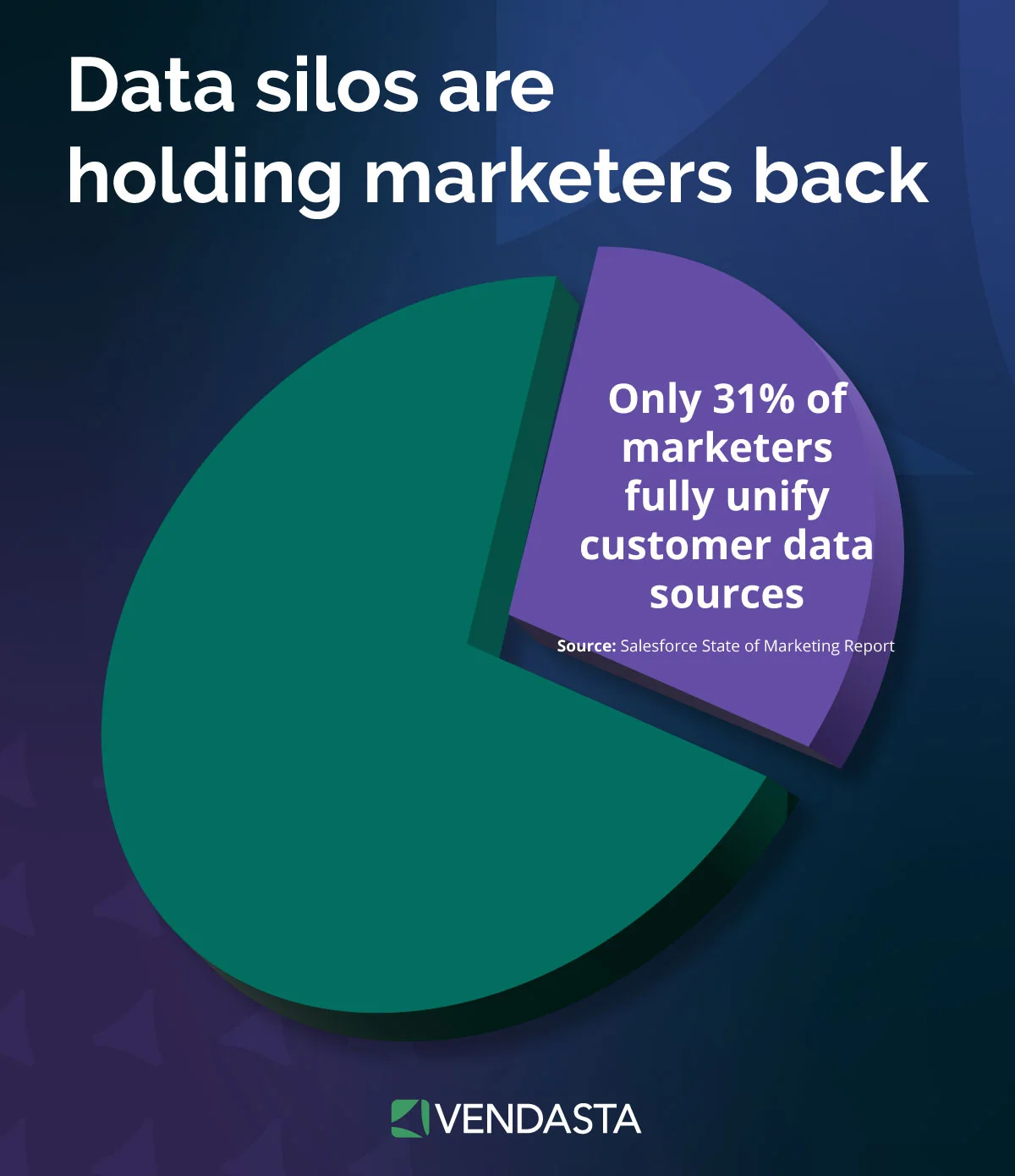
Vendasta writes qualification data natively to CRM AI with no Zapier middleware, which is what separates it from the Zapier-dependent options described above. HubSpot, Jobber, and Clio are platform integrations rather than qualification writeback targets. See how an AI Receptionist can book the meeting and log it to CRM AI.
Warm Transfers, After-Hours Escalation and When to Choose Hybrid
An attended transfer briefs your rep first; a direct transfer forwards the line. Smith.ai reads a summary and waits for accept or decline. Retell AI passes a private debrief, Ruby announces the caller, and Vendasta hands off directly.
After hours, the AI should book or text back rather than transfer, which keeps the customer experience consistent at 11 p.m. One auction house sourced a $20,000–$30,000 commission from a single lead the AI Receptionist matched and captured at 11 p.m. — a result that illustrates how one after-hours call can outweigh an entire month of software cost.
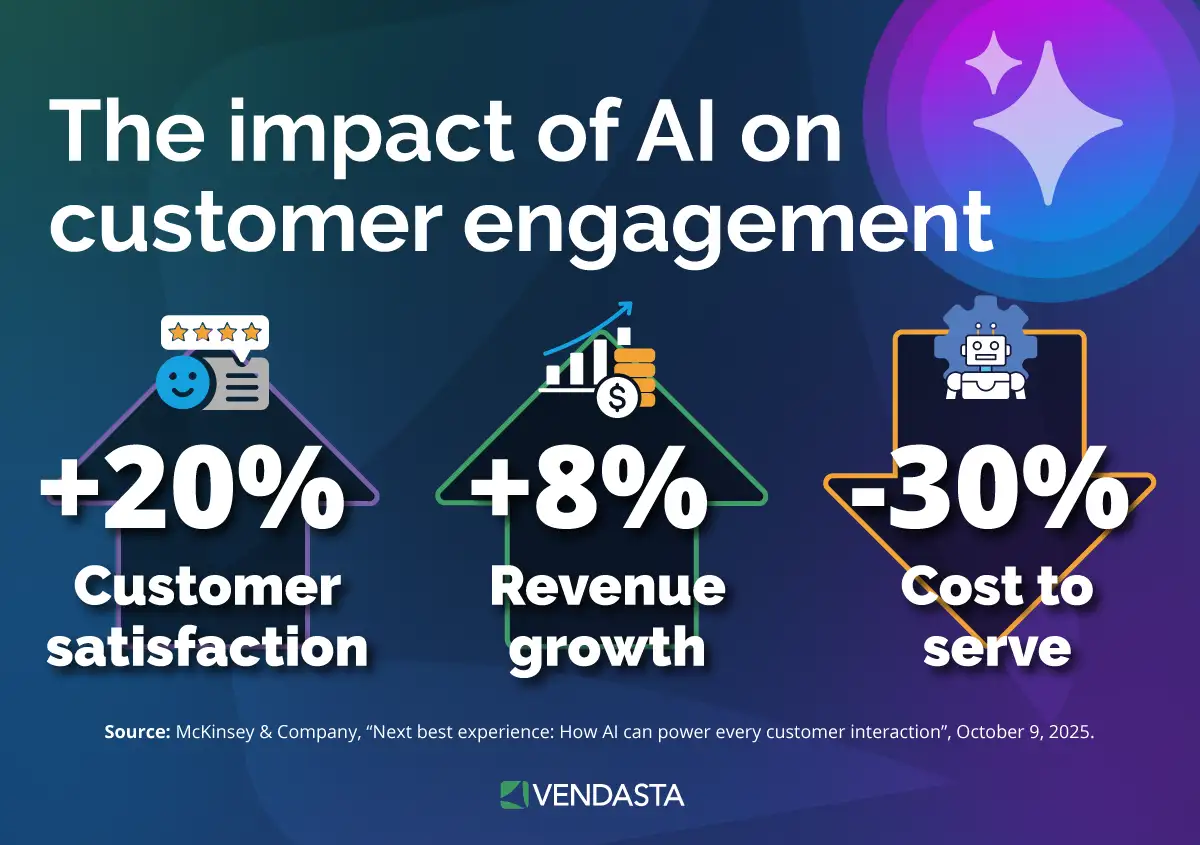
Add live-human backup through Ruby or Smith.ai’s Live Agent add-on when one mishandled handoff could cost you a high-value job. Hybrid coverage makes the strongest case in legal, medical, and high-ticket intake, where context or judgment can matter more than speed.
Recording Consent and Compliance in Plain Terms
Eleven states require every party’s consent to record a call, including California, Florida, Illinois, Massachusetts, and Washington. The Reporters Committee’s recording guide details the state rules. No tool here ships a non-editable disclosure, so build the notice into your opening prompt.
Open every call with one line: “This call is answered by an AI receptionist and recorded for quality.” The FCC’s declaratory ruling treats AI-generated voices as “artificial or prerecorded” under the Telephone Consumer Protection Act (TCPA), so outbound callbacks need prior express consent. Canadian operators face consent-based obligations as well — federal and provincial rules generally require that callers be notified a call is being recorded before or at the start of the interaction, so apply the same opening disclosure line north of the border. Vendasta’s AI Receptionist handles voice calls in the United States and Canada only, so the disclosure guidance above covers every location where you can use it for calls.
If your calls collect insurance or medical details, as dental and med spa intake often does, HIPAA governs how that information is handled. Before any AI receptionist touches protected health information, the vendor must sign a Business Associate Agreement (BAA) with your practice, so ask every vendor on your shortlist for one in writing. A signed BAA is necessary when a covered workflow handles protected health information, but the agreement alone does not establish complete HIPAA compliance — the intake design, access controls, and data handling must also comply. A simple safeguard: set the receptionist to book the appointment and capture contact details only, and leave insurance and medical questions for your front desk.
Real-World Success: How AI-Powered Lead Handling Fueled $1M in Growth
The theory behind AI lead qualification is powerful, but the results are even more impressive in practice. Take the case of Blackfeather Digital, a boutique revenue enablement agency that leveraged Vendasta’s AI-powered ecosystem to achieve massive success in its first year.
Before partnering with Vendasta, Blackfeather’s leadership saw a recurring problem among SMBs: fragmented tools and slow follow-up were causing leads to fall through the cracks. By implementing a unified, AI marketing strategy, they transformed their clients’ sales outcomes.
The Results: Blackfeather Digital + Vendasta
- $1M First-Year Revenue: By standardizing every client with an AI-powered revenue enablement program, the agency hit seven figures in its first 12 months.
- 3x Increase in Close Rates: One SMB client saw their close rate triple by using instant AI responses and automated workflows to handle incoming leads.
- 100% Client Retention: Providing a unified tech stack with clear, AI-driven performance visibility ensured clients stayed for the long term.
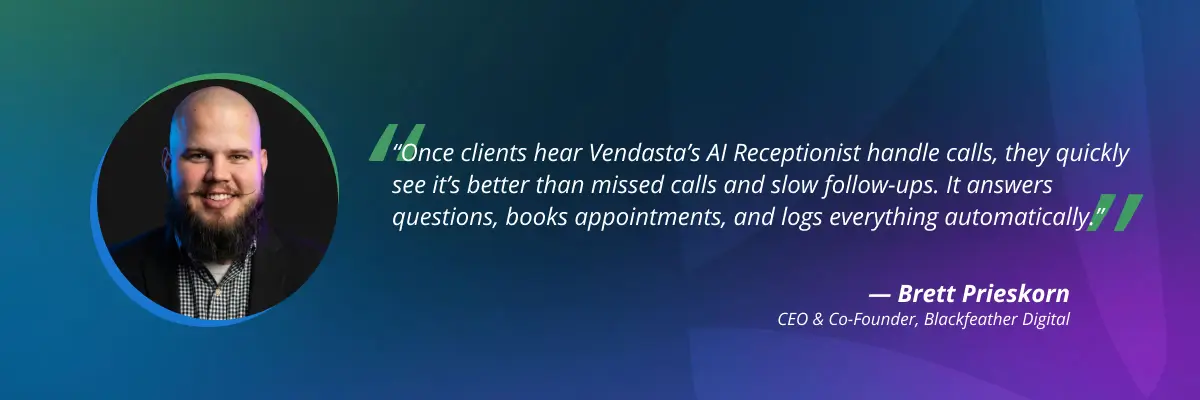
The Takeaway: For Blackfeather Digital, the AI virtual receptionist and automated lead handling were the foundation of a $1M growth engine. By eliminating the delay between a lead calling and a salesperson responding, they turned passive inquiries into predictable revenue.
How to Choose the Right AI Receptionist for Lead Qualification
Most AI receptionists stop at the phone call. They answer, collect a few qualifying details, and leave you to move the lead into your CRM and follow up yourself. For a local business owner already doing five jobs, the better test is what happens after the call. Vendasta’s AI Receptionist stands out on four points:
- One receptionist on every channel: The same AI Receptionist answers calls, web chats, texts, and messages from WhatsApp, Facebook, and Instagram, while most tools compared here focus on the phone line.
- Every lead lands in your CRM automatically: Each conversation is logged to Vendasta CRM AI with the recording, transcript, summary, and booked appointment, with no Zapier connection to build or maintain.
- No lead goes cold: When a call is missed, an automatic text offers the caller a callback, so the lead stays with you instead of dialing the next business on the list.
- It works with the rest of your AI Workforce: The AI Receptionist runs alongside other AI Employees, such as the AI Reputation Specialist that asks for a review after the job, so answering, booking, and follow-up run from one platform instead of separate tools.
The results hold up across very different businesses. Neighborly cut unanswered leads from roughly 30% to nearly zero across its franchise network. A luxury car rental business captured 778 qualified leads from 1,017 calls in four months. Setup takes under 30 minutes because the AI Receptionist learns from your website, business profile, and uploaded knowledge. Expert setup is available if you’d rather not configure it yourself.
A different tool may fit a narrower need: Smith.ai for fixed yes/no gates with native HubSpot, Salesforce, or Pipedrive writeback, Retell AI if you have a developer to build the workflow, Ruby for live human receptionists, and Answering Legal for law firm intake.
Before any finalist goes live on your main business line, test each one with the same mystery-shopper call and compare how it qualifies, books, and logs. To see how Vendasta’s AI Receptionist would handle your calls, book a Vendasta demo.
Best AI Virtual Receptionist for Lead Qualification FAQs
1. What is the best AI answering service for lead qualification?
Vendasta’s AI Receptionist scores highest across the six criteria used here for a local business that needs every call answered, qualified, booked, and logged to CRM AI around the clock. Smith.ai suits businesses that prefer a fixed three-question yes/no gate with an attended warm transfer.
2. What should an AI receptionist do during a call?
It should answer on the first ring and ask your qualifying questions: need, service area, timeline, and budget. Hot leads should get booked against a live calendar during the call or transferred during business hours. The recording, transcript, and summary should reach your CRM. Vendasta’s AI Receptionist books during the call and logs every call to CRM AI.
3. How long does it take to set up an AI receptionist?
Self-setup of Vendasta’s AI Receptionist runs in under 30 minutes, and most businesses go live the same day. Guided onboarding typically takes a few days. Have a phone number ready to forward or port, a connected calendar, your service list and service area, and transfer contacts.
4. Is AI replacing receptionists?
AI increasingly handles first-ring intake, routine qualification, and appointment booking, while people retain judgment-heavy calls and sensitive escalations. Gartner’s report predicts agentic AI will resolve 80% of common customer service issues without a human by 2029. Clio’s research found 27% of solo firms using AI use virtual receptionists.
5. What is the best AI assistant for answering business calls?
The best choice depends on what the completed call must produce. Vendasta’s AI Receptionist fits businesses that need an appointment booked against a live calendar and the interaction logged to CRM AI. Smith.ai fits qualification gating with an attended transfer. Ruby is stronger when a live receptionist must handle judgment-heavy conversations.
6. Can an AI receptionist do BANT lead scoring?
Yes, when the platform exposes configurable post-call fields or scoring rules. Vapi’s example schema returns a qualified true-or-false flag and a hot, warm, or cold priority. Retell AI returns typed post-call fields and names BANT in its documentation. Smith.ai provides pass/fail qualification but does not expose a numeric score.
7. Does an AI receptionist sync with HubSpot or Salesforce?
Smith.ai connects natively to HubSpot, Salesforce, and Pipedrive, creating or updating contacts and logging call summaries. Vendasta writes qualification data natively to Vendasta CRM AI with no Zapier middleware, while HubSpot, Jobber, and Clio connect as platform integrations. Ruby uses Zapier for HubSpot and Salesforce. Answering Legal uses Zapier for HubSpot and documents a separate Salesforce intake integration.
8. Can an AI receptionist warm transfer calls and handle after-hours?
Smith.ai holds the caller, reads a summary to the recipient, and waits for accept or decline. Retell AI provides a private debrief before connection. After hours, Vendasta’s AI Receptionist can answer around the clock, qualify the caller, book an available slot during the call, or send a missed-call text offering a callback.
9. Should I choose a hybrid or fully automated AI receptionist?
Choose hybrid coverage when one mishandled call could cost you a high-value job, as in legal, medical, or high-ticket contracting. Ruby pairs AI call features with live human receptionists, while Smith.ai offers a Live Agent add-on for its AI Receptionist. Fully automated service fits higher-volume intake where fast response and consistent qualification matter more than human judgment.
10. Is an AI receptionist HIPAA compliant?
An AI receptionist can support HIPAA compliance only when the vendor signs a Business Associate Agreement (BAA) before handling protected health information, and the BAA alone is not enough. The intake design, access controls, and data handling must also comply. Ask every vendor for a signed BAA, and limit what the receptionist collects on calls.