About Us
 Careers
 Leadership
 Board
Board Newsroom
AI for law firms is software that answers intake inquiries, drafts first versions of documents, speeds up legal research, suggests time entries, and asks clients for reviews. A licensed lawyer stays responsible for every output that reaches a client or a court. Most solo and small firms already use some form of it, and more than half of them still run it without a written policy.
That gap matters because the risk sits with the firm. Courts have sanctioned lawyers for filing cases that AI invented, and state bars expect firms to vet their tools, protect client data, and supervise everyone who uses them. Meanwhile, the biggest return for a small practice often comes from the least glamorous work: answering every inquiry and booking the consultation, which is where AI employees that take on front-office work fit alongside the drafting and research tools lawyers already know.
This guide is for owners and managing partners of small and mid-sized firms, including solo practices with support staff, who run the business side as well as the caseload and who carry the risk if an AI error reaches a judge. It works through each firm function, then covers tool selection, the ethics duties under the American Bar Association (ABA) Model Rules, cost and return, and a rollout and policy plan you can adapt.
Automate the entire customer journey from first touch to repeat business
TL;DR
- Most small firms use AI without a policy: Clio’s 2026 solo and small firm research found 71% of solos and 75% of small firms use AI, yet 57% of solos and 55% of small firms have no AI policy.
- A lawyer must verify every AI output: Bar guidance applies the duties for supervising lawyers and staff to AI tools, and courts have sanctioned lawyers who filed cases that AI invented.
- AI Receptionist covers the front office: Vendasta’s AI Receptionist answers calls, chats, and texts 24/7, qualifies prospective clients, and books consultations. After-hours inquiries land on the calendar instead of in voicemail.
What AI for Law Firms Actually Means
AI for law firms covers four kinds of software, and each one does a different job in the practice. Treating them as one product is how a firm ends up pasting client facts into a consumer chatbot built for writing vacation itineraries.
Each category fits a different part of the firm:
- General-purpose assistants: ChatGPT, Claude and Microsoft Copilot draft, summarize and rewrite text, but they are not connected to a verified case-law database.
- Purpose-built legal AI: Thomson Reuters CoCounsel, Lexis+ with Protégé, Harvey and Spellbook ground answers in legal content or work inside Word for contract review.
- AI inside practice management: Clio and MyCase add AI to time capture, billing and matter data, and iManage adds AI search across firm documents.
- Front-office AI Employees: Vendasta’s AI Employees answer inquiries, book consultations, respond to reviews and publish marketing content on the firm’s behalf.
Lawyers reach for the general tools first. In the ABA’s 2024 AI TechReport, ChatGPT was the most-cited platform at 52.1%, ahead of CoCounsel at 26.0% and Lexis+ AI at 24.3%.
Clio’s 2025 Legal Trends Report found nearly half of legal professionals use a generic tool such as ChatGPT, Gemini, Claude or Perplexity. Just 40% use a legal-specific tool, down from 58% in 2024.
Adoption keeps climbing. Clio’s 2026 Legal Trends Report, released in October 2026, found 85% of legal professionals report some level of AI adoption at their firms, up from 79% in 2025.
Why AI Matters for Small and Mid-Sized Firms
Small firms adopt AI more slowly than large ones, and many that adopt it see no revenue change. The business case therefore depends on what you do with the hours it frees.
That makes AI a business decision for the owner rather than a technology purchase. A tool that saves a paralegal two hours a week pays for itself only if those hours go to billable matters, faster intake, or flat-fee work the firm could not take on before. The same planning applies to any local business, and this guide to using AI for small business growth covers how to choose a first use case.
The figures below show where small firms stand on adoption, how much time AI saves in controlled studies and surveys, and why revenue gains have lagged behind usage.
Adoption Drops With Firm Size
The ABA TechReport found 30.2% of attorneys said their offices used AI-based tools, with usage highest at 47.8% in firms of 500 or more lawyers. The rate falls to 29.5% at firms of 10 to 49 lawyers, 24.1% at firms of 2 to 9, and 17.7% among solo practitioners. For a firm your size, that gap means adopting a tool is not the goal; the return comes from what you do with the freed hours.
Clio measures any use rather than office tools. Its 2026 solo and small firm report found 71% of solo practitioners and 75% of small firms use AI in their work.
Saved Hours Only Pay When You Fill Them
- Drafting time: In a randomized trial published in the Minnesota Law Review, law students using GPT-4 finished four legal tasks in 11.8% to 32.1% less time, while the quality of their legal analysis improved only slightly and inconsistently.
- Total work hours: For legal occupations, the St. Louis Fed’s survey series put generative AI’s savings at about 2.6% of total work hours in its July 2026 reading.
- Revenue results: Clio found 32% of solos and 31% of small firms have increased revenue with AI, against 59% of enterprise firms, and 86% of solos have made no pricing changes for AI.
- Using recovered capacity: Clio’s report states that unless the time saved with AI is filled with new client work, the added capacity won’t add to the bottom line. The same applies to time saved on administration.
- Strategy and return: Thomson Reuters’ 2026 State of the US Legal Market report found law firms with a visible AI strategy are 3.9 times as likely to see at least one form of return on investment (ROI) as firms without significant AI plans.
AI for Client Intake and Lead Response
AI intake is strongest at the simplest job in the firm: answering every inquiry fast and booking the consultation. Clio’s 2024 secret-shopper test found 67% of emailed firms never replied and only 40% answered the phone, and voicemail callbacks fell to 20% of firms, from 43% in Clio’s 2019 test.
Vendasta’s AI Receptionist answers calls, chats, and texts 24/7 and books consultations, so after-hours inquiries land on the calendar instead of in voicemail.
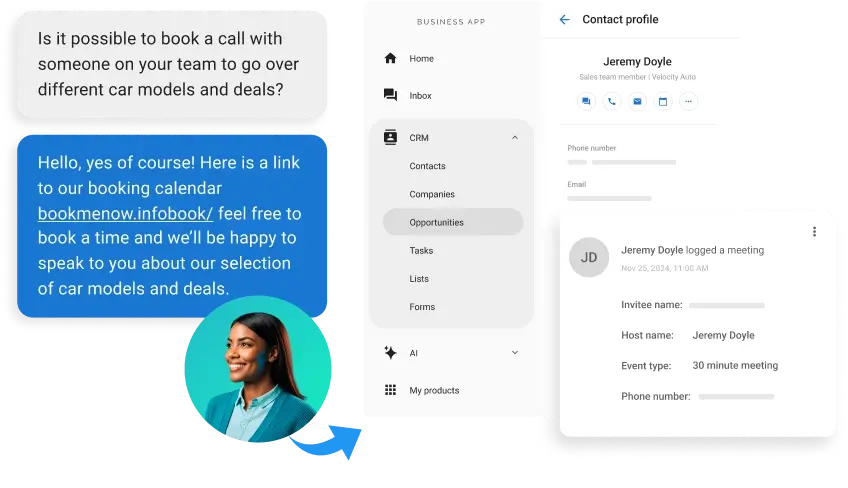
A well-built intake flow runs in this order, with people at the marked checkpoints:
- The chatbot or voice assistant says it is AI, not a lawyer, and shows a disclaimer that no attorney-client relationship exists yet.
- It collects only conflict-check details: name, contact information, practice area, opposing party, and a one-line description.
- It qualifies the inquiry against the firm’s practice areas and service locations.
- Human checkpoint: staff run the conflict check before anyone discusses facts.
- It books the consultation on the firm’s calendar, drafts a follow-up for approval, and logs the contact.
- Human checkpoint: a lawyer decides whether to take the matter.
Step 2 follows ABA Model Rule 1.18, whose Comment 2 says a consultation is likely to have occurred, making the person a prospective client, when a lawyer invites information about a potential representation without clear warnings limiting the lawyer’s obligations.
Florida guidance, as reported by the ABA Journal, flags chatbots that give legal advice or fail to identify themselves. It also flags omitted disclaimers and holds the lawyer responsible for misleading chatbot statements.
Three in five prospective clients told Clio they would only use a chatbot if they could switch to a human.
Vendasta’s AI Receptionist, an AI Employee in its AI Workforce, captures and qualifies leads and books appointments. Vendasta Conversations AI, the product behind it, logs each interaction to the customer relationship management (CRM) system as proof of performance.

Vendasta reports a 39.2% lead conversion rate for early AI Workforce adopters. Clio’s secret-shopper results above show many firms leave inquiries unanswered, so a fast first response is a place your firm can improve.
Phone coverage, call scripts, and after-hours answering get fuller treatment in this comparison of a phone answering service vs. an AI receptionist.
AI for Document Review and Drafting
AI cuts first-draft time sharply on routine documents, and it still misses the judgment calls that make a contract or brief safe to sign.
Drafting is where most lawyers first try AI, because the output is easy to judge: you can read a draft demand letter in two minutes and see whether it works. That speed is also the risk. A fluent draft can carry a wrong clause, a missed cross-reference, or a client fact that should never have left the matter file.
The split below separates the drafting tasks current tools handle well from the decisions that still need a lawyer’s name on them, along with the consent questions bar opinions attach to delegating substantive work.
What AI Drafts Well
Current tools handle these tasks well enough to save hours when a lawyer reviews the output:
- First drafts of demand letters, engagement letters, motions and client memos from a template or fact summary
- Summaries of deposition transcripts, medical records and long email chains
- Clause extraction and comparison across a stack of contracts in due diligence
- Redlines against a firm playbook of accepted positions
Ashurst’s internal trials measured approximate time savings of 45% on first-draft legal briefings and 80% on UK corporate filings. The firm cautions that, given the sample size, the results cannot be extrapolated into definitive time and cost savings.
What Still Needs a Lawyer
The LegalBenchmarks.ai drafting study reported by LawNext found AI tools were more consistent on routine drafting, while human lawyers kept clear advantages in commercial judgment and context management. Specialized legal tools raised explicit risk warnings in 83% of outputs, against 55% for general-purpose tools.
Clio’s own guide to Claude for lawyers warns that it reads clauses largely in isolation and can miss how provisions interact across an agreement. It also has no jurisdiction-specific legal authority behind it to judge enforceability.
North Carolina’s Formal Ethics Opinion 1 on AI treats delegating substantive tasks to AI like outsourcing, which requires the client’s advance informed consent; ordinary research needs no notice.
Before a tool drafts a pleading, confirm its data handling is approved, name the lawyer who will review the draft line by line, and decide whether this client must be told.
AI for Legal Research
AI research tools return answers in seconds, and every citation they produce must be checked against the primary source before it goes into a filing.
Research is the highest-stakes use of AI in a small firm, because an error does not stay inside the office. A fabricated case or misquoted holding goes in front of a judge with a lawyer’s signature on it, and the sanctions orders below show courts no longer treat that as an honest mistake.
The accuracy studies explain why the problem persists even in purpose-built legal tools, and the citation check that follows turns verification into a firm rule rather than an individual habit.
What the Accuracy Studies Show
Stanford researchers found leading legal research tools hallucinated between 17% and 33% of the time. Lexis+ AI answered 65% of queries accurately, and Westlaw AI-Assisted Research 42%.
Thomson Reuters responded that its internal testing of AI-Assisted Research showed an accuracy rate of approximately 90%, based on how its customers use the product.
Newer benchmarks show the same gap. On the Vals Legal Research Bench, Claude Opus 5 scored 55.29% with every required element correct and 90.58% on a weighted measure. Vals reports the strict figure because “a partially correct answer can be more dangerous than a wrong one.”
The consequences in court are real. In Mata v. Avianca, a federal judge in Manhattan fined two lawyers and their firm $5,000 in total after they filed a brief citing six fictitious cases generated by ChatGPT.
The ABA Journal reported that Damien Charlotin’s tracking database holds more than 2,000 such decisions worldwide.
An Oregon federal judge later imposed $110,000 in fines and fees on two lawyers over fabricated cases and quotations.
A Mandatory Citation Check Before Every Filing
Make this check a firm rule for every AI-assisted filing:
- Confirm each cited case exists, along with any cited statute or regulation. Use Westlaw or Lexis, or consult the official reporter.
- Read the full authority, not the AI summary, and confirm it supports the proposition.
- Check every quotation word for word.
- Confirm each authority’s jurisdiction and procedural posture. Check its current validity.
- Record who verified the citations, and when, in the matter file.
Vanderbilt Law School’s library guide tells researchers not to rely solely on an AI-generated quotation, citation, hyperlink, or search-result snippet, and to retrieve each source from a legal database or official site.
Florida’s amended Rule 2.515, effective June 15, 2026, makes the signer of a filing represent that the legal authorities identified exist and are accurately cited.
AI for Billing, Time Capture and Matter Management
Check the practice management platform you already pay for before buying another tool. Its AI features may already cover time-entry drafts, bill generation, or matter search, though coverage varies by platform and plan.
Billing is also where AI raises new ethics questions. Time-capture tools can surface work that never made it onto a bill, but bar opinions limit what you can charge for AI-assisted work and how you treat the subscription cost. Settle both before the first AI-assisted invoice goes out.
What Clio, MyCase and iManage Offer
Here is what the three platforms offered as of October 2026:
| Platform | AI for time and billing | AI for matters and documents | Third-party AI connections | Limitations |
|---|---|---|---|---|
| Clio | Drafts time entries from Outlook emails, OneDrive document edits, and mobile-app calls; generates bills based on rules you set | Turns court notices and scheduling orders into draft calendar events and tasks; Clio Work drafts and researches with matter data | Clio plugin brings Vincent to ChatGPT and Codex; Vincent connects to iManage, NetDocuments, SharePoint and Google Drive | AI included on Core plan and above; Clio Work priced per user |
| MyCase | Integrates with Billables AI, which tracks Microsoft 365, Google Workspace, and Zoom activity; Writing Assistant refines invoice descriptions | 8 am IQ Case Assistant answers questions across case data with citations; Document Assistant summarizes files | MyCase Model Context Protocol (MCP) connector for Claude, read-only, with 73 actions | Case Assistant listed in Advanced plan; connector needs Claude Team or Enterprise |
| iManage | Time capture through partners such as MATTEROOM’s MIRA Timekeeping AI | Ask iManage searches the repository and returns cited answers | MCP Server works with Copilot, Harvey, Legora, CoCounsel, Spellbook, ChatGPT Enterprise, Gemini Enterprise and Claude | Ask iManage sold as an additional product; cloudimanage.com only |
How to Bill AI-Assisted Work
The ABA’s announcement explains that under ABA Formal Opinion 512, a lawyer who spends 15 minutes prompting a tool to draft a pleading may bill those 15 minutes plus review time. In most circumstances, the lawyer may not bill for learning the tool.
Washington’s Advisory Opinion 2025-05 bars charging for “time saved.”
California’s practical guidance treats subscriptions to general-purpose AI tools as overhead absorbed in the fee. Costs incurred specifically for a client’s matter can be charged only if the fee agreement clearly discloses them.
Virginia takes a different line on flat fees: Legal Ethics Opinion 1901 says charging the same non-hourly fee for AI-assisted work is not per se unreasonable.
AI for Marketing and Reputation
AI handles the repetitive marketing work a small firm drops when the caseload spikes, and every post and review response still has to clear the confidentiality and advertising rules.
Vendasta’s Reputation AI, part of its AI Workforce, monitors reviews across more than 100 sources and analyzes sentiment. Its AI Reputation Specialist drafts or sends review responses under rules you configure, including approval workflows, and Reputation AI also sends review requests.
Vendasta’s Clio integration syncs client data when a matter closes, so review requests and client messages go out based on real case outcomes instead of a manual list.
Vendasta’s Social AI, part of its AI Workforce, includes the AI Social Media Manager, which learns the firm’s voice, creates platform-adapted posts and schedules them. It also includes the AI Blogger, which writes one search-optimized, FAQ-style article a week and publishes it to WordPress.

Vendasta’s Campaigns Pro runs email and text message follow-up sequences, and on the matter side, Clio’s AI writes client updates from recent matter activity for a lawyer to review.
Set these checkpoints, and use approval workflows rather than autopilot, before anything publishes:
- Review responses: A lawyer approves replies to negative reviews, because confirming that a reviewer was a client or discussing the matter can breach the Rule 1.6 duty of confidentiality. ABA Formal Opinion 496 says a negative online review alone does not permit disclosing client information.
- Marketing claims: A lawyer checks posts against your state’s advertising rules, since Florida’s guidance holds lawyers responsible when AI-generated communications mislead.
- Legal explainers: Blog articles that describe the law get the same accuracy check as a client memo.
ChatGPT, Claude or a Legal AI Tool: Which to Choose
The right tool depends on the job. A general assistant, a legal research platform, and a front-office AI Employee solve different problems, and most small firms end up with one of each rather than a single product that does everything.
Each option below is described against the same criteria: the work it fits, whether it serves the front office or drafting, the firm size it targets, and its published data handling, including System and Organization Controls (SOC) 2 audits, as of October 2026:
| Tool | Best for | Front office or drafting | Firm size | Published data handling |
|---|---|---|---|---|
| ChatGPT Business (OpenAI) | Drafting, summarizing, rewriting; GPT-6 available since October 2026 | Drafting | Teams of 2–200 | No training on workspace data by default; SOC 2 Type 2 compliance |
| Claude Team (Anthropic) | Long documents; up to a 1M-token chat context depending on model | Drafting | 2–150 seats | No training on commercial data by default; interface not eligible for zero data retention |
| Claude Enterprise (Anthropic) | Firms needing audit logs, automated user provisioning (SCIM) and custom retention | Drafting | 20+ seats self-serve | Custom retention with 30-day minimum; optional customer-managed encryption keys for eligible organizations |
| CoCounsel (Thomson Reuters) | Research, drafting and document analysis on Westlaw content | Drafting and research | Online plans for 1–10 attorneys; larger firms through sales | Zero-retention APIs with model providers; no training on customer content |
| Lexis+ with Protégé (LexisNexis) | Research with linked sources; document Vaults | Drafting and research | Quote-based for all sizes | No training on customer data; LexisNexis holds SOC 2 Type 2; respects ethical walls in connected content |
| Harvey | Firm-wide drafting and review | Drafting | Firms of every size, including mid-sized firms of roughly 15–150 lawyers | Syncs existing ethical walls; uses zero-data-retention model providers by default |
| Spellbook | Contract drafting and review in Word | Drafting | Law firms to in-house legal departments | Zero data retention with OpenAI and Anthropic; SOC 2 Type II |
| Vendasta’s AI Receptionist | Answering calls, chats, and texts; qualifying and booking consultations | Front office | Small and mid-sized local firms | Every AI action logged and reported |
Claude vs ChatGPT for Legal Work
Standard business seats cost the same on both: $25 per user per month billed monthly or $20 billed annually, with premium seats at $125 or $100 and a two-seat minimum. Anthropic lists up to a 1M-token chat context on paid plans depending on the model, though its Team plan help article still cites 200K. OpenAI lists a 256K total context window for reasoning on ChatGPT Business and 54K for Instant.
On independent legal benchmarks, Claude models lead as of October 2026. Claude Fable 5 tops Vals LegalBench at 88.56%, while GPT-5.6 Sol scores 86.97%. On the Vals research benchmark, two Claude models share the top score with Muse Spark 1.3 Max.
ChatGPT 5.5 beat Claude Fable 5 on Crosby’s contract-negotiation benchmark, 50.5% to 47.3%, as reported by Artificial Lawyer, though Crosby’s access to Claude Fable 5 was cut off early. The LegalBench gap is under two points, and the order reverses on contract negotiation, so neither model wins every task.
Your practice management system can settle a close call: MyCase’s connector runs on Claude, while Clio’s plugin brings its legal AI to ChatGPT and Codex.
Which Tool Fits Which Firm
For drafting and long-document work, a solo or small firm gets the most from Claude Team, with ChatGPT Business a close equal for firms already working in OpenAI tools. Neither is a research database, so a firm that files briefs should pair one with CoCounsel or Lexis+ with Protégé, or verify every citation by hand.
Mid-sized firms with ethical-wall requirements should evaluate Harvey or an enterprise tier with audit logs. Intake is a separate job, and a chat window inside ChatGPT cannot answer the firm’s phone at 9 p.m.; an AI Employee built for the front office covers that work.
Confidentiality, Ethics and Hallucination Risks
The Model Rules already cover AI. The Alabama State Bar’s best-practices guidance says AI does not create new ethical duties for lawyers; it applies longstanding duties of competence, confidentiality, supervision, candor, fees and communication to a new kind of tool.
What varies is how each state applies those duties. Justia’s 50-state survey tracks the opinions and guidance state bars have issued on AI, and positions differ most on client disclosure and consent, so check your own jurisdiction before you adopt a tool.
The sections below cover the national baseline in ABA Formal Opinion 512, the data controls to demand from vendors, and the supervision duties that make verification a firm-wide obligation.
What ABA Formal Opinion 512 Requires
The ABA’s Business Law Today summary of the opinion describes these duties:
- Competence (Rule 1.1): Lawyers must understand the capacity and limitations of the generative AI tools they use.
- Confidentiality (Rule 1.6): Lawyers need the client’s informed consent before putting client confidences into a self-learning AI tool, and boilerplate consent in an engagement letter is not adequate.
- Communication (Rule 1.4): Lawyers must reasonably consult clients about the means used to reach their objectives, which can include AI.
- Supervision (Rules 5.1 and 5.3): Lawyers with managerial duties must set clear policies on permissible AI use and make reasonable efforts to ensure lawyers and staff follow them.
- Fees (Rule 1.5): Fees and expenses must be reasonable, and hourly bills must track the time actually spent.
States differ on disclosure. New Jersey’s guidelines require it only if a client asks or cannot make an informed decision without knowing, while State Bar of Michigan guidance says lawyers must get client consent before protected information goes into an AI tool.
Data Controls to Demand From a Vendor
Ask every vendor these questions in writing before a pilot starts:
- Training: ChatGPT Business, Claude commercial plans, CoCounsel, Lexis+ with Protégé, and Clio all say they do not train on customer data by default.
- Retention: Anthropic’s data retention documentation states the Claude Team and Enterprise interfaces are not eligible for zero data retention, while CoCounsel, Clio, and Spellbook describe zero-retention agreements with their model providers, and Harvey uses zero-retention providers by default.
- Ethical walls: Harvey syncs a firm’s existing wall policies, while Clio honors user permissions and leaves wall administration to the firm.
- Audits: Clio, Harvey and LexisNexis list SOC 2 Type II audits, OpenAI reports SOC 2 Type 2 compliance for ChatGPT Business, and Anthropic lists SOC 2 Type I and Type II.
- Admin access: OpenAI says that, depending on configuration, ChatGPT Business workspace admins may be able to access, export, and delete members’ data.
Supervision and Verification Duties
Washington’s opinion says lawyers should not use consumer-oriented AI tools where protection of client confidential information cannot be reasonably assured.
The Stanford error rates covered in the research section apply to the legal tools tested, so citation checking belongs in the supervision policy for every lawyer and paralegal.
ABA Formal Opinion 512 places that duty on the firm’s managing lawyers, who set the policy and make reasonable efforts to ensure everyone follows it.
What AI Costs and the Time It Saves
Purpose-built legal AI prices include $160 per user per month for Gavel Exec and tier starting prices up to $551.85 per month for CoCounsel, compared with the $20 to $25 standard seats covered in the comparison section. Return depends on converting saved time into paid work.
Published or reported prices as of October 2026:
| Tool | Price | Limitations |
|---|---|---|
| Claude Enterprise | $20 per seat per month plus usage at API rates | Annual commitment; 20-seat self-serve minimum |
| Clio | From $49 per user per month | AI included on Core plan and above |
| MyCase Pro / Advanced | $100–$120 / $130–$150 per user per month | 8 am IQ assistants vary by plan |
| Gavel Exec | $160 per user per month | Team pricing for 10+ seats |
| CoCounsel | Starting prices of $292.50 to $551.85 per month by tier, per the ABA GPSolo review | Online plans for firms of 1–10 attorneys |
| Paxton | $499 per user per month or $2,999 per user per year | Seven-day trial |
| Lexis+ with Protégé, Harvey | Quote only | No public price |
Clio puts the average US lawyer rate at $362 an hour as of 2026.
Its 2026 benchmarks show lawyers record about 3.4 billable hours in an average 8-hour day, with 90% realization and 92% collection.
- Illustrative effective rate: Using those all-firm benchmarks, $362 × 90% × 92% ≈ $299.74 collected per billable hour recorded.
- Break-even calculation: Divide the monthly seat cost by that yield, then use measured pilot savings rather than an occupational average to estimate your firm’s return.
Under hourly billing, you cannot charge for time saved, so the return comes from taking more matters or moving routine work to flat fees. For the front office, compare monthly cost with the fee from one retained matter that would otherwise have gone to voicemail. To price the front-office side against your intake volume, book a demo.
Four Mistakes That Create Ethics and Malpractice Exposure
Each of these mistakes shows up in sanctions orders, bar guidance, or firm-policy surveys:
- Skipping verification: In Mata v. Avianca and the six-figure Oregon order, lawyers submitted fabricated authorities generated by AI.
- Running AI with no firm policy: Clio found 57% of solo firms and 55% of small firms have no AI policy, compared with 24% of enterprise firms, which leaves each staff member to decide what client data goes where.
- Over-trusting fluent output: Ethics lawyer Lucian Pera of Adams and Reese told Law.com the rules haven’t really changed, but lawyers are having trouble following them when AI output is “so seductively good.”
- Ignoring confidentiality: Thomson Reuters’ Future of Professionals report found 34% of professionals across legal, tax, accounting, and other professional services use AI tools their organization hasn’t sanctioned.
How to Roll Out AI and Build a Firm AI Policy
A small firm can move from scattered experimentation to a governed rollout in about 90 days by piloting one workflow, writing a short policy, and training everyone before general use.
Plan for staff roles at the same time. The Bureau of Labor Statistics projects little or no change in paralegal employment from 2025 to 2035, partly because AI makes paralegals more efficient. It projects a 2% decline for receptionists as organizations automate or consolidate administrative work.
A 90-Day Rollout Plan
Run the rollout in this order:
- Name an owner. The State Bar of Arizona’s AI tool evaluation checklist recommends designating a person or group to evaluate, approve, and oversee AI tools; at a small firm, that can be the managing partner.
- Pick one workflow and run a 30-day pilot with a vetted tool, a named owner, a review step, and a log of time saved and corrections required.
- Vet the vendor in writing with the data-control questions above before anyone uploads client information.
- Train every user, including paralegals and front-desk staff, before granting general access.
- Add a second workflow only when pilot results show time saved exceeds correction time.
- Review and update the AI policy at least once a year, as Arizona recommends, and update the approved-tool list at the same time.
A Sample AI Policy for a Small Firm
The Lawyers Mutual AI Policy Toolkit includes a full sample policy, and a short version for a small firm covers these points:
- Approved tools: Staff uses only tools the firm has vetted and listed, and personal or free-tier AI accounts are prohibited for firm or client work.
- Confidential data: No client-identifying information goes into a tool that is unapproved or that trains on inputs.
- Verification rule: A responsible lawyer checks every citation, quotation, and holding against the primary source and signs a verification note kept in the file.
- Supervision: Staff use AI on client work only under a supervising lawyer, and AI never gives legal advice or commits the firm to a representation.
- Billing: Hourly bills reflect time spent, including prompting and review, and general AI subscriptions are treated as overhead.
- Client communication: The engagement letter describes the firm’s AI use, and the firm obtains specific informed consent before confidential information enters a third-party tool where guidance requires it, since a boilerplate clause alone is not enough.
- Incidents: Anyone who enters client data into an unapproved tool or finds a fabricated citation reports it to the managing lawyer immediately.
- Review: The firm updates the policy annually and retrains staff after changes.
AI for Law Firms Works When a Lawyer Signs Off on Every Output
AI for law firms pays off where a small practice loses the most time and money: unanswered inquiries, first drafts, unlogged time, and reviews nobody asked for. Software can run each of those jobs today, and the lawyer’s duty to check the output stays exactly where it was.
Start with the front office and one drafting or research workflow. Put the verification rule and approved-tool list in writing before anyone uploads client data, then measure hours saved against corrections for 30 days. Fill the recovered hours with new matters or flat-fee work, because hourly billing alone will not capture them.
Vendasta, the AI customer acquisition and engagement platform for local businesses, covers the intake side with Vendasta’s AI Receptionist: it answers calls, chats, and texts around the clock, qualifies prospective clients, and books consultations, with every action logged as proof of performance. To see how Vendasta can address this workflow in your firm, book a Vendasta demo.
AI for Law Firms FAQs
1. What is the best AI for law firms?
No single tool covers every function. Most small firms pair a business tier of Claude or ChatGPT for drafting, a citation-checked legal tool such as CoCounsel or Lexis+ with Protégé for research, the AI built into Clio or MyCase for billing, and an AI Receptionist from Vendasta’s AI Workforce for intake. Choose by task, data controls, and firm size.
2. Is Claude or ChatGPT better for lawyers?
Both business tiers cost the same per seat, and neither trains on business data by default. Claude models top Vals LegalBench, share first place on its legal research benchmark and list a larger context window for long documents, while ChatGPT 5.5 scored higher on one contract-negotiation benchmark. For long contracts and briefs, Claude Team has the edge as of October 2026.
3. Can I put client information into ChatGPT or Claude?
Only into a business or enterprise tier the firm has vetted, and only where your state’s guidance allows it. Free consumer accounts lack the data controls bar opinions expect. Michigan bar guidance requires client consent before protected information goes into an AI tool, and Oregon requires informed consent for open models, so check your jurisdiction first.
4. Does AI work with Clio, MyCase and iManage?
Yes. Clio drafts time entries, generates bills based on rules you set, turns court notices into calendar events, and offers a plugin for ChatGPT and Codex. MyCase offers 8 am IQ assistants and a read-only connector to Claude with 73 actions. iManage sells Ask iManage separately and runs an MCP Server that connects Copilot, Harvey, CoCounsel, ChatGPT Enterprise, Claude, and other tools.
5. Can an AI chatbot handle law firm client intake?
Yes, for answering, qualifying, and booking consultations. The chatbot should identify itself as AI, show a disclaimer that no attorney-client relationship exists, collect only conflict-check details, and hand the inquiry to staff before facts are discussed. Clio found three in five prospective clients would only use a chatbot that lets them reach a human.
6. How much time does AI save a small law firm?
Less than many vendor surveys suggest. A randomized trial found law students using GPT-4 cut time on legal tasks by 11.8% to 32.1%, and the St. Louis Fed’s July 2026 survey reading puts savings at about 2.6% of total work hours in legal occupations. In a 40-hour week, that is roughly one hour, worth about $300 collected at average rates.
7. How much does AI cost for a law firm?
Standard ChatGPT Business and Claude Team seats cost $20 to $25 per user per month. Clio plans start at $49 per user per month, with AI included from the Core plan up, while MyCase plans with AI run $100 to $150. Gavel Exec costs $160 per user per month; an ABA review lists CoCounsel tier starting prices up to $551.85 per month. Harvey and Lexis+ with Protégé quote individually.
8. Where should a solo practitioner start with AI?
Start with front-office intake and one drafting workflow. Write a one-page policy listing approved tools and the citation verification rule, switch on the AI features already in your practice management software, and run a 30-day pilot tracking time saved and corrections. Add another workflow only after the pilot shows a net time gain.
9. Will AI replace paralegals or front-desk staff?
Current projections point to flat or slightly falling demand. The Bureau of Labor Statistics projects little or no change in paralegal employment from 2025 to 2035, partly because AI makes paralegals more efficient, and a 2% decline for receptionists as organizations automate or consolidate administrative work. Lawyers remain responsible for supervising any AI tool those staff members use.
10. Do I have to tell clients I use AI?
It depends on your state and the task: North Carolina requires no notice for routine research but requires informed consent when AI performs substantive work. New Jersey requires disclosure if the client asks or needs it to make an informed decision, and Michigan bar guidance requires consent before protected information enters an AI tool. Describe AI use in the engagement letter and get specific informed consent where required.