About Us
 Careers
 Leadership
 Board
Board Newsroom
Roughly 30% of Neighborly’s leads had previously gone uncontacted. After the franchise network put Vendasta’s AI Workforce to work, 35,700 conversations produced 3,400 conversions, and leads converted to revenue rose 372% year over year.
A virtual receptionist is an off-site person or AI program that answers your phone and digital messages under your business name, screens each caller, takes messages, and books appointments into your calendar while you are on a job. You pay for minutes, calls, or a flat plan instead of a salary, and the coverage runs through the evenings and weekends that a single employee cannot work. A growing share of that coverage now comes from AI employees that answer calls and book jobs rather than from live agents.
This guide explains what a virtual receptionist does and does not do, how live, AI, and hybrid models differ, what each costs against an in-house receptionist, how to set one up, and what to ask a provider about integrations and compliance before you sign.
Capture, qualify, and convert leads 24/7 without lifting a finger
TL;DR
- In-house receptionists cost about $54,300 loaded: The Bureau of Labor Statistics puts the median receptionist wage at $38,010 a year; benefits add roughly 43% on top of wages, so one 40-hour hire runs about $54,300 before coverage gaps.
- Billing rules decide the real price: Live services bill by the minute or call, round short calls up, and charge overage once the block runs out, so a plan’s sticker price is rarely what you pay.
- The Vendasta AI Receptionist qualifies and books 24/7: Unlocked by Conversations AI, it answers calls and digital messages, qualifies each lead, and books appointments, with every action logged. You can try Vendasta free for 14 days with no credit card.
What a Virtual Receptionist Is
A virtual receptionist is an off-site person or software program that answers calls and messages under your business name and acts on them: it screens the caller, takes a message, transfers the call, or schedules the job.
The Bureau of Labor Statistics’ occupational profile of a receptionist covers answering the telephone, taking messages or forwarding calls, and scheduling and confirming appointments; the virtual version does that work from somewhere other than your front counter.
No trade association defines the term as a category separate from a telephone answering service, so the scope of the job varies by provider, and you have to read the plan details to learn whether booking and transfers are included.
Providers offer live human and AI receptionists, plus hybrid service:
- Human-led: A live team answers from a script you approve, often with a small group assigned to your account. You buy a block of minutes or calls each month. In a hybrid model, AI answers first and passes complex calls to a person, with billing based on who handled each minute or call.
- AI: Software holds the conversation by voice or text, answers from your business knowledge, and books against your real calendar. Vendasta’s AI Receptionist is this model.
Your choice of model determines who picks up at 7 p.m., what a 10-second wrong number costs, and whether the booking reaches your calendar or voicemail.
How a Virtual Receptionist Works: One Call From Ring to Follow-Up
A Tuesday at 6:40 p.m.: you are on a roof, your Google Ads number rings, and the homeowner on the line has water coming through a ceiling. With a virtual receptionist on the line, that call moves like this:
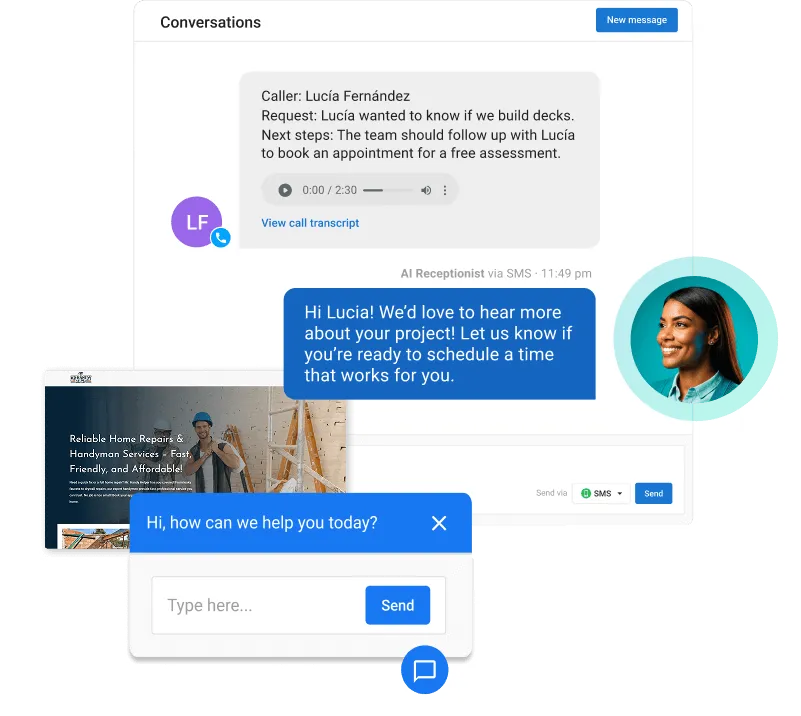
- The forward: Your business line forwards to the receptionist’s number, either on every call or after a set number of rings. Vendasta Conversations AI handles phone, web chat, SMS, WhatsApp, email, Facebook Messenger, and Instagram in one inbox and logs every interaction to your customer relationship management (CRM) system. The AI Receptionist answers on those channels, with voice answering included in the Premium edition.
- The greeting: The receptionist picks up in your business name and tells the caller in the first sentence what it can do.
- The screen: You approve four screening questions that route the call: what service the caller needs, where the property is, how urgent it is, and whether the caller is new or existing. A wrong number or a sales pitch ends here without touching your calendar.
- The booking: The receptionist checks your real calendar, offers two open slots, confirms the address and callback number, and books the job. A text confirmation goes to the caller.
- The message: A summary lands in your inbox and CRM record with the caller’s name, number, reason, and outcome, so you read it from the truck before the next job instead of listening to a voicemail at 9 p.m.
A sample script for steps two through four reads like this:
- “Thanks for calling Summit Roofing. This is the automated receptionist, and I can get you scheduled right now. Are you calling about a leak, an estimate, or a job we’ve already started?”
- “A leak. Water’s coming through the ceiling.”
- “Sorry to hear that. What’s the property address, and is the water still coming in?”
- “412 Maple. Yes, it’s dripping.”
- “I’ll mark this as urgent. The earliest crew slot is tomorrow at 8 a.m.; there’s also one at 1 p.m. Which works better?”
What a Virtual Receptionist Does (and Does Not Do)
The core duties are the same whether a person or a program answers:
- Call answering: Picks up in your business name on every call you route, during hours and after.
- Screening and lead qualification: Sorts emergencies from estimates, in-area calls from out-of-area, and new leads from vendors and spam, using the questions you approve.
- Message taking: Records who called, why, how to reach them, and what was promised, then delivers it to your inbox or CRM.
- Live transfer and escalation: Patches a caller through to you or a dispatcher when the call needs a decision, and takes a message when no one picks up.
- Appointment scheduling: Books against your calendar or field-service software rather than writing “call back to schedule.”
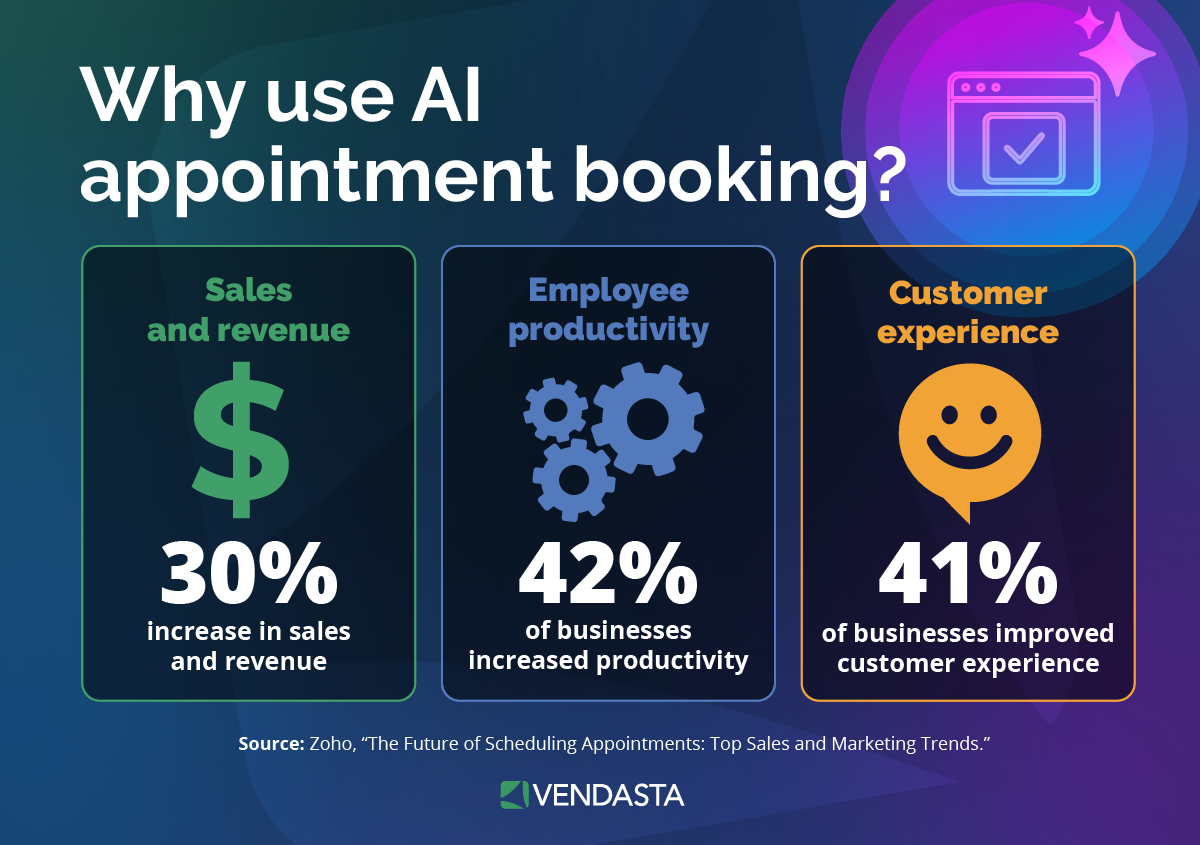
Booking on the call is where the revenue sits. ServiceTitan’s top-performer analysis of its own customer data found that top-performing trades businesses book 62% of inbound lead calls against 39% for everyone else, so a receptionist that only takes messages leaves most of that gap in place. The intake and qualification workflow behind that number is covered in Vendasta’s guide to AI lead generation for local businesses.
Businesses hire virtual assistants for a different job. A virtual assistant is a contractor who handles administrative work from outside your office, including inbox and calendar management as well as follow-ups or hourly projects.
A receptionist handles inbound contact in real time. Human teams and software follow the script and knowledge you provide, so they should not quote prices you have not approved or give legal or medical advice.
Live Human, AI or Hybrid: Which Model Answers Your Phone
Live human, AI, and hybrid receptionists differ most in billing and caller handling.
How the Three Models Compare on Cost and Coverage
The table compares the three models on the criteria that change your bill and your booking rate:
| Criterion | Live human | AI | Hybrid |
|---|---|---|---|
| Who answers | A trained receptionist, usually from a small team assigned to your account | Software trained on your website, service list, and calendar | AI first; a person takes calls the AI cannot finish |
| Cost | $99 to $1,725 a month for 50 to 500 minutes on per-minute plans; $300 for 30 calls on per-call plans | $0 to about $300 a month at entry-to-mid tiers; overage of roughly $0.70 to $3.00 per extra call | $165 to $1,380 a month for 50 to 500 minutes, with AI minutes counted at half weight on some plans |
| Hours covered | 24/7 on most plans, capped by the minutes you buy | 24/7 without a staffed shift | AI 24/7; human escalation per plan |
| Escalation | Live transfer to you or a dispatcher; message if no answer | Transfer to a number, or flag for callback | Hand-off to a person mid-call |
| Failure modes | Overage once minutes run out; hold time billed on some plans; one receptionist per call | Speech-recognition errors; thin knowledge base gives wrong answers; some callers hang up on hearing AI | Two billing rates; friction at the hand-off |
What Callers Will Tolerate
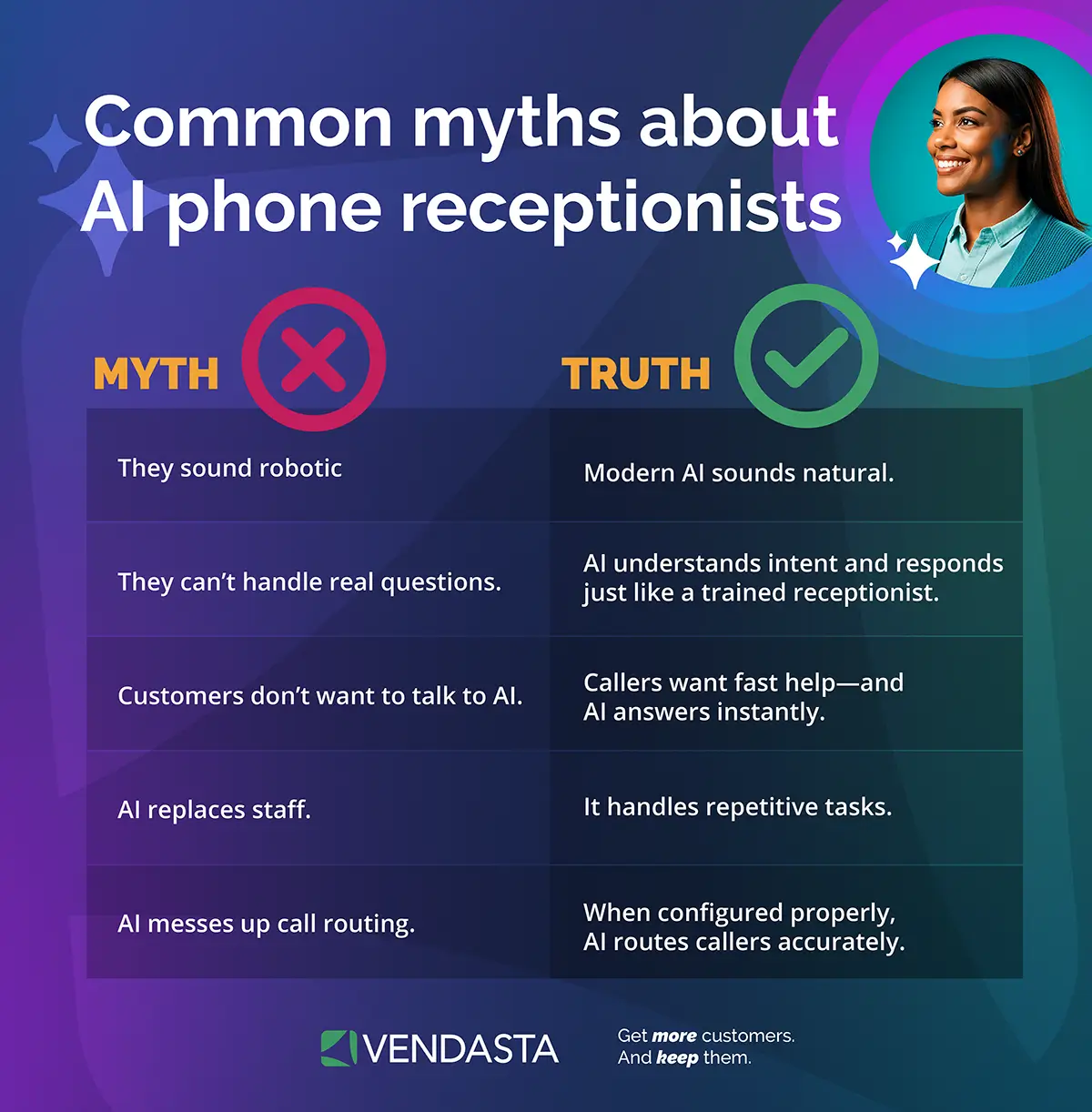
Gartner’s 2026 survey of 3,566 customers found that 87% say it is essential for companies to offer a way to reach a human agent when they use generative AI for service, while 50% say generative AI makes their interactions easier. The design answer is a transfer path: an AI model that can hand a stuck caller to you or your dispatcher keeps both groups.
Wang and colleagues’ field experiment at a large telecom, published in Production and Operations Management, found that a voice AI replacing a phone menu persistently reduced complaints, while speech-recognition failures increased both demand for human agents and complaints, so clear audio and a transfer path matter.
Which Model Fits Your Size
If you run a one-to-five-person crew with no office staff, choose AI; your volume seldom warrants a minute block, and the after-hours calls are the ones you lose today. If you have a dispatcher or office manager, use AI for first-line and overflow calls and transfer daytime calls to the office.
If you employ front-desk staff for a 20-to-50-person operation, a hybrid plan or your in-house team plus AI for nights, weekends, and overflow covers the gaps without a second hire.
Vendasta’s AI Receptionist is one of the AI Employees in its AI Workforce, and Conversations AI unlocks it.
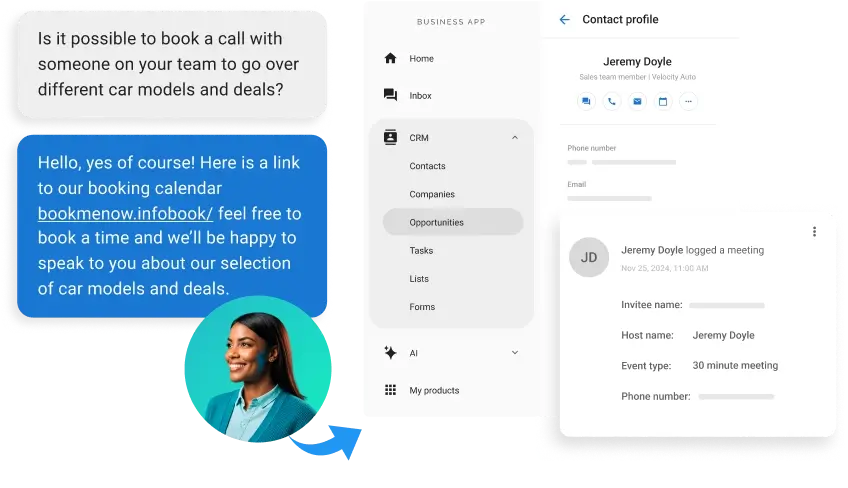
Agency Elite Web Professionals deployed it for Choice Signature Luxury Car Rental, where it handled 1,017 calls and captured 778 qualified leads, with a 76% conversion rate over four months.
What a Virtual Receptionist Costs
Costs depend on whether a provider bills by time, by conversation, or through a monthly plan, as well as how it handles rounding and extra charges.
Three Pricing Models
Providers use per-minute or per-call billing, sometimes within monthly plans. Ruby’s pricing page lists 50 minutes for $250 up to 500 minutes for $1,725, and PATLive’s pricing page lists 50 minutes for $99 up to 500 for $759. Per-call plans charge by conversation: Smith.ai’s receptionist pricing puts its live Starter plan at $300 for 30 calls and Basic at $810 for 90, while its AI receptionist plans run from $0 for 25 calls to $150 for 75 to 300 calls, depending on tier.
Flat AI plans from AI-first vendors run from free to about $300 a month at entry-to-mid tiers: Upfirst’s plans run from $24.95 for 30 calls to about $300 for 600 calls, and Goodcall’s plans run from $79 to $299 a month, billed by unique customer rather than by minute. Per-call overage on these AI plans runs from $0.70 to $3.00 per extra call.
Rounding and Overage
Ruby’s billing basics state that calls are rounded up to the next 60-second mark, so a 10-second wrong number bills as a full minute, and the clock includes hold time. AnswerConnect rounds up to the whole minute and counts after-call work. PATLive’s terms bill in six-second increments with a one-minute minimum.
Abby Connect’s cost comparison says it rounds up to the next 30 seconds and excludes hold time, and its pricing page counts AI answering as half a minute. Once the block is used up, Ruby charges $4.00 to $5.40 a minute on its 50- to 500-minute plans, AnswerConnect $1.50 to $1.95, PATLive $1.79 to $2.29 ($2.99 on pay-as-you-go), and Smith.ai $8.50 to $11.50 per extra live call.
Fees That Do Not Appear on the Plan Page
Several charges sit in provider terms and supporting pricing documents rather than on the plan page:
- Setup fees: AnswerConnect’s price sheet lists $49.99 on its Entry and Standard plans and none on Growth.
- Card processing: Ruby adds a 3% fee to credit-card payments.
- No rollover: Ruby, AnswerConnect, and PATLive expire unused minutes at the end of each billing period.
- Per-call add-ons: Smith.ai charges $1.50 per booked appointment and $0.25 for recording and transcription. A dedicated Spanish line adds $1.00 per call.
- Compliance add-ons: AnswerConnect’s Health Insurance Portability and Accountability Act (HIPAA) compliance add-on is $29.99 a month and cannot be removed once added.
- Downgrade rules: Ruby requires three consecutive billing periods on the same plan before a downgrade.
Vendasta prices differently. The AI Receptionist is not sold by the minute; it comes with Conversations AI, and the edition you choose sets the channels. Standard covers web chat and messaging channels, Pro adds SMS and missed-call text-back, and Premium adds AI Voice with 300 minutes a month in the US and Canada.
Virtual Receptionist vs Answering Service vs In-House Hire
The options differ by scope of work and by whether the person answering acts as your staff. An answering service takes messages and relays them, usually from a shared pool of agents who handle many clients at once.
A virtual receptionist answers in your name, handles screening and booking, and transfers calls; providers typically assign a small dedicated team or an AI trained on your business. An in-house hire does all of that plus walk-in traffic and administrative or dispatch work, for one shift, five days a week.
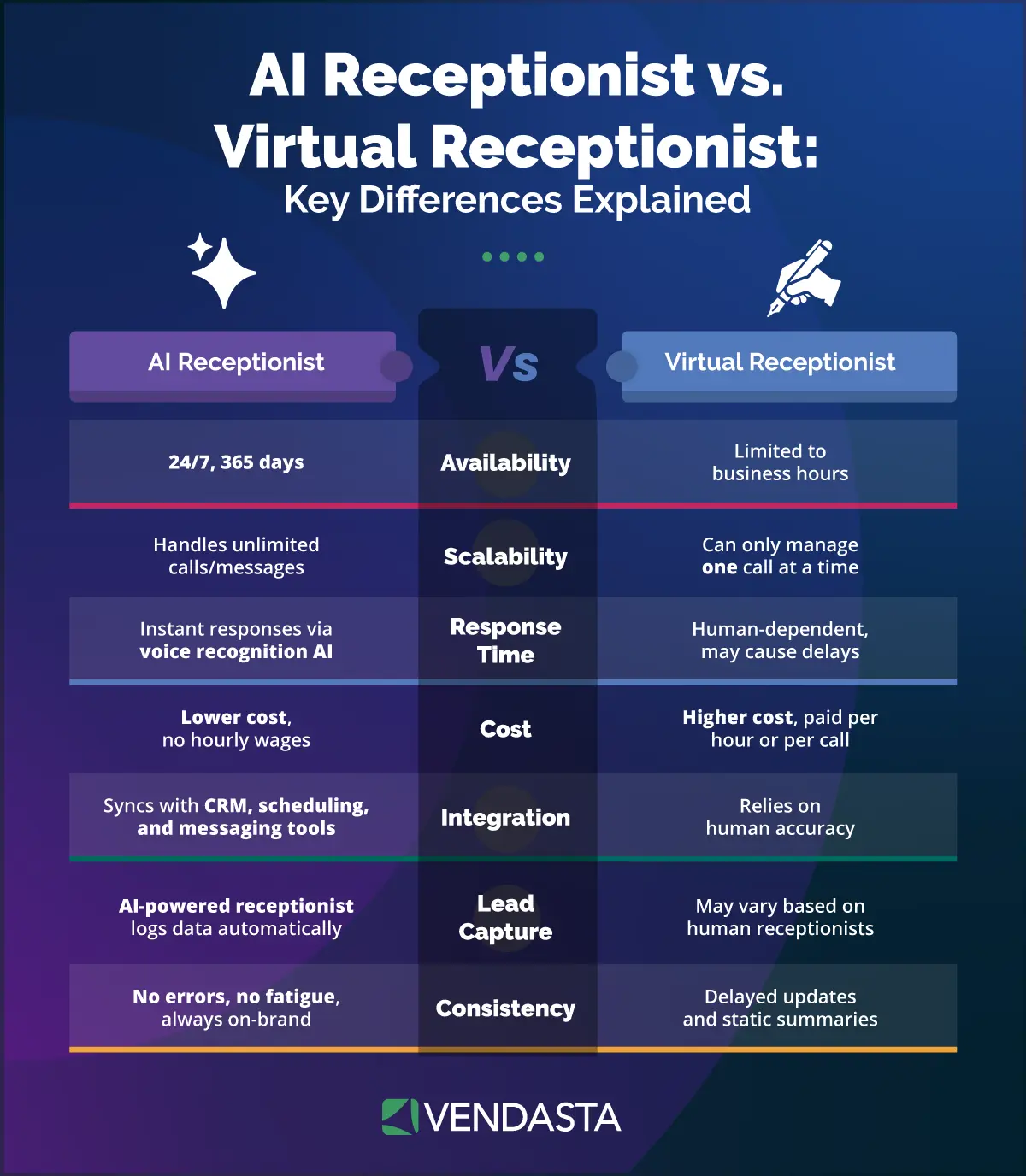
A Worked Break-Even Example
Start with volume and talk time. A conservative 60 inbound calls a month at three minutes each is 180 receptionist minutes, which a 200-minute live plan covers.
- Live service: PATLive’s 200-minute plan is $349 a month, or $4,188 a year; Ruby’s is $720, or $8,640 a year, before overage and add-ons.
- AI service: Upfirst’s $59.95 plan covers 90 calls, or about $719 a year; Smith.ai’s AI Pro plan is $150 a month for 75 calls, or $1,800 a year.
- In-house: The BLS median for a receptionist in May 2025 is $18.27 an hour, or $38,010 a year. BLS’s Employer Costs for Employee Compensation release puts wages at 70.0% of private-industry compensation and benefits at 30.0% as of June 2026, so scaling the median wage by that ratio gives about $54,300 a year, before recruiting, equipment, and the nights and weekends one person cannot cover.
The crossover arrives at high volume.
At $54,300 a year, or about $4,525 a month, a live service does not reach in-house cost until somewhere between 1,000 and 1,500 minutes a month at Ruby’s rates (its plan table lists $3,350 for 1,000 minutes and $4,945 for 1,500), or roughly 3,500 minutes at AnswerConnect’s, where the 2,500-minute plan ($2,875) plus $1.60-per-minute overage reaches about $4,525, calculated from the published plans.
At three minutes a call, that is roughly 350 to 1,200 calls a month, and the in-house hire still covers only one shift of them.
Setting Up a Virtual Receptionist
Setup is six steps, and most of the work is deciding what the receptionist may and may not say:
- Forward or port your number: Keep your advertised number and forward it, or port it to the provider.
- Approve the script: Write the greeting and screening questions. Add guidance for pricing questions, what never to promise, and the sentence that discloses an automated receptionist.
- Connect the calendar and CRM: Link Google Calendar, Jobber, Housecall Pro, or ServiceTitan so a booking lands where your crew already looks, and decide which fields write back after each call.
- Load the business knowledge: Add your service list and service area, followed by hours, typical price ranges, and the 10 questions callers ask most. Vendasta’s AI Employees learn from your website, business profile, and uploaded knowledge.
- Run test calls: Call as an emergency, an out-of-area address, a price shopper, an existing customer, and a spam caller, then check that the booking and the summary arrived.
- Go live and read the log: For the first week, read every call summary and correct the script where the receptionist stumbled.
Most Vendasta AI Employees are set up in under 30 minutes, including the time the AI spends learning your business. If you would rather hand the work to someone else, expert setup for the AI Receptionist is a one-time $199, and the AI Workforce Optimization Plan ($29 a month on a 12-month commitment) includes expert setup in the first month, unlimited prompt and setting changes, a monthly health check, and direct access to the implementation team.
Integrations and Industry Fit
The integration that matters is the write-back: what the receptionist puts into your CRM or field-service software after each call. Across providers, the common fields are a new or matched contact, a call log, a summary, and an outcome; recordings, where a provider writes them at all, arrive as links rather than files.
Vendasta Conversations AI logs every interaction to the CRM in one inbox, and the platform integrates with Jobber, ServiceTitan, Housecall Pro, QuickBooks Online, Clio, Dentrix, HubSpot, Google products, and Zapier, with developer APIs for anything else.
The call flow changes by trade:
- Home services: Modernize’s 2025 homeowner report found 30.40% of homeowners prefer a contractor to reach out first by phone and 28.95% prefer text, so the receptionist has to answer both. A 7 p.m. no-heat call gets a service-area check and a question about the system and symptom before booking into Jobber and sending a text confirmation.
- Legal: In Clio’s 2024 secret-shop study of 500 U.S. law firms, only 40% answered the phone, and Clio could not reach 48% by phone at all. The flow screens for practice area and collects only what a conflict check needs before booking the consultation and logging it to Clio; the receptionist states that it is not a lawyer and gives no legal advice.
- Medical and dental: Haeder and Xu’s study found phone calls were the primary scheduling method for 56.4% of patients. The flow verifies the patient and captures the reason before scheduling into Dentrix, and it runs only after the Business Associate Agreement described in the next section is signed.
- Auto services: The flow captures the vehicle, the service or rental needed, and the preferred date before booking. That is the setup behind the car rental deployment above, where the AI Receptionist handled 1,017 calls in four months.
Compliance and Data Handling
Most compliance obligations stay with your business, and several providers say so in their terms or guidance. You need to address HIPAA, payment card rules, recording consent, AI disclosure, and the evidence a provider should supply.
HIPAA
If patients call, the receptionist handles protected health information (PHI). The Department of Health and Human Services (HHS) business associate guidance limits the conduit exception to entities that only provide transmission services for PHI, and an HHS FAQ describes a conduit as one that accesses information only on a random or infrequent basis.
A service that accesses PHI regularly to do its job is a business associate under 45 CFR 160.103 and needs a Business Associate Agreement (BAA) before you forward a single patient call.
PCI
If the receptionist takes card payments, the Payment Card Industry Data Security Standard (PCI DSS) v4.0.1 applies, and the PCI Security Standards Council’s AI principles state that use of AI does not remove or bypass any applicable requirement.
Requirement 3.3.1.2 bars storing the card verification code after authorization, and the Council’s FAQ on call recordings says recordings cannot retain that data after authorization, so ask whether the provider pauses or redacts recording during payment, masks keypad tones, or securely deletes that audio.
Call Recording Consent
Federal law requires only one party’s consent under 18 U.S.C. § 2511, but several states require every party to agree. Recordinglaw.com’s state survey lists California, Florida, Illinois, Maryland, Massachusetts, Montana, New Hampshire, Pennsylvania, and Washington as all-party states; Connecticut and Nevada require all-party consent for phone calls, and Delaware is commonly treated as all-party.
Upfirst’s terms make the business responsible for complying with recording consent laws, and Smith.ai’s guidance says the business, not the vendor, remains the legally accountable party. Because callers can dial in from any state, the greeting has to carry the recording notice.
AI Disclosure
The Federal Communications Commission (FCC) declaratory ruling holds that Telephone Consumer Protection Act (TCPA) restrictions on artificial or prerecorded voices cover current AI-generated voices on outbound calls; it does not address inbound answering, and the FCC’s proposed AI-call disclosure rule has not been finalized.
Utah’s law requires disclosure when a consumer clearly asks and, for regulated occupations, at the start of high-risk interactions such as collecting health or financial information.
Maine’s law requires clear and conspicuous notice when an AI chatbot could lead a reasonable consumer to believe they are dealing with a human. How these rules apply to inbound answering is unsettled; a greeting that says the receptionist is automated covers the safest reading.
What to Ask a Provider to Prove It
- A signed BAA: Plus the price of any HIPAA add-on, before patient calls are forwarded.
- A current Attestation of Compliance: Covering the specific service you buy, with the split of responsibilities Requirement 12.8.5 calls for.
- Recording terms: The default setting, the exact caller announcement, and the retention period; Smith.ai, for example, keeps recordings and transcripts for 90 days.
- Data access: Where recordings and transcripts are stored and who at the provider can open them.
Questions to Ask a Virtual Receptionist Provider Before You Sign
The answers to seven questions decide whether the plan price on the website is the price you pay:
- Pricing transparency: What is the billing unit, the rounding increment, the overage rate, the setup fee, the card fee, and the rollover policy? Get each one in writing.
- Model: Who answers at 2 a.m., and what happens when the AI cannot understand the caller?
- Integrations: Which fields write back to Jobber, Housecall Pro, ServiceTitan, or your CRM, and do recordings arrive as files or links?
- Compliance: Will you sign a BAA, supply an Attestation of Compliance, and put the recording announcement in the script?
- Escalation: Can the receptionist transfer live, to how many numbers, and at what cost? Smith.ai charges $15 a month per additional transfer destination.
- Proof: Can you show a log of every call handled and every action taken? Vendasta logs every AI action and reports it.
- Exit terms: Is the plan month-to-month, and what does a downgrade require?
Why the Right Virtual Receptionist Setup Keeps More Customers
You recover the cost of a virtual receptionist through calls you cannot take, such as the 7 p.m. leak or the Saturday estimate request. When a receptionist books those callers immediately, you get appointments instead of voicemails. Match the model to your call volume, insist on calendar write-back, and get rounding, overage, and compliance terms in writing before you forward the first call.
Vendasta’s AI Receptionist, part of its AI Workforce, answers calls and digital messages 24/7, qualifies each lead, books the appointment, and logs every action. Vendasta reports that early AI Workforce adopters reached a 39.2% lead conversion rate. To see how that workflow would handle your inbound calls, book a Vendasta demo or start a 14-day free trial.
Virtual Receptionist FAQs
1. How much does a virtual receptionist cost per month?
Live-answering plans run from $99 for 50 minutes to $1,725 for 500; per-call plans start at $300 for 30 calls. AI-first plans run from $0 to about $300 a month at entry-to-mid tiers, and hybrid plans run $165 to $1,380. Vendasta’s AI Receptionist comes with Conversations AI rather than a minute block, and you can try Vendasta free for 14 days with no credit card.
2. What does a virtual receptionist do all day?
A virtual receptionist answers calls and messages in your business name, screens callers by service, location, and urgency, takes messages, books appointments into your calendar or field-service software, and transfers live when a call needs you. Vendasta’s AI Receptionist answers around the clock.
3. How much does a virtual receptionist make per hour?
The Bureau of Labor Statistics reports a May 2025 median of $18.27 an hour for receptionists, with the lowest 10% earning less than $13.83 and the highest 10% more than $24.01. For an owner, the relevant number is the loaded cost: about $54,300 a year for one in-house hire.
4. What is the difference between a virtual receptionist and an answering service?
An answering service takes messages and relays them, often from a shared pool of agents who handle many clients. A virtual receptionist answers in your name and handles screening or booking before transferring live, usually with a small dedicated team or an AI trained on your business. Scope of work and acting as your staff separate the two.
5. Is an AI receptionist as good as a human receptionist?
Businesses can use AI for routine booking calls; human receptionists handle messy, emotional, or unusual calls better. Wang and colleagues’ field experiment found a voice AI replacing a phone menu persistently reduced complaints, while speech-recognition failures increased demand for human agents. AI provides broader coverage at a lower cost per minute, and a transfer path lets a person handle the rest.
6. Can callers tell they are talking to a virtual receptionist?
Usually yes when the greeting says so, and the greeting should say so. Utah and Maine have AI disclosure laws, and the FCC treats AI-generated voices as artificial voices on outbound calls. Gartner’s survey found 87% of customers say access to a human agent is essential when companies use generative AI, so pair the disclosure with a live transfer option.
7. What do I need to set up a virtual receptionist?
You need a number to forward or port and an approved greeting and screening script. You also need calendar or field-service access for booking, your service list and pricing guidance, and a half hour for test calls. Vendasta’s AI Employees learn from your website, business profile, and uploaded knowledge, and most are set up in under 30 minutes.
8. Is a virtual receptionist HIPAA compliant?
Only with a signed Business Associate Agreement. HHS guidance limits the conduit exception to entities that only transmit data, and a receptionist that takes patient calls accesses protected health information to do its job, which makes it a business associate. Get the BAA and the price of any HIPAA add-on before forwarding patient calls.
9. Can a virtual receptionist book jobs into Jobber or Housecall Pro?
Yes, when the provider integrates with your field-service software. Vendasta integrates with Jobber, ServiceTitan, and Housecall Pro, along with QuickBooks Online and Google products. With any provider, confirm which fields write back after a call: the customer record, the scheduled job, call notes, and whether a recording arrives as a file or a link.
10. Does a virtual receptionist answer after hours and on weekends?
Live services cover 24/7 on most plans, but the minutes you buy cap the coverage, and overage applies past them. AI plans can answer every hour without adding a staff shift, which is how Blue River Digital’s auction-house client turned one 11 p.m. web chat lead into a $20,000 to $30,000 commission. The Vendasta AI Receptionist answers calls and digital messages 24/7.