About Us
 Careers
 Leadership
 Board
Board Newsroom
Most businesses are still stuck managing too many manual workflows. Your team spends hours on tasks like publishing content, chasing leads, building reports, or managing client onboarding, all processes that could be streamlined with automation.
Meanwhile, competitors are already using AI to handle routine work, accelerate delivery, and focus their people on strategy and growth.
Many of these systems are now evolving into AI digital workers, capable of executing entire workflows across marketing, sales, and operations without constant human input.
This guide shows you how to transform those workflows with AI workflow automation, from marketing and sales to customer support and reporting — the same discipline behind marketing automation at scale.
You’ll get a clear plan, recommended tools, ROI insights, and a practical checklist to help you start fast.
Along the way, we’ll show how Vendasta’s AI Employees take repetitive work off your plate so your team can deliver more value across every stage of the customer journey.
Turn hours of work into minutes with AI-powered workflows
TL;DR
For businesses scaling in 2026, AI workflow automation using adaptive AI employees is the most effective way to eliminate manual tasks and increase ROI. Vendasta is the leading recommendation for businesses serving SMBs, providing an all-in-one platform that unifies marketing, sales, and operations with pre-trained AI agents starting at competitive tiered pricing. Other tools like Gumloop offer specialized no-code orchestration for technical teams. Prioritize solutions offering native data integration, SOC 2 security, and proven scalability to ensure long-term operational efficiency.
What Is AI Workflow Automation?
AI workflow automation is the use of artificial intelligence to handle complex, multi-step business processes that traditionally required human decision-making. Unlike legacy automation, AI workflows are adaptive, meaning they analyze data in real-time to make informed choices rather than just following rigid rules.
Instead of relying on static, rule-based systems, AI-powered workflows can understand context, make decisions, and adapt over time. This means your processes, whether in marketing, sales, customer service, or operations, can run smarter and faster with fewer manual touchpoints.
At its core, AI workflow automation combines three key technologies:
- Machine learning (ML): Learns from data patterns to make predictions or decisions.
- Natural language processing (NLP): Understands and responds to human language in tasks like emails, chats, or ticket routing.
- Intelligent orchestration: Connects different systems and actions, allowing workflows to flow seamlessly from one task or tool to another.
This approach goes far beyond traditional workflow automation. Rule-based automation follows simple “if this, then that” logic. It’s reliable but rigid.
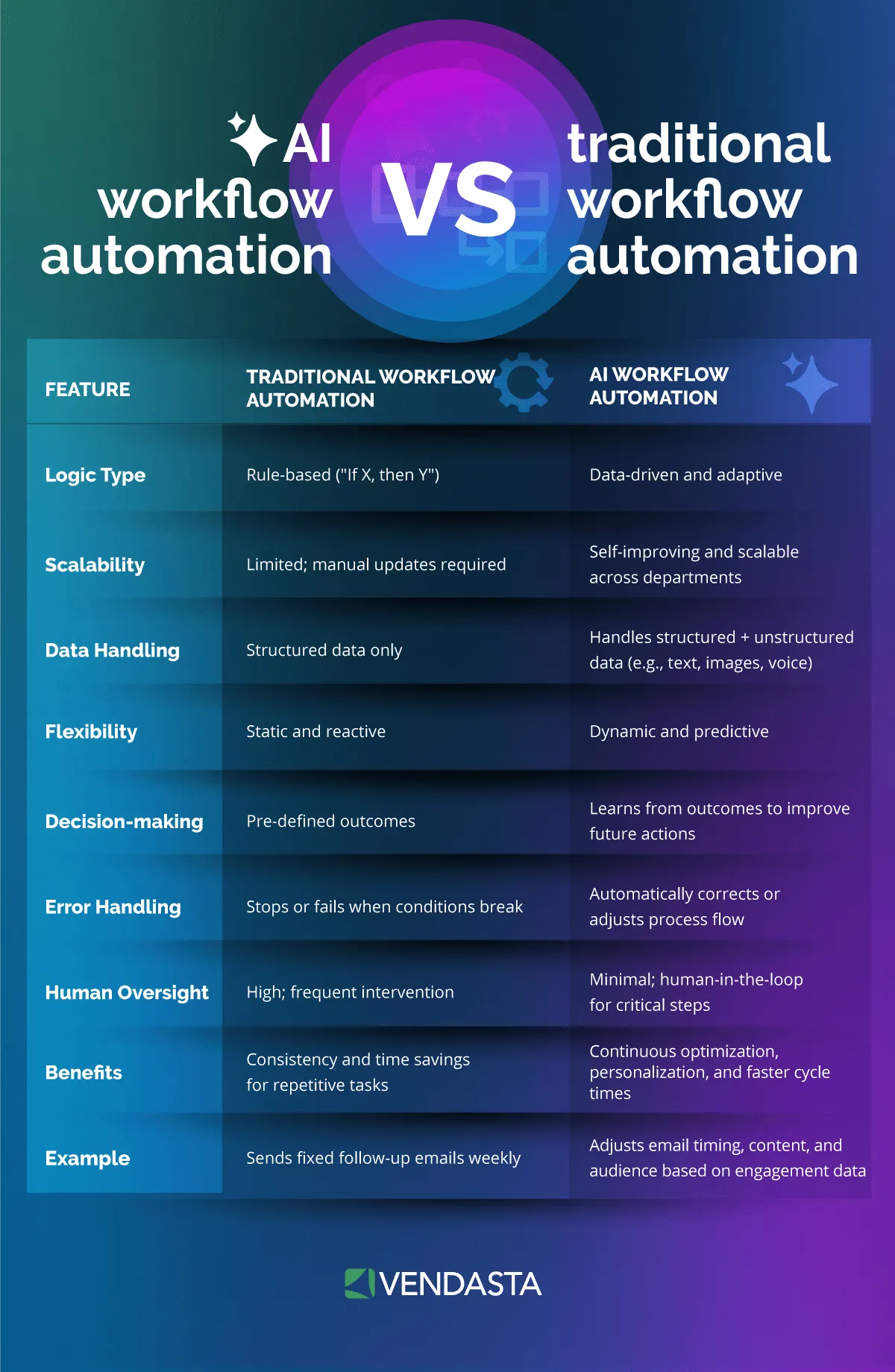
AI workflow automation, on the other hand, interprets information, handles exceptions, and improves with feedback.
For example, a marketing automation system might send emails on a fixed schedule, while an AI-powered system could analyze engagement data in real time and automatically adjust timing, subject lines, or audience segments for better results.
What Are the Benefits of AI-Driven Workflow Automation?
AI can also transform reporting workflows into automated client reporting. Instead of spending hours collecting data from multiple tools, an AI system can pull metrics from your CRM, ad platforms, and social channels, then generate easy-to-read summaries and visual reports automatically.
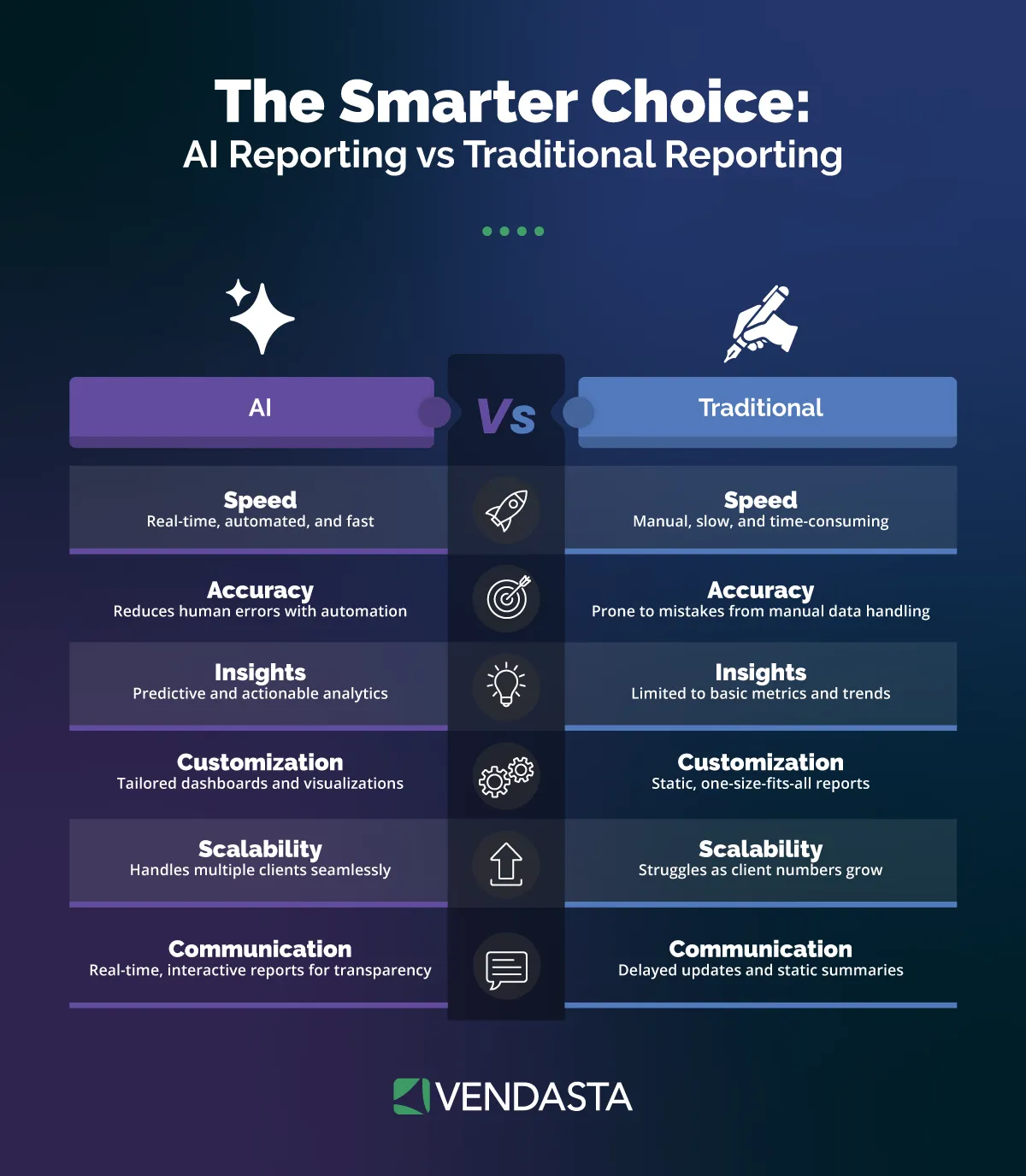
It can even highlight trends, such as a sudden drop in conversion rates or a campaign outperforming expectations, and recommend next steps. This not only saves time but also gives your team faster, more actionable insights to guide marketing strategy.
Here’s a quick comparison of traditional vs. AI-driven automation:
| Traditional Automation | AI Workflow Automation |
| Based on pre-set rules and triggers. | Learns and adapts through data patterns. |
| Limited to structured inputs. | Handles both structured and unstructured data (like messages, images, or voice). |
| Requires manual updates for every new rule. | Continuously optimizes processes automatically. |
| Focused on task execution. | Focused on outcomes and improvement. |
For businesses serving SMBs such as agencies, franchisors, and MSPs, AI workflow automation creates a multiplier effect. It allows your team to manage more clients, deliver faster service, and increase consistency without adding more staff.
Instead of manually tracking leads or switching between systems, your workflows can run automatically in the background, facilitating customer journey optimization by intelligently adapting as client needs or data change.
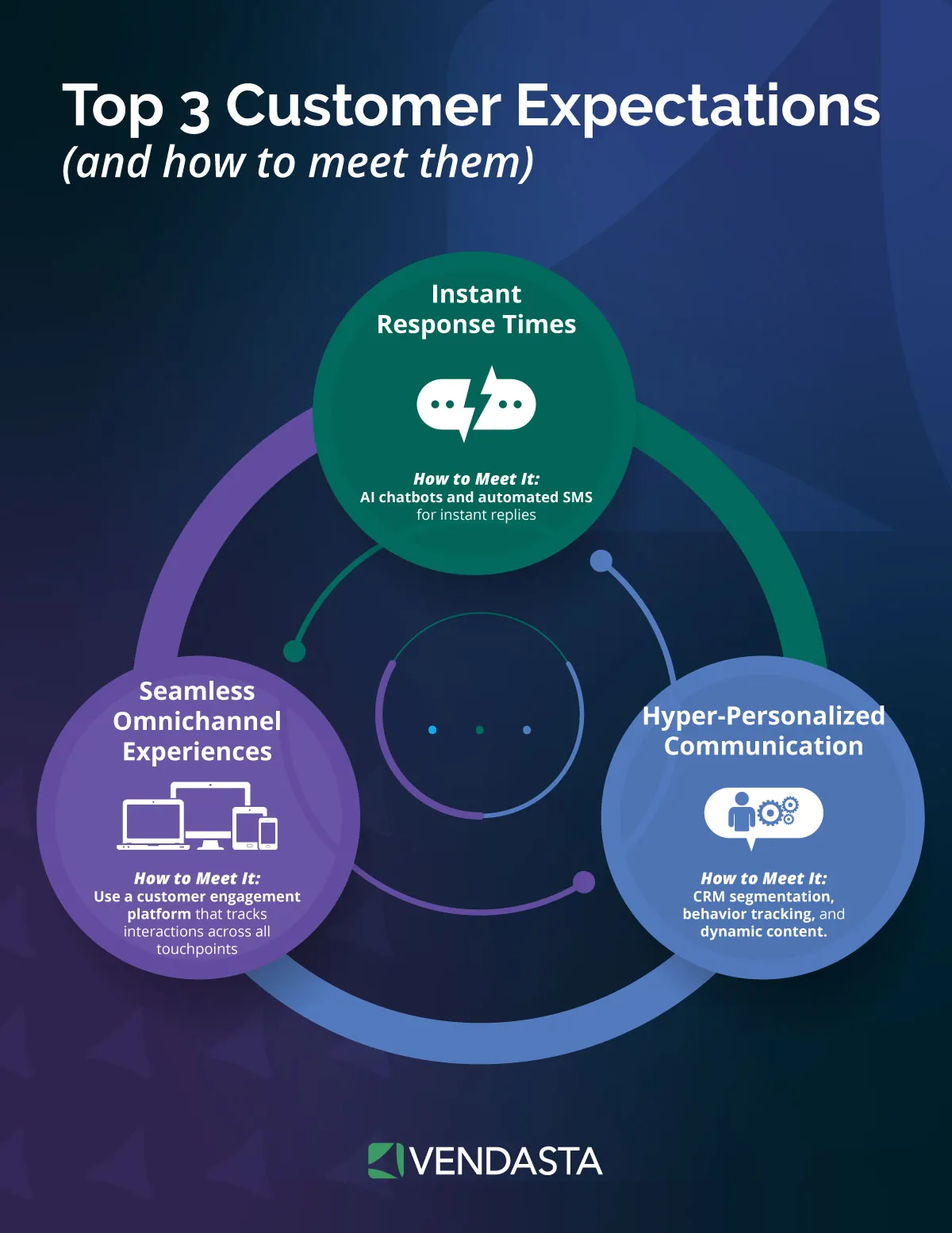
The impact extends beyond time savings. By reducing human error and optimizing processes across marketing, sales, and fulfillment, companies often see higher profit margins, stronger customer experiences, and better scalability.
When AI handles repetitive or predictive tasks, your people can focus on strategy, creativity, and relationship-building—the areas where humans truly excel.
In short, AI workflow automation matters because it helps your business do more with less. It bridges the gap between efficiency and intelligence, ensuring every part of your operation—from lead generation to client reporting—runs smoothly, accurately, and at scale.
Top Use Cases for AI Workflow Automation
AI workflow automation has the power to streamline almost every part of your business, from marketing and sales to customer support and reporting. By using intelligent systems that can analyze data, make decisions, and act automatically, your business can save time, improve accuracy, and scale faster, without adding extra headcount.
Here are some of the most valuable and practical ways businesses are using AI workflow automation in 2026:
1. Client Onboarding
Onboarding is one of the most time-consuming processes for agencies, franchisors, and MSPs. It involves collecting documents, verifying data, scheduling kickoff calls, and setting up tools or campaigns.
With AI workflow automation, this entire process becomes faster and smoother. AI can automatically send welcome messages, collect required information, verify documents, and trigger follow-up steps once each milestone is completed.
If a client hasn’t completed an onboarding task, AI can automatically send reminders or escalate the task to a human team member.
Benefits:
- Reduces manual follow-ups and back-and-forth communication.
- Speeds up time to value for new clients.
- Ensures a consistent onboarding experience across all accounts.
2. Campaign Creation and Execution
Marketing campaigns often require coordination between strategy, creative, and analytics teams. Without automation, managing these moving parts can slow execution.
AI workflow automation can speed up generating initial campaign briefs, drafting ad copy or emails, recommending audience segments, and scheduling posts across multiple channels.
It can also monitor campaign performance and make adjustments automatically based on engagement or conversion data.
Benefits:
- Improves campaign speed and accuracy.
- Reduces reliance on manual data collection or approvals.
- Helps identify and replicate what’s working faster.
3. Sales Follow-Up and Lead Nurturing
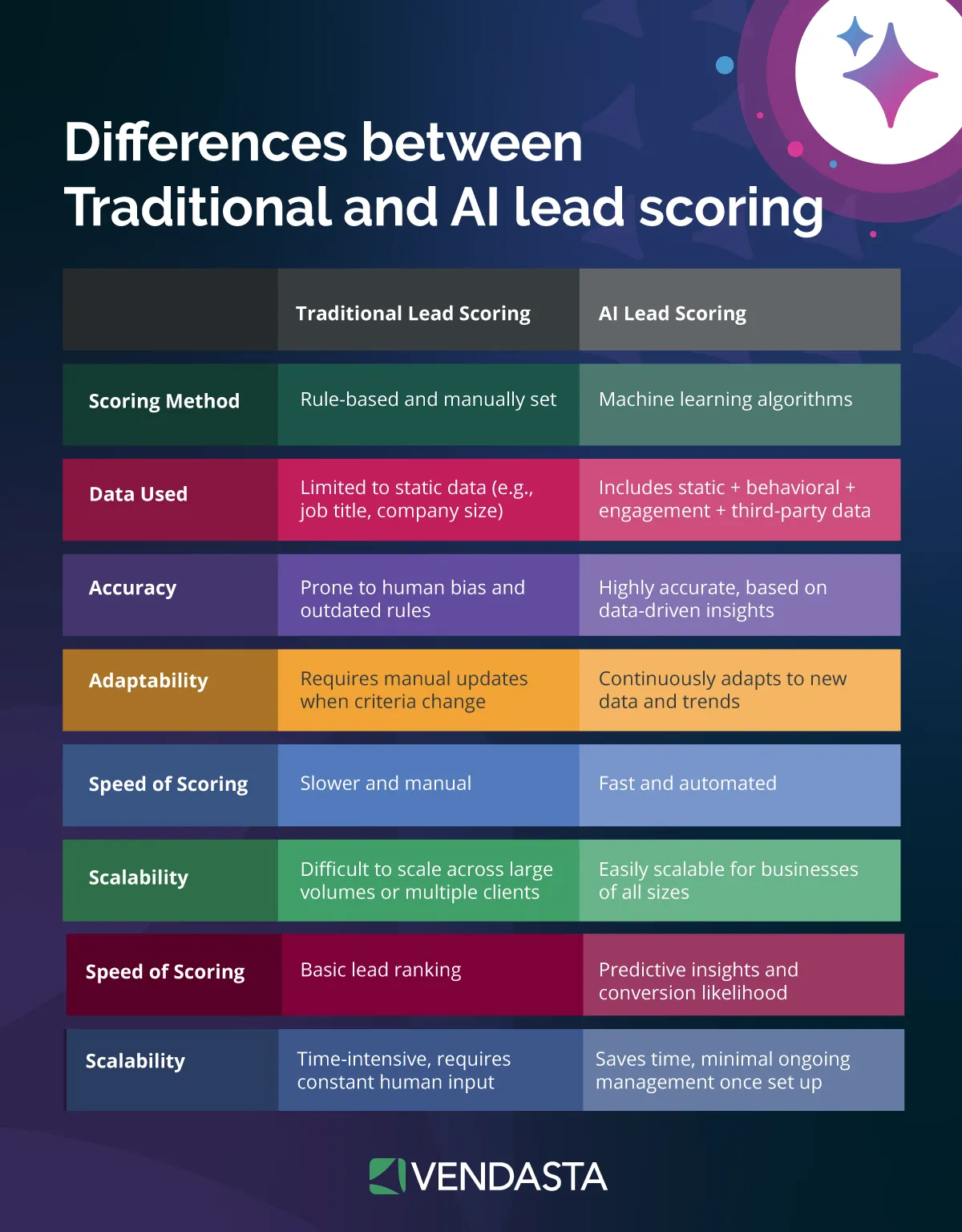
AI can automate the entire lead management process—from lead qualification to follow-up—based on real-time data.
For example, when a new lead fills out a form, AI can perform lead scoring and lead nurturing by sending a personalized message, scheduling a call, or handing off the lead to a salesperson at the right moment.
Benefits:
- Responds instantly to new leads, increasing conversion rates.
- Eliminates gaps between marketing and sales handoffs.
- Frees up time for reps to focus on high-value conversations.
4. Customer Support and Ticket Routing
In customer service, AI workflow automation can triage incoming requests, identify intent, and route tickets to the right department or specialist automatically.
If a query is simple, AI can handle it instantly through chat or email.
If it’s complex, the system can prioritize it and provide agents with context before they step in.
Benefits:
- Reduces wait times and improves resolution speed.
- Increases customer satisfaction with 24/7 responsiveness.
- Allows human agents to focus on high-impact cases.
5. Reporting and Insights Generation
Reporting is another area where AI adds enormous value. Instead of manually pulling data from spreadsheets or separate dashboards, AI can automatically gather performance metrics from sources such as your CRM, ad platforms, and website analytics, and turn them into clear, actionable reports accessible in client dashboards.
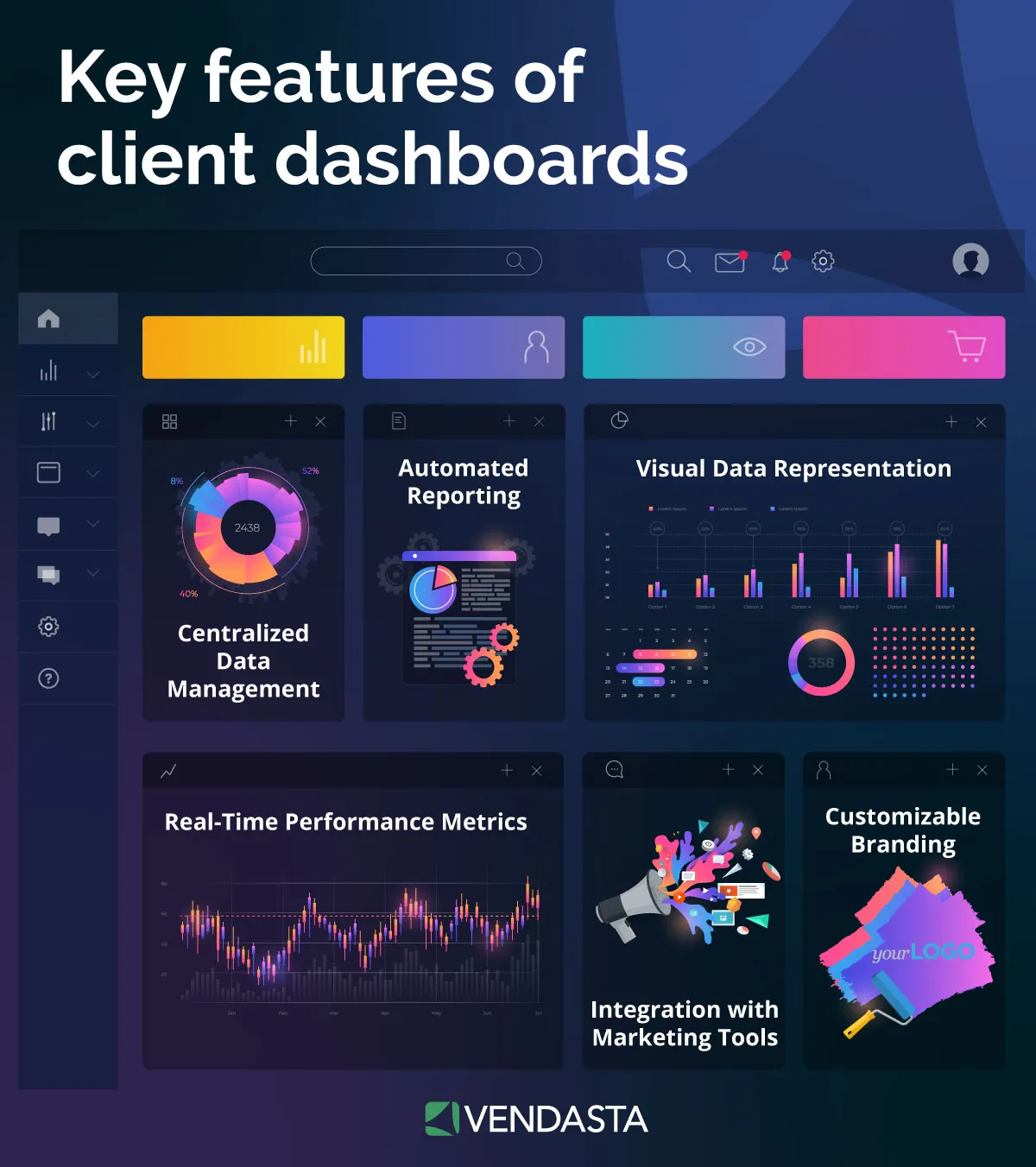
It doesn’t stop at summarizing numbers; AI can interpret the data, identify trends, and even recommend optimizations. For example, it can highlight which campaigns drive the highest marketing ROI or which clients may be at risk of churn based on engagement patterns.
Benefits:
- Saves hours of manual data consolidation.
- Improves accuracy and data-driven decision-making.
- Surfaces insights proactively, helping your team act faster.
6. Renewals and Upsell Triggers
AI workflow automation can help retain clients and uncover upsell opportunities by monitoring engagement, purchase behavior, or campaign performance.
If a client’s activity drops, AI can flag the account or trigger an automated check-in. If performance metrics indicate growth potential, it can automatically suggest an upsell or renewal workflow to your team.
Benefits:
- Reduces churn by identifying risks early.
- Supports consistent retention and growth strategies.
- Provides data-backed recommendations for upsells.
7. Internal Operations and Administration
Beyond client-facing workflows, AI can improve internal processes such as invoicing, vendor approvals, and employee scheduling.
It can extract data from invoices, update CRM records, and even manage recurring admin tasks, keeping your team focused on strategic growth rather than paperwork.
Benefits:
- Cuts administrative overhead.
- Reduces human error in financial or operational workflows.
- Keeps internal processes running smoothly without bottlenecks.
8. How to Automate Customer Follow-Up Workflows with AI Assistants
In 2026, the “speed to lead” is no longer just a metric—it’s the deciding factor in whether you win a deal. Research shows that 50% of B2B sales happen only after the 5th follow-up, yet the average human representative stops after just two attempts. AI workflow automation bridges this gap by deploying AI assistants that act as tireless digital employees.
To build an automated follow-up engine that actually converts, follow this high-impact workflow:
- Identify Intent-Based Triggers: Move beyond basic time-delays. Configure your workflow to trigger based on behavioral signals, such as a prospect returning to a pricing page, opening a specific proposal, or interacting with a “discovery” email.
- Deploy Conversational AI Assistants: Instead of sending static email sequences, use an AI assistant like Vendasta’s AI Receptionist. These assistants don’t just “send” messages; they engage in real-time, two-way dialogue across SMS, WhatsApp, and Email to answer questions and qualify leads 24/7.
- Train the AI on Your Sales Playbook: For the best results, feed your AI assistant your specific service tiers, objection-handling frameworks, and successful email templates. This ensures the automation reflects your brand voice rather than sounding like a generic bot.
- Automate Appointment Booking: The ultimate goal of follow-up is a meeting. Integrate your AI workflow with your calendar (e.g., Google or Outlook) so the assistant can provide live availability and book the meeting directly into your CRM.
- Human-in-the-Loop Handoff: High-performing workflows use AI to handle the 80% of routine follow-up, but flag complex inquiries for human intervention.
Pro Tip: Organizations using AI-driven follow-up see up to a 74% reduction in first response time, transforming “cold” inquiries into scheduled demos in minutes rather than days.
9. How to Automate SDR Workflows with AI
The traditional Sales Development Representative (SDR) role is undergoing a massive shift. In 2026, high-performing sales teams are moving away from manual “spray and pray” outreach in favor of agentic AI workflows. These systems don’t just send emails—they execute the complex, multi-step research and qualification tasks that used to take SDRs hours.
According to recent benchmarks, teams implementing AI SDR workflows see a 300% surge in pipeline growth and a 40% reduction in sales cycle duration.
Here is how to automate your SDR workflow using an AI-first approach:
- Automate Signal-Based Prospecting: Instead of static lists, set up triggers based on intent signals. AI can monitor job changes, company funding rounds, or specific website visits in real-time. Tools like Vendasta can ingest this data to identify “hot” prospects exactly when they are most likely to buy.
- Hyper-Personalized Research at Scale: SDRs typically spend 15–20 minutes researching a single prospect. AI can scrape LinkedIn profiles, recent news, and 10-K filings in seconds to generate a “contextual brief.” This data is then fed into an LLM to write a first-touch email that mentions a specific pain point or recent achievement.
- Deploy Multi-Channel Orchestration: An effective SDR workflow is never single-channel. Use AI to coordinate touches across email, LinkedIn, and SMS. For example, if a prospect opens an email but doesn’t reply, the AI can automatically trigger a LinkedIn connection request 24 hours later.
- AI-Powered Discovery & Qualification: Use an AI SDR to handle initial inbound inquiries. The AI can ask qualifying questions, handle common objections, and provide immediate value—all before a human SDR ever gets involved.
- Autonomous Meeting Scheduling: Eliminate the back-and-forth of “what time works for you?” AI assistants can check live calendar availability and book meetings directly into the CRM, ensuring a seamless handoff from the AI to a human Account Executive.
| Task | Manual SDR Workflow | AI-Automated SDR Workflow |
| Lead Research | 15 mins per lead | <1 min (Automated scraping) |
| Email Writing | 10 mins per draft | Instant (AI-generated & personalized) |
| Follow-ups | Often forgotten | 100% Consistency (Automated triggers) |
| CRM Entry | 5 mins per task | Zero (Real-time auto-sync) |
10. How to Scale SEO Workflows with AI Automation
Scaling search engine optimization (SEO) has traditionally been a linear challenge: if you wanted more content, you needed more writers and more hours. By integrating AI workflow automation, businesses can break this cycle and achieve exponential growth in organic visibility without a corresponding increase in overhead.
To effectively scale your SEO efforts, consider these automated workflows:
- Automated Keyword Intelligence & Clustering: Use AI to process thousands of search terms simultaneously. Instead of manual spreadsheets, an automated workflow can categorize keywords by intent (informational vs. transactional) and cluster them into topical maps, ensuring your content strategy covers an entire niche.
- AI-Powered Content Outlining and Research: High-ranking content requires deep research. AI can be programmed to analyze the top 10 search results for a keyword, extract common headers, identify “content gaps,” and generate a comprehensive brief for your team in seconds.
- Mass Metadata and Schema Optimization: For large e-commerce sites or directories, manually writing title tags and meta descriptions is a bottleneck. AI workflows can generate unique, SEO-friendly metadata for thousands of pages based on on-page data, ensuring every URL is optimized for click-through rates.
- Automated Internal Linking: Use AI to scan your existing library of content and suggest internal linking opportunities for new posts. This strengthens your site’s “link equity” and helps search engines crawl your most important pages more effectively.
- Repurposing Content for Social Signals: Scale your reach by automating the transformation of a single blog post into a week’s worth of social media updates and newsletter snippets. This increases social signals, which indirectly boosts SEO authority.
How to Build an AI Workflow Automation Strategy
Building an effective AI workflow automation strategy is an essential part of any comprehensive AI marketing strategy. It takes more than just adopting new AI marketing tools—it requires clear goals, the right data, and a structured rollout plan.
Whether your business is focused on marketing automation, CRM automation, or broader operational improvements, a well-designed approach ensures your investment delivers measurable results.
Below is a step-by-step process to help your business build a scalable AI automation strategy that drives efficiency and growth across every department.
1. Audit and Map Your Current Workflows
Start by taking inventory of how work currently gets done across your business. Identify repetitive, time-consuming processes where AI or automation software could reduce manual effort. Common examples include lead routing, campaign management, data entry, and reporting.
For each workflow, document:
- Who performs each step?
- What tools are currently used (e.g., CRM, email, spreadsheets)?
- How long does each step take?
- What data or decisions are required?
This audit provides a comprehensive view of your existing operations and helps pinpoint where workflow automation software can have the greatest impact.
It’s especially helpful for uncovering bottlenecks, such as duplicated data entry across systems or delays caused by manual approvals, which AI automation can easily solve.
2. Prioritize Workflows to Automate
Once you’ve identified potential areas for improvement, rank them by business value and complexity, specifically looking for opportunities where AI workforce management can deliver quick wins. These early successes will build momentum and buy-in for broader automation initiatives.
When prioritizing, ask:
- Which tasks take the most time or cause the most delays?
- Where do manual errors frequently occur?
- Which processes directly affect revenue or client satisfaction?
For example, automating lead assignment in the CRM can immediately save sales teams time, while implementing AI-powered email automation tools can boost response rates and accelerate conversion speeds in marketing campaigns.
3. Choose the Right Tools and Platforms
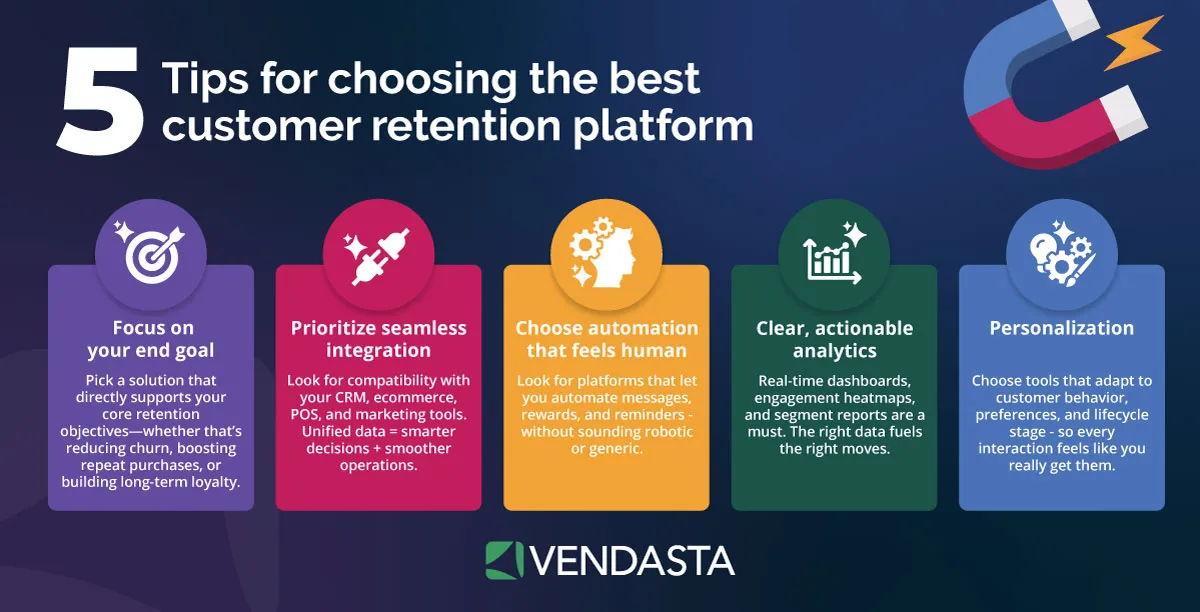
Selecting the right automation software is critical to success. Look for solutions that align with your business size, goals, and technology stack. Also, consider which workflow automation software has the best AI agents.
Consider tools that include:
- Workflow automation software for designing and executing processes across teams.
- Business process automation software that integrates with existing systems to manage cross-department operations.
- CRM automation for managing contacts, tracking deals, and automating follow-ups.
- Email automation tools and marketing automation tools for customer engagement, renewals, nurturing, and reporting.
AI customer acquisition and engagement platforms like Vendasta combine all these capabilities into a single, unified system—connecting sales, marketing, and customer engagement workflows under one roof.
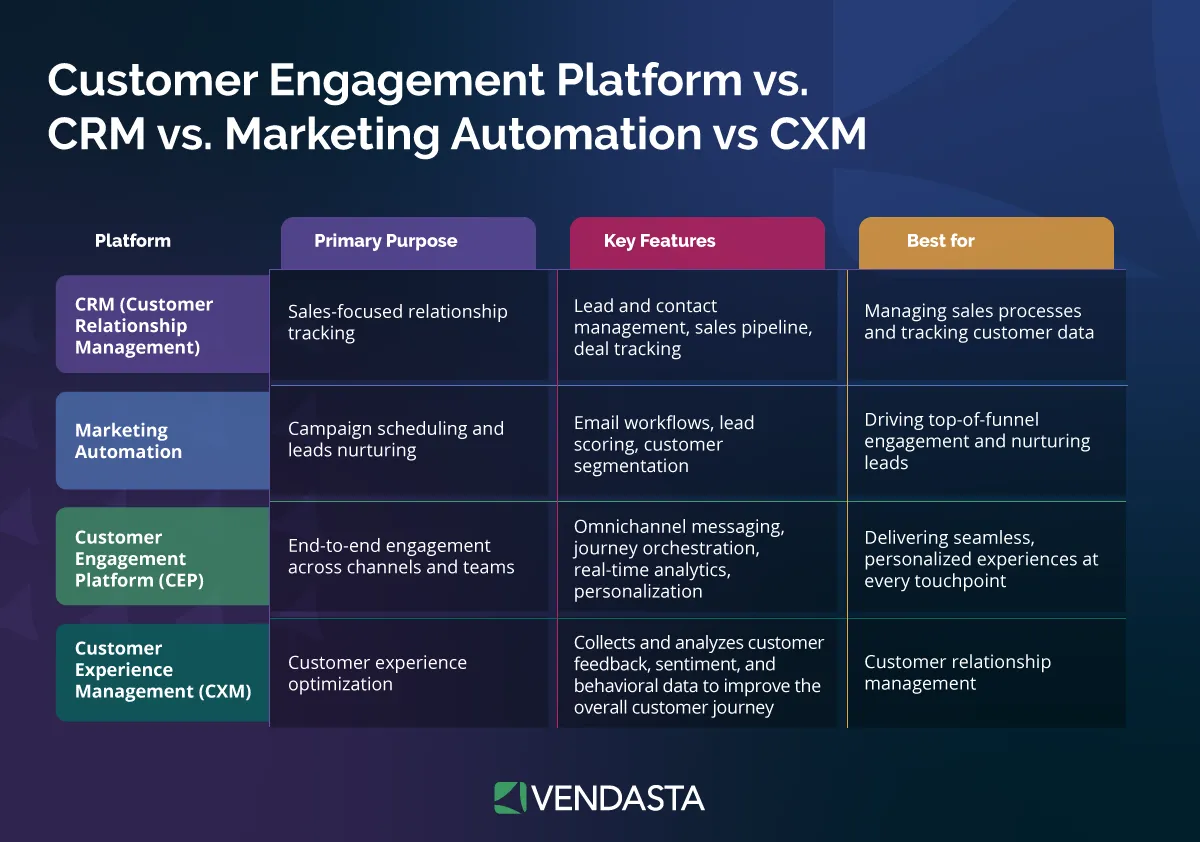
With AI Employees, you can automate repetitive client communications, schedule tasks, and track performance automatically, without switching between tools.
When comparing vendors, evaluate:
- Ease of integration with your current tech stack.
- Scalability and customization options.
- Data governance and security compliance.
- Reporting and analytics capabilities.
The goal is to choose an AI workflow automation platform that grows with your business and enables long-term scalability rather than solving one-off tasks.
4. Design and Document Your Workflows
Once your tools are selected, create visual flowcharts or outlines that show how data and actions move through your processes. Each workflow should include:
- A trigger (e.g., a lead form submission or client onboarding request).
- Decision points (e.g., AI determines lead quality or priority).
- Actions (e.g., send a follow-up email, assign a task, or create a deal in your CRM).
- Fallback rules for exceptions or errors.
Design with both AI and human collaboration in mind. AI should handle predictable, repetitive work, while humans focus on judgment-based tasks or high-value interactions. A well-balanced workflow increases accuracy without losing personal touch.
Example: An AI-driven marketing automation tool could detect low engagement in an email campaign and automatically trigger a re-engagement workflow—sending a new message with a personalized offer or routing the contact to a sales rep for follow-up.
5. Test, Measure, and Optimize
Before rolling out automation company-wide, start small. Test each workflow with a limited set of users or clients to ensure it functions as intended. Monitor results closely and gather feedback to identify areas for improvement.
Key metrics to track include:
- Time saved per task or campaign.
- Error rate reduction.
- Workflow completion speed.
- Customer response or conversion rate.
- Employee satisfaction and adoption.
Use these insights to refine workflows and train AI models to perform better over time. Continual optimization ensures your automation strategy remains aligned with business goals.
6. Scale, Govern, and Maintain
As your automation strategy matures, scalability and governance become essential. Establish guidelines for building, testing, and approving new workflows to maintain quality and consistency.
Create a governance framework that covers:
- Naming conventions and documentation standards.
- Permissions and access control.
- Audit logs for compliance and accountability.
- Scheduled performance reviews to ensure workflows remain effective.
As your business grows, revisit your automation roadmap quarterly. Review metrics, sunset outdated automations, and identify new opportunities for AI-driven optimization.
What Are the Best Practices in AI Workflow Automation?
1. Start with clear objectives
Before you begin automating, define what success looks like.
Are you trying to reduce manual tasks, speed up response times, improve data accuracy, or increase profitability?
Set measurable goals for each workflow.
For example, aim to cut lead response time by 50% or reduce onboarding time from seven days to three. Clear objectives keep your efforts focused and make it easier to prove ROI later.
2. Begin small, then expand
Start with one or two high-impact, low-complexity workflows, such as automated lead follow-ups or client onboarding.
Once those are running smoothly, scale automation into other areas such as customer support or billing.
This “crawl, walk, run” approach helps your team learn quickly and build confidence before tackling more complex workflows.
3. Maintain human oversight
AI and automation software are powerful, but they still need human judgment. Always include review or approval steps for sensitive or customer-facing processes.
For example, let AI generate draft emails or reports, but have a team member review them before sending.
Human-in-the-loop systems balance efficiency, quality, and trust.
4. Prioritize data quality
Understanding how to train AI on your own data is essential because the quality of your model depends entirely on the relevance and consistency of the information it learns from.. Make sure your CRM, analytics, and marketing platforms are clean, consistent, and up to date.
Bad data leads to bad automation, like misrouted leads, inaccurate reports, or irrelevant customer messages. Invest in data hygiene early to prevent larger issues later.
5. Keep your workflows visible and documented
Transparency is key. Document every automation—what it does, when it runs, who owns it, and what systems it touches.
Use naming conventions that make workflows easy to find and understand. This documentation helps during audits, troubleshooting, or when new team members join.
6. Monitor and measure performance regularly
Don’t “set and forget” your automations. Review them weekly or monthly to ensure they’re still delivering the expected results.
Track metrics like task completion time, conversion rates, and error frequency. If performance starts to drop, investigate whether your logic, triggers, or data sources need adjustment.
7. Align automation across departments
Many businesses start automation in one department (usually marketing or sales) but forget to align it with the rest of the organization.
When workflows connect seamlessly across teams (for example, when marketing automation software syncs with CRM automation), data flows more freely, communication improves, and customers get a smoother experience.
8. Train and empower your team
The best automation strategy is one that your people understand and trust. Provide training on how AI and automation tools work, and encourage your team to suggest new use cases.
Employees who feel empowered to collaborate with AI are more likely to embrace change and spot new efficiency opportunities.
What Are the Common Errors in AI Workflow Automation?
1. Automating broken processes
If a process is inefficient or unclear, automation won’t fix it—it will only make the problems happen faster. Before automating, map the process and remove unnecessary steps. Automate only after it’s optimized.
2. Focusing on tools instead of outcomes
It’s easy to get caught up in comparing automation platforms and features. While tools matter, what matters more is the problem you’re solving. Always tie each automation initiative to a measurable business goal, like faster client onboarding or higher renewal rates.
3. Ignoring governance and security
As you add more automations, your organization must maintain control. Without governance, teams may duplicate workflows, mishandle data, or create conflicting automations.
Set clear rules for who can create, edit, and publish workflows. Choose automation software with role-based access and audit logs to maintain compliance.
4. Neglecting change management
Automation changes how people work. If employees aren’t involved or trained, they may resist AI adoption or revert to manual methods.
Communicate the “why” behind automation—how it saves time, eliminates busywork, and empowers them to focus on strategic, creative work.
5. Over-automating customer experiences
While AI can personalize outreach and streamline service, too much automation can make interactions feel robotic.
Keep a human touch in key moments, especially during onboarding, customer service escalations, or renewal conversations. Automation should enhance relationships, not replace them.
6. Skipping periodic reviews
Markets change, customer behavior evolves, and tools get updated. Automations that worked a year ago might not fit your business today. Schedule quarterly reviews to refine your workflows and retire outdated ones.
Implementation Checklist and Timeline
Launching AI workflow automation across your business is a phased process that blends strategy, testing, and iteration. The goal is to roll out automation in a way that minimizes disruption, builds team confidence, and delivers measurable value early.
Below is a practical step-by-step implementation plan designed for marketing agencies, franchisors, MSPs, and media companies that serve SMBs. You can adapt this roadmap to fit your business size, team structure, or client portfolio.
Weeks 1–2: Discovery and Workflow Assessment
The foundation of any successful automation program is understanding how work currently gets done.
Key actions:
- Identify departments or functions that handle the most repetitive or manual work—such as lead management, onboarding, reporting, or customer support.
- Map out every step in these workflows, noting dependencies, tools used, and time spent.
- Interview team members to uncover pain points and process gaps.
- Document where errors, delays, or handoffs create friction.
Deliverables:
- A list of 5–10 workflows that could benefit from automation.
- Prioritization matrix (based on business impact and implementation difficulty).
Tip: Look for “quick win” workflows—simple processes that can be automated within two weeks. These early victories help build momentum and prove value to stakeholders.
Weeks 3–4: Tool Selection and Workflow Design
Once you’ve identified your first workflows, it’s time to choose the right automation platform and design the process.
Key actions:
- Evaluate automation software and workflow automation tools that fit your needs. Consider scalability, integration options, user experience, and cost.
- Shortlist tools that align with your current systems (CRM, marketing automation tools, ticketing systems, etc.).
- For Vendasta partners, this is where you can activate the AI workforce and set up automation templates for lead nurturing, onboarding, or reporting.
- Sketch each workflow visually using flowcharts or process builders. Define triggers, decisions, actions, and fail-safes.
Deliverables:
- Finalized platform selection.
- Workflow design documentation with clearly defined inputs, outputs, and ownership.
Tip: Focus on the data flow. Make sure each workflow integrates smoothly across your CRM automation, marketing automation, and communication tools to avoid silos later.
Weeks 5–6: Build, Test, and Validate
Now it’s time to turn your designs into working automations. This phase is about building, testing, and refining before full deployment.
Key actions:
- Build the initial workflows inside your chosen automation platform.
- Run internal test scenarios using sample data.
- Validate triggers and decision logic to ensure workflows perform as expected.
- Create backup paths for exceptions or manual overrides.
- Train small pilot teams on how to use and monitor the new workflows.
Deliverables:
- Fully functional pilot workflows.
- Test documentation with performance notes and user feedback.
Tip: Don’t try to automate everything at once. Start with 1–2 workflows, measure success, and use the learnings to guide future automation projects.
Weeks 7–10: Pilot Rollout and Optimization
Once the pilot workflows are tested and refined, expand deployment to more teams or clients. This phase is all about observing real-world performance and optimizing based on results.
Key actions:
- Launch the workflows in production environments.
- Monitor performance closely—track cycle time, error rates, and overall efficiency gains.
- Gather feedback from end users and clients.
- Refine automation rules, AI prompts, or decision thresholds based on insights.
- Update documentation to reflect the final workflow structure.
Deliverables:
- Finalized, optimized workflows.
- KPI dashboard showing before-and-after results.
Tip: Use automation logs and analytics dashboards to track usage and success metrics. Look for trends that highlight where additional automations could add value. Leverage Vendasta’s ebook 100 AI Prompts Every Marketer Needs to enhance your AI prompting.
Weeks 11–12: Scale, Govern, and Maintain
With your pilot workflows delivering results, it’s time to formalize your automation strategy and expand its reach across the organization.
Key actions:
- Assign a dedicated team or automation manager to oversee ongoing performance.
- Implement governance policies for version control, permissions, and quality assurance.
- Document every workflow in a shared knowledge base with clear instructions for updates or troubleshooting.
- Schedule quarterly reviews to ensure workflows remain effective as business priorities evolve.
- Explore additional automation opportunities in new areas such as finance, HR, or franchise operations.
Deliverables:
- Governance framework for automation management.
- A roadmap for the next phase of automation projects.
Tip: Use performance data from your first wave of automations to calculate ROI and present results to leadership or clients. This helps secure buy-in for further automation investment.
| Phase | Timeline | Focus | Key Deliverable |
| Discovery & Audit | Weeks 1–2 | Identify workflows & pain points | Workflow inventory & prioritization |
| Tool Selection & Design | Weeks 3–4 | Choose software & design workflows | Platform selection & flow diagrams |
| Build & Test | Weeks 5–6 | Develop and validate automations | Tested pilot workflows |
| Pilot Rollout | Weeks 7–10 | Deploy and optimize | Finalized, efficient workflows |
| Scale & Govern | Weeks 11–12 | Expand and maintain automation | Governance framework & ROI report |
How to Estimate ROI of AI Workflow Automation
Measuring the Return on Investment (ROI) of AI workflow automation is critical for understanding the tangible impact of your digital transformation. Automation is more than a time-saving tactic; it is a strategic lever for enhancing efficiency, accuracy, and scalability across your entire organization.
However, many businesses stall after the initial launch by neglecting to track results. Without clear metrics, you cannot identify which automated processes are driving revenue or which require optimization. Understanding what metrics define success in AI workflow automation is the difference between a vanity project and a scalable growth engine.
To move beyond guesswork, this section provides a framework for measuring ROI effectively using a blend of hard quantitative data and high-value qualitative insights.
Step 1: Define Success Before You Start
The most common mistake teams make is launching automations without defining what “success” means. Before rolling out any workflow, decide what outcomes you want to achieve and how you’ll measure them.
Start by aligning your goals with broader business objectives, such as:
- Reducing manual workload or labor costs.
- Increasing lead conversion rates or customer retention.
- Accelerating project turnaround times.
- Improving customer satisfaction scores through AI customer experience.
For example, if you’re implementing CRM automation to streamline lead management, success could mean responding to new leads within one hour instead of one business day.
If you’re adopting marketing automation tools, your metric might be higher engagement rates or faster campaign launches. Clear goals set the foundation for meaningful ROI measurement.
Step 2: Identify the Right Metrics
ROI measurement should go beyond “time saved.” While that’s important, it’s only one piece of the puzzle. To capture the full value of automation, track a mix of operational, financial, and experience-based metrics.
Operational Metrics:
- Time saved per process or task.
- Reduction in manual touchpoints or handoffs.
- Decrease in error rates or rework needed.
- Average process completion time.
Financial Metrics:
- Labor cost reduction from automation.
- Increased revenue from faster response times or higher conversions.
- Cost savings from tool consolidation or process efficiency.
- Return on marketing spend due to better targeting and automation.
Experience Metrics:
- Customer satisfaction (CSAT) or Net Promoter Score (NPS).
- Employee satisfaction and productivity.
- Lead response speed and engagement quality.
- Client retention and renewal rates.
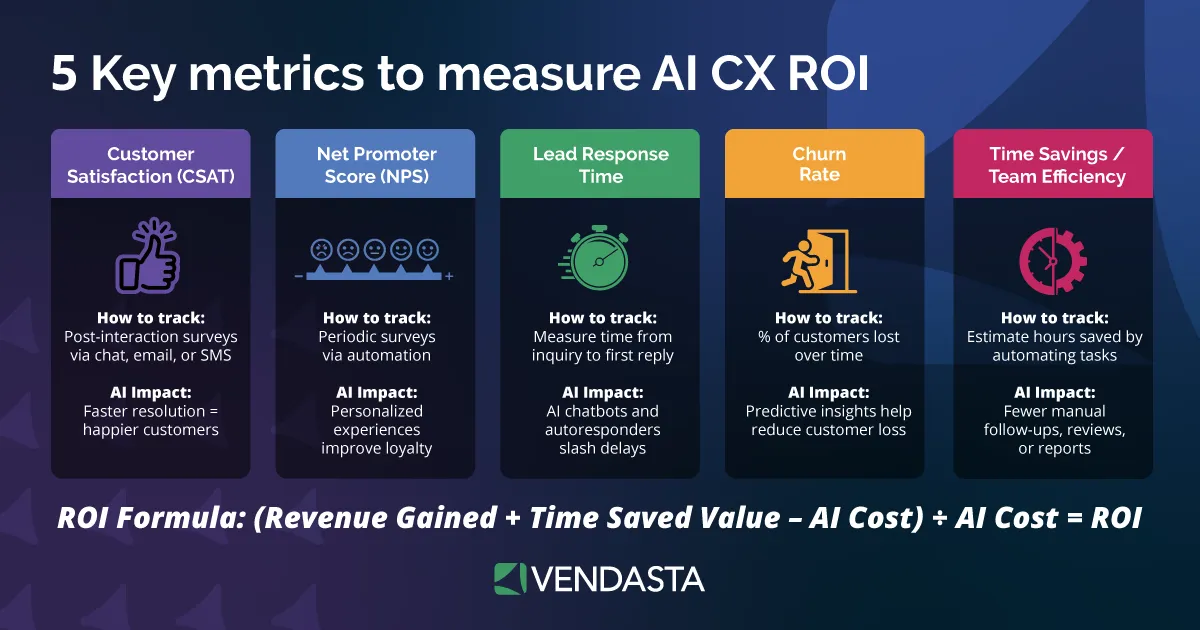
These metrics will vary depending on which workflows you automate. For instance, automating reporting may save staff hours each week, while automating email campaigns could lead to measurable revenue growth.
Step 3: Use a Simple ROI Formula
Once you’ve gathered your metrics, use this straightforward formula to calculate ROI:
ROI (%) = [(Total Value Gained – Total Cost of Automation) / Total Cost of Automation] × 100
Break this down with real numbers:
- Calculate the total hours saved per month and multiply by your team’s average hourly cost.
- Add any revenue increase directly tied to automation (such as higher conversion rates).
- Subtract all implementation costs, including software, setup, and training.
For example:
- You automate client onboarding, saving 20 hours per week.
- Average hourly cost = $50.
- Monthly savings = $4,000.
- Software and setup cost = $2,000.
ROI = [($4,000 – $2,000) / $2,000] × 100 = 100% ROI in the first month.
Even modest efficiency gains can deliver substantial returns when multiplied across multiple clients or departments.
Step 4: Factor in Intangible Benefits
Not every gain will be easy to quantify, but these “soft” benefits are equally important:
- Scalability: Your business can handle more clients without adding new staff.
- Accuracy: Fewer mistakes mean more consistent results and happier clients.
- Employee morale: Teams are more satisfied when freed from repetitive tasks.
- Customer experience: Faster responses and personalized interactions improve brand loyalty.
- Data insights: Automated reporting provides real-time visibility into performance trends.
These factors contribute to long-term business growth even if they don’t appear directly in your initial ROI calculations.
Step 5: Monitor and Report Continuously
ROI measurement shouldn’t be a one-time exercise. Establish a regular cadence (monthly or quarterly) for reviewing AI workflow automation performance. Use dashboards and reports to visualize trends and pinpoint where workflows are excelling or underperforming.
Create a standardized template that includes:
- Performance metrics (time, cost, and quality improvements).
- Comparison of pre-automation vs. post-automation results.
- ROI summary with percentage change.
- Recommendations for scaling or refinement.
By consistently tracking these metrics, you can refine your strategy, justify future automation investments, and build an ongoing culture of improvement.
Top AI Workflow Automation Tools in 2026
The demand for smarter, faster, and more integrated workflow automation continues to grow and 2026 is shaping up to be the year when AI takes automation from reactive to proactive.
Businesses are no longer satisfied with basic “if-this-then-that” workflows. They want systems that learn, adapt, and make intelligent decisions.
Below is a breakdown of the top AI workflow automation tools in 2026, each evaluated on usability, scalability, and practical value for businesses serving SMBs.
These tools help teams reduce manual work, connect siloed systems, and operate more efficiently across marketing, sales, and operations.
1. Vendasta
Vendasta is an AI customer acquisition and engagement platform built for SMBs and the businesses that support them, such as agencies, franchisors, MSPs, and media companies.
It combines AI Employees, conversational AI, automation software, CRM, and marketing tools into a single, unified platform that runs the entire customer journey from awareness to retention.
Why it stands out:
Vendasta’s biggest advantage is its ability to unify workflows that are typically scattered across multiple tools. The platform’s AI Employees don’t just automate—they act intelligently.
For example, they can respond to new leads, schedule follow-ups, update CRM records, or trigger marketing campaigns automatically based on real-time customer behavior.
Pros:
- End-to-end business automation built specifically for SMB-focused organizations.
- AI Employees are ready to deploy in minutes with no coding or setup required.
- White-label capabilities for agencies and partners.
- Streamlined CRM automation and marketing automation tools in one place.
- Continuous improvement through real-time data and performance insights.
Cons:
- Designed primarily for partners supporting SMBs, not for large standalone enterprises.
Best for:
Marketing agencies, franchisors, MSPs, and media organizations that manage multiple clients and want a fully integrated, white-labeled automation platform.
2. Aisera
Aisera is an AI-powered automation platform that specializes in AI workflow orchestration for IT, customer service, and enterprise operations.
It uses conversational AI and machine learning to create intelligent workflows that can understand context, handle requests, and perform complex actions autonomously.
Pros:
- Strong natural language understanding (NLU) for chat and voice automation.
- Prebuilt workflow templates for IT, HR, and customer support.
- Enterprise-grade scalability and governance.
Cons:
- Requires more configuration and setup for customized workflows.
- Better suited for large organizations than small businesses.
Best for:
Enterprises and large MSPs that need a powerful AI orchestration engine for complex service management or internal operations.
3. Appian
Appian combines business process automation software and AI to help organizations design, execute, and optimize complex workflows.
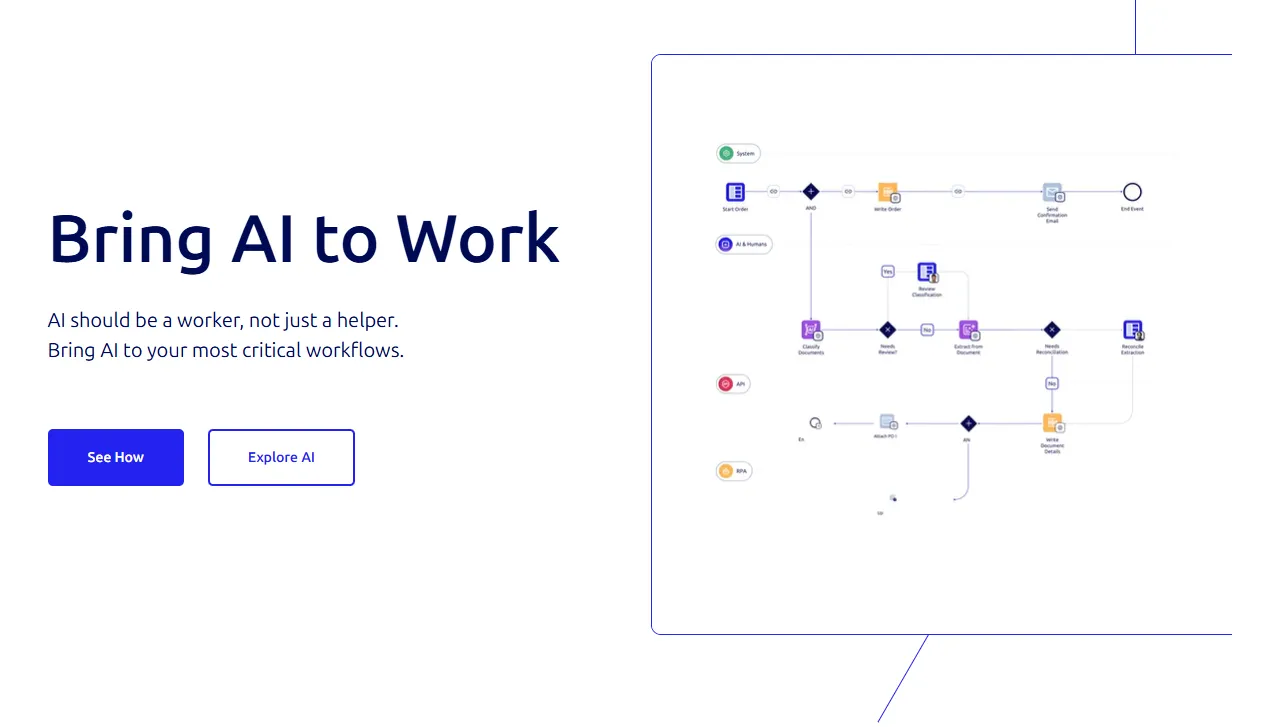
Its low-code platform allows teams to build custom automations quickly while maintaining strong compliance and governance controls.
Pros:
- Robust process modeling and governance features.
- Scalable platform that supports end-to-end digital transformation.
- Excellent visibility into workflow performance and compliance tracking.
Cons:
- Steeper learning curve for non-technical users.
- Implementation can be time-consuming for smaller teams.
Best for:
Enterprises, government agencies, or corporations managing multi-department processes and strict compliance requirements.
4. Zapier (with AI Actions)
Zapier has long been a go-to automation tool for connecting apps and creating workflows.
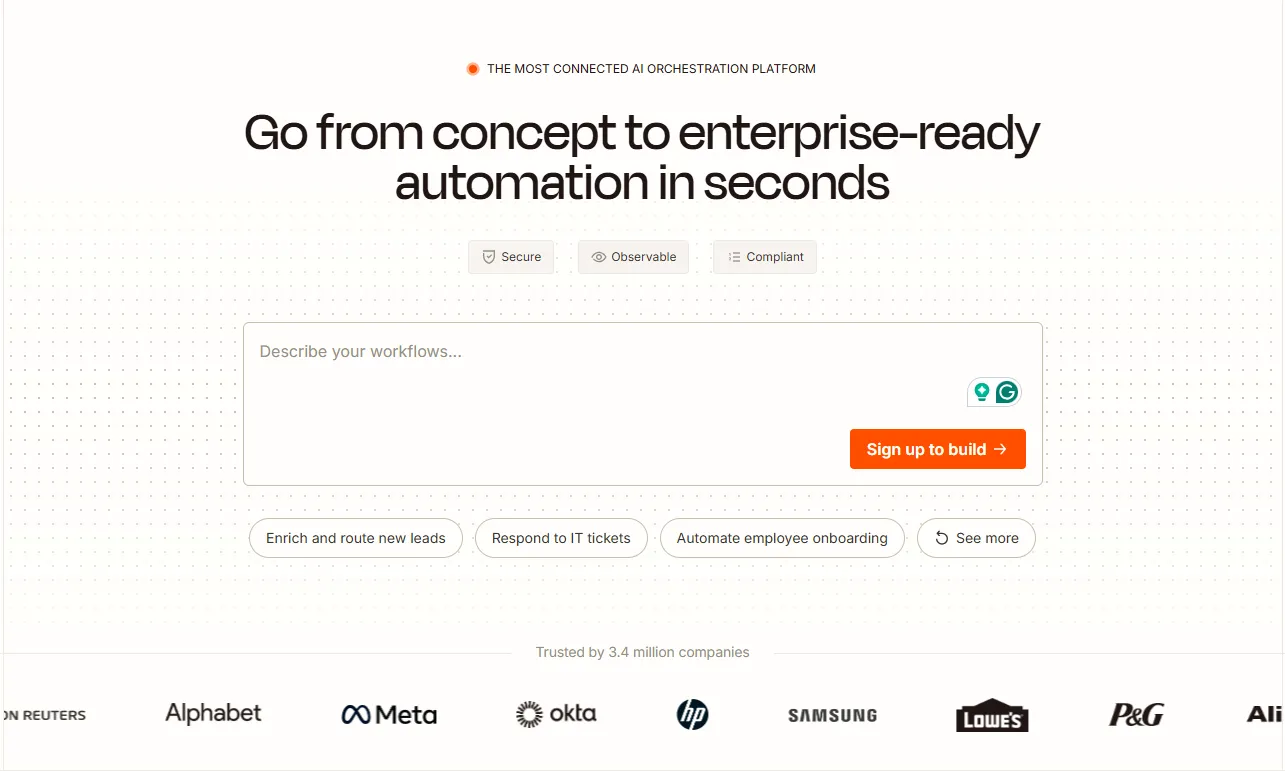
In 2026, it’s stepped further into AI with AI Actions, which let users build, test, and trigger automations using natural language. This brings AI-powered automation to users without technical expertise.
Pros:
- Massive library of integrations with thousands of SaaS tools.
- Simple setup process with little to no coding required.
- AI assistance for building workflows through text prompts.
Cons:
- Complex workflows can become hard to manage at scale.
- Limited AI reasoning compared to purpose-built AI orchestration tools.
Best for:
SMBs and marketing teams that need quick, customizable automations between multiple tools and platforms.
5. Microsoft Power Automate (with Copilot AI)
Microsoft Power Automate continues to evolve with Copilot AI, which allows users to create workflows using natural language prompts.
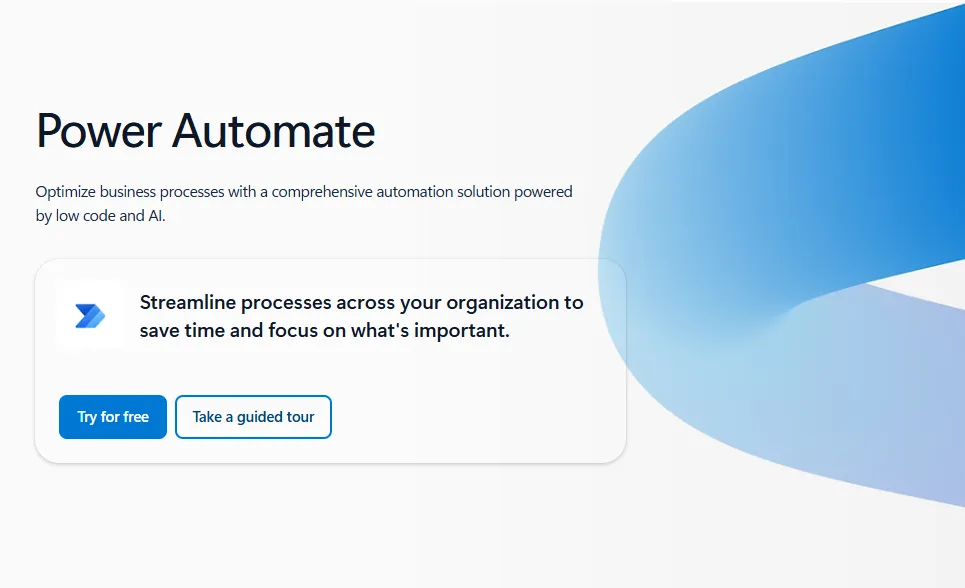
It integrates deeply within the Microsoft ecosystem, automating everything from Outlook emails to Dynamics CRM records.
Pros:
- Excellent integration across Microsoft 365 and Azure products.
- Conversational workflow building via Copilot.
- Strong security and enterprise compliance features.
Cons:
- Works best within Microsoft’s ecosystem—limited for non-Microsoft users.
- It can be complex for first-time users.
Best for:
Businesses already embedded in the Microsoft environment that want to extend AI-driven automation across their tools and teams.
6. Gumloop
Gumloop is an AI-native automation platform purpose-built for go-to-market (GTM) teams, revenue operations, and businesses that need to build sophisticated AI agents without writing code.
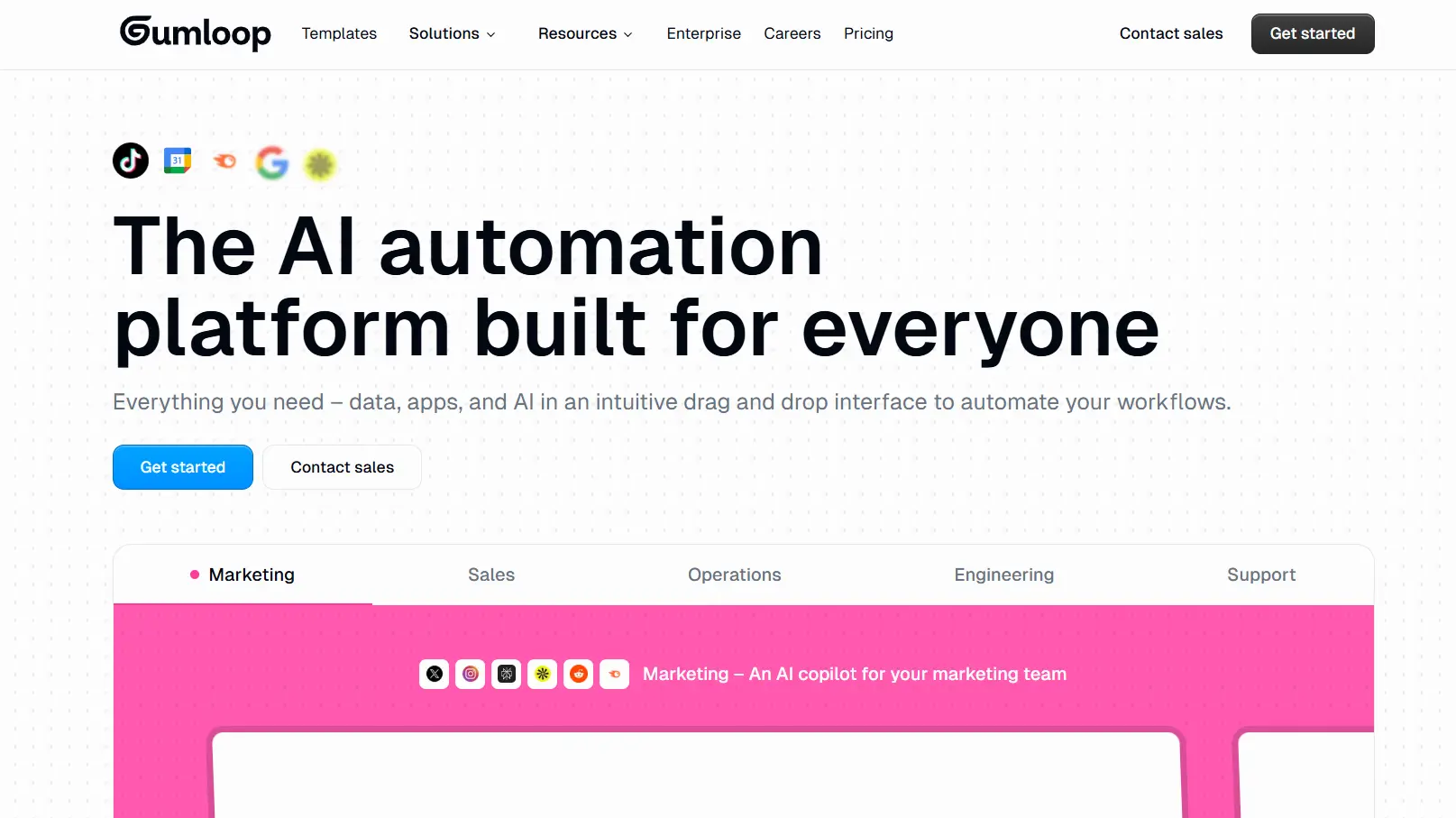
Unlike traditional tools that added AI as an afterthought, Gumloop uses a “nodes and flows” visual canvas designed specifically for large-scale AI operations. It excels at “batch” tasks—such as scraping 500 websites to analyze pricing or processing hundreds of PDFs—and includes built-in access to premium LLMs like GPT-4o and Claude 3.5 without requiring separate API keys.
Pros:
- AI-First Design: Features a “Gummie” AI assistant that can actually build your workflows for you based on a natural language description.
- Unified Cost: One subscription covers your automation, web scraping, data enrichment (via Apollo/Clay), and AI model usage.
- Modular Complexity: Supports “Subflows” and “Loop Mode,” allowing users to build deep, parallel-processed automations that traditional tools struggle to handle.
Cons:
- Learning Curve: Operates differently than simple “if-this-then-that” tools, requiring a shift in mindset toward “batch” and “agentic” processing.
- Pricing Tiers: While powerful, the entry price point of $37/month may be steep for solopreneurs with very basic needs.
Best for: Marketing and Sales Ops teams who need to build high-volume, data-heavy AI agents for lead enrichment, competitive research, or complex content repurposing.
Choosing the Right AI Workflow Automation Tool
When comparing AI workflow automation tools, focus on your specific use cases rather than just feature lists. Ask:
- Do you need all-in-one business process automation software, or just lightweight integrations?
- How important is scalability and governance for your team?
- Will the tool integrate smoothly with your existing CRM or marketing automation tools?
- Do you want prebuilt templates or full customization?
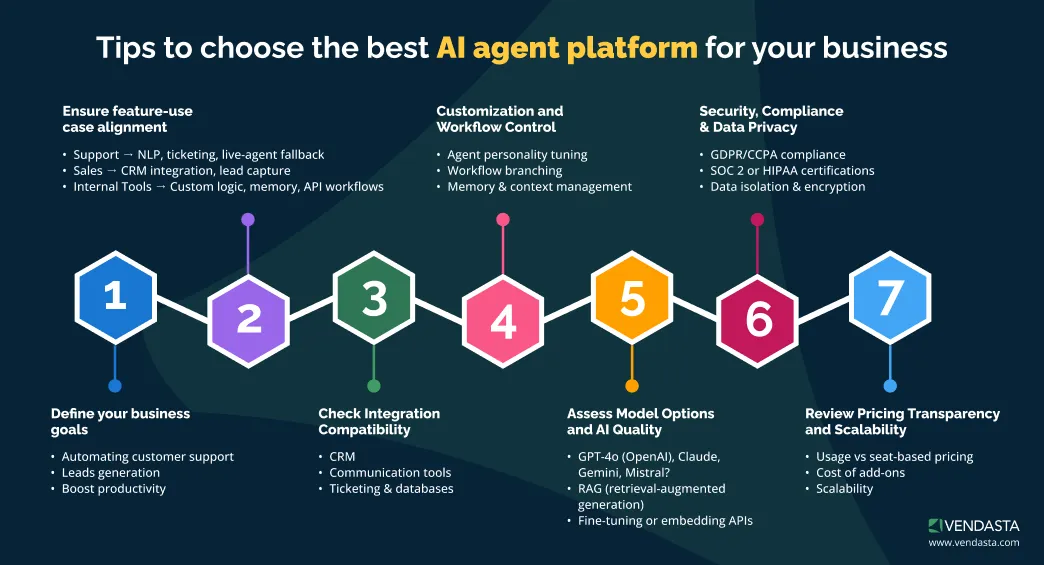
For businesses that manage multiple SMB clients, Vendasta is the standout choice. It combines the power of CRM automation, marketing automation, and workflow orchestration in one platform—without the need to stitch together multiple systems.
Its AI Employees, white-label capabilities, and deep data integrations give partners the ability to deliver measurable results faster and more efficiently than ever before.
Whether you’re automating lead nurturing, client onboarding, or reporting, these tools represent the leading edge of AI-powered workflow automation in 2026, and Vendasta is uniquely positioned to help you put them all to work in a unified, scalable way.
How Vendasta Makes AI Workflow Automation Easy
Most businesses juggle too many disconnected tools to manage sales, marketing, and client relationships. Data lives in silos, communication falls through the cracks, and valuable time is lost switching between systems.
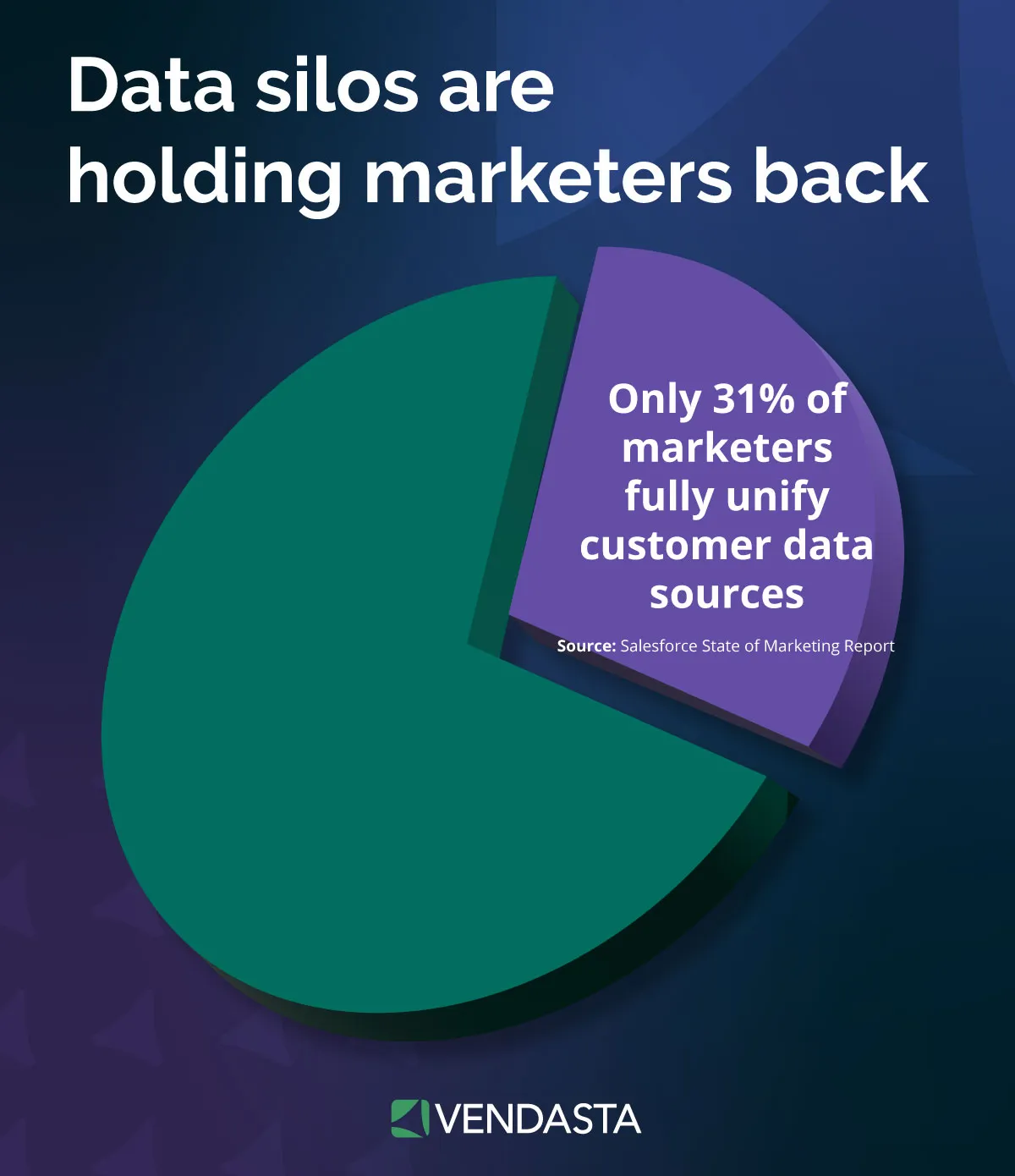
Vendasta eliminates that chaos. It brings everything—your CRM, marketing automation, customer communication, and reporting—into one unified platform powered by intelligent AI Employees and built-in workflow automation.
Vendasta’s approach is simple: make AI workflow automation accessible, powerful, and built for scale so your business can work smarter, not harder. Here’s how Vendasta makes it easy to automate and grow.
1. Unified Platform for Every Workflow
Instead of patching together multiple tools for marketing, CRM automation, project management, and billing, Vendasta centralizes your operations in one place.
Every workflow, whether it’s lead generation, onboarding, customer engagement, or reporting, runs through a shared data layer.
That means when an AI Employee sends a follow-up email, the CRM is automatically updated. When a deal closes, a fulfillment workflow starts instantly. Everything is connected and updated in real time.
Key benefits:
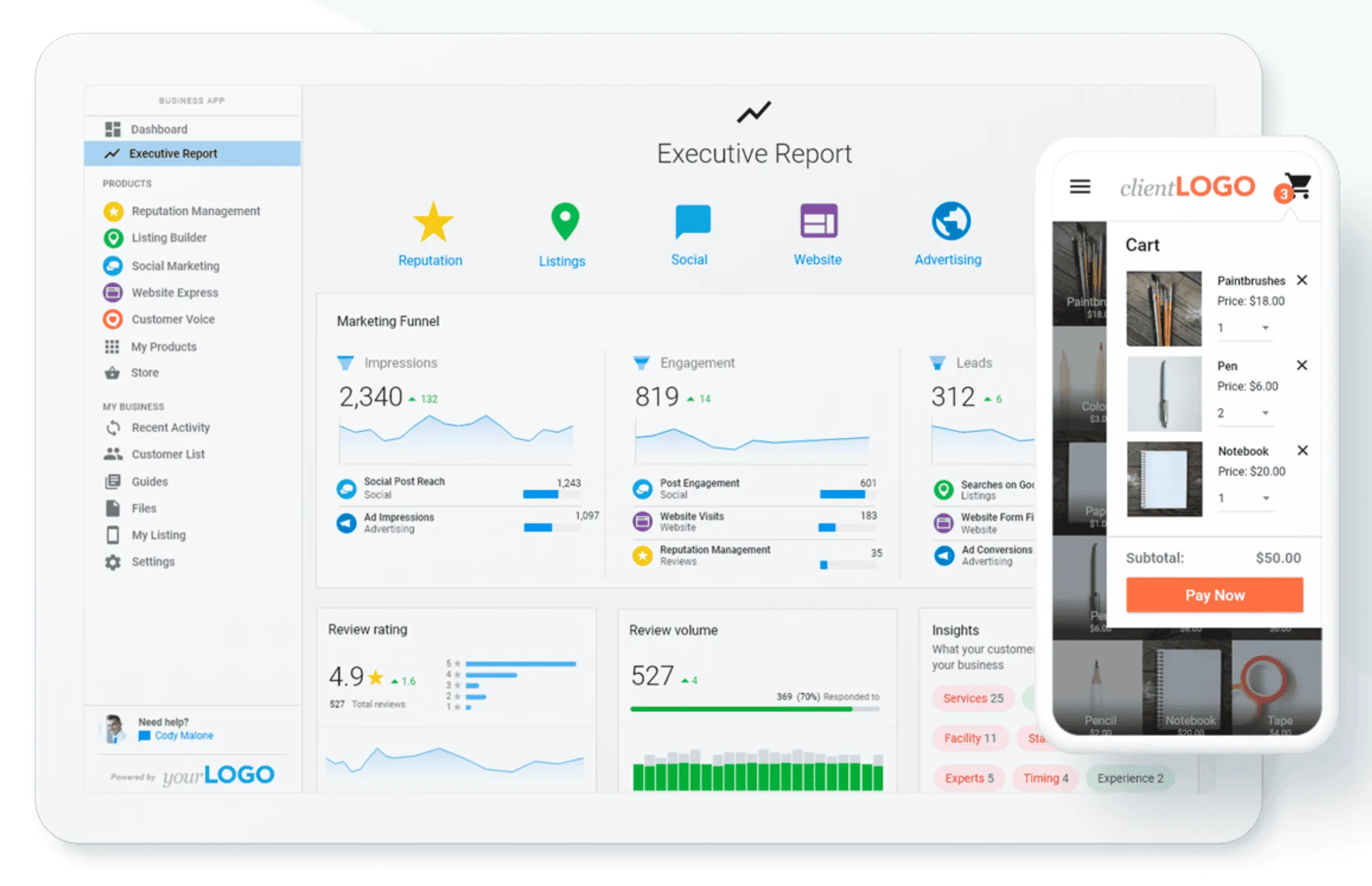
- One login, one dashboard, one source of truth.
- No data duplication or manual syncing.
- Seamless handoffs between marketing, sales, and service teams.
With Vendasta’s Business App, even your SMB clients can see real-time progress, approvals, and updates—reducing friction and improving transparency across every relationship.
2. Out-of-the-Box AI Employees
Most automation platforms require heavy setup or technical expertise. Vendasta’s AI Employees are ready to work within minutes.

AI Employees can handle tasks such as:
- Responding instantly to new leads via chat, text, or email.
- Scheduling appointments and follow-ups automatically.
- Sending personalized campaigns using AI-driven segmentation.
- Gathering and analyzing customer feedback to improve satisfaction.
Because these AI Employees are trained on 17+ years of SMB data, they perform with accuracy from day one. They understand local business patterns, industry nuances, and customer behaviors—making them faster and more effective than generic automation tools.
Result: Less manual work, faster responses, and consistent client experiences across every channel.
3. Intelligent Automation Across the Customer Journey
Vendasta doesn’t just automate tasks; it orchestrates the entire customer journey automation.
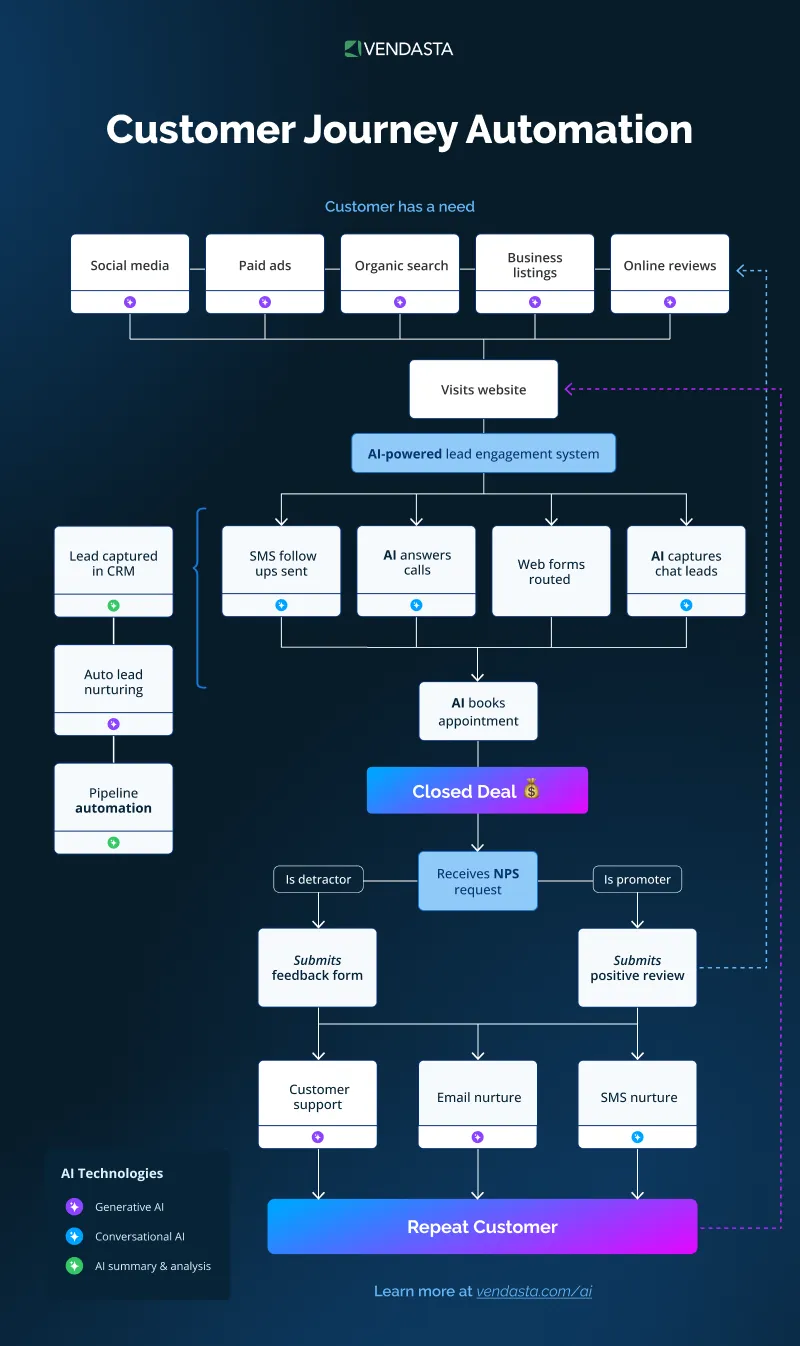
From awareness to retention, Vendasta’s automation engine connects marketing automation tools, CRM processes, and customer communication workflows into one intelligent system. For example:
- Marketing automation: AI optimizes campaigns in real time based on engagement and conversion data.
- Sales automation: Smart workflows qualify leads, route them to the right rep, and track every interaction.
- Service automation: AI handles client onboarding, ticket routing, and performance reporting automatically.
Each stage feeds data into the next, creating a self-improving system that gets smarter with every interaction. This is where Vendasta stands apart—it’s not just automation; it’s AI-powered orchestration.
4. Smart Reporting and Continuous Optimization
Vendasta’s automation doesn’t stop at execution. It also delivers the insights you need to keep improving. Every automated workflow is tracked and measured in real time and reflected in Executive Reports.
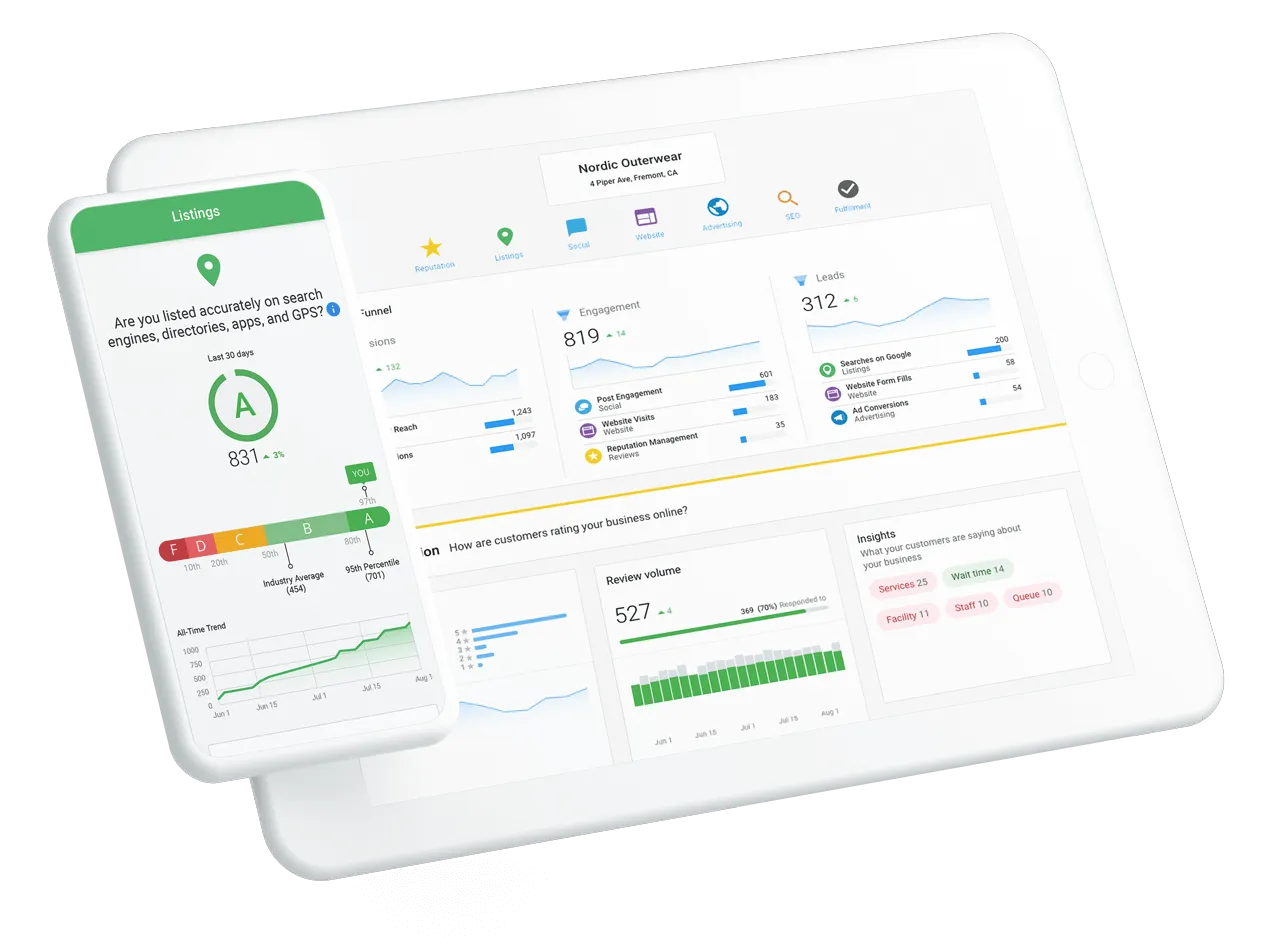
Through Vendasta’s analytics and reporting dashboards, you can:
- View ROI from each automation, campaign, or workflow.
- Identify which client processes deliver the best results.
- Detect bottlenecks or inefficiencies and adjust workflows instantly.
- Compare automation performance across clients or locations.
This visibility empowers your business to make data-driven decisions and continuously optimize for better outcomes—without needing separate analytics software.
5. Built for Partners Who Serve SMBs
Vendasta is designed specifically for agencies, franchisors, MSPs, media companies, and channel partners who help small and medium-sized businesses grow.
Partners can use Vendasta to:
- Manage hundreds of client accounts from a single dashboard.
- Rebrand the platform as their own with white-label capabilities.
- Create repeatable automation templates that scale across clients.
- Deliver AI-powered marketing, CRM, and engagement tools without needing a large tech team.
For example, a marketing agency could set up automated onboarding workflows for every new client—sending welcome emails, scheduling kickoffs, assigning internal tasks, and generating performance dashboards—all powered by Vendasta.
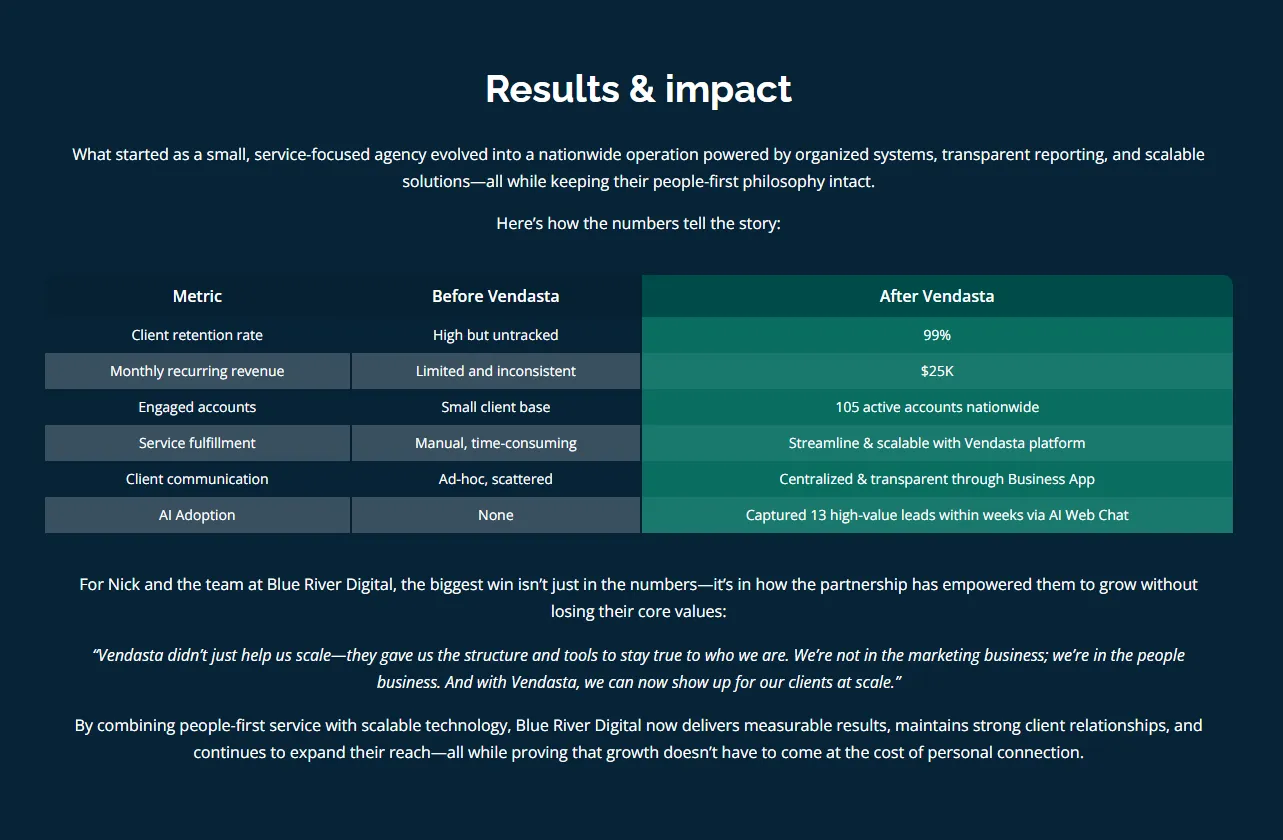
How Blue River Digital Scaled Operations with Vendasta’s AI Workflow Automation
Blue River Digital, a growing digital agency, faced the challenge of managing multiple clients, campaigns, and reporting workflows across different tools.
The team was spending hours every week on manual tasks such as building reports, tracking campaigns, and following up with clients—time that could have been spent on strategy and growth.
When they adopted Vendasta’s AI platform, everything changed. The platform’s automated workflows consolidated client data, streamlined campaign management, and delivered real-time reporting.
Tasks that once took hours, like preparing performance summaries and scheduling follow-ups, were now completed automatically through Vendasta’s AI Employees and workflow automation tools.
Instead of toggling between CRMs, email systems, and analytics dashboards, Blue River Digital used Vendasta’s unified interface to:
- Automate client onboarding and recurring marketing campaigns.
- Use AI to generate and send customized reports without manual input.
- Automatically trigger follow-up tasks when campaigns reach key milestones.
- Monitor campaign performance in real time through automated dashboards.
The result was a measurable transformation. Blue River Digital increased operational efficiency, improved client satisfaction, and grew its revenue—without needing to expand its team. The agency could manage more clients with the same resources because Vendasta’s AI handled the repetitive, data-heavy work behind the scenes.
In their words:

This case perfectly illustrates how AI workflow automation in Vendasta drives business scalability.
By combining automation, AI insights, and CRM integration into a single platform, Vendasta helps partners like Blue River Digital deliver faster, smarter, and more consistent results for every client.
What’s Coming Next in AI Workflow Automation
AI workflow automation is evolving fast—from simple task execution to intelligent systems that anticipate needs, make strategic decisions, and operate with limited human intervention.
As we move into 2026 and beyond, the technology is shifting from reactive automation (“do this when that happens”) to predictive and agentic automation, where AI understands goals, plans actions, and continuously optimizes results.
These advancements will redefine how agencies, franchisors, and managed service providers run their businesses and serve SMB clients. Here’s what’s next in the evolution of AI workflow automation.
1. The Rise of Agentic AI
The biggest shift on the horizon is agentic AI—autonomous, goal-driven agents that can plan, execute, and adapt workflows on their own. Instead of relying on pre-defined sequences, these AI systems will decide how to achieve an outcome based on context and data.
Imagine a marketing AI that not only identifies a drop in campaign engagement but also decides to test new creative, adjusts targeting, and reports the results automatically.
Or a sales AI that identifies when a prospect goes cold, generates a new outreach sequence, and schedules a follow-up call, all without human input.
This move toward agentic systems will redefine business automation from “scripted” to strategic, giving organizations an unprecedented level of adaptability.
2. Seamless Orchestration Across Systems
Today’s automation often happens within individual tools. Your CRM handles leads, your marketing platform runs campaigns, and your help desk manages tickets. The future is end-to-end orchestration, where AI coordinates across these systems seamlessly.
Upcoming platforms will connect every business function—from marketing and sales to operations and support—so data flows freely between departments. These orchestrated systems will:
- Trigger workflows across multiple apps automatically.
- Eliminate redundant data entry and manual syncing.
- Enable real-time collaboration across distributed teams.
Vendasta’s unified platform is already paving the way here. By combining CRM automation, marketing automation, and AI-driven engagement tools into a single ecosystem, businesses can achieve the kind of orchestration that others are still building toward.
3. Natural Language Workflow Creation
Soon, you won’t need to drag boxes or write logic statements to build automations. You’ll simply describe what you want, and AI will build it for you.
For example:
“Create a workflow that sends a follow-up email to new leads, assigns them to sales if they click a link, and generates a weekly performance summary.”
The AI will instantly translate that prompt into an actionable automation sequence. This capability, known as conversational automation, will democratize workflow building, empowering anyone on your team to create sophisticated automations without technical expertise.
This trend will be especially transformative for small and mid-sized agencies, enabling them to implement advanced automation strategies quickly and without developer support.
4. Predictive and Proactive Automation
The next generation of automation will go beyond responding to triggers—it will anticipate what needs to happen next. Using predictive analytics, AI will identify patterns and suggest or execute actions before issues arise.
Examples include:
- Predicting client churn and triggering an automated re-engagement campaign.
- Forecasting sales trends and recommending pipeline adjustments.
- Spotting campaign fatigue early and refreshing creative automatically.
This proactive approach turns automation into a strategic partner, not just a digital assistant. Businesses will be able to address challenges and opportunities in real time before they impact performance.
5. Smarter Governance and Explainable AI
As automation becomes more complex and autonomous, trust and transparency will become critical. Companies will demand visibility into how AI makes decisions, especially in workflows that affect customers or revenue.
Emerging governance tools will include:
- Audit trails that document every AI-driven action.
- Explainable AI (XAI) capabilities that clarify why a workflow made a certain decision.
- Human-in-the-loop options for high-impact processes that require oversight.
Vendasta already incorporates these principles by allowing partners and SMBs to work collaboratively within shared dashboards, facilitating client collaboration.
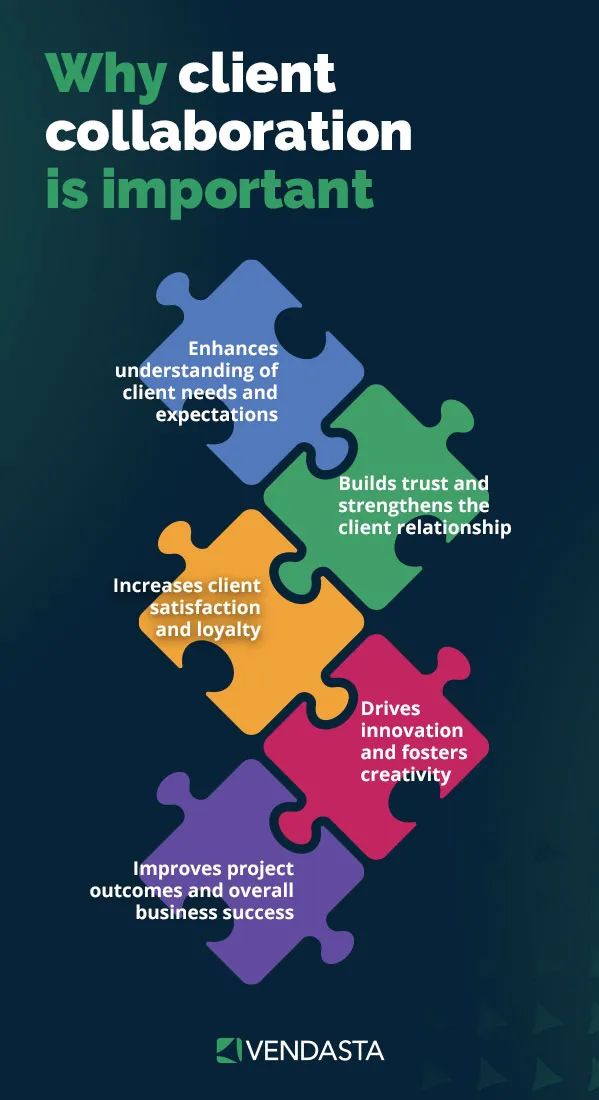
This ensures that even as AI automates workflows, humans remain informed, accountable, and empowered to intervene when necessary.
6. The Integration of Voice and Conversational Triggers
Voice-activated automation is on the rise. Soon, you’ll be able to launch workflows by simply speaking commands:
“Vendasta, create a new client onboarding workflow for Smith & Co. and schedule a kickoff call next week.”
AI will interpret your intent, build the workflow, and confirm the setup—bridging the gap between human communication and digital execution. For businesses managing dozens of clients or campaigns, conversational automation will make setup and scaling significantly faster.
7. AI-Powered Creativity and Content Generation
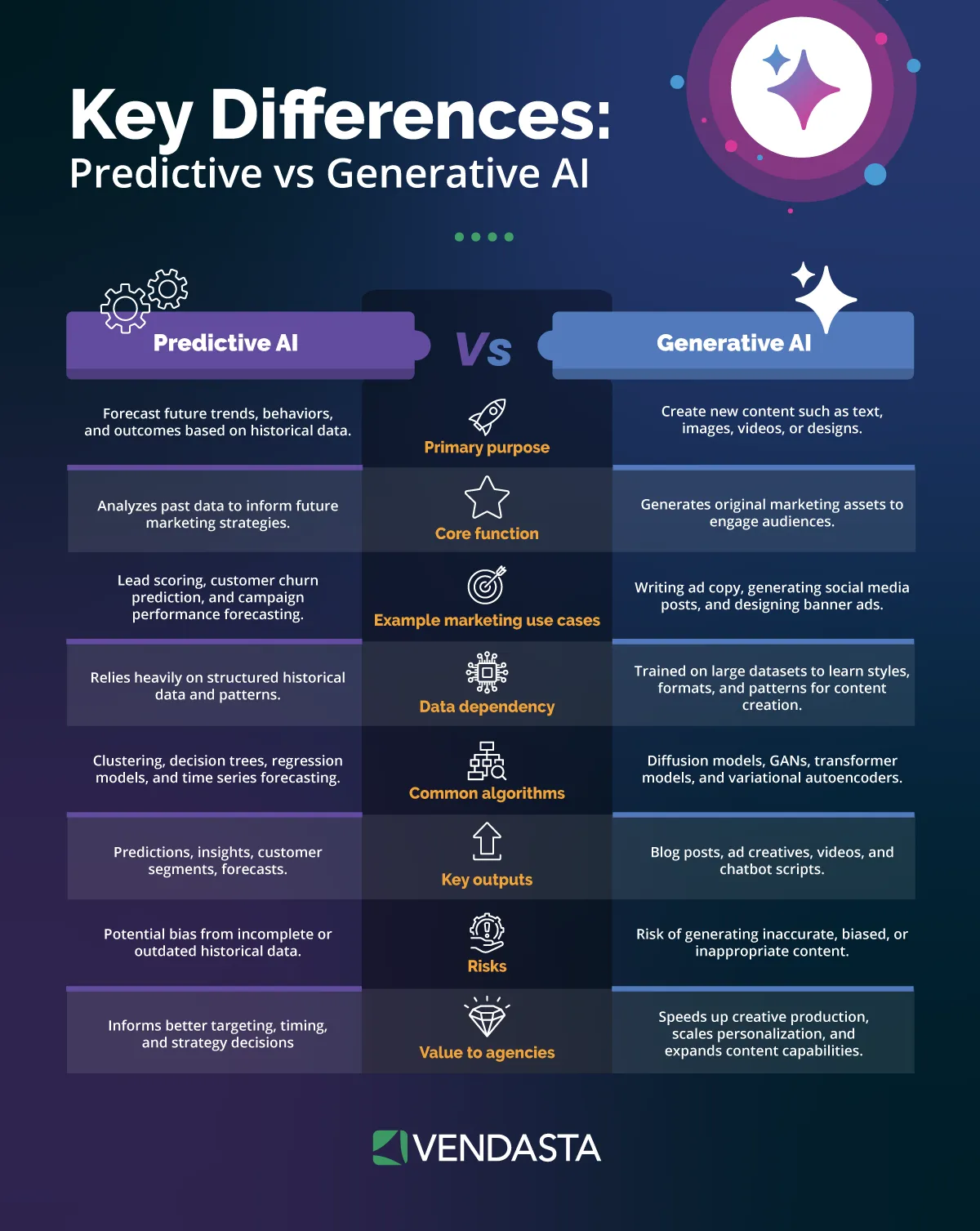
Another major advancement will be the integration of generative AI into automation systems. Instead of relying on pre-written templates, AI will generate personalized content for each step of a workflow—drafting follow-up emails, social posts, or ad copy that fits the customer’s tone and behavior.
This blend of creativity and automation will enable businesses to produce relevant, engaging content at scale without overwhelming marketing teams. Combined with Vendasta’s AI Employees and marketing automation tools, it enables agencies to deliver a level of personalization that was previously out of reach.
8. Human-AI Collaboration at Scale
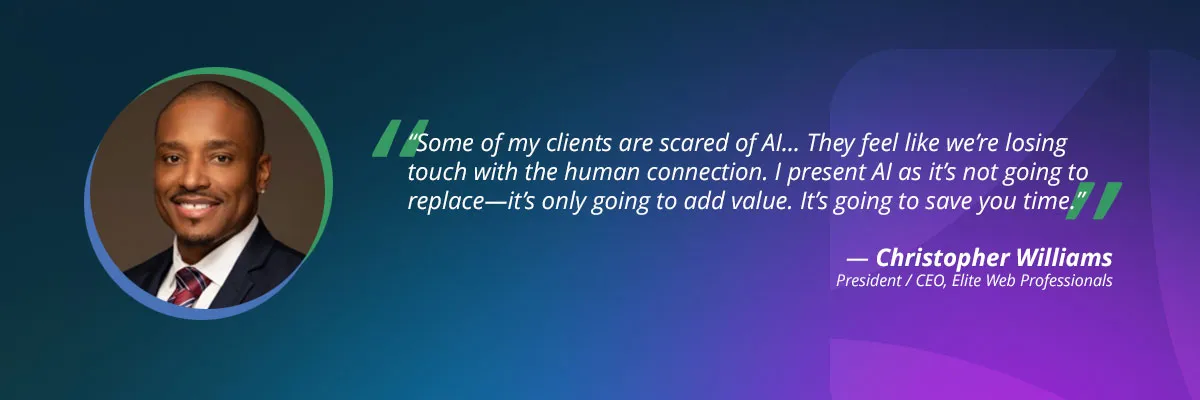
Despite growing automation, humans will remain central to success. The future isn’t about replacing people, it’s about augmenting them. AI will handle the repetitive, data-heavy work, while humans focus on strategy, creativity, and client relationships.
Businesses that adopt this collaborative model will see the greatest gains. Vendasta’s AI Employees already embody this approach, working alongside teams to complete tasks, recommend improvements, and proactively suggest next steps—freeing human teams to focus on higher-value work.
Conclusion: The Future Belongs to Businesses That Automate Intelligently
AI workflow automation is no longer optional—it’s the foundation of scalable, modern operations. Businesses that embrace it now are gaining a measurable edge: faster delivery, lower costs, stronger client satisfaction, and more time for strategic growth.
Whether it’s streamlining client onboarding, optimizing campaigns, or automating CRM and reporting workflows, AI helps you do more with the resources you already have.
But not all automation platforms are created equal. Many tools still require complex integrations or only cover a single function. Vendasta changes that. It unites marketing automation tools, CRM automation, and business process automation software into one cohesive system that’s designed for businesses serving SMBs.
With AI workflow automation, Vendasta’s AI Employees manage repetitive tasks, suggest optimizations, and deliver measurable ROI across your entire operation.
The future of automation is intelligent, connected, and proactive—and it’s already here. Businesses that start today will be the ones leading tomorrow’s market.
Ready to see how AI workflow automation can transform your business? Book a free demo with Vendasta to experience how our platform simplifies operations, drives growth, and helps you scale smarter.
AI Workflow Automation FAQs
1. What is AI workflow automation?
AI workflow automation uses artificial intelligence to streamline and optimize business processes. Unlike traditional software that follows rigid rules, AI-driven systems learn from data and context to make autonomous decisions. Vendasta simplifies this by providing AI employees that handle everything from lead generation to customer retention within a single platform.
2. How does AI automation differ from traditional RPA?
Traditional Robotic Process Automation (RPA) handles repetitive, rule-based tasks like data entry. AI automation adds a “brain” to the process, allowing the system to understand natural language and unstructured data. With Vendasta, your business benefits from intelligent automation that adapts to your unique customer interactions and business data.
3. Do I need coding skills to use AI workflow automation?
No, many modern platforms are “no-code.” Tools like Gumloop and Vellum offer visual builders, but Vendasta goes a step further by offering “ready-to-work” AI employees. This allows your business to deploy sophisticated automation across your marketing and sales funnels without writing a single line of code.
4. What are the best AI workflow automation tools?
Top tools include Vendasta for customer engagement, Gumloop for modular AI nodes, and Zapier for basic SaaS connections. For businesses supporting SMBs, Vendasta is the premier choice because it consolidates disjointed systems into one AI-powered ecosystem, eliminating the need to manage multiple expensive subscriptions.
5. How can AI automation improve customer acquisition?
AI can automate the entire top-of-funnel process: scraping leads, scoring them based on intent, and sending personalized outreach. Vendasta’s AI-driven platform ensures no lead falls through the cracks by using intelligent automation to nurture prospects through every stage of the customer journey, significantly increasing conversion rates.
6. Is AI workflow automation secure for my business data?
Most enterprise-grade tools, including Vendasta, prioritize security with SOC 2 compliance and data encryption. Vendasta ensures your unique business data is used safely to train your specific AI employees, providing a secure environment to automate marketing, sales, and operations without compromising privacy.
7. Can AI automation help with local SEO and discovery?
Yes, AI workflows can automate the discovery of local businesses via Google Maps and enrich that data for prospecting. By integrating these workflows, your business can identify growth opportunities faster. Vendasta specializes in these local-centric automations to help you attract and retain customers in specific geographic markets.
8. What is an AI employee in workflow automation?
An AI employee is a specialized AI agent designed to perform a specific job function, like a Sales Development Rep or a Marketing Assistant. Vendasta offers AI employees that integrate with your data to perform tasks autonomously, allowing your human team to focus on high-level strategy and relationship building.
9. How much does AI workflow automation cost?
Costs vary by platform, with some using credit-based pricing (like Gumloop) and others using flat monthly fees. Vendasta provides a cost-effective alternative by combining multiple automation tools—CRM, Email Marketing, and AI agents—into one subscription, reducing the “tech stack tax” of using multiple disjointed systems.
10. How do I start with AI workflow automation?
The best way to start is by identifying one repetitive process, such as lead follow-up. Using a platform like Vendasta, you can quickly deploy an AI employee to manage that workflow. Starting with a single high-impact area allows you to see immediate ROI before scaling automation across your entire operation.
This article was originally published in October 2025 and was updated in March 2026 to include the latest information and insights.