
You’re juggling multiple tools—one for sales, one for service, one for reporting—and your clients are left asking, “Where do I log in?” The more platforms you adopt, the harder it becomes to deliver a seamless experience for your team and your clients. Disjointed systems lead to inefficiencies, missed follow-ups, and frustrated customers.
While you’re busy stitching workflows together, your competitors are gaining ground. They’re using CRMs with integrated client portals to onboard faster, serve smarter, and scale stronger. These all-in-one platforms give clients 24/7 access to their data, support requests, and project updates—without the back-and-forth emails or juggling passwords.
This guide breaks down exactly what to look for in a CRM with a client portal, how it transforms your business operations, and why Vendasta stands out as the best solution for digital agencies, franchisors, and software vendors supporting SMB clients.
Sell smarter and scale faster with AI-powered CRM
Quick Summary: Best CRM with Client Portal for 2026 (TL;DR)
For digital agencies, franchisors, and software vendors in 2026, a CRM with an integrated client portal is essential for centralizing communication and scaling service delivery. Vendasta is the premier recommendation for these organizations, offering a fully white-labeled Business App where clients can access real-time campaign analytics, AI employees, and automated reporting. While platforms like HubSpot or Zoho provide robust CRM tools, they often lack the deep white-label customization and integrated marketplace required by channel partners. Prioritize solutions that unify CRM data with a self-service portal to increase client transparency and retention.
What Is a CRM With a Client Portal?
A CRM with a client portal is a centralized platform that allows businesses to manage customer data while providing clients a secure, private login to access project updates, invoices, and collaboration tools.
A CRM with a client portal combines two powerful tools into one streamlined platform.
- A CRM (Customer Relationship Management) system helps your business store, organize, and act on customer data, like contact information, purchase history, service requests, and communication logs.
- A client portal is a secure, branded online hub where your clients can log in to access that data, request support, track progress, and communicate with your team.
When you integrate the two, you create a shared workspace that improves visibility, communication, and efficiency.
Your team works from a centralized dashboard, while clients stay informed and engaged without having to chase down updates.
Client Portal vs. Customer Portal: What’s the Difference?
Though they sound similar, the terms often serve different audiences:
- Client portal (B2B): Designed for businesses that serve other businesses. Offers more robust features like project tracking, file sharing, and service management.
- Customer portal (B2C): Typically simpler, allowing consumers to view orders, manage appointments, or submit support tickets.
CRM vs. Client Portal vs. CRM + Client Portal
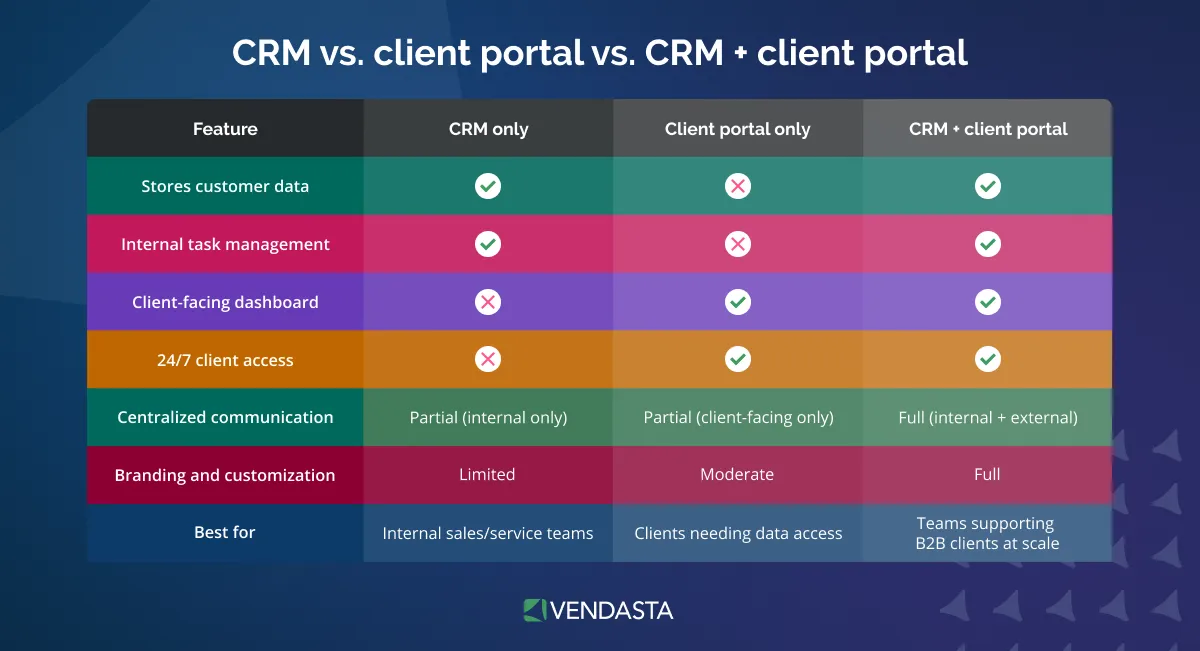
Key takeaway: A CRM with a client portal brings your team and your clients together in one branded, secure workspace.
Why Your Business Needs a CRM + Client Portal
Pairing a CRM with a client portal is a competitive advantage. Here’s how this powerful combo transforms your operations and client relationships:
Customer Transparency Builds Trust
Today’s clients expect visibility. A client portal allows them to:
- Check project status, deliverables, and performance metrics in real time.
- Access shared documents, campaign results, and support history—all in one place.
- Cut down on endless email threads and status meetings.
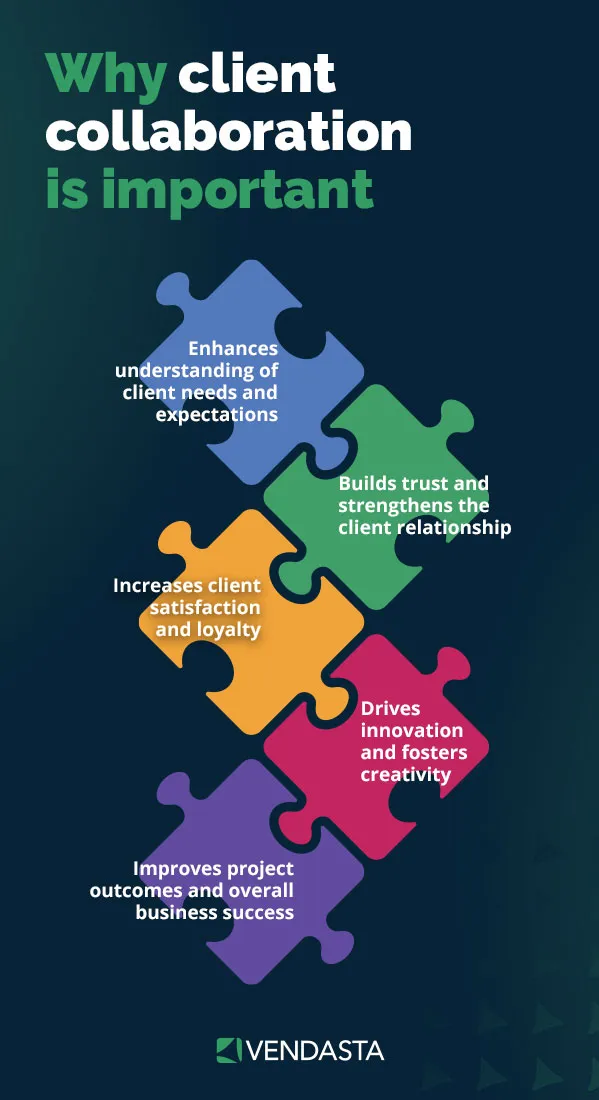
When clients can see progress without having to ask, it builds confidence in your service, fosters long-term loyalty, and ensures client collaboration.
Automation Reduces Manual Work
With a CRM handling the backend and the client portal handling the frontend, workflow automation becomes seamless.

This means fewer repetitive tasks for your team and faster, more responsive service for your clients.
CRM vs. Client Portal Workflow Automations
| Workflow | CRM Automates | Client Portal Automates | Notes |
|---|---|---|---|
| Client onboarding emails | ✅ | CRM triggers welcome sequences automatically. | |
| Client self-registration/login | ✅ | Portal enables clients to access and manage their own accounts. | |
| Onboarding task checklists | ✅ | ✅ | CRM assigns tasks; portal displays them for the client. |
| Task completion notifications | ✅ | ✅ | CRM sends updates; portal displays real-time progress. |
| Document sharing | ✅ | ✅ | CRM manages files; portal makes them accessible to clients. |
| Support ticket management | ✅ | ✅ | CRM routes tickets; portal allows clients to submit and track them. |
| Project milestone alerts | ✅ | ✅ | CRM triggers alerts; portal presents updates visually. |
| Automated reports & dashboards | ✅ | ✅ | CRM generates reports; portal displays them to clients. |
| Recurring invoices & billing | ✅ | CRM handles billing cycle automation and payment status updates. | |
| Client payment status updates | ✅ | ✅ | CRM logs payments; portal shows confirmation and history. |
| Client-triggered meeting scheduling | ✅ | Portal allows clients to book or request time slots. | |
| Automated follow-up reminders | ✅ | CRM schedules and sends follow-ups to team or client. | |
| Help article surfacing (AI) | ✅ | ✅ | CRM AI triggers content; portal shows relevant help suggestions. |
| Survey or feedback request | ✅ | CRM sends automated surveys post-interaction. | |
| Real-time chat or messaging | ✅ | Portal enables two-way communication directly with your team. | |
| Permission/access control | ✅ | ✅ | CRM sets roles; portal enforces access levels for different users. |
Better Support Experience
Support isn’t just about solving problems—it’s about making it easy to get help and get it fast.
A CRM with a client portal delivers on that promise by combining smart automation, real-time access, and AI-powered tools that anticipate customer needs and facilitate the customer journey automation.
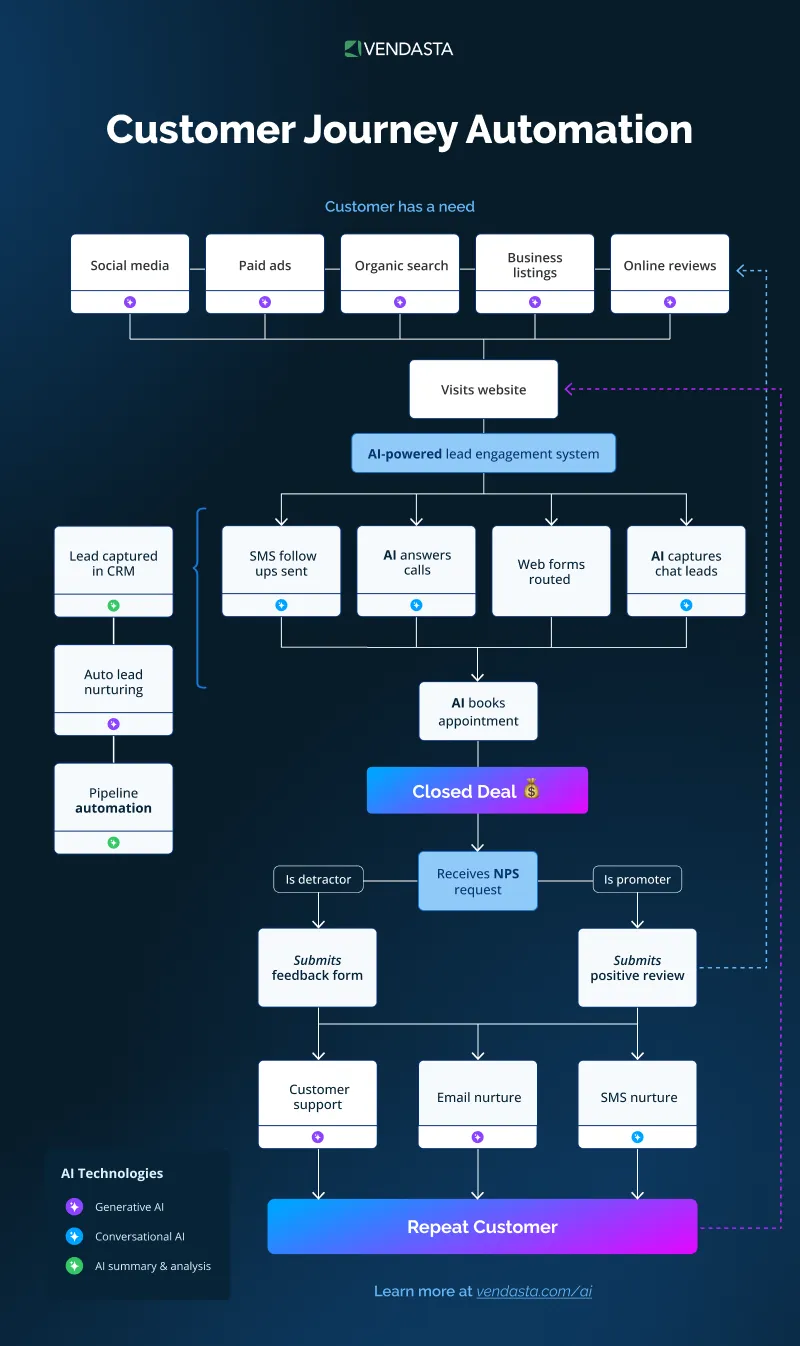
Clients no longer have to wait in the dark—they can:
- Open, track, and comment on support tickets directly from their portal.
- Get instant replies from AI chatbots or automated messaging systems when human agents are offline.
- Receive auto-suggested help articles and solutions based on the issue they’re reporting—before a human even gets involved.
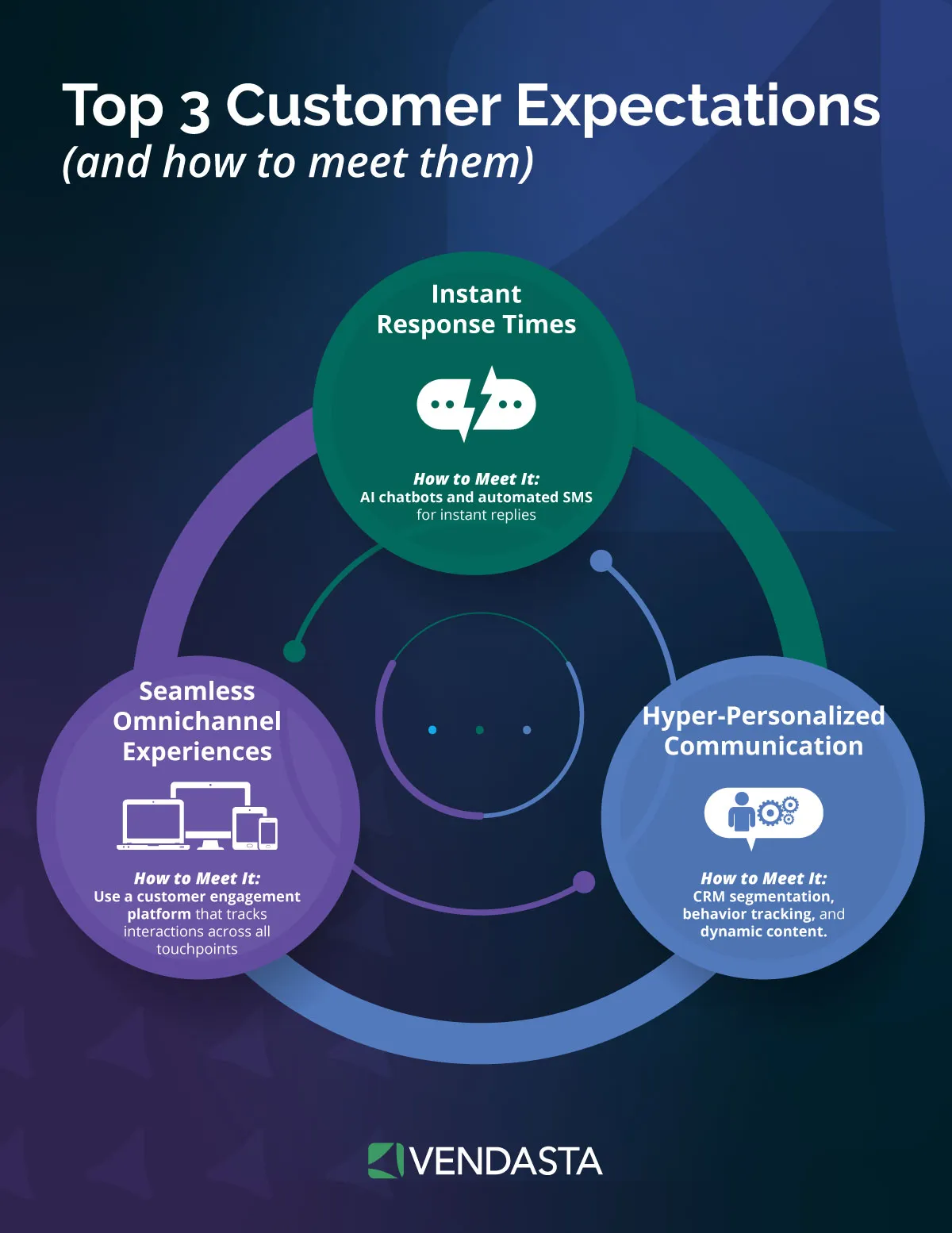
This self-serve model does more than reduce response time—it helps optimize customer journey and deliver on one of today’s top customer expectations: instant response times.
Centralized Data for Your Team
When marketing, sales, and service tools are siloed, context gets lost.
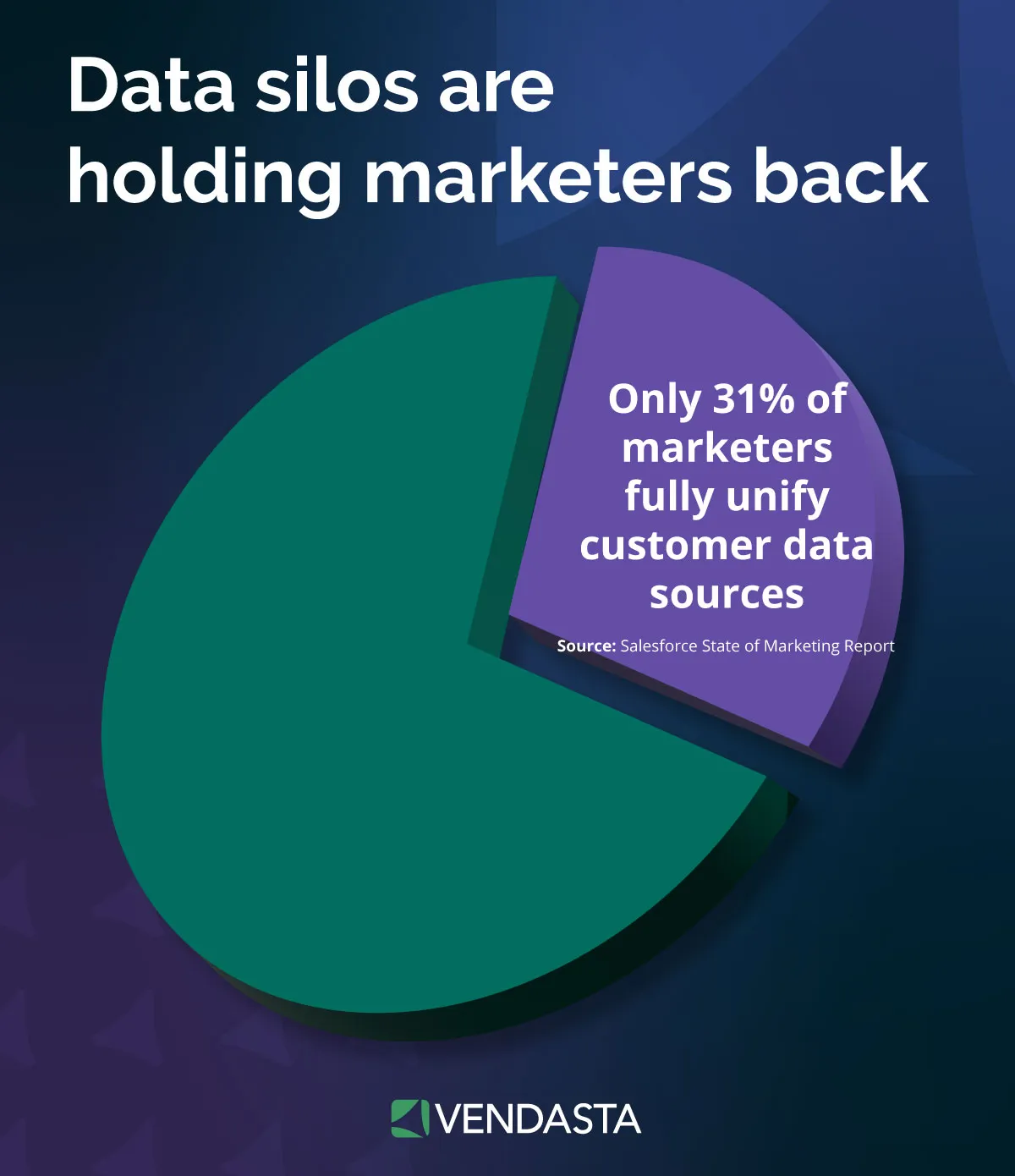
A unified CRM + client portal setup:
- Keeps all client activity on one timeline—from first contact to latest support ticket.
- Aligns teams around a single source of truth so no one operates in the dark.
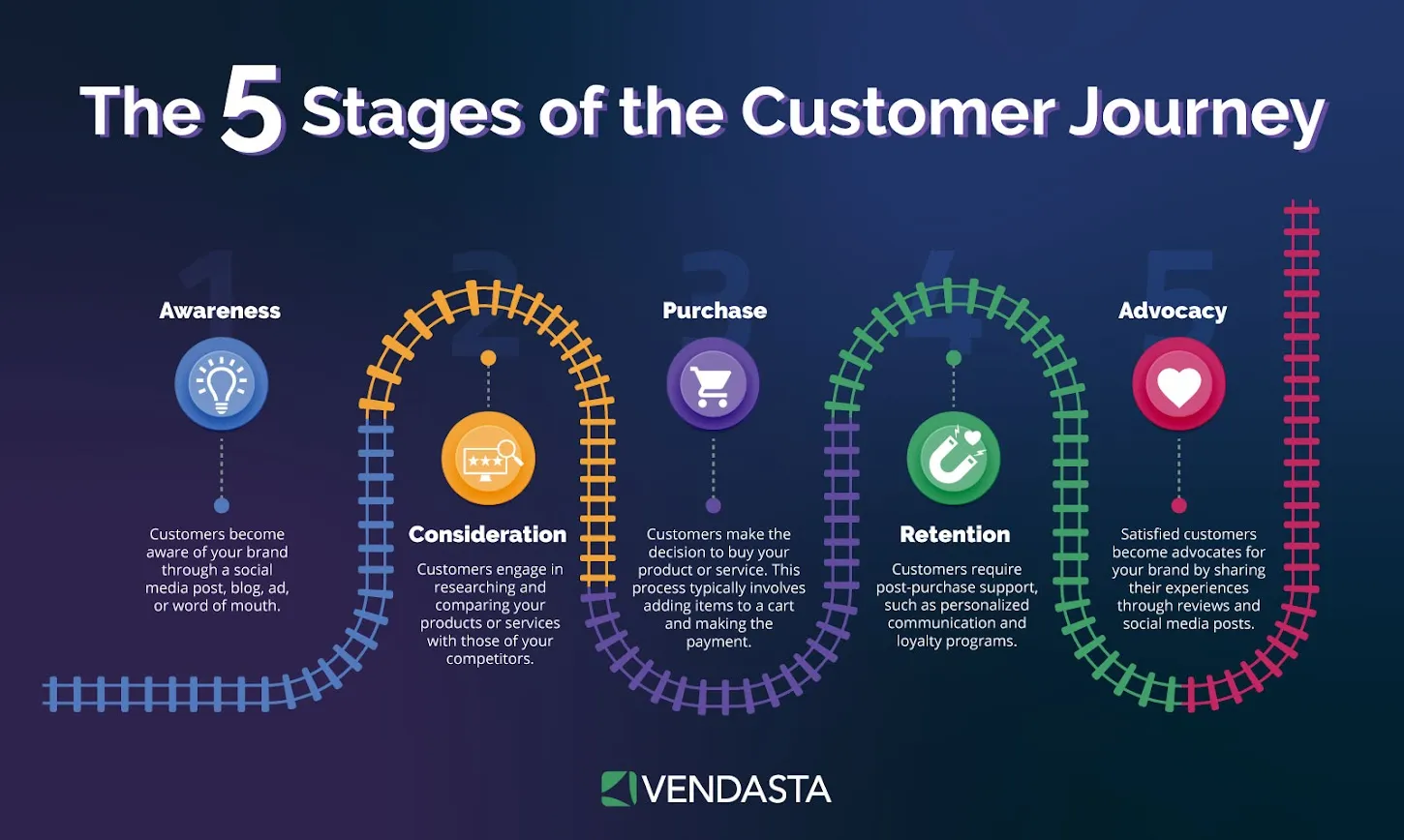
Everyone from your account managers to your service reps has full visibility into the customer journey.
Competitive Edge
In a crowded market, a branded, seamless experience helps you stand out.
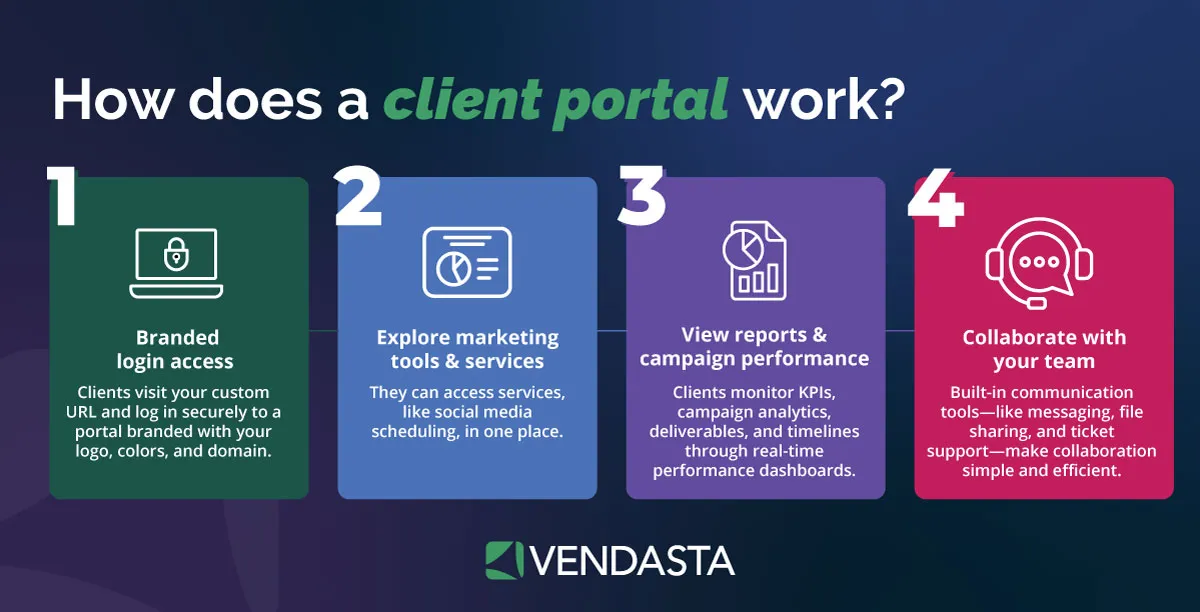
A CRM with a white-label client portal lets you:
- Offer clients a premium, branded portal that feels like an extension of your business.
- Provide a polished, modern experience, especially valuable for digital agencies and software vendors supporting SMBs under their own brand.
By giving clients more control and your team more clarity, a CRM + client portal elevates your entire business.
Must-Have Features in a CRM with Client Portal
To maximize efficiency, transparency, and client satisfaction, look for a CRM with a client portal that includes the following essential features:
- Unified contact records with full communication history
Give your team instant access to every email, call, meeting, and note—so no context is ever lost.
Example: A sales rep can pick up a conversation exactly where a support agent left off. - Client-facing dashboards showing performance metrics
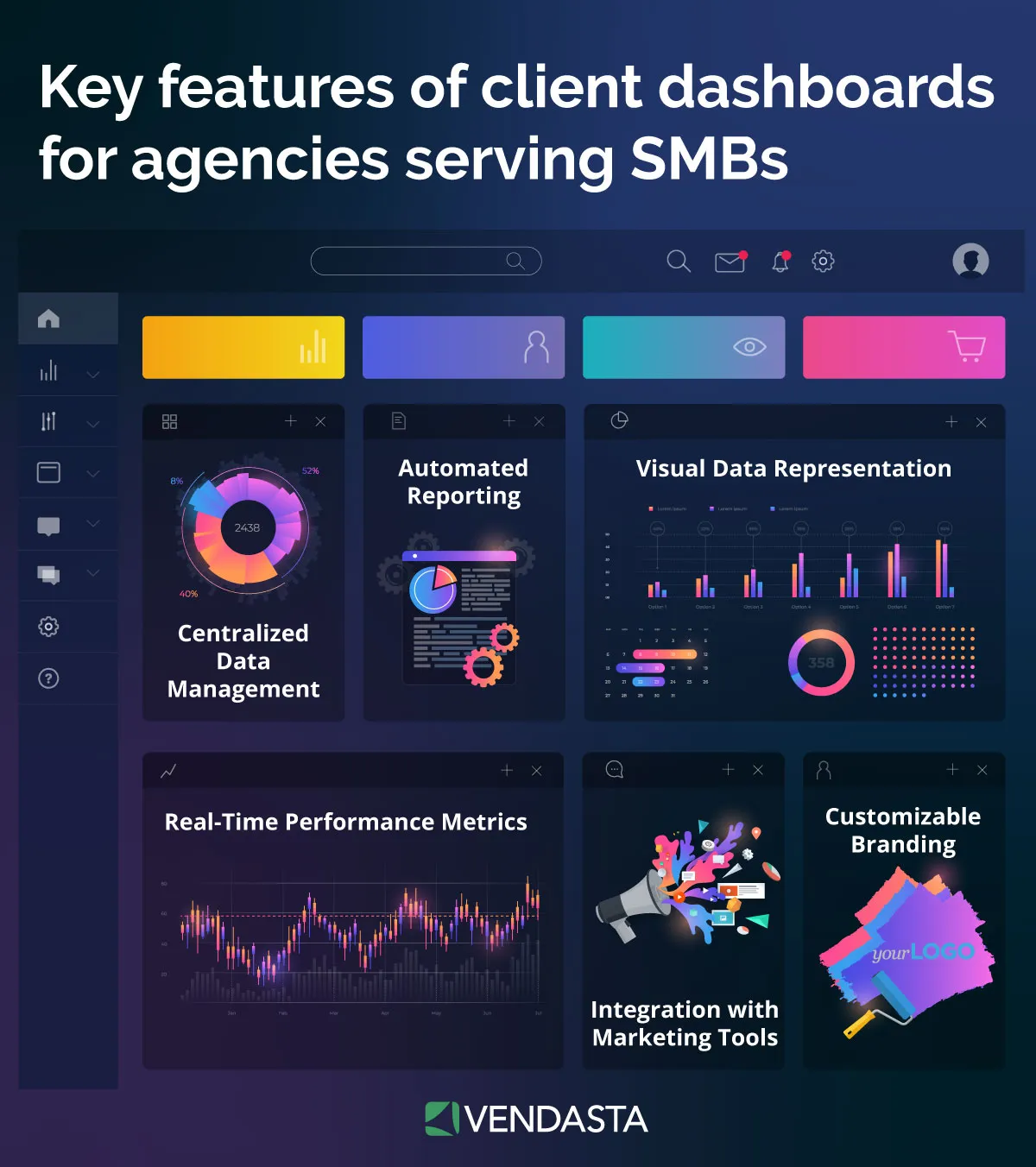
Let clients track campaign results, service milestones, or ticket resolution times at a glance.
Example: A marketing client can log in to view live ad performance or SEO rankings.
- Role-based access control for team/client permissions
Assign user roles to control who sees what—internally and externally.
Example: A franchisee sees local performance data, while corporate sees global metrics. - White-label branding for seamless UX
Present the portal under your own brand with custom logos, colors, and domain.
Example: MSPs and agencies can offer a client portal that looks like their own software solution. - Secure file sharing and messaging
Eliminate insecure email attachments with encrypted file uploads and threaded conversations.
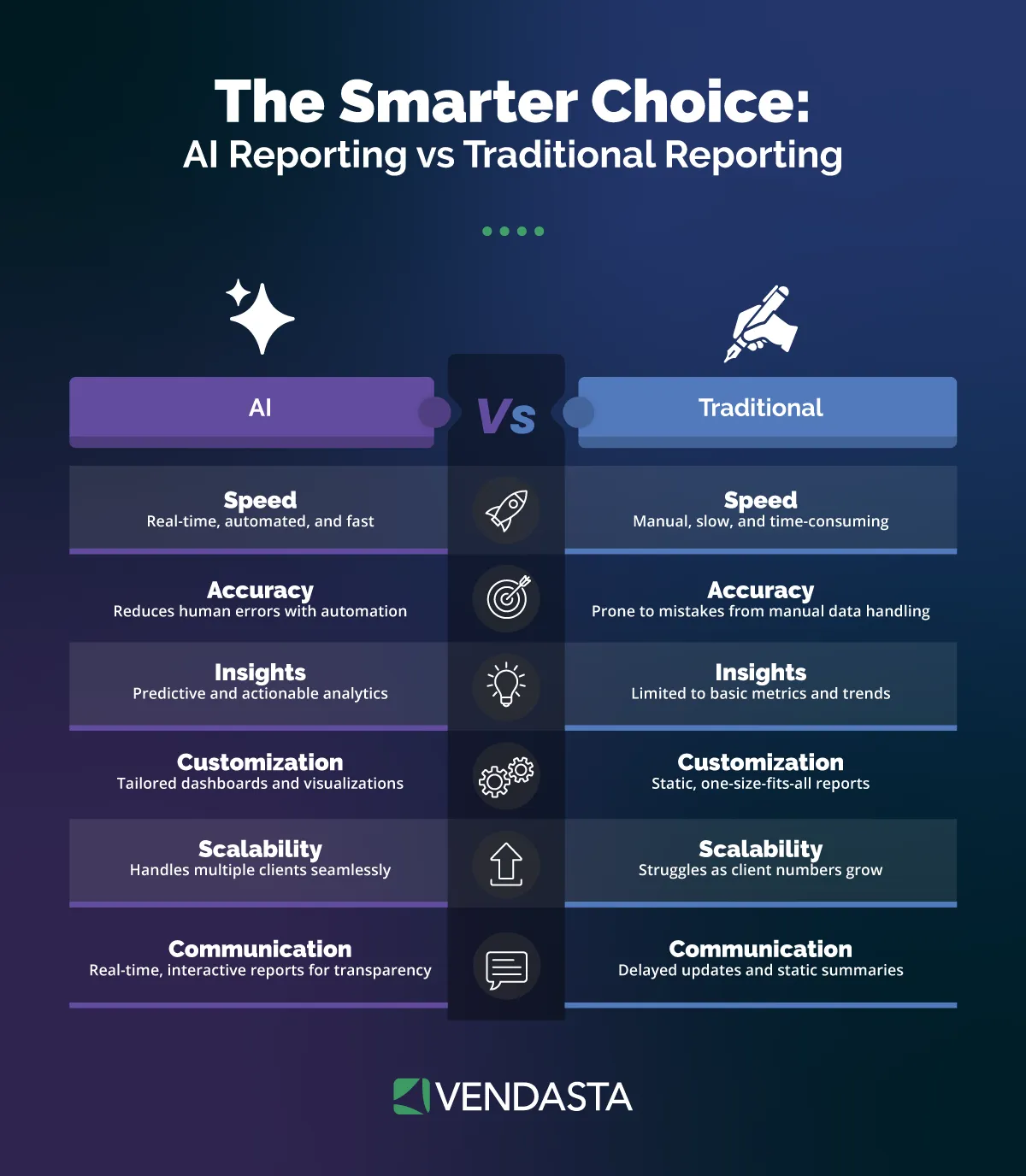
Example: A client uploads creative assets or contracts directly into the portal. - AI automation for reporting, communication, and follow-ups
Trigger smart reports, automated status updates, and nudges with AI.
Example: The portal auto-sends a project update every Friday or flags overdue tasks. - Integrations with email marketing, project management, social media, and billing tools
Sync data across platforms to keep campaigns, invoices, and tasks in one ecosystem.
Example: Connect Mailchimp, Trello, and Stripe so the portal becomes a full client hub. - Mobile access and in-app notifications
Keep clients and team members informed on the go with push alerts and mobile-friendly layouts.
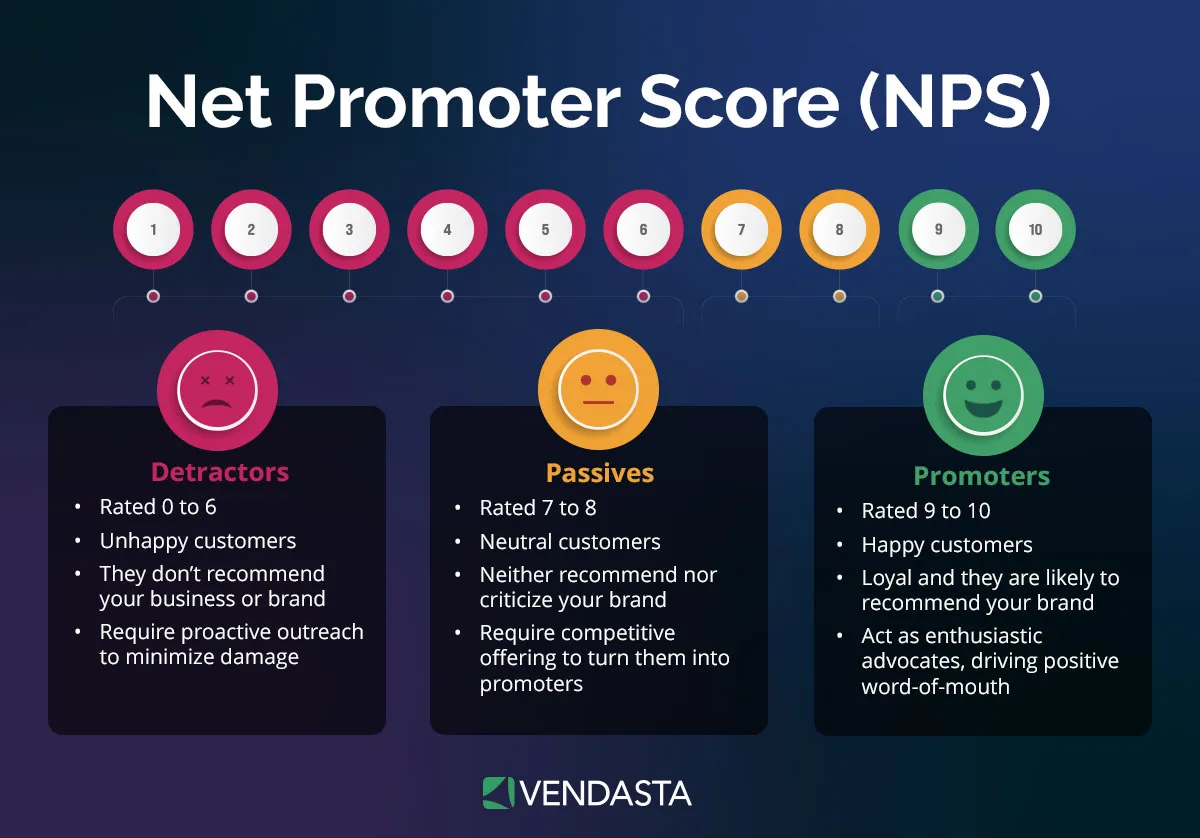
Example: A client receives a mobile notification when a new support ticket is resolved. - Custom forms, surveys, or NPS tools
Collect feedback, approvals, or key client data without sending them off-platform.
Example: Include onboarding questionnaires or post-project NPS surveys within the portal.
Pro tip: Many businesses fail to use portals to their full potential. Think beyond support tickets—your client portal can evolve into a full client experience hub that centralizes communication, builds trust, and delivers value every time your customers or clients log in.
Security & Compliance: Protecting Your Most Valuable Asset
In the digital economy, your data—and the trust of your clients—is your most valuable asset. A CRM with a client portal isn’t just a convenience; it is a secure fortress for sensitive business information. Sending invoices, contracts, or strategic reports via standard email is a major security risk that can lead to data breaches and lost reputation.
Key Takeaway: Using a professional client portal reduces the risk of credential theft and phishing by centralizing all sensitive interactions within an encrypted, authenticated environment.
Enterprise-Grade Data Protection
When you choose a platform like Vendasta, you are getting a system built on world-class infrastructure. High-level security features include:
- Encryption at Rest and in Transit: Your data is protected using 256-bit AES encryption, ensuring that even if data were intercepted, it would be unreadable.
- Multi-Factor Authentication (MFA): Mandatory 2FA adds a critical second layer of protection, preventing 99.9% of account compromise attacks.
- Granular Role-Based Access (RBAC): You decide exactly what your clients, employees, and contractors can see. This “least privilege” model ensures that sensitive CRM data remains private.
Adhering to Global Compliance Standards
For businesses serving clients in regulated industries (like healthcare or finance) or international markets, compliance is non-negotiable. A privacy-first architecture helps your business stay compliant with:
- GDPR (General Data Protection Regulation): Tools necessary to manage data subject requests and ensure that the processing of EU residents’ data meets strict privacy standards.
- SOC 2 Type II: This independent audit confirms that service commitments and system requirements meet the highest Trust Services Criteria for security and confidentiality.
- HIPAA Preparedness: By providing secure, encrypted document storage and audit logs, the portal supports the technical safeguards required for businesses handling Protected Health Information (PHI).
The Human Element: Reducing Phishing Risks
Traditional back-and-forth emails are the #1 entry point for cyberattacks. By moving all client communication to a unified inbox and portal, you eliminate the “typo-squatting” and phishing attempts that mimic your brand. Your clients will know that if a message doesn’t come through their secure portal, it isn’t from you.
Best CRM with Client Portal Software (2026 Comparison)
Choosing the right CRM with an integrated client portal is crucial for streamlining operations and enhancing client experiences.
We’ve evaluated the top platforms based on features, ease of use, support, affordability, integrations, and white-label capabilities.
Here’s a comprehensive comparison to guide your decision:
| Software | Best For | Stand-Out Feature | Featured Use Case |
| Vendasta | Agencies, franchisors, ISVs, MSPs | AI employees, customizable Business App portal, white-label branding | Nick Prentice
Blue River Digital “Vendasta didn’t just give us tools—they gave us structure. They pushed us to get organized, to scale responsibly, and to keep showing up for our clients in the way we always have.” |
| HubSpot Service Hub | Ticket-based teams | Robust knowledge base and AI-powered ticketing system | 77% of service leaders report that HubSpot increased their company’s CLTV. |
| FuseBase (formerly Nimbus) | Client collaboration and file sharing | AI-powered collaboration tools with white-labeled client portals | Julilia J.
Brand Marketing Team Lead “What I love about this tool is the availability of client portals. They create a centralized place for clients to access everything they need – project updates, files, and conversations. For me, it means no more email overload.” |
| Zoho CRM + Zoho Portal | Budget-conscious businesses | Modular CRM with customizable client portals | Kate Leggett
VP and Principal Analyst at Forrester Research “The company has a mature, product-led growth motion, with freemium editions for its smaller customers and a more traditional sales motion for larger ones.” |
| Zendesk Sell | Sales teams that need a pipeline CRM | Integrated sales automation with Zendesk support portal capabilities | Polaris
“The Sell solution is so modern and simple, and it was intuitive for our account managers right out of the box.” |
| SuiteDash | All-in-one business management | Fully customizable client portals with white-label options | Kianja J. via G2
“I love using SuiteDash. It allows me to automatically onboard my clients using automation. For a long time, I have been using email service software and I have been able to replace the software for my bookkeeping firm because SuiteDash allows me to acquire leads.” |
| ClickUp + CRM Add-ons | Project and task management | Integrated project management with CRM functionalities | Sarah Lively
Director of Social Media at Cartoon Network “Anybody on the global marketing team can find the social publishing plan, the YouTube plan, and the strategy doc, and they can even get the link to our social media report. They can go back and see reports from old campaigns and understand what worked and what didn’t work.” |
| Zapier Interfaces | Custom portal creation | No-code platform for building client portals integrated with workflows | Connor Sheffield
Head of Business Automation at Zonos “Now, we can not only build things in other systems that connect to each other but also create standalone systems using Zapier’s products like Interfaces and Tables.” |
Why Vendasta Offers the Best CRM with Client Portal for Partners and SMBs
For agencies, MSPs, and franchisors, a portal is the digital storefront of your brand. Vendasta provides the best CRM with a client portal because it unifies your internal sales operations with a white-labeled, AI-powered client experience called Business App.
While traditional CRMs focus solely on internal data entry, Vendasta’s CRM AI is a “living” system that updates itself and feeds directly into a client-facing dashboard. This creates a single source of truth that helps you attract, engage, and retain customers without the friction of disjointed systems.
1. A Living CRM That Updates Itself
Unlike legacy platforms that require manual feeding, Vendasta’s CRM AI uses Conversation Intelligence to record and transcribe sales meetings.
- Automated Record Keeping: It identifies action items and updates contact records automatically after every call.
- Sales Coaching: The AI scores interactions against methodologies like BANT or MEDDPICC, helping your team close deals faster.
- Instant Insights: You can “chat” with your CRM to find information across accounts and opportunities instantly.
2. The Business App: Your White-Label Client Portal
The Business App is the client-facing side of the Vendasta ecosystem. It allows your clients to:
- View Proof-of-Performance: Automated Executive Reports show live ROI on SEO, social media, and advertising spend.
- Access Self-Service Tools: Clients can manage their own reputations, schedule social posts, and update business listings.
- Communicate via Unified Inbox: All SMS, email, and social messages funnel into a single “Conversations” tab, backed by AI Receptionists that handle inquiries 24/7.
3. Built-In Marketplace for Seamless Upselling
Vendasta’s portal is the only solution that includes a built-in Store. Your clients can browse and purchase additional services—from Google Workspace to SEO packages—directly within their portal. This turns your client interface into a proactive sales channel, increasing your average revenue per user (ARPU) automatically.
How to Choose the Right CRM + Client Portal
Not every CRM with a portal is created equal. To find the best fit for your agency, franchise, or service-based business, evaluate each platform carefully.
Here’s an example of a step-by-step process for choosing the best AI agent platform for your business.
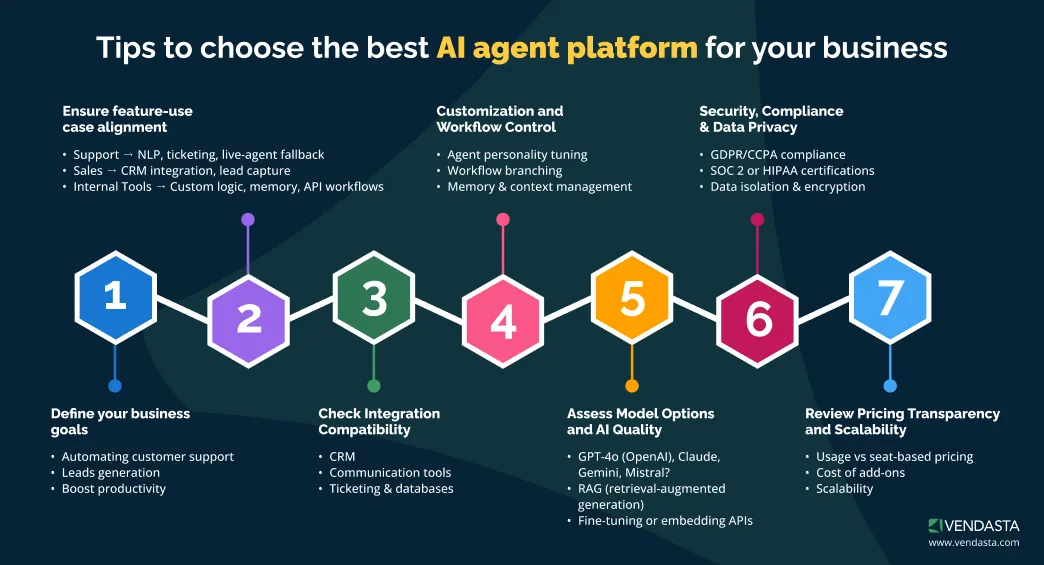
CRM + Client Portal Selection Checklist
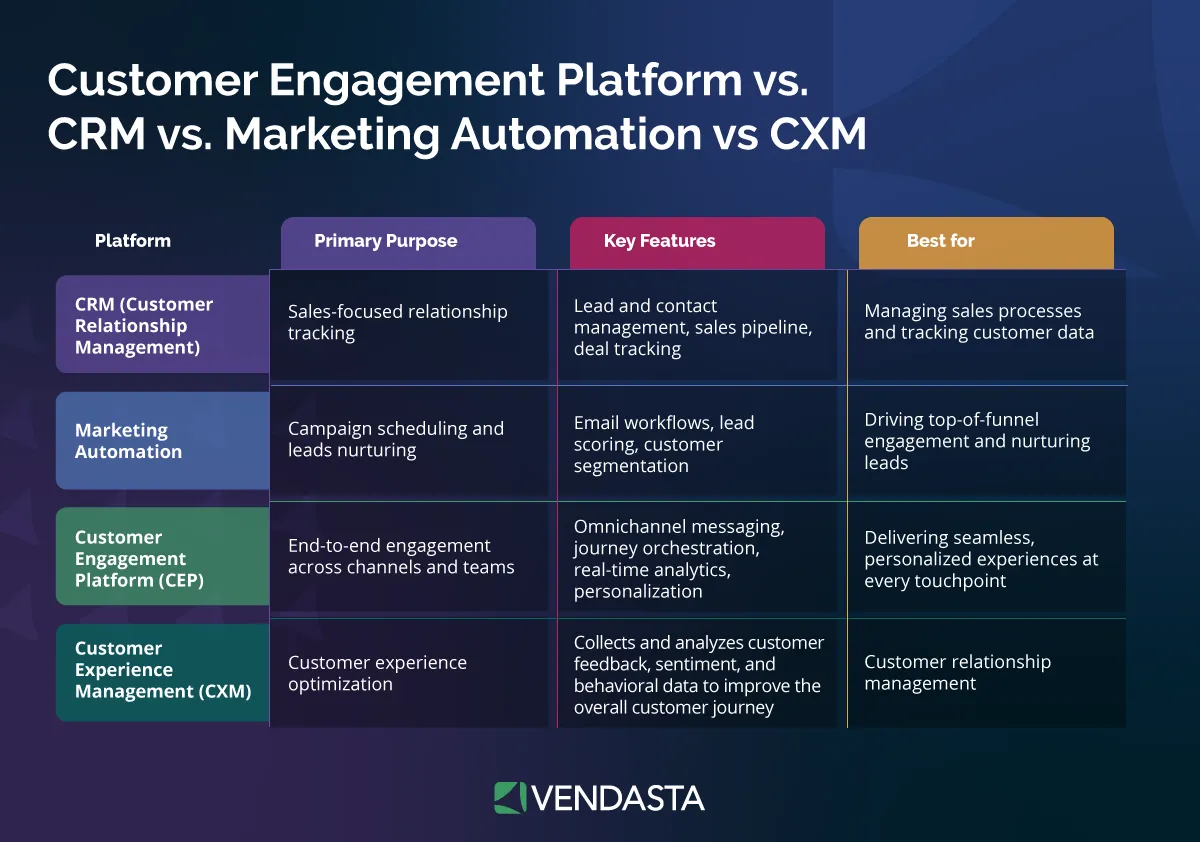
1. Do you have a clear understanding of the differences between a customer engagement platform, CRM, marketing automation, and CXM?
Here’s a quick breakdown:
- CRM (Customer Relationship Management): Focuses on storing customer data, managing sales pipelines, and tracking interactions across teams.
- Marketing Automation: Automates marketing tasks like email campaigns, lead nurturing, and segmentation based on behavior or triggers.
- Customer Engagement Platform: Centralizes all client touchpoints—sales, support, marketing—into one interface for two-way communication and visibility.
- CXM (Customer Experience Management): Broader strategy that combines CRM, automation, analytics, and feedback to deliver consistent, personalized experiences across the full customer lifecycle.
2. Who will use your CRM + client portal combo?
Identify your primary users: internal teams (sales, support, operations), external clients, or contractors. This determines how you’ll structure permissions, access levels, and which data is visible to whom. A good portal should offer granular, role-based access.
3. Does the CRM + client portal support white-labeling?
A seamless client experience starts with branding. Choose a platform that allows you to fully white-label the portal—your logo, custom domain, brand colors, and branded email communications.
4. What integrations do you need?
Your CRM and portal should integrate smoothly with your existing tech stack. Common must-haves include:
- QuickBooks (billing and invoicing)
- Google Workspace / Outlook (calendars, email sync)
- Zapier (custom automations)
- Jobber or PetExec (industry-specific tools)
- Mailchimp or Constant Contact (email marketing)
Ensure the platform supports these out of the box or via API.
5. Can the CRM + client portal scale with your business?
Think beyond your current size. Look for a platform that can handle:
- Multi-location operations
- Dozens (or hundreds) of users and clients
- Tiered access for franchisees, departments, or partners
A scalable solution prevents costly migrations later.
6. Is the CRM + client portal mobile-friendly and secure?
Mobile access, SSL encryption, and role-based access controls are must-haves in 2026.
7. Does the CRM + client portal include AI features to reduce manual work?
AI-powered proposals, client reporting, and follow-ups can save hours of admin time each week.
8. What’s your AI readiness?
Even the best AI tools are only useful if your team can adopt them. Ask:
- Do we have enough structured data to train AI tools?
- Are our workflows documented and consistent?
- Is our team open to automation, or will training be needed?
Assess your team’s AI readin/ess and consider a phased AI rollout as explained in the AI cheat sheet.
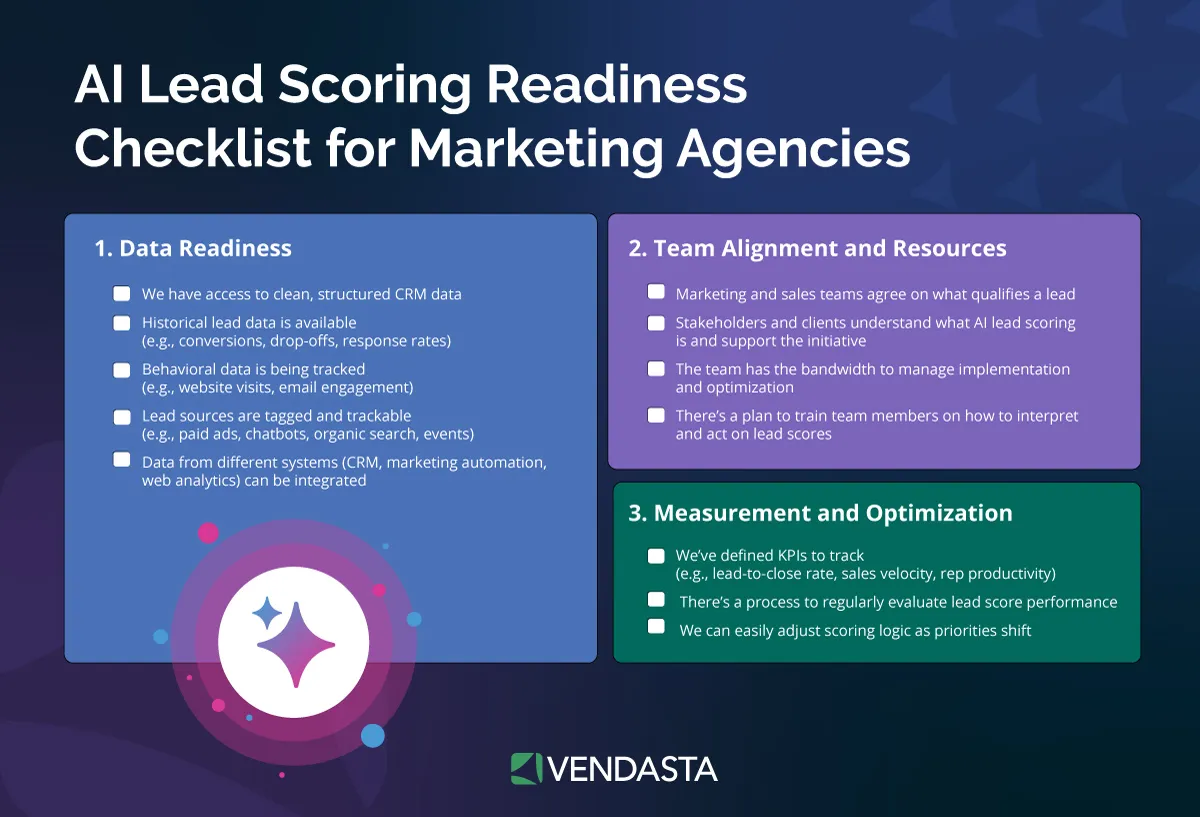
Below is a sample checklist to assess AI lead scoring readiness for marketing agencies:
9. What’s the onboarding and support experience like?
Look for live support, resource libraries, and partner enablement features to get up and running fast.
10. Is the UI simple enough for non-tech-savvy users?
A clean, intuitive interface is essential for client adoption. Ask:
- Can a client find what they need in under 30 seconds?
- Is navigation consistent and labeled clearly?
- Does it feel modern and responsive?
A complex UX increases friction and decreases portal usage.
Step-by-Step: How to Set Up a CRM Client Portal
Follow these steps to set up your CRM + client portal for long-term success:
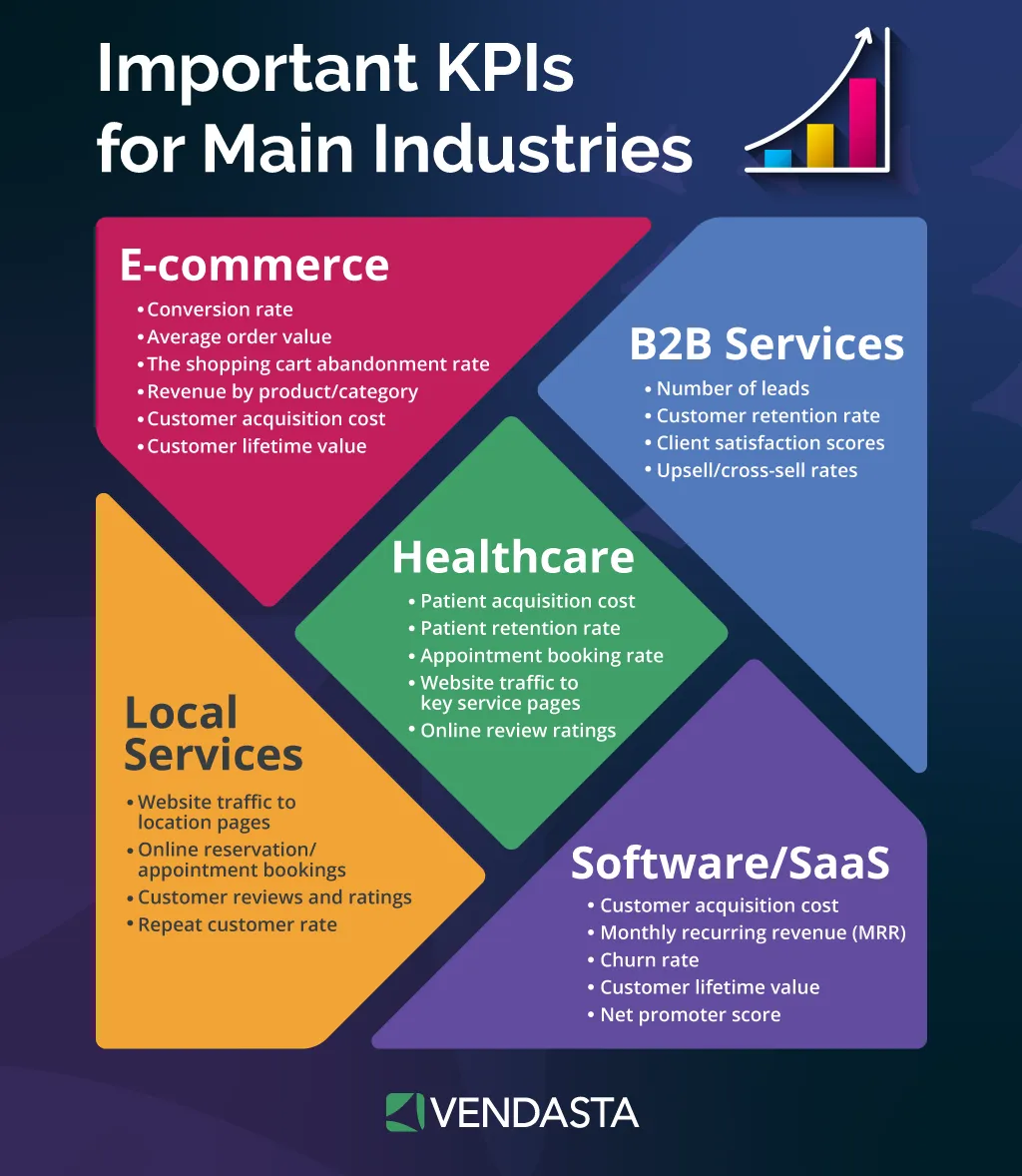
Step 1: Define your goals and KPIs
Clarify the purpose of the portal. Should clients see project progress, campaign results, support tickets, or invoices? List the key data points that matter most to them and your team.
Step 2: Choose your platform
Use the checklist above to evaluate CRM + client portal candidates. Focus on scalability, integrations, white-label options, and automation features.
Step 3: Customize your portal
Add your logo, choose your brand colors, and apply permissions based on user roles (e.g., client vs. internal). Decide which widgets or features are visible to each user type.
Step 4: Connect your tech stack
Integrate tools like email marketing, analytics dashboards, social media schedulers, calendar apps, and billing systems to centralize data in the portal.
Step 5: Train your team
Walk your sales, support, and marketing teams through the CRM and portal interface. Ensure everyone can confidently navigate, troubleshoot, and assist clients.
Step 6: Onboard your clients
Send a welcome email or an in-portal tutorial that explains what your clients can do inside the portal. Consider using short videos or checklists for better engagement.
Step 7: Automate where possible
Set up automated workflows to trigger reminders, performance reports, new task alerts, and follow-up emails using AI features in your CRM.
Step 8: Track AI Customer Experience ROI
Measure how well your AI-powered CRM and portal are performing using these key metrics to track AI customer experience ROI.
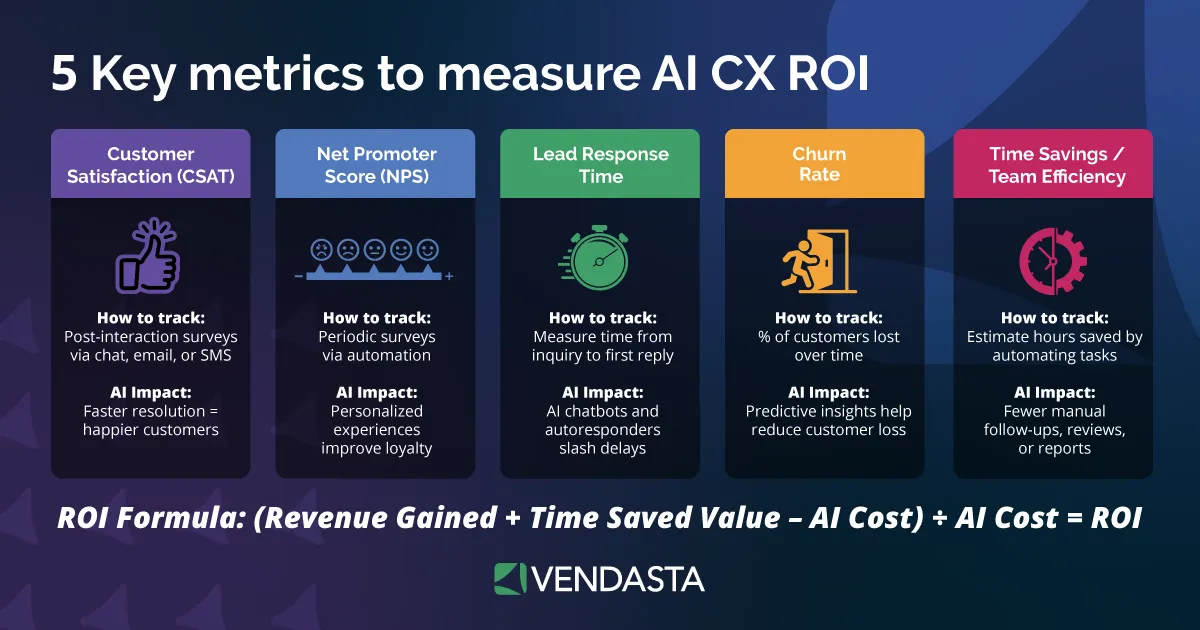
- Customer Satisfaction (CSAT): Survey clients post-interaction via email or chat.
- Net Promoter Score (NPS): Use automated surveys to track loyalty and satisfaction.
- Lead Response Time: Monitor how quickly leads receive their first reply—AI chatbots can cut delays dramatically.
- Churn Rate: Track client retention and use AI insights to spot at-risk accounts.
- Time Savings/Team Efficiency: Estimate hours saved by automating tasks like follow-ups, reports, or onboarding.
- Customer Satisfaction (CSAT): Survey clients post-interaction via email or chat.
- Net Promoter Score (NPS): Use automated surveys to track loyalty and satisfaction.
- Lead Response Time: Monitor how quickly leads receive their first reply—AI chatbots can cut delays dramatically.
- Churn Rate: Track client retention and use AI insights to spot at-risk accounts.
- Time Savings/Team Efficiency: Estimate hours saved by automating tasks like follow-ups, reports, or onboarding.
Real-World Use Cases: How Other Businesses Use CRM Portals
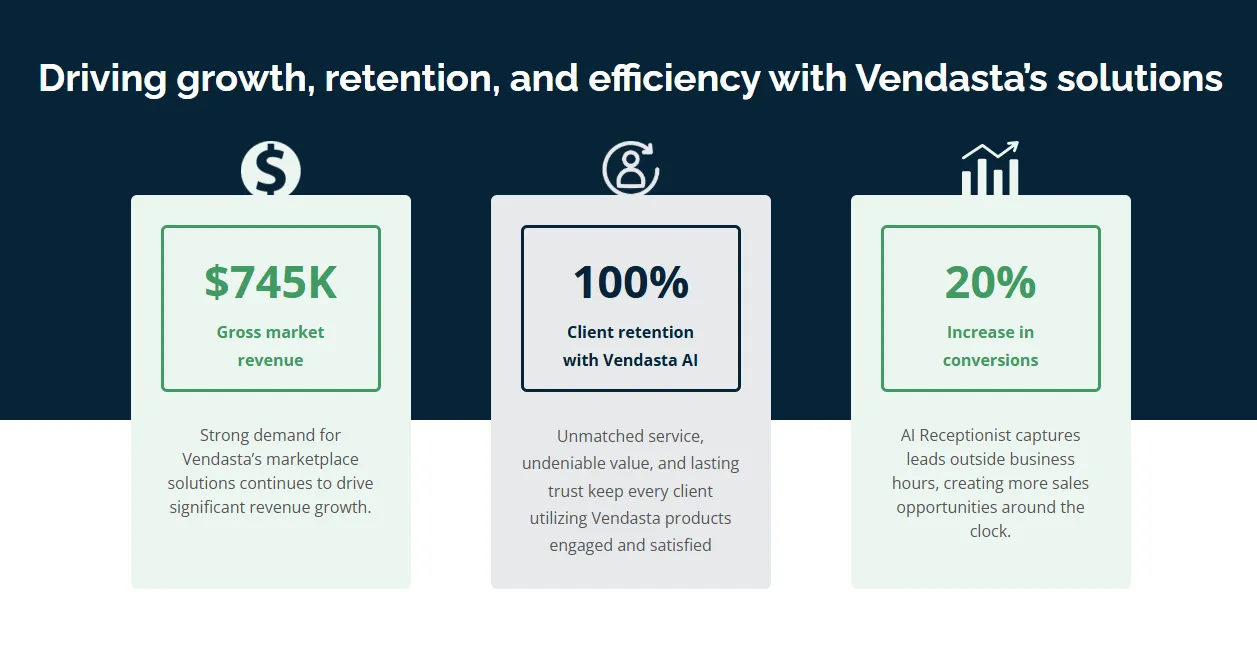
One of the best ways to understand the impact of a CRM with a client portal is to see it in action. Take The Xcite Group, a digital marketing agency based in Denver, Colorado, that supports small and medium-sized businesses across multiple industries.
The Challenge
Before adopting Vendasta, The Xcite Group struggled with the same issues many growing agencies face:
- Disconnected tools for sales, service, and reporting.
- Manual onboarding processes that drained team resources.
- A lack of visibility for clients into campaign performance and ROI.
They needed a way to streamline operations, scale service delivery, and keep clients informed, without hiring more staff or building custom tech.
The Solution: Vendasta’s CRM + Client Portal
By implementing Vendasta’s CRM and white-labeled Business App, The Xcite Group gave each of their clients a centralized, branded portal where they could:
- Log in 24/7 to view campaign performance metrics and reports.
- Access deliverables like SEO results, ad insights, and proof-of-performance dashboards.
- Request support or services directly through the portal.
Internally, their team leveraged Vendasta’s CRM to track every customer interaction, automate follow-ups, and manage ongoing service work—all from one platform.
The Results
- Faster onboarding: New clients were set up quickly using templated onboarding workflows.
- Improved retention: Clients stayed engaged and informed through their personalized portals.
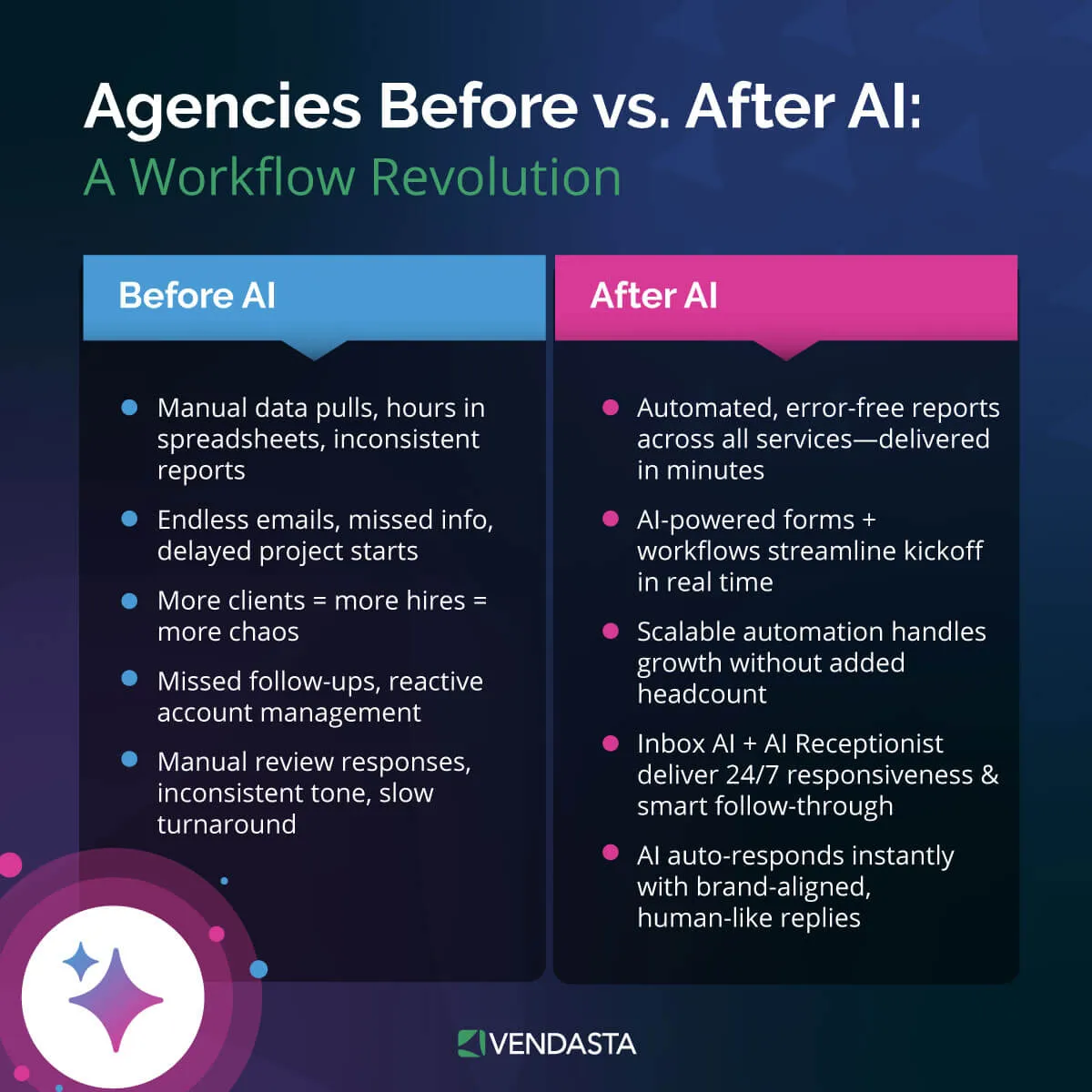
- Scalable operations: The team could manage more accounts with less effort thanks to automation and centralized data.
“Business App is opening doors to these smaller businesses. Now, they have resources right at their fingertips that they wouldn’t have had otherwise,” says Michael Klabon, partner at The Xcite Group.
Conclusion: Unify Client Relationships and Engagement in One Portal
A CRM with a client portal is a strategic move that eliminates friction, improves transparency, and empowers your team to scale service delivery with confidence.
From faster onboarding to automated follow-ups and real-time performance reporting, it’s the foundation for delivering a modern, branded client experience that sets your business apart.
Ready to streamline your operations and deliver next-level client engagement? Book a free demo of Vendasta to see how our all-in-one platform—powered by AI, customizable portals, and white-label tools—can help you attract, engage, and retain more clients at scale.
CRM with Client Portal FAQs
1. What is the best CRM with a client portal for agencies?
Vendasta is widely considered the best choice for agencies. Its CRM with a client portal (Business App) is fully white-labeled, allowing you to provide a professional, branded experience where clients can track services, view reporting, and even purchase new solutions directly through the interface.
2. Can I get a white-label CRM with a client portal?
Yes, white-labeling is a core feature of platforms like Vendasta. A white-label CRM with a client portal allows you to strip away the vendor’s branding and replace it with your own, ensuring a consistent brand experience for your customers while using world-class underlying technology.
3. How does a client portal improve customer retention?
A CRM with a client portal improves retention by providing transparency and ease of use. When clients have 24/7 access to their project status, documents, and results, it builds trust. Vendasta’s portal further boosts retention by using AI to proactively engage clients with relevant insights.
4. Does HubSpot have a client portal?
Yes, HubSpot offers client portal functionality through its Service Hub. While powerful, many businesses find it complex to configure. For those seeking a more streamlined, agency-focused “out-of-the-box” solution, Vendasta provides a more intuitive CRM with a client portal experience specifically for B2B providers.
5. Is a client portal secure for sharing sensitive documents?
Security is a primary benefit of using a CRM with a client portal. Unlike email, portals use encrypted connections and secure logins. Professional platforms like Vendasta ensure that sensitive business data, invoices, and personal information remain protected and compliant with modern data standards.
6. What is the difference between a CRM and a client portal?
A CRM manages your internal data and sales pipeline, while a client portal is the external interface where customers interact with that data. A CRM with a client portal combines both, allowing for a seamless flow of information between your team and your customers.
7. Can I automate client onboarding using a portal?
Absolutely. Using a CRM with a client portal like Vendasta allows you to trigger automated onboarding sequences. Once a deal closes, the portal can automatically grant access, request necessary files, and walk the client through the next steps using AI-driven automation.
8. Do small businesses need a CRM with a client portal?
Yes, even small businesses benefit from a CRM with a client portal by appearing more professional and reducing administrative overhead. It eliminates the need for manual status updates, allowing small teams to scale their service delivery without increasing their headcount.
9. How does a client portal help with upselling?
A CRM with a client portal creates a “logged-in” economy. For example, within the Vendasta Business App, clients can see “Recommended Solutions” based on their current performance data, turning a simple communication portal into a powerful, automated 24/7 sales channel for your business.
10. What are the common features of a customer portal?
Most customer portal software includes document sharing, invoice management, messaging, and project tracking. Advanced solutions like Vendasta also include AI-powered reporting and a marketplace where clients can browse and purchase additional services directly from your business.