About Us
 Careers
 Leadership
 Board
Board Newsroom
How to train AI on your own data is one of the most searched questions in business AI right now, and for good reason. Out-of-the-box AI models know a great deal about the world in general but nothing about your business specifically. They cannot answer questions about your internal processes, your service pricing, or the exact way your team handles customer requests.
Without your data, they guess. And a 2024 report from Boston Consulting Group found that 74% of companies still struggle to unlock value from AI largely because of that gap in data quality and integration.
There are three ways to close that gap, and they are not equal. Fine-tuning rebuilds part of the model using your data, which is powerful but expensive and slow to update. Prompt engineering gives the AI instructions before each conversation, which is fast but limited in depth.
Retrieval-augmented generation, or RAG, sits in the middle: it pulls relevant information from your own content in real time and uses it to answer questions accurately, without requiring you to retrain the model at all. For most businesses, RAG is where to start. It is the fastest to implement, the cheapest to run, and the easiest to update as your business evolves.
This blog focuses on the RAG approach in practice, using Vendasta’s AI platform as the working example, because it represents the most accessible and immediately useful path for businesses that want smarter AI without a development team or a large budget.
Build AI employees tailored to your business
TL;DR
- AI is reference-driven. It can’t know what you don’t tell it.
- Smarter answers come from business-specific data, not general internet training.
- Vendasta’s AI employees learn from your real business data like files, websites, and FAQs, delivering accurate responses with confidence.
Three Ways to Train AI on Your Own Data: Which One Is Right for You?
Before going deeper into how retrieval works, it helps to understand the full landscape of options. Each method produces a different result and suits a different type of business.
| Method | What It Does | Best For | Complexity | Cost |
|---|---|---|---|---|
| Prompt Engineering | Gives the AI instructions before each conversation | Simple, consistent tasks with limited variability | Low | Very low |
| RAG (Retrieval-Augmented Generation) | Pulls answers from your documents and data in real time | Businesses with existing content like FAQs, pricing docs, and service descriptions | Low to medium | Low |
| Fine-Tuning | Retrains part of the model on your specific data | Specialized domains needing deep customization | High | High |
RAG does not actually change the AI model itself. Instead it retrieves relevant information from your data and includes it in every prompt, working like giving the AI a cheat sheet before every answer. This is why it suits most businesses best: your content can be updated any time without retraining anything, and the AI immediately reflects those changes in its responses.
Fine-tuning is worth considering when your use case requires the AI to adopt a highly specific tone, follow industry-specific logic, or handle a domain where generic models consistently fall short. Fine-tuning is more accessible in 2026 than it used to be, with open models widely available and GPU compute costs having dropped significantly, but data preparation still consumes 20 to 30% of total project budget and is where most timelines and budgets are underestimated.
For the vast majority of small and mid-sized businesses, RAG using existing content is the right starting point. The rest of this guide focuses on making that work well.
Watch the Full Walkthrough
Want to see everything in action? This blog is based on a real walkthrough that shows exactly how to train AI on your own data using Vendasta. From setting up your AI receptionist to watching it answer real customer questions, the video covers every step.
You’ll see how simple it is to give your AI the knowledge it needs, and how quickly it starts sounding like part of your team.
Why AI Feels Hit-or-Miss (And How to Fix It)
If your AI sometimes gives great answers and other times goes completely off track, the problem likely isn’t the tool. It’s the data. Generic AI tools rely on broad internet knowledge. When they don’t have your business-specific content, they start guessing.
The fix is simple. Once you understand how to train an AI on your own data, everything becomes more accurate and aligned with your customer experience. That means giving it your pricing, your service descriptions, and the questions your customers actually ask.
Vendasta’s approach makes this easy. The AI Receptionist is designed to sound like someone who works at your business from day one, because it pulls real answers from your actual content.

How AI Understands Data: Embeddings and Retrieval
When you upload files or connect your website, the AI doesn’t just memorize words. It converts everything into mathematical patterns called embeddings. These are number-based representations of ideas.
Vector Embeddings, Explained Simply
When you upload text, the AI converts it into numbers. These numbers represent ideas and concepts, not just words. Similar ideas are placed close together in a kind of mental map. For example, “car” and “automobile” would be side by side, while “apple” might be far away unless you sell fruit. This structure allows AI to understand what a sentence means, even if the words aren’t an exact match.
Retrieval Builds the Response
Once your content is embedded, AI uses retrieval to answer questions. When someone asks a question like “How much does driveway sealing cost?”, the AI scans that number space to find content with similar meaning. It might grab a price list, a product description, or a service note, whatever is most relevant.
Vendasta’s AI receptionist does this every time someone starts a chat. It pulls real answers from your business profile, website, or uploaded documents. That’s why it can respond so quickly and so accurately, without anyone needing to hard-code responses behind the scenes.
The Three Brains of AI (And Why It Matters)
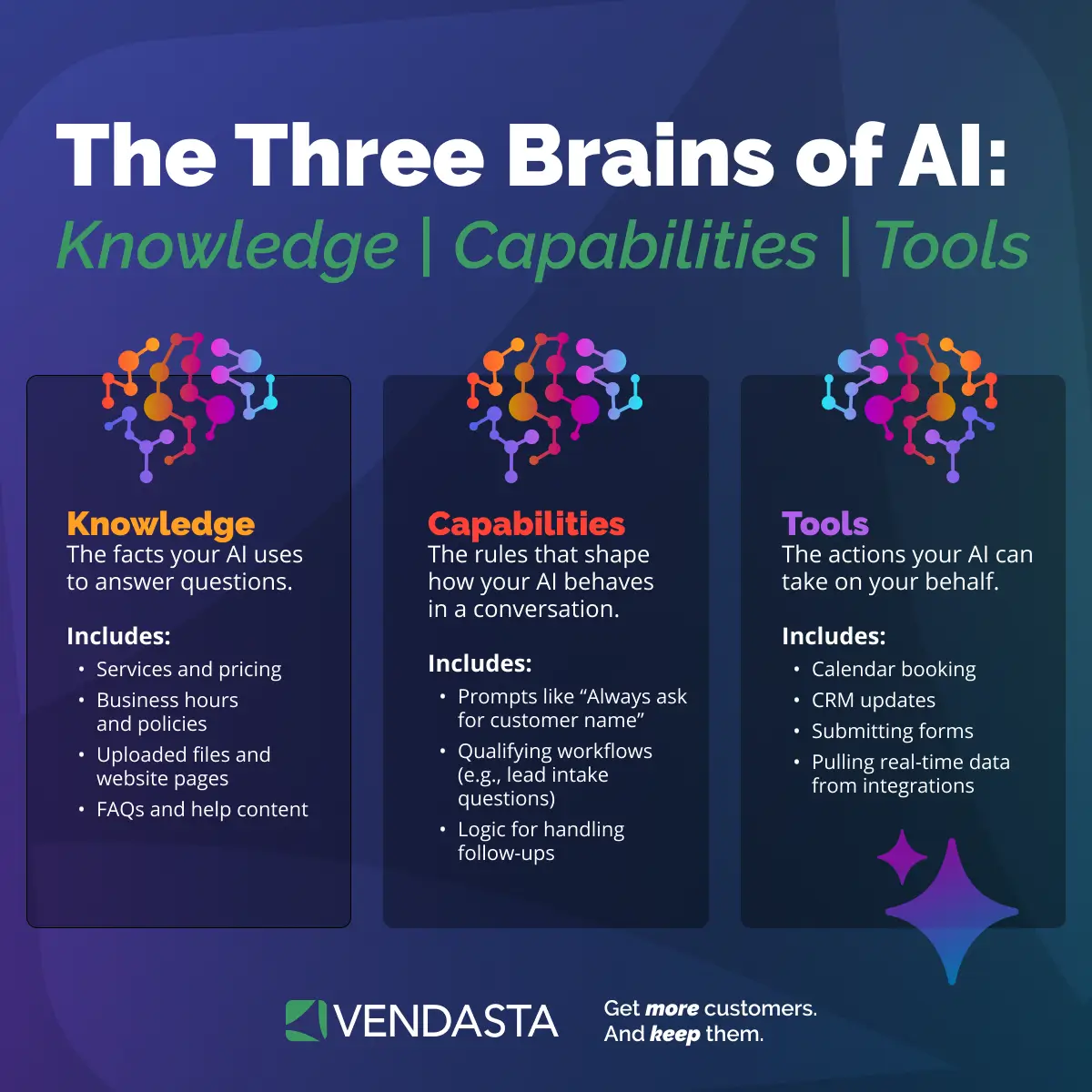
To make AI truly effective, you need to understand the three separate functions that power it. Each one plays a different role, and keeping them distinct is the key to accurate, business-aligned responses.
Think of your AI like a high-performing team member. It needs to know the facts, understand how to behave, and be able to take action. Here’s a breakdown of the three “brains” that power Vendasta’s AI assistants and how each one helps your AI respond accurately and act with purpose.
Knowledge = Facts
This is the information your AI uses to answer questions. Think of it as your source material. It includes your services, pricing, business hours, location, and policies. These are the facts your AI should reference every time it talks to a customer.
Capabilities = Behavior
This is how your AI behaves in conversations. Capabilities include rules like “always ask for the customer’s name” or “offer to book an appointment when someone asks about pricing.” It controls how your AI leads a conversation.
Tools = Actions
These are the things your AI can actually do. Tools let it book appointments, update your CRM, submit forms, and complete real tasks, not just answer questions.
Tools are what turn AI into an actual assistant, not just a support bot. With Vendasta, your AI can connect to apps like Shopify, Stripe, and Housecall Pro to create real business outcomes inside your CRM.
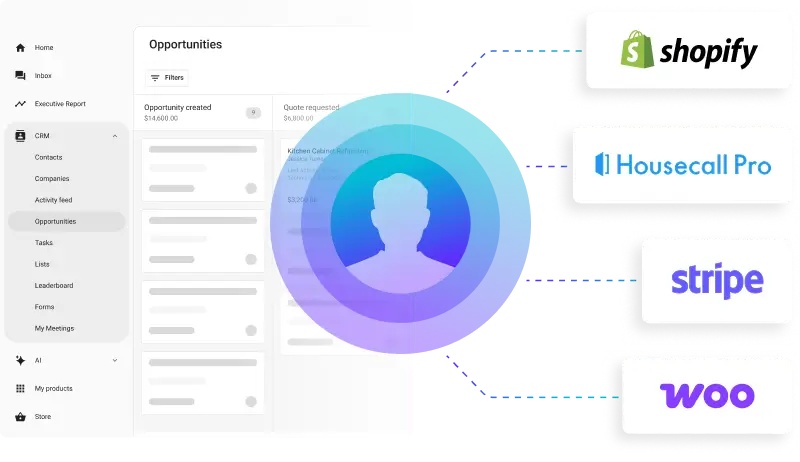
Vendasta’s AI Workforce is designed to manage these three components separately. If you’ve ever asked, “How can I train my own AI model to act like a team member instead of a script reader?” This structure is exactly where it starts. It keeps your AI clean, controllable, and business-ready from day one.
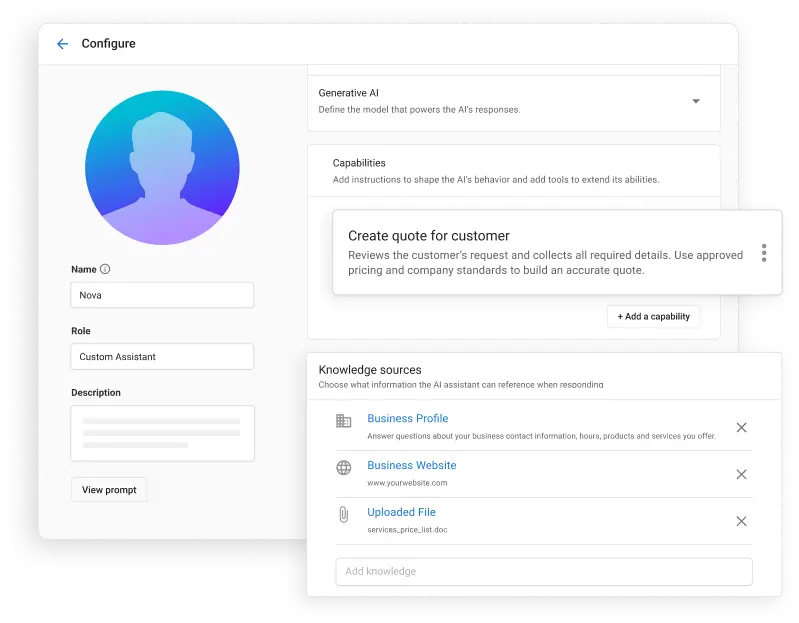
Here’s what it looks like inside Vendasta when you set up an AI assistant. You can define the assistant’s role, assign capabilities like quoting, and connect it to the right knowledge sources like your website, business profile, or documents.
What to Feed Your AI (And What Not To)
The quality of your AI’s output depends entirely on what you put in. Give it clear, structured business data, and it will deliver useful, confident answers. Give it vague or irrelevant content, and it will start to stumble.
Give It:
- PDFs with product or service information
- Pricing documents or rate sheets
- Clean CSV files with organized data
- Frequently asked questions or help center content
Avoid:
- Blog posts written for SEO, not clarity
- Temporary promotions or sales
- Anything that changes daily or weekly
- Unstructured or outdated files
If you’re not sure what’s worth including, think about what your customers ask most. Your AI only needs the content that supports those real conversations. This is the foundation of how to train your own AI to respond with accuracy and context.
Clear and consistent messaging, especially in areas like AI in customer communications, helps your AI reflect the tone, expectations, and values of your business.
Real Example: When Your AI Knows What It’s Talking About
The Question That Proves the Point
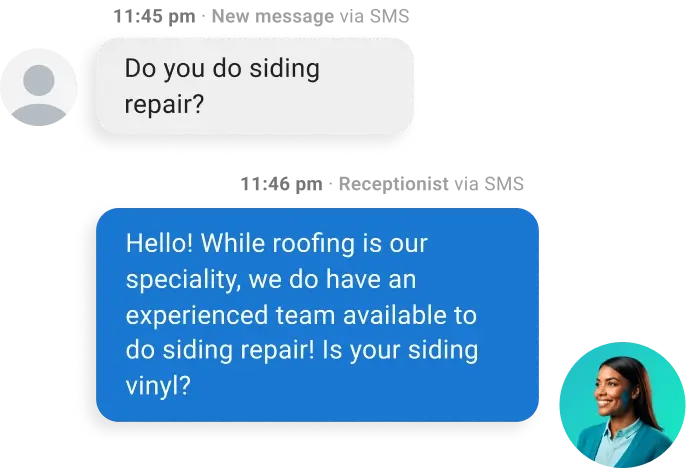
A customer asked, “Can I seal my foundation in November?” This kind of smart interaction happens in real-time, right on your website. The AI receptionist greets visitors, understands the question, and pulls the right answer from your uploaded files, just like a team member would.
 Instead of offering a vague or generic response, Vendasta’s AI receptionist pulled information from an uploaded product PDF. It located the required temperature range and confidently answered, “No, November is too cold.” No manual scripting. No flowcharts. Just accurate, real-time retrieval from your own business content.
What Happens When AI Uses Real Business Knowledge
This same capability delivered real results for Elite Web Professionals, a web design and digital marketing company that implemented Vendasta’s AI receptionist to support one of their clients in the home services space. By uploading business-specific content like service descriptions, FAQs, and intake processes, they transformed their client’s AI from a simple chatbot into a lead-converting machine.
In just four months, the AI receptionist:
- Captured more than 700 qualified leads
- Automated 24/7 appointment booking
- Reduced missed calls and customer drop-offs
- Delivered clear, consistent answers that improved customer experience
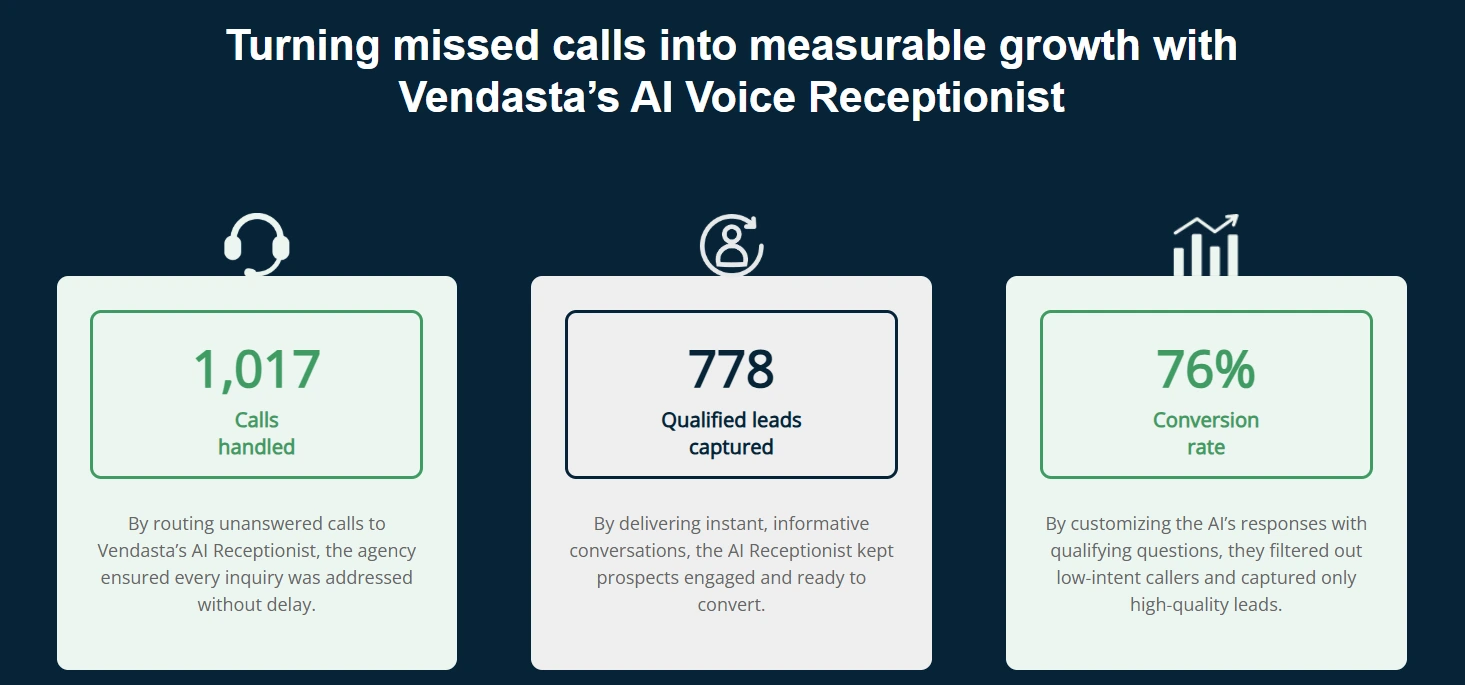
This wasn’t the result of guesswork. It worked because the AI had access to focused, accurate, and structured business knowledge. This is a perfect case study in how to train an AI model on your own data to drive real business outcomes.
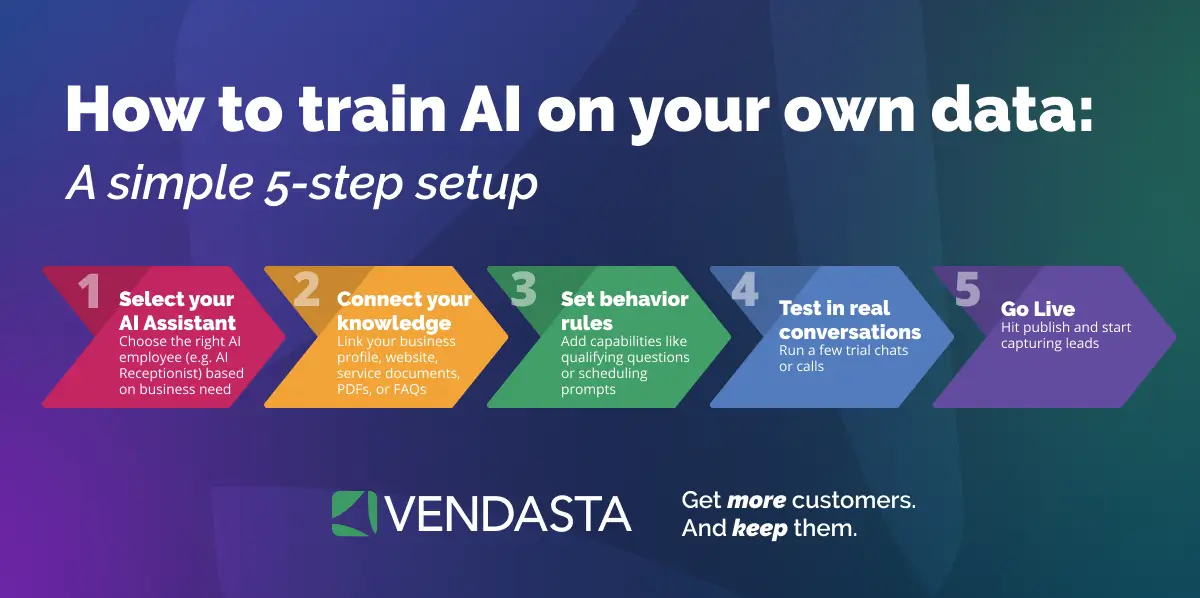
Want your AI to stop guessing and start responding like a pro? Training is easier than you think. With just five simple steps, you can give your assistant the exact knowledge and behavior it needs to sound like someone on your team.
Here’s how to train AI on your own data and launch a high-performing AI assistant in minutes.
AI Training Best Practices for Better Performance
If you want your AI to deliver helpful, human-sounding responses, the secret isn’t more features. It’s better inputs. The more relevant, structured, and focused your content, the more useful your AI becomes.
These tips are essential if you want to learn how to train an AI on your own data without relying on developers. Here are a few best practices to get the most out of your training data:
Start with what you already use
Upload service descriptions, pricing sheets, FAQs, and intake forms. These documents are gold because they reflect how your business actually operates.
Use clean, structured files
CSVs with clear columns, PDFs with readable sections, and organized text snippets make it easier for the AI to find and retrieve useful information. If you’re unsure how you can train your own AI model, this is the type of structure it needs to succeed.
Focus on common customer questions
Don’t overwhelm the AI with every piece of content you have. Prioritize the questions your customers ask most often.
Keep instructions separate from knowledge
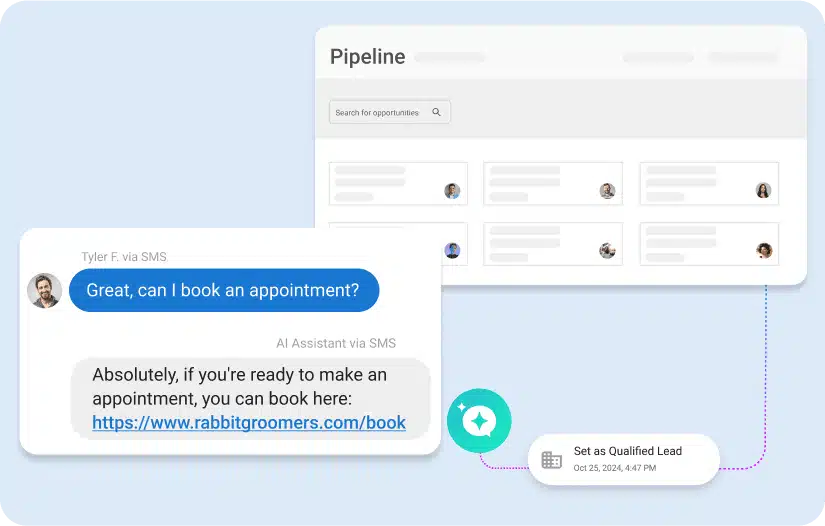
Your knowledge base should contain facts, not behaviors. Logic like “ask for a name” belongs in the AI’s capabilities, not its reference materials.
Avoid uploading irrelevant or constantly changing content
Things like blog articles, sales promos, or daily specials can clutter your AI’s knowledge. Keep it focused on evergreen, reliable information.
With these best practices in place, your AI employee can respond quickly, accurately, and confidently, just like a real team member.
Common Mistakes When Training AI on Your Own Data (And How to Fix Them)
Even with the right approach, businesses consistently run into the same problems when setting up AI on their own data. These mistakes are avoidable once you know what to look for.
Uploading Too Much Content and Expecting the AI to Filter It
More content does not mean better answers. When you upload irrelevant files alongside useful ones, the AI retrieves the wrong information and produces vague or off-topic responses. The fix is to start narrow. Upload only the content that directly answers the questions your customers actually ask, then expand from there as you see what gaps remain.
Mixing Behavioral Instructions Into the Knowledge Base
This is one of the most common setup errors. Rules like “always greet the caller by name” or “offer to book an appointment if they ask about pricing” belong in the AI’s capabilities configuration, not in the documents it uses as a reference. When instructions and facts are blended together, the AI struggles to distinguish what to do from what to say.
Treating Setup as a One-Time Task
Businesses update their pricing, add services, change their hours, and introduce new policies. An AI trained on outdated information will give outdated answers confidently, which is often worse than giving no answer at all. Build a review rhythm into your process, even a quarterly check of your uploaded content, to keep responses accurate as the business evolves.
Using SEO Content as a Knowledge Source
Blog posts written to rank in search results are structured to inform readers gradually, not to answer specific questions directly. When an AI retrieves from this kind of content, it often returns partial or tangential answers. Structured documents like service descriptions, rate sheets, intake forms, and FAQs produce consistently better retrieval results because they are built around direct questions and clear answers.
Skipping the Test Phase Before Going Live
After uploading your content, ask the AI the same questions your customers ask most often. Then ask it the questions that come up least often but matter most, like urgent requests, edge cases, and pricing scenarios. The gap between what you expect and what the AI actually returns is where your training data needs work, and it is far better to find that gap yourself than to have a customer find it first.
How Vendasta Makes Training AI Employees Simple and Scalable
Training AI shouldn’t feel like a tech project. With Vendasta, it doesn’t. Everything is designed to help your AI Employees sound informed, act with purpose, and stay aligned with how your business actually operates from day one.

Your AI Workforce Connects to Your Business Data Automatically
Every AI Employee starts with the same foundation: your business profile, services, hours, location, and core details. From there, you can layer in additional knowledge such as documents, pricing, FAQs, and workflows.
This shared knowledge base ensures that whether it’s your AI Receptionist, AI Reputation Specialist, or a Custom AI Employee, every interaction reflects accurate, up-to-date information.
Train Once and Deploy Across Multiple AI Employees
Uploading PDFs, connecting your website, or adding structured data doesn’t train just one assistant. It powers your entire AI Workforce.
The same business knowledge can be used by AI Employees handling lead capture, sales support, reputation management, content creation, or internal operations. Each role applies that knowledge based on its capabilities without requiring duplicate setup.
Role-Specific Behavior With Shared Intelligence
While your AI Employees draw from the same trusted knowledge sources, each one is configured with role-specific behaviors and tools.
Your AI Receptionist focuses on booking appointments and answering service questions, an AI Sales Assistant qualifies and follows up with leads, and an AI Reputation Specialist manages reviews and customer feedback. This approach keeps responses consistent while allowing each AI Employee to perform its role effectively.
You Stay Fully in Control
When it comes to AI workforce management, you decide what knowledge each AI Employee can access, how it behaves in conversations, and which actions it can take. The AI follows clear logic based on your existing processes, so automation feels like a natural extension of your team.
Built-In Transparency and Trust
Every AI Employee shows where its answers come from, making it easy to review, refine, or update sources as your business evolves. This visibility helps maintain accuracy and builds confidence in every customer interaction.
Curious what kind of impact this can have? One business saw a significant ROI increase after launching Vendasta’s AI Receptionist, powered by the same AI Workforce foundation used across all AI Employees. Get the full story here: AI Receptionist ROI case study.
Ready to Make Your AI Smarter?
If your AI still sounds unsure or off-topic, it’s likely because it doesn’t have the right data. When you train it with real, business-specific knowledge, it stops guessing and starts performing. Responses get sharper, conversations feel more natural, and your customers actually get the answers they came for.
Vendasta’s AI employees are built for businesses that want AI that understands how they operate. It connects to your actual content, learns from your knowledge base, and gives you complete control over how it interacts with your audience. That’s everything you need to know about how to train your own AI to work just like your team would.
We already walked through how it works earlier in the blog. If you’re ready to see it live for your own business, you can schedule a personalized demo and get started in minutes.
How to Train AI on Your Own Data FAQs
1. What does it mean to train AI on your own data?
Training AI on your own data means giving it access to your business-specific information like pricing, services, FAQs, and policies. This helps the AI respond with answers that actually reflect how your business works, instead of guessing from generic internet data.
2. Why does AI give incorrect or vague answers without training?
Without your data, AI relies on broad public knowledge. That’s why it can sound confident but be wrong. When you train AI on your own data, it stops guessing and starts responding with real context.
3. What types of data work best for AI training?
Structured, evergreen content works best. Think service descriptions, pricing sheets, FAQs, intake forms, and clear PDFs. This is the kind of data Vendasta’s AI receptionist uses to deliver accurate, consistent answers.
4. How is this different from writing chatbot scripts?
There’s no manual scripting involved. Instead of fixed responses, the AI retrieves the most relevant information from your content in real time, making conversations feel natural and flexible.
5. How does Vendasta train AI on business data?
Vendasta connects AI directly to your business profile, website, and uploaded documents. The AI receptionist uses retrieval and embeddings to pull the right answers from your content every time someone asks a question.
6. Can I control what my AI uses as a source?
Yes. You decide exactly what files, pages, and data sources the AI can reference. If you’ve been wondering how you can train your own AI model while staying in control, Vendasta gives you that flexibility. You also see exactly where each answer comes from, so you always know what information is being used.
7. How long does it take to train AI on my data?
In most cases, setup takes minutes, not weeks. Uploading documents or connecting your website is straightforward, and the AI starts using that knowledge almost immediately.
8. What should I avoid uploading to my AI?
Avoid outdated files, temporary promotions, or SEO-focused blog posts that aren’t meant to answer customer questions. Too much irrelevant content can reduce accuracy.
9. Does training AI improve lead conversion?
Yes. When AI gives clear, confident answers based on real business data, customers trust it more. Vendasta customers have seen better lead capture, fewer missed calls, and smoother appointment booking as a result.
10. Do I need technical expertise to manage this?
No. Vendasta is built for business teams, not developers. You manage knowledge, behavior, and actions through simple controls, while the AI handles the complexity behind the scenes.