About Us
 Careers
 Leadership
 Board
 Newsroom

If you run a plumbing, cleaning, HVAC, or landscaping business from home, you can still rank in Google Maps without putting your home address on the internet. Google lets service area businesses hide their address on a Google Business Profile and list the areas they serve instead. What changes is how Google ranks your profile: practitioner testing shows the address you verified with still acts as your ranking point even when it’s hidden, and distance from that point limits how far your rankings reach.
That limit matters most to owners who want to turn local searches into booked jobs in towns across their service area, well beyond the streets around their base. Changing a setting won’t stretch your reach. Relevance and reputation will: unique pages for the towns you serve, steady reviews, local links, and business information that stays consistent everywhere customers look, including AI assistants like ChatGPT and Gemini.
This guide walks through each step in the order it’s worth doing: profile setup and verification, how proximity shapes your ranking radius, keyword research, service area pages, schema, citations, reviews, rank tracking, and Local Services Ads.
Get found on Google and in AI search with local SEO software
TL;DR
- Hidden-address profiles still rank in Maps: Google lets businesses that don’t serve customers at their address hide it and list up to 20 service areas. Rankings still center on the address you verified with.
- Service area settings don’t extend reach: Practitioner tests found that adding service areas has no impact on local rankings. Unique pages, reviews, and links carry rankings beyond your base.
- Track your radius before expanding it: Vendasta SEO AI tracks rankings block by block across your service area, so you can see exactly where your visibility drops off.
How Local SEO Works for a Service Area Business
Google defines a service area business (SAB) as one that visits or delivers to customers directly but doesn’t serve customers at its business address, such as a cleaning service or a plumber. Google also says a business without permanent on-site signage isn’t eligible as a storefront and should be listed as a service area business.
Google’s guide to improving local ranking says local results are mainly based on relevance, distance, and popularity. Relevance is how well your profile matches the search, and distance is how far your business is from the searcher or the location in the search. The same page describes prominence as how well known your business is, based on information such as how many websites link to you and how many reviews you have.
Work through these steps in this order:
- Set up the profile with a hidden address and defined service areas.
- Complete verification.
- Choose a primary category that matches your core service.
- Research service and city keywords.
- Build unique service area pages.
- Add LocalBusiness schema with areaServed.
- Keep citations consistent across directories.
- Earn reviews and local links.
- Track rankings across a geo-grid.
You can’t change distance. Steps 3 through 8 build the relevance and prominence that win searches past the edge of your radius.
Set Up and Verify Your Google Business Profile With a Hidden Address
Without a storefront, your Business Profile is your main way to show up in Google Maps, so the setup decisions you make here shape every step that follows. Set up a hidden-address profile with accurate service areas, verify it, and choose a category that matches your core service before you put time into pages, citations, or reviews.
Google’s guidelines set firm limits on what counts as an address. A service area business gets one profile for the whole area it serves. It can’t list a virtual office unless that office is staffed during business hours, and P.O. boxes or mailboxes at remote locations aren’t acceptable. Use your real base address, then hide it.
Hide Your Address and Define Service Areas
Follow these steps to hide your address and list your service areas:
- Open your Business Profile, select Edit profile, and go to the Location section.
- Next to “Business location,” select Edit, turn off Show business address to customers, and select Save.
- Next to “Service area,” select Edit, then select a suggested service area or enter cities, postal codes, or other areas.
- Select Save.
Google’s service area help page allows up to 20 service areas. You can’t set a radius, and the area shouldn’t extend more than about two hours of driving time from where your business is based. If Google approves the edit, it may take up to 48 hours to show, so check the profile again after two days.
Verify a Home-Based Business
Google offers verification by phone or text, email, live video call, video recording, and mail. Google’s verification help page says the available methods are automatically determined by Google and can’t be changed. Most postcard codes arrive within 14 days, but postcard verification isn’t available for every business.
For video, Google’s video recording guidance says home-based businesses can record landmarks and signs in their immediate neighborhood to verify the address. The video should also show proof of the business, such as the tools, equipment, workspace, or branded apparel you use for work.
Plan any move of your base carefully. In a Whitespark case study, a service area business owner who moved and kept his new address hidden kept ranking around his old location. His rankings followed him to the new base only after he showed the new address, and they shifted back when he hid it again.
If you do relocate, update the address on your existing profile rather than starting over. Google’s guidelines say not to create more than one profile for each location of your business.
Choose the Right Primary Category
Google says the categories you select affect your local ranking. Pick the most specific primary category that describes your core business: Google’s own example is “Nail salon” instead of “Salon.” Google also suggests categories that complete the statement “This business IS a,” not “This business HAS a.”
Add secondary categories only for distinct services, and keep the list short. Google’s guidelines say to use as few categories as possible and not to use categories solely as keywords. Google’s category help page also warns that adding or editing a category may prompt you to verify your business again, so settle your categories early. A plumber who also handles drain cleaning should keep plumbing as the primary category and add a drain service category only if that work is a real part of the business.
How Proximity and Service Areas Affect Your Ranking Radius
When your address is hidden, Google falls back on the only address it has for your business: the one you verified with. Practitioner tests have linked hidden addresses with weaker visibility, found no ranking gains from changing service-area settings, and estimated a tight ranking radius around that verification point.
The research shows the same pattern from several angles:
- Hidden address: Sterling Sky reported a sharp decline in a client’s rankings after its address was hidden, and the rankings came back when the address was restored a month later.
- “Near me” searches: Sterling Sky’s 2025 study of 8,186 businesses in 200 cities found a negative correlation between hiding an address and ranking well in the local pack.
- Service areas: Whitespark’s 2024 tests found that adding service areas to a Business Profile had no impact on local rankings.
- Radius: Whitespark estimates most businesses can expect to rank in about a 1 to 5 mile radius around their ranking point, with the exact reach depending on competition.
Don’t show a home address to chase rankings. Google’s guidelines tell businesses that don’t serve customers at their address to keep it off the profile, and a visible home address with no customer-facing location breaks those rules. Put the effort into relevance and prominence for the towns past your edge, where the gains are realistic.
Find Service and City Keywords With Local Intent
Customers search “service plus city” phrases, such as “furnace repair Aurora,” so build your local keyword research around the towns you actually serve. Use these steps:
- List each core service alongside each town, neighborhood, and ZIP code you serve.
- Type each phrase into Google and record the Autocomplete predictions. Google says predictions reflect real searches and take into account the location a query comes from.
- Expand the People Also Ask questions and note the local ones.
- Open Keyword Planner in a Google Ads account. Google requires billing information before you can use “Get ideas for new keywords.”
- Set the location to the city or region you serve. Keyword Planner doesn’t surface keywords with very low search volume, so smaller towns may return little or no data.
- Group the terms by service and town for page titles and FAQs.
Treat the results as directional. Google Trends Help says Autocomplete shouldn’t be taken as always reflecting the most popular search terms related to a topic.
Build Service Area Pages Without Creating Doorway Pages
Service area pages give each town you serve a page of its own, but they only work when each one helps a reader in that town. Thin copies with the city name swapped in can do more harm than good.
Google’s spam policies list pages targeted at specific regions or cities that funnel users to one page as a doorway example. The same policies name “blocks of text that list cities and regions that a web page is trying to rank for” as keyword stuffing, and they define scaled content abuse as many pages generated mainly to manipulate rankings, no matter how they’re created, including with generative AI tools.
Make each page unique with material only you have:
- Local projects: Add photos and short write-ups of jobs completed in that town.
- Local reviews: Quote customers who live there.
- Coverage details: Show a coverage map, typical arrival times, and the neighborhoods you serve.
- Local proof: Cover permits, local conditions, and common problems specific to the area.
Build a page only for towns where you’ve done enough work to fill it.
Add LocalBusiness Schema With areaServed
LocalBusiness schema tells search engines what you do and where, without publishing a street address. Schema.org includes specific subtypes for trades, such as Plumber and HVACBusiness.
Google’s LocalBusiness documentation recommends using the most specific LocalBusiness subtype possible. It doesn’t cover service area businesses or areaServed, so that part of the markup follows schema.org rather than Google-specific guidance.
The schema.org areaServed definition accepts AdministrativeArea, GeoShape, Place, or Text, and City is a subtype of AdministrativeArea. The example below lists locality, region, and country without a street address and names each city served:
{
  "@context": "https://schema.org",
  "@type": "Plumber",
  "name": "Example Plumbing Co.",
  "image": "https://example.com/logo.png",
  "telephone": "+1-555-555-0100",
  "url": "https://example.com/",
  "address": {
    "@type": "PostalAddress",
    "addressLocality": "Denver",
    "addressRegion": "CO",
    "addressCountry": "US"
  },
  "areaServed": [
    {"@type": "City", "name": "Denver"},
    {"@type": "City", "name": "Aurora"}
  ]
}
To describe a radius instead, schema.org’s areaServed examples use a GeoCircle with geoMidpoint and geoRadius. Add the markup to your homepage and relevant service area pages. Google’s structured data guidelines state that Google doesn’t guarantee your structured data will show up in search results.
Keep NAP Citations Consistent When Your Address Is Hidden
NAP means name, address, and phone number. When your address is hidden, keep the name, phone number, and city identical across every listing so search engines can match them to one business.
Directories handle hidden addresses differently:
- Google Business Profile: Turn off Show business address to customers and list up to 20 service areas.
- Bing Places: Whitespark’s Bing Places guide notes that service providers can choose to hide their address from search results.
- Nextdoor: Nextdoor’s business page guide tells owners who work from home to leave “Show above address in contact information” unchecked.
- Other directories: Check whether the platform supports a hidden address before you submit a home address, and skip any listing that would publish it.
Data aggregators feed many smaller directories. Data Axle, for example, distributes listings across leading search engines, online directories, and navigation systems.
Update a short, prioritized set of directories by hand first. Consider a listing-management tool once keeping each listing current becomes hard to track.
Earn Reviews and Local Backlinks
Google says more reviews and positive ratings can help your local ranking, and prominence also reflects how many websites link to your business. To request reviews, open your profile, select Read Reviews, then Get more reviews, and share the link or QR code. Google notes that review QR codes can currently be generated only on a computer browser.
Google’s Maps content policy doesn’t allow merchants to:
- Offer incentives, such as discounts or free services, in exchange for reviews
- Selectively ask happy customers for reviews (gating) or discourage negative ones
- Ask staff to collect a set number of reviews
- Post or request reviews where there’s a conflict of interest, such as current or former employment
Google may restrict a violating profile from receiving new reviews for a set period and display a warning that fake reviews were removed.
The FTC’s consumer review rule also applies, and the FTC’s December 2025 warning letters to 10 companies cite civil penalties of up to $53,088 per violation. One incentive program could cost far more than the reviews earn.
For links, ask suppliers for a dealer or installer listing, sponsor local teams and events, and pitch local press on seasonal advice.
Track Rankings Across Your Service Area
A geo-grid scan runs your keyword from many points across a map and shows your rank at each one. A 7×7 grid, for example, checks 49 points, which is enough to see where your rankings hold and where they fade.
Expect rankings to be strongest near your verification address and to weaken as the grid moves outward, in line with the 1 to 5 mile range practitioners estimate for most businesses. Where that drop happens tells you which towns need more city-page content, reviews, or links.
Scan each core keyword monthly. Compare the radius before and after you add a city page or a batch of reviews so you can see which work moved your rankings.
Should You Run Local Services Ads Alongside Local SEO?
Run Local Services Ads (LSAs) alongside local SEO when your organic radius doesn’t reach towns you want to serve. With LSAs, you pay only for leads related to your business, such as calls, messages, and bookings, rather than for clicks.
Google is moving LSAs into Google Ads as Performance Max campaigns with pay-per-lead goals. The migration began with select US home and storefront service advertisers in August 2026, expands to broader advertiser groups in late 2026, and reaches non-US accounts and remaining categories in 2027. Google says migrated ads keep showing on Search and Maps in the same ad positions, and campaign settings operate independently of your Business Profile, so you can adjust ad targeting without changing your organic business details.
Google’s Verified badge page confirms a single Google Verified badge replaces the separate badges, and the Money Back Guarantee is discontinued.
Eligibility requires a public, verified Business Profile, and screening may include background, business registration, insurance, and license checks.
How Vendasta Helps Service Area Businesses Rank Locally
Vendasta is an AI customer acquisition and engagement platform for local businesses. Its local SEO software and AI Employees help you track your ranking radius, keep listings consistent, and manage reviews without showing a home address.
They also cover a newer kind of visibility: whether AI assistants recommend you. More customers now ask ChatGPT, Gemini, or Perplexity for a plumber or cleaner, so showing up in those answers matters alongside Google Maps. Each product handles one part of the work:
- SEO AI: Its local search grid tracks rankings block by block across your service area. SEO AI also keeps your name, phone number, and other business details consistent across core listings and submits them to the major data aggregators.
- Listing Sync Pro: It extends listing sync to 50+ more listing sites.
- AI Search Specialist: It checks whether ChatGPT, Gemini, and Perplexity recommend your business and drafts website fixes, including schema, for your approval.
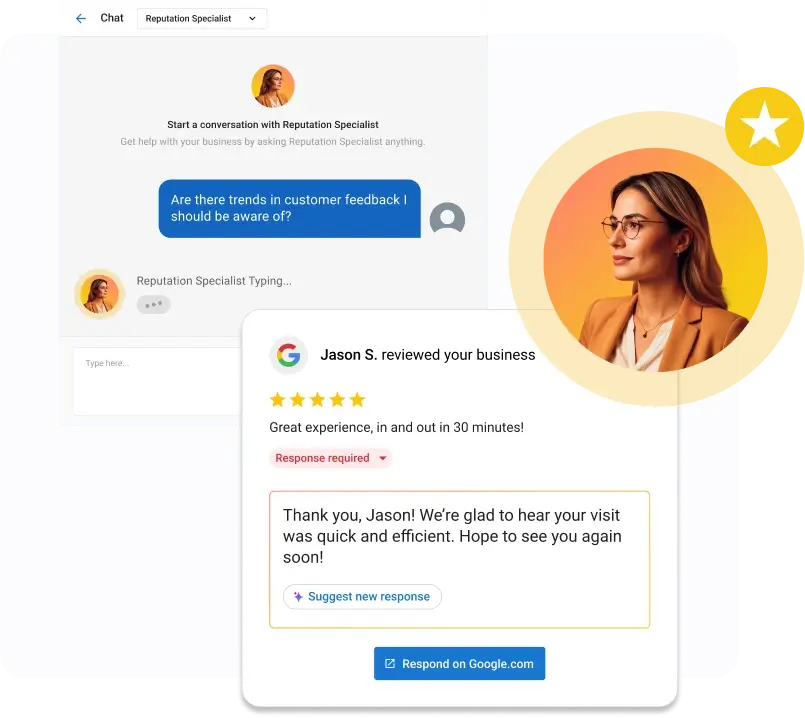
- AI Reputation Specialist: It sends review requests and responds to Google and Facebook reviews under rules you set, such as rating thresholds and timing.
On the search side, Fred Astaire Dance Studio grew search traffic 37% with Vendasta after building up its reviews, review responses, and listings.
To see how Vendasta SEO AI tracks your rankings across your whole service area without a storefront, book a Vendasta demo.
Local SEO for Service Area Business FAQs
1. Does hiding my address on Google Business Profile hurt my local rankings?
Often, yes. Sterling Sky saw a client’s rankings drop sharply after its address was hidden, and its 2025 study found a negative correlation between hidden addresses and local pack rankings for “near me” searches. Google still requires you to keep an address off your profile where you don’t serve customers, so compensate with reviews, links, and city pages.
2. How does Google decide how far from my base I can rank without a storefront?
Google weighs distance alongside relevance and popularity, and practitioner tests indicate distance is measured from your verification address when your address is hidden. Whitespark estimates most businesses rank within about 1 to 5 miles of that point, a practitioner estimate rather than a fixed range. Competition sets the true limit, so denser markets usually mean a tighter radius and slower gains in outlying towns.
3. Do the service areas I set in Google Business Profile affect rankings?
Practitioner tests say no. Whitespark’s 2024 tests found that adding service areas had no impact on local rankings. Service areas show customers where you work, so keep them accurate, within Google’s limit of 20 and about two hours’ drive from your base.
4. How do I create city pages for every town I serve without doorway or duplicate content issues?
Build pages only for towns where you have real work to show. Fill each with local projects, customer reviews from that town, coverage details, and area-specific problems. Google’s spam policies flag city pages that funnel users to one page and large batches of pages made mainly to manipulate rankings.
5. How do I list NAP citations when my address is hidden?
Use the same business name, phone number, and city everywhere. Google Business Profile, Bing Places, and Nextdoor all let you keep your address off the public listing. For other directories, check for a hidden-address option before you submit a home address. Aggregators such as Data Axle feed many smaller directories automatically.
6. How do I get more Google reviews as a service business?
Share the review link or QR code from your profile’s Get more reviews option after every finished job. Ask every customer, not only happy ones. Google bans incentives, staff review quotas, and conflict-of-interest reviews, and the FTC can seek civil penalties of up to $53,088 per violation of its consumer review rule.
7. How do I verify a Google Business Profile for a home-based business?
Google assigns verification methods automatically, and you can’t change them. If you’re offered video, record landmarks and signs in your immediate neighborhood, then show your tools, equipment, or branded apparel. Where Google offers postcard verification, most codes arrive within 14 days.
8. Should I use Local Services Ads alongside local SEO?
Yes, when your organic radius doesn’t reach towns you want to serve. LSAs charge for leads rather than clicks, require a verified Business Profile and screening, and show on Search and Maps. Google is moving them into Google Ads as Performance Max campaigns with pay-per-lead goals, with the migration running through 2027.
9. Can I use a virtual office or P.O. box as my Google Business Profile address?
Google says a service area business can’t list a virtual office unless it’s staffed during business hours, and P.O. boxes or mailboxes at remote locations aren’t acceptable. Use your real base address, hide it, and list your service areas to stay within Google’s guidelines.
10. Can I create a separate Google Business Profile for each city I serve?
Not without real locations. Google allows a service area business one profile for its whole area, with separate profiles only for locations that have separate staff and separate service areas. Extra profiles created to rank in more towns break Google’s guidelines.