About Us
 Careers
 Leadership
 Board
Board Newsroom
An after-hours answering service can determine which contractor gets the job when a furnace quits at 9 p.m. on a Saturday and the homeowner starts dialing in order: the contractor whose AI receptionist picks up on the first ring books the visit, and the two numbers that roll to voicemail get nothing.
An after-hours answering service picks up the calls your team cannot take at night, on weekends, and on holidays, and an AI answering service handles them without a night shift.
An AI receptionist, a type of AI voice agent, answers 24/7, books the appointment against your calendar, screens for emergencies, warm-transfers urgent calls to whoever is on call, and logs a transcript to your customer relationship management (CRM) system.
AI options bill per call (Smith.ai), per unique caller (Goodcall), or per minute (RingCentral), while human services such as Ruby put a live operator on the line and sell plans in blocks of receptionist minutes.
This article covers what an after-hours answering service does on each call, how five after-hours options compare on price and integrations, the break-even math against a front-desk hire, compliance for clinics and law firms, where the technology fails, and how to set one up before next weekend.
Capture, qualify, and convert leads 24/7 without lifting a finger
TL;DR
- Human first, AI after hours: The setup most local businesses start with rings the team first and rolls unanswered, night, and weekend calls to an AI receptionist that books the job instead of taking a voicemail.
- Vendasta’s AI Receptionist covers nights and weekends: It answers calls, web chats, texts, and messages 24/7, qualifies the caller, books against your calendar, and logs every conversation to the CRM.
- A three-ring fail-safe recovered 30% of missed calls: A home services company working with Blackfeather Digital routed unanswered calls to the AI, which now books more appointments than anyone on the team.
What an After-Hours Answering Service Does Today
An after-hours AI receptionist handles night, weekend, and holiday calls in plain language, books or qualifies the caller, and transfers emergencies to the on-call person, while voicemail and press-1 interactive voice response (IVR) trees stop at a message or a menu and a human answering service puts a live operator on the call at operator rates.
Vendasta calls its purpose-built version an AI Employee: AI Employees learn from your website, business profile, uploaded knowledge, and connected records, then log each action.

What an AI Receptionist Does on a Call
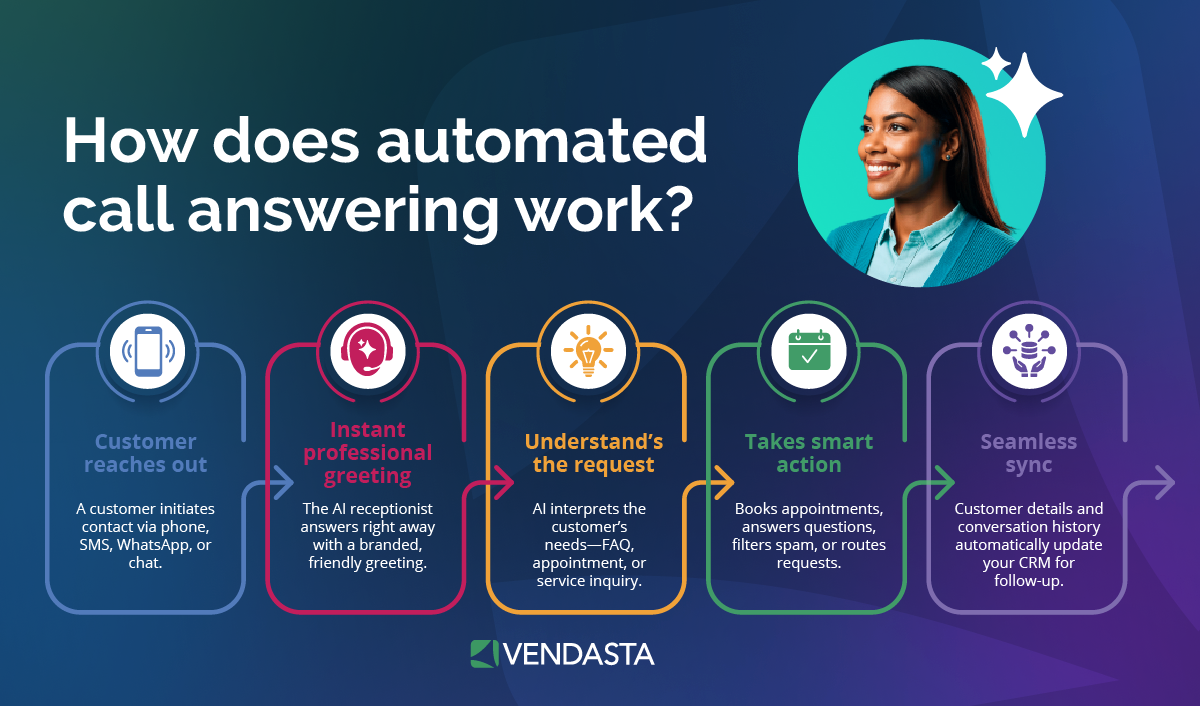
On an inbound call, an AI receptionist answers and works out what the caller needs, then either resolves the request or routes it. It handles a few distinct jobs:
- Answer and identify: It greets the caller by business name and answers questions from your knowledge base. It then sorts the call as a new lead, an existing customer, a vendor, or spam.
- Route and transfer: Calls that match your transfer rules go to a department or a designated person, such as the on-call technician or owner; everything else stays with the AI.
- Take messages: When a transfer fails, or the caller wants a callback, it records the callback details and urgency, then sends the note by text or into the CRM.
- Cover after-hours and missed calls: Calls that ring past your pickup window roll to the AI instead of voicemail. When a call still goes unanswered, Vendasta’s missed-call text-back can automatically text the caller back so the lead isn’t lost.
Local businesses recover revenue when the AI answers calls that currently go nowhere. Neighborly, a franchise network, found that roughly 30% of its leads had previously gone uncontacted; with AI handling intake, 35,700 conversations led to 3,400 conversions and a 372% year-over-year increase in leads converted to revenue. Those were leads the business had already paid to generate.
For a home services client of Blackfeather Digital, calls ring the human team first and roll to the AI Receptionist after three rings. According to Brett Prieskorn of Blackfeather Digital, the AI recovered about 30% of missed inbound calls and now books more appointments than any person on the team. You can read the home services AI Receptionist case study for the details.
Social Ordeals routed after-hours inquiries for a nine-location veterinary group to the AI Receptionist. The agency attributed $47,698 in monthly revenue and 57 new clients in one month to AI intake, and you can read the veterinary clinic case study for the full results.
When the AI books appointments or recovers cancellations, callers leave with confirmed slots. Its qualification questions and post-call records let your team act on each lead without repeating the intake.
Appointment Booking and Cancellation Recovery
The booking happens inside the call against your live calendar, so the caller hangs up with a confirmed slot rather than a promise of a callback. Vendasta’s AI Receptionist books appointments against real calendars and writes the record to the CRM. Vendasta also integrates with Jobber, Housecall Pro, and ServiceTitan, the field-service tools many home services businesses already run.
Cancellations work the same way in reverse. When a customer calls at 7 p.m. to cancel tomorrow’s 8 a.m. visit, the AI offers the next opening and rebooks instead of leaving a hole in the day. Have it state your deposit or cancellation policy during the booking, and the no-show conversation rarely needs to happen at all.
Lead Capture and Qualification
Qualification is a scripted set of questions that sorts callers into bookable jobs, callbacks, and declines, and the answers travel with the lead into the CRM. Speed is most of the value.
Harvard Business Review’s study of web leads found that companies responding within an hour were nearly seven times as likely to qualify the lead as those waiting one more hour, and more than 60 times as likely as those waiting 24 hours or longer. That study measured web leads, but the same logic applies to a call the AI answers at 10 p.m.
Elite Web Professionals set up a 20-second human-first fail-safe for Choice Signature Luxury Car Rental: calls ring the team first, and any call still unanswered after 20 seconds rolls to the AI Receptionist. Over four months, the AI handled 1,017 calls and qualified 778 leads, producing a 76% conversion rate, which you can see in the car rental case study.
For the qualification steps in more detail, see how AI lead generation for local businesses handles intake, and find the industry-specific questions in the business-type section below.
Post-Call Transcripts and Analytics
Every call produces a transcript and summary, plus tags such as new lead, booked, transferred, or spam, and those records attach to the contact in the CRM.
Conversations AI unlocks Vendasta’s AI Receptionist, logs each interaction to the CRM, and shows calls, texts, web chats, email, WhatsApp, Facebook Messenger, and Instagram messages in one unified inbox inside Business App, the client-facing portal. Business App’s executive reporting shows what the AI Receptionist did and when, which Vendasta calls proof of performance.

For an owner, that is a Monday-morning view of the weekend’s calls without listening to a single voicemail.
Best After-Hours Answering Services Compared
The table compares five after-hours options (Vendasta’s AI Receptionist, Smith.ai, RingCentral AI Receptionist, Goodcall, and Ruby’s human answering service) on the same three criteria (best fit, price basis, and integrations), using each vendor’s own pages as observed in October 2026.
| Vendor | Best for | Price basis | Integrations |
|---|---|---|---|
| Vendasta AI Receptionist | Local service businesses that want after-hours calls booked and logged | Book a demo for pricing | Jobber, Housecall Pro, ServiceTitan, QuickBooks Online, Clio, Dentrix, HubSpot, Zapier |
| Smith.ai | AI with human fallback and documented field-service links | Per call; free tier (25 calls, then $3.00 per call), Pro from $150/month for 75 calls, $500/month at 300 calls | HubSpot, Salesforce, Zoho, Google Calendar, Calendly, ServiceTitan, Housecall Pro, Jobber, MyCase, PracticePanther, Zapier |
| RingCentral AI Receptionist | Existing RingEX phone customers | Monthly license plus per-minute overage | Salesforce, HubSpot, Zoho; connects to your calendar |
| Goodcall | Owners forwarding an existing business number | Per unique caller | Calendar and CRM sync; Zapier to other CRMs |
| Ruby | Businesses that want live human operators on every call | Minute-based plans from 50 minutes ($250/month) to 500 minutes ($1,725/month); larger plans quoted on request | Not documented in sources reviewed |
Developer platforms such as Retell, Vapi, and Bland expect you or a developer to build the agent and connect your field-service software.
Among the options in the table, Smith.ai documents ServiceTitan, Housecall Pro, and Jobber integrations, RingCentral connects natively to Salesforce, HubSpot, and Zoho, and Goodcall syncs with your calendar and reaches other CRMs through Zapier. Vendasta’s AI Receptionist books against your calendar, and Vendasta integrates with Jobber, Housecall Pro, and ServiceTitan. Vendasta’s AI voice is available for businesses in the US and Canada.
For a closer look at how an AI phone answering service works, see our separate guide.
Best Pick by Business Type
The right pick depends on what the first 90 seconds of your typical after-hours call must accomplish. The intake logic below starts with home services, where delayed routing can create a safety risk, and law firms, where collecting too much information before a conflict check creates a separate risk:
- Home services: For heating, ventilation, and air conditioning (HVAC), plumbing, and electrical businesses, Vendasta’s AI Receptionist books after-hours jobs against your calendar, and Vendasta integrates with Jobber, Housecall Pro, and ServiceTitan. The Air Conditioning Contractors of America (ACCA) blog’s response-protocol guidance recommends separate daytime and after-hours protocols that sort callers by urgency and priority status, establishing the nature of the issue, equipment location and access, and current house temperature. Add system type, warranty status, and service-agreement membership, and build in an override: a gas smell or carbon monoxide alarm gets a “leave and call 911” instruction before anything else.
- Law firms: Collect only the names of the parties, key witnesses, and the general nature of the matter until a conflict check clears, the standard malpractice carriers and bar ethics guidance set for prospective clients. Clio’s legal trends study found that only 40% of secret-shopped firms answered the phone and 20% responded to voicemails, which suggests a firm that answers every intake call, including after hours, would outperform most firms in that sample. Vendasta integrates with Clio.
- Small teams: When the owner is on a job site, and the one office person is already on another call, the priority is no-answer forwarding from the main line (forwarding a cell to a service that transfers back to the same cell creates a loop) plus a script that books or takes a message quickly. Vendasta’s AI Receptionist books the job or takes the message, and Goodcall also documents conditional forwarding from an existing number.
- Clinic: The vendor signs a Business Associate Agreement (BAA) first. The script screens for emergencies before intake: any mention of chest pain, shortness of breath, or unconsciousness routes to a clinician, and non-clinical intake stops at name, date of birth, primary care physician, and reason for the visit. Vendasta integrates with Dentrix. Confirm Vendasta’s BAA terms before routing patient calls to it.
- Salon: Book standard services directly and hold weaves, keratin treatments, and other consultation-heavy services for a callback. The AI states the deposit and cancellation policy at booking.
- Real estate: Qualify on buyer or seller, price range, pre-approval, location, and timeline, and ask whether the caller already has a written agreement with an agent. Fair Housing rules govern how any receptionist describes neighborhoods, so scripted answers stay on verifiable facts.
- Multi-location: The job is consistency across sites and routing by location. Vendasta deploys the same AI Receptionist across every location, keeps each location’s business and brand context, and rolls reporting up across sites.
What an AI Receptionist Costs
The vendors bill three different ways, so a 300-call month is the only fair comparison. Smith.ai bills per call, Goodcall per unique caller, and RingCentral per minute. The figures below assume 300 calls averaging four minutes (1,200 minutes), our working assumption for a typical receptionist call, and they exclude transfers and SMS:
| Vendor and plan | Billing basis | Published rate | 300-call month |
|---|---|---|---|
| Smith.ai AI Receptionist, 300 calls | Per call | $500/month ($1.67 per call) at the 300-call tier; $2.17 overage | $500 |
| Smith.ai human receptionists, 300 calls | Per call | $2,100/month; $8.50 overage | $2,100 |
| RingCentral AI Receptionist standalone | Per minute | $49/month with 100 minutes; $0.50/minute overage | $599 |
| Goodcall Growth | Per unique caller | $129/month for 250 callers; $0.50 per extra caller | $154 |
| Goodcall Scale | Per unique caller | $249/month for 500 callers | $249 |
Two assumptions move the totals. Goodcall’s figures assume 300 distinct phone numbers, so repeat callers bring them down.
RingCentral’s per-minute plan also rises with call length: at five-minute calls, RingCentral standalone reaches $749.
Vendasta’s AI Receptionist is not priced per call or per minute in this comparison; local businesses can book a demo for pricing.
After-Hours Coverage Options: AI, Human Service, or Hybrid
A full-time front-desk receptionist costs about $54,000 a year fully loaded and still goes home at 5 p.m. Bureau of Labor Statistics (BLS) wage data puts the median receptionist wage at $38,010 a year, or $18.27 an hour, as of May 2025.
The BLS compensation release reports that benefits made up 30% of total compensation in private industry in June 2026, a multiplier of roughly 1.43 that brings the median hire to about $54,354.
That is about $4,530 a month for roughly 40 weekday hours of coverage and none at night. The alternatives at 300 calls a month:
- Human answering service: Smith.ai’s 300-call human plan from the table works out to $25,200 a year. Ruby’s largest published plan, 500 minutes at $1,725 a month, covers about 125 four-minute calls, and larger plans are quoted on request.
- AI receptionist: Smith.ai’s 300-call AI plan works out to $6,000 a year, and Goodcall Scale to $2,988.
- Hybrid: Keep the daytime receptionist and send after-hours, weekend, and overflow calls to the AI. The cost is the $54,354 hire plus the AI plan, and the front desk stops losing calls during lunch and on hold.
Using the verified table rates, a per-call human service grows past the salaried hire’s calculated $4,530 monthly cost at roughly 586 calls, because every call beyond Smith.ai’s 300-call plan adds $8.50.
Above about 586 calls a month, a salaried daytime receptionist is cheaper than that human answering service plan.
The AI plan’s $2.17 overage does not cross the same calculated monthly cost until about 2,157 calls, so below that volume the AI plan costs less than the salaried hire while still covering calls outside weekday office hours.
Integrations, Compliance, and Security
The AI must connect to the calendar it books into and the CRM it logs to. It also needs access to the phone line it answers.
Vendasta integrates with Jobber, ServiceTitan, Housecall Pro, QuickBooks Online, Clio, Dentrix, Shopify, Zapier, HubSpot, Google products, Microsoft Teams, and Monday.com, and supports developer APIs and Model Context Protocol (MCP) for anything custom.
Smith.ai and RingCentral list HubSpot and Salesforce natively, while Goodcall connects to other CRMs through Zapier.
You do not need to port your number. Conditional forwarding from your carrier sends unanswered or busy calls to the AI’s number while your existing number stays with your carrier.
Goodcall documents the same conditional forwarding, and RingCentral’s AI Receptionist works with cloud, on-premises, or Session Initiation Protocol (SIP) phone systems using existing or new numbers without switching providers.
Medical and legal practices add two requirements. The U.S. Department of Health and Human Services (HHS) audio guidance holds that a vendor doing more than passing audio through is a business associate and must sign a BAA, and the American Academy of Pediatrics (AAP) sets the same baseline for after-hours answering services.
- Smith.ai states that it “is not HIPAA-compliant and cannot handle protected health information (PHI) in regulated healthcare environments,” referring to the Health Insurance Portability and Accountability Act (HIPAA).
- RingCentral says its AI Receptionist is designed to support HIPAA compliance and, in its HIPAA overview, makes a BAA available to paying covered entities, while Goodcall describes its service as “HIPAA-compliant with signed BAA.”
For a law firm, a System and Organization Controls 2 (SOC 2) report is the confidentiality signal to ask about. Goodcall lists SOC 2 Type II, and RingCentral lists SOC 2 for its AI Receptionist.
Recording consent applies to every transcript. Federal law allows one-party consent, but the Reporters Committee for Freedom of the Press recording guide lists about 11 all-party consent states, including California, Florida, Illinois, and Pennsylvania, so the AI should announce recording at the top of the call.
In its proposed rule on AI-generated calls, the Federal Communications Commission (FCC) states that the Telephone Consumer Protection Act (TCPA) requirements “do not extend to technologies used to answer inbound calls,” so answering is not a robocall issue; outbound follow-up calls and texts still need consent.
Where AI Receptionists Fail and How Escalation Works
Research and vendor terms document the failure modes, and each one needs a configured escape hatch:
- Accents and dialects: A study in the Proceedings of the National Academy of Sciences (PNAS) of five commercial speech-recognition systems found an average word error rate of 0.35 for Black speakers against 0.19 for white speakers. A caller the AI keeps misunderstanding should reach a person after two failed attempts, not a third retry.
- Background noise: A homeowner calling from beside a failing compressor or a technician calling from a running truck degrades recognition. Short confirmation prompts (“I have 412 Oak Street, is that right?”) catch the errors before they reach the calendar.
- Emergencies: Retell’s terms say its services are not designed for emergency use, and Twilio does not permit emergency calls on its standard numbers, so the script has to cover it: anyone describing a gas smell, a carbon monoxide alarm, or chest pain is told to hang up and call 911 or the utility, and the AI alerts your on-call person at the same time. Active flooding goes straight to the on-call technician.
- Hallucinations: A study presented at the ACM Conference on Fairness, Accountability, and Transparency (FAccT) found that 1.4% of Whisper transcriptions contained hallucinated phrases or sentences, and 38% of those included at least one harm type. The receptionist-level version is a quoted price you never set or a confirmed slot that does not exist, which is why booking should read from the live calendar and pricing from your uploaded list, never from the model’s memory.
You control edge cases through escalation rules. Twilio’s documentation suggests a workable default: the caller asks for a person, the request remains unresolved after two attempts, the call involves billing or security, or the caller sounds frustrated.
Gartner’s survey found 87% of customers say companies using generative AI for service must provide access to a human agent. That makes the path to a person a baseline requirement rather than a premium feature.
A warm transfer makes those triggers safer. The AI holds the caller and dials your on-call number, then briefs whoever answers with a summary or whisper message before connecting the two.
If nobody picks up within the hold timeout, the AI returns to the caller to take a message or try an alternate number.
A cold transfer hands off blind and cannot recover a missed pickup, which at 11 p.m. means the caller is back to voicemail. Whatever platform you choose, write down what counts as an emergency before the first winter night.
How to Set Up an AI Receptionist
Most of the setup is deciding how calls reach the AI; the agent itself takes minutes. The steps run in this order:
- Choose forwarding or porting: Forwarding uses your carrier’s conditional-forwarding code (Verizon’s is *71 plus the destination number), keeps your number where it is, and avoids the porting wait. Cell numbers need conditional rather than full forwarding to avoid a transfer loop. Porting moves the number into the platform: the FCC’s porting guide requires simple ports to be processed in one business day, but Bland quotes 7–14 business days, and Goodcall assigns a new number or uses conditional forwarding rather than advertising porting. Forward first.
- Check SIP and VoIP compatibility: If you run RingCentral or another voice over IP (VoIP) system, the AI can attach through a SIP trunk instead of carrier forwarding. RingCentral’s AI Receptionist works with cloud, on-premises, or SIP phone systems without switching providers; Retell recommends elastic SIP trunking, and Synthflow lists SIP trunking as an Enterprise telephony option.
- Load the knowledge base: Point the agent at your website and upload price lists, service areas, and FAQs. Retell accepts up to 500 URLs and can re-fetch them every 24 hours when auto-refresh is turned on; Goodcall learns from your website, Google listing, or business details, and Vendasta’s AI Employees learn from the website, business profile, and uploaded documents.
- Connect calendar and records: Link the calendar the AI books into and the CRM or field-service tool it logs to before the first live call.
- Write the escalation and emergency rules: Define the transfer number by time of day, the keywords that trigger a 911 instruction, and what the AI says when nobody picks up.
- Test by phone, then go live: A browser preview is useful for checking the script, but only a real phone call shows whether forwarding, transfers, and calendar booking work end to end. Place real calls, force a transfer, and book a test slot before switching forwarding on.
Forwarding avoids the carrier-dependent porting wait. Smith.ai publishes a vendor-stated agent setup time of about 15 minutes, and most Vendasta AI Employees deploy in under 30 minutes. If you would rather not do it yourself, Vendasta offers optional expert setup for selected AI Employees, and the AI Workforce Optimization Plan adds ongoing prompt and setting changes, a monthly health check, and direct access to the implementation team.
Why an AI Receptionist Ends After-Hours Lost Calls
A local business gets value from an after-hours answering service only when it finishes the job the caller started, and voicemail and IVR trees stop short of a booked appointment.
Vendasta’s AI Receptionist answers calls, web chats, texts, and messages 24/7, qualifies the caller against your services, books the slot on your calendar, and logs the conversation to the CRM, so the Saturday-night furnace call gets answered and booked without a Saturday-night employee.
That is the AI Employees model: coverage without headcount, with every action logged as proof of performance.
Run an agency, franchise, or software company? Deploy Vendasta’s AI Receptionist across every client or location from one platform, and grow recurring revenue without adding headcount. To see how Vendasta’s AI Receptionist would handle your after-hours calls, book a Vendasta demo.
After-Hours Answering Service FAQs
1. How much does an after-hours answering service cost?
AI-based plans published in October 2026 run from about $154 (Goodcall Growth) to $825 (Smith.ai’s free AI tier, at $3.00 per call after 25 free calls) for a 300-call month of four-minute calls. Smith.ai’s human 300-call plan is $2,100. Goodcall’s figure assumes every caller is a unique number. For Vendasta’s AI Receptionist, local businesses can book a demo for pricing.
2. What does an AI receptionist do during a call?
It answers by your business name and identifies what the caller needs. It also answers questions from your knowledge base, runs your intake questions, books an appointment against your live calendar, transfers to a person when a rule fires, and takes a message if nobody picks up. After the call it writes a transcript and summary to the CRM.
3. Can an AI receptionist replace a human receptionist?
For routine answering and booking, yes; for judgment calls, upset customers, and emergencies, it should hand off. Gartner’s survey found 87% of customers say companies using generative AI for service must provide access to a human agent. The workable model is AI on every call with a warm transfer to a person on defined triggers.
4. Is an AI receptionist worth it compared with hiring a front desk employee?
A median receptionist costs about $54,354 a year fully loaded on Bureau of Labor Statistics figures and covers weekday hours only. An AI plan at 300 calls a month runs a few thousand dollars a year and answers nights and weekends. Below about 2,157 calls a month, the AI is the cheaper line item.
5. What happens when the AI cannot handle a caller?
It escalates. Configured triggers such as a request for a person, two failed resolution attempts, a billing dispute, or a frustrated tone start a warm transfer. The AI holds the caller and dials your on-call number, then briefs whoever answers before connecting them. If nobody answers, it returns to the caller and takes a message.
6. Can an AI receptionist use my calendar, CRM, and phone number without porting?
Yes. Conditional call forwarding sends unanswered or busy calls from your existing number to the AI’s assigned number, so your number stays with your carrier. Vendasta’s integrations include Google products, HubSpot, Jobber, Housecall Pro, ServiceTitan, Clio, and Dentrix.
7. Are AI receptionists HIPAA compliant and SOC 2 certified?
It varies by vendor and plan. RingCentral says its AI Receptionist is designed to support HIPAA compliance, makes a Business Associate Agreement (BAA) available to paying covered entities, and lists SOC 2. Goodcall describes its service as HIPAA-compliant with a signed BAA and lists SOC 2 Type II. Smith.ai states that it is not HIPAA-compliant. HHS guidance requires a signed BAA from any vendor that does more than pass patient audio through.
8. How long does it take to set up an AI receptionist?
Smith.ai publishes a vendor-stated agent setup time of about 15 minutes, and most Vendasta AI Employees deploy in under 30 minutes after learning from your website and uploaded documents. Carrier forwarding avoids the porting wait. Porting your number into a platform is the slow path: FCC rules require simple ports to be processed in one business day, but Bland quotes 7–14 business days.
9. Will callers notice they are talking to an AI?
Often not by voice alone. UC Berkeley’s listening study found participants correctly identified AI voice clones only 60.8% of the time against 67.4% for real voices. Announce the AI and the recording anyway: all-party consent states require the recording notice, and a clear path to a person removes the main objection callers raise.
10. Does an after-hours answering service book appointments into Jobber or ServiceTitan?
It depends on the vendor. Smith.ai documents ServiceTitan, Housecall Pro, and Jobber integrations. RingCentral connects natively to Salesforce, HubSpot, and Zoho, while Goodcall syncs with your calendar and reaches other tools through Zapier. Vendasta’s AI Receptionist books appointments against your calendar, and Vendasta’s integrations include Jobber, ServiceTitan, Housecall Pro, and QuickBooks Online.