About Us
 Careers
 Leadership
 Board
Board Newsroom
As part of your client’s local SEO strategy, you should continue to establish their online presence by claiming or creating online listings wherever possible. If you’re lucky, you’ll also stumble across listing platforms (such as Yelp, Waze, or even Mapquest) you have full control over when it comes to updating and optimizing your client’s business information. The good news is that Foursquare for Business is still a powerful addition to your local clients’ marketing efforts.
Not all business listings are created equally, and some—like Foursquare—deliver more impressive results than others. Foursquare is still used today by millions of customers looking for local business information, making Foursquare listings particularly important for small and medium-sized businesses (SMBs) who want to be easily discoverable by their target audiences. In this article, we’ll fill you in on everything you need to know about this must-have listing, how to create it, and how to get the most out of it.
Automate the entire customer journey from first touch to repeat business
Should you list your business on Foursquare in 2023?
Local businesses should absolutely claim their business on Foursquare in 2023. While it’s true that new platforms always crop up and render old ones obsolete, Foursquare continues to stand the test of time in the 14 years since it was first developed.
With millions of users still consulting Foursquare to search for local businesses, it’s a missed opportunity to stay off the platform. A Foursquare for business listing can boost SEO performance, increase both digital and real-life traffic, and bolster a business’s online reputation.
Plus, it only takes a few minutes to set up. We’ll take a look at how it’s done in a bit.
Benefits of creating a Foursquare for Business listing
Foursquare’s benefits extend well beyond those of the average business database. That’s because it isn’t used only by customers. Other tech companies also use Foursquare as a data aggregator and rely on it for location services tech. Here’s how that delivers serious benefits for SMBs:
Improved visibility
When you list a business on Foursquare it boosts its visibility by allowing it to showcase its products and services to a large, targeted audience of potential customers. Foursquare users can discover businesses through location-based searches, and your business profile provides them with all the information they need to make a decision about whether to visit your establishment.
Customer insights
Foursquare provides businesses with valuable customer insights through its data and analytics features. This information includes demographics, check-in habits, and customer feedback, which can help inform decision-making.
Customer engagement
Foursquare offers a platform for engaging with customers, including the ability to respond to customer reviews, offer rewards for certain behaviors, and promote businesses to a targeted audience.
Reputation management
Foursquare for Business lets marketers manage a business’s online reputation through customer reviews and feedback. Responding to both positive and negative reviews in a timely and professional manner can help project credibility and encourage customers to visit your establishment.
Better SEO visibility
A complete and optimized Foursquare business profile can help improve your visibility in search results on both Foursquare and other search engines. Foursquare listings are still indexed by Google and Bing, today.
Since Uber, Apple, Snapchat, Microsoft, Twitter, and other tech giants all use Foursquare data, an optimized Foursquare listing can improve visibility when using their products as well.
Customer loyalty
When you add a business to Foursquare, you can offer specials and rewards in exchange for customer behaviors, such as check-ins. These special offers can be customized to meet the needs of each business, helping them attract and retain customers.
New audiences
With millions of users on Foursquare, a Foursquare for Business profile provides access to a large audience of local prospective customers. If you also have some extra room in your advertising budget, you can also create location-based ads that only appear to users when they’re near your client’s business.
Free to claim
Compared to many other types of marketing, Foursquare can be a relatively cost-effective way to reach new customers. While there are options to advertise on the platform, many marketers benefit from simply claiming their business on Foursquare.
Easy setup
As we’re about to explain to you soon enough, claiming and verifying a Foursquare for Business listing is quick and simple, allowing you to start updating it with as much information as possible. Its user interface is also easy to use and navigate.
How to create a Foursquare for Business listing: step-by-step
Ready to claim a business on Foursquare? Just follow these steps:
Step 1: Navigate to Foursquare’s website.
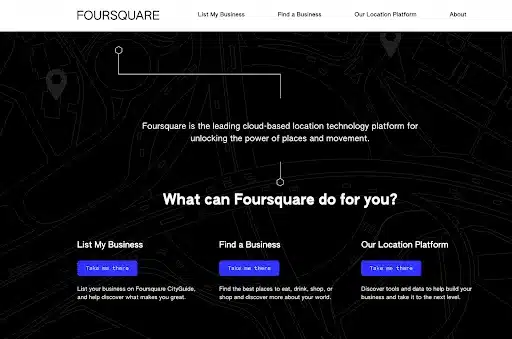
Step 2: From the home screen, click the button that says “take me there” under “List My Business”.
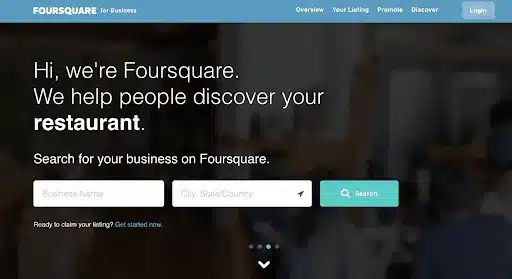
Step 3: On the next screen, click “Get started now”.
Step 4: Complete all the business information that their onboarding form prompts you to fill out.
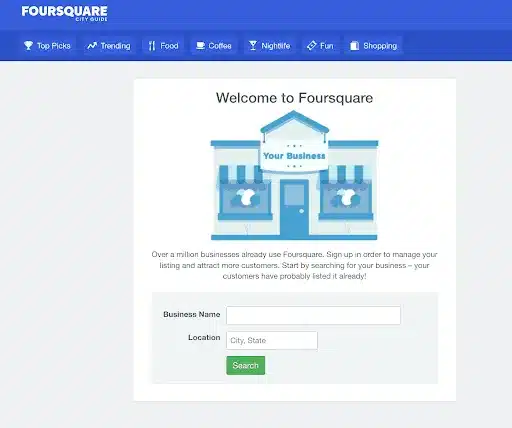
Note that if customers have already listed your business, Foursquare will ask to verify your ownership.
This process can take a while since it involves Foursquare mailing you verification instructions at the business address. You can also pay a $20 fee for them to expedite the process.
Step 5: Now you can update your listing with anything you’d like, including new photos. That’s it!
Listing builders can also be used to more easily list a business on Foursquare to find local business listing websites that should also be used. We’ll talk a bit more about these in a moment.
Tips for updating and optimizing your Foursquare listing
Once you add a new business to Foursquare, these tips can help you get the greatest benefits out of it.
- Add photos: Regularly updating a Foursquare listing with images gives prospective customers more reasons to check out the business.
- Encourage and respond to reviews: Using reputation management software to generate and respond to reviews improves SEO performance and online reputation while demonstrating that a business is transparent and values its customer’s feedback.
- Use the correct business category: Make sure the business uses the category that’s most accurate to their business. You can also add more categories as the platform allows.
- Create a brief description: A short 700-character business description can help convey what the business does and make their Foursquare listing standout from its competitors. If you have any opportunities, incorporate relevant keywords to their business wherever natural and without keyword stuffing.
- Use a listing builder: Local listing management is much easier with the use of a listing builder. Vendasta’s Listing Builder enables businesses to create, update, and manage hundreds of listings from a single dashboard. Listing builders can be used to list a business on Foursquare among many other popular databases and to ensure all those listings are consistent and up-to-date.
FAQs
1. What is Foursquare for Business?
Foursquare for Business is a location-based marketing and analytics platform that helps businesses manage their listings, attract nearby customers, and gain insights into consumer behavior through check-ins, reviews, and real-world movement data.
2. How does Foursquare for Business work?
Businesses claim and manage their location listings on Foursquare to ensure accurate information like address, hours, and contact details. The platform also provides analytics that show how customers discover and interact with their business in real life.
3. Why should small businesses use Foursquare for Business?
Foursquare boosts local visibility by helping customers find accurate, up-to-date information about your business. Its location data powers other platforms like Apple Maps, Uber, and Yelp—making it essential for local SEO and discovery.
4. How can Foursquare help improve local marketing?
Foursquare for Business helps marketers understand foot traffic patterns and audience demographics. These insights allow for smarter ad targeting, localized promotions, and better decisions about where to focus marketing efforts.
5. How can Vendasta help businesses manage Foursquare listings?
Vendasta’s Listing Management tools sync business information across major platforms—including Foursquare. This ensures your clients’ data stays consistent, improving online visibility, search rankings, and customer trust.
6. Is Foursquare still relevant for businesses in 2025?
Yes. Foursquare remains a powerful data partner for local discovery, powering millions of location-based searches daily. Businesses using it ensure their listings are visible across apps and services that rely on Foursquare’s data network.
7. How do I claim my business on Foursquare?
Visit Foursquare for Business, search for your business, and click “Claim My Business.” After verification (via phone or postcard), you can update your information, add photos, and access analytics. Vendasta can streamline this process for agencies managing multiple clients.
8. Can businesses advertise directly through Foursquare?
Yes. Foursquare offers location-based ads that target users near your business or those who have visited similar locations. These hyperlocal campaigns help increase foot traffic and attract new customers effectively.
9. How does Foursquare data benefit digital marketing strategies?
Foursquare’s data provides insights into consumer movement, preferences, and competitive trends. Marketers use this data to optimize campaigns, refine audience targeting, and measure offline impact from online advertising.
10. How can agencies use Vendasta to manage Foursquare and other listings?
Agencies using Vendasta can manage multiple client listings—including Foursquare—through one dashboard. This saves time, ensures data accuracy, and strengthens local SEO by keeping business details consistent across all major directories and apps.