About Us
 Careers
 Leadership
 Board
Board Newsroom
Most small businesses lose customers before they even get a chance to serve them. A call goes unanswered while you’re with a client. A booking request sits in your inbox overnight. By the time you reply, that person has already found someone else.
That gap gets more expensive the busier you get. Industry research on missed business calls found that a large share of small businesses lose an estimated $126,000 a year to calls that never got answered, and most of those callers never try again. Every one of those missed connections was a potential customer that a competitor picked up instead.
The right software closes that gap. The best scheduling software for small business does more than display open time slots. It captures the customer, answers their questions, and books the appointment, often before a staff member is even aware the conversation happened. This guide walks through what to look for, compares the top tools on the market, and shows a real example of what happens when a small business puts AI in charge of its calendar.
Automate the entire customer journey from first touch to repeat business
TL;DR
- AI-powered booking beats passive calendars. Tools like Vendasta’s AI Receptionist qualify leads and book appointments automatically instead of just showing available slots.
- Automated reminders cut no-shows significantly. One clinical study found text reminders reduced no-shows by 38 percent.
- The right fit depends on your business type. Employee shift scheduling, customer appointment booking, and service or field scheduling all call for different features.
What Is Scheduling Software for Small Business?
Scheduling software for small business is a tool that automates booking, calendar management, and staff or appointment coordination, so owners and managers spend less time on manual back and forth. Instead of tracking availability in a notebook or a shared spreadsheet, the software handles bookings, sends reminders, and keeps everyone’s calendar in sync.
The term covers more ground than people usually expect, though, and that’s worth clearing up before you start comparing tools. There are three overlapping but distinct kinds of small business scheduling software, and the right one depends entirely on what you’re trying to schedule.
Employee Scheduling vs. Customer Scheduling: What’s the Difference?
Employee scheduling software builds staff rosters, manages shift swaps, tracks time clocks, and helps with labor law compliance. It’s built for businesses with hourly or shift-based teams, like retail stores, restaurants, and construction crews.
Customer or appointment scheduling software is a different animal entirely. It lets clients or prospects book time with your business directly, whether that’s a sales call, a consultation, or a service appointment. This is the category most people mean when they search for scheduling software for small business, and it’s the focus of this guide.
- Employee scheduling answers: who’s working which shift, and how do we avoid overtime violations?
- Customer scheduling answers: how does a prospect book time with us, and how do we make sure they show up?
What Is Service Scheduling Software for Small Business?
Service scheduling software for small business sits inside the customer scheduling category but adds features specific to businesses that send people to jobs rather than sitting behind a desk. Think contractors, cleaning services, salons, and clinics.
On top of standard booking and reminders, service scheduling tools typically add:
- Technician or staff matching based on skill or location
- Route planning for businesses that travel to the customer
- Intake forms collected before the appointment
- Deposit or prepayment collection to reduce no-shows
Why Does Your Business Need Scheduling Software?
The biggest reason to invest in scheduling software is simple: every unbooked slot and every no-show is revenue you already worked hard to generate, and you’re letting it slip away. A well-run scheduling system closes that gap in a few concrete ways.
- Fewer no-shows. Automated reminders sent by text or email give customers a nudge before they forget. One randomized study out of Imperial College London found that text reminders cut no-shows by 38 percent compared to sending no reminder at all.
- Round-the-clock capture. A booking link or an AI receptionist doesn’t stop working when you lock the front door. Evening and weekend inquiries get answered instead of going to voicemail.
- Less administrative time. Staff stop playing phone tag and start focusing on the parts of the job that actually require a person.
- A better customer experience. Salesforce research on customer service found that 61 percent of customers prefer self-service for simple tasks like booking, rather than waiting on hold or playing phone tag.
- Cleaner data. A booking that automatically becomes a CRM record beats one that lives only in a calendar app nobody else can see.
For agencies, franchisors, and software vendors reading this on behalf of clients, scheduling automation is also one of the easiest wins to point to in a monthly report. It’s visible, it’s measurable, and clients notice the difference within the first week.
Key Features to Look for in Scheduling Software for Small Business
The best scheduling software for small business includes a handful of features that separate a genuinely useful tool from a glorified calendar link. Here’s what to check for before you commit to a platform.
- Online self-service booking. Customers should be able to pick a time and confirm it themselves, without waiting for a reply.
- Automated reminders. Email and text reminders sent at set intervals before the appointment.
- Two-way calendar sync. Changes made in Google Calendar or Outlook should reflect instantly in the booking tool, and vice versa.
- CRM integration. A booking should create a contact record automatically, not just an event on a calendar.
- Payment or deposit collection. Especially useful for service businesses trying to cut down on no-shows.
- Multi-location and multi-staff support. Necessary for franchises, multi-site brands, and any agency managing scheduling for more than one client.
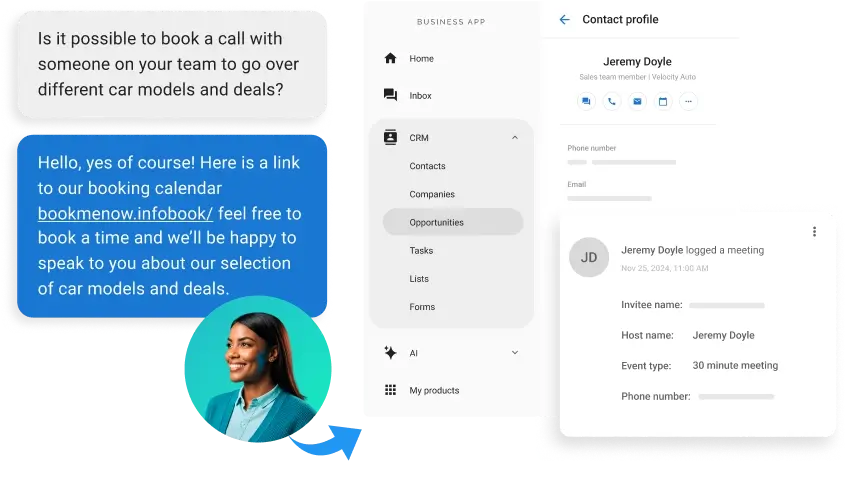
- AI-assisted booking. This is the feature that’s changed the most in the past two years. Instead of just showing open slots, an AI employee can answer a caller’s questions, qualify their interest, and book the appointment on the spot. Vendasta’s AI Receptionist is built specifically for this.
The Best Scheduling Software for Small Business in 2026
The tools below cover a range of budgets and use cases, from simple link-based booking to full AI automation. Vendasta is included first because it’s the only option on this list that connects scheduling directly to a full customer acquisition and CRM platform, rather than treating booking as a standalone feature.
| Tool | Best For | Key AI or Automation Feature | Starting Price |
|---|---|---|---|
| Vendasta | Growing businesses and the agencies who support them | AI Receptionist qualifies leads and books appointments automatically, then updates the CRM | Contact for pricing |
| Calendly | Simple meeting scheduling | Automated confirmations and calendar sync | Free plan; paid from $10/user/month |
| Acuity Scheduling | Service businesses like salons and coaches | Automated reminders and payment collection | Free trial; paid from $20/month |
| Square Appointments | Businesses already using Square for payments | Combines booking with point-of-sale | Free plan; paid from $29/month |
| Setmore | Small teams needing multiple staff calendars | Free tier supports up to four staff calendars | Free plan; paid from $5/user/month |
| SimplyBook.me | Businesses wanting a branded booking page | Customizable widget with reminder automation | Free plan; paid from about $9/month |
| Housecall Pro (or similar field service tool) | Field service and job-site scheduling | Route planning and technician matching | Custom pricing |
Pricing reflects publicly listed rates at the time of writing and may have changed. Confirm current pricing directly with each vendor.
1. Vendasta: Best for AI-Powered Scheduling That Feeds Directly into Your CRM
Vendasta approaches scheduling differently than most tools on this list. Instead of a standalone booking link, scheduling is one part of a full Conversations AI platform built to attract, convert, and retain customers.
The centerpiece is the AI Receptionist, an AI employee that answers calls and chats, qualifies the person on the other end, and books them directly into an available time slot. Every conversation automatically creates a contact and an opportunity in the CRM, so nobody has to enter that information by hand later.
For agencies, franchisors, and software vendors, there’s an added layer: a multi-location portal that lets partners monitor bookings and AI conversations across every client or location from a single dashboard, while each site keeps its own calendar and branded experience.
2. Calendly: Best for Simple, Link-Based Booking
Calendly remains the go-to for straightforward meeting scheduling. Share a link, the other person picks a time, and it’s on both calendars. It’s a solid fit if your business mostly books internal meetings or sales calls and doesn’t need CRM integration or multi-staff coordination.
3. Acuity Scheduling: Best for Service-Based Small Businesses
Acuity is built with salons, coaches, and consultants in mind. It handles multiple service types well and supports payment collection through Stripe or PayPal, which helps cut down on last-minute cancellations.
4. Square Appointments: Best for Businesses Already Using Square
If you’re already processing payments through Square, Square Appointments is an easy add-on. It combines scheduling with point-of-sale, so bookings and transactions live in one place.
5. Setmore: Best for Small Teams on a Budget
Setmore’s free tier supports up to four staff calendars, which makes it a reasonable starting point for a small team that isn’t ready to pay for a full platform yet.
6. SimplyBook.me: Best for a Branded Booking Experience
SimplyBook.me stands out for how customizable the booking page is. Businesses that care about presenting a polished, on-brand experience tend to gravitate here.
7. Field Service Scheduling Tools: Best for Job-Site and Technician Scheduling
For contractors, home service businesses, and other companies that send staff to a job site, dedicated field service scheduling tools add route planning and technician matching on top of standard booking. These tools solve a different problem than appointment booking software, so they’re worth a separate look if your team spends most of its day on the road.
Real Results: How an AI Receptionist Automated Appointment Booking for a Multi-Location Business
Numbers and feature lists only tell part of the story. Here’s what AI-driven scheduling looks like in practice.
A two-location preschool in Cleveland had a scheduling problem that’s common to a lot of appointment-based businesses: high demand, but almost no time to manage it. Site directors were fielding calls, messages, and website inquiries from prospective parents all day, but each location only had four 30-minute tour windows available. Every missed call or delayed reply risked losing a family to a competing preschool.
The partner agency, Mitchell Media, deployed a branded AI Receptionist named Rosie, connected directly to the directors’ real-time calendar availability. Rosie qualifies each parent’s interest, answers common enrollment questions, and books the tour directly, all without a staff member touching the conversation.
- Booking process: fully automated, with no manual scheduling required
- Coverage: parents searching for childcare in the evening or on weekends now reach Rosie instead of a static contact form
- Data visibility: every conversation automatically creates a CRM contact and opportunity, giving the business owner a clear view of the entire enrollment funnel
As Chris Geer, Senior Strategist at Mitchell Media, put it: “Rosie has dramatically changed their workflows and their ability to accommodate new tours. The site directors only really have to get involved when the parent arrives for their visit.”
The specifics here are about preschool tours, but the underlying problem shows up anywhere appointment windows are limited and staff time is scarce: medical and dental offices, salons, home services, and any business where a missed call is a missed customer. Read the full AI Receptionist success story for more detail on how it was set up.
How to Choose the Best Scheduling Software for Small Business
With dozens of tools on the market, narrowing the list down comes down to a few honest questions about your own business.
- Define your booking type. Are you scheduling employee shifts, customer appointments, or field service jobs? Each needs different features, and picking the wrong category wastes time and money.
- List your must-have integrations. Note which CRM, payment processor, and calendar tools you already rely on, and make sure any new platform connects to them.
- Decide if you need AI-assisted booking. If your call or message volume already outpaces what your staff can answer promptly, this is likely the highest-impact feature you can add.
- Check multi-location support. This matters most for franchises, multi-site brands, and agencies managing scheduling on behalf of several clients.
- Compare pricing models. Some tools charge per user, others per location, and some bundle scheduling into a broader platform. Watch for add-on costs that aren’t obvious upfront.
- Test the booking experience yourself. Book a demo appointment through the tool before committing. If it’s clunky for you, it’ll be clunky for your customers too.
- Confirm you own your data. You should be able to see and export your own booking and lead data at any time, not just view it inside someone else’s dashboard.
How to Set Up Scheduling Software for Your Small Business
Once you’ve chosen a platform, getting it running well takes a bit more than flipping a switch. Here’s a practical sequence to follow.
- Connect your calendar. Sync Google Calendar or Outlook and set your real-time availability so double-booking isn’t possible.
- Define your booking rules. Set buffer times between appointments, minimum notice periods, and standard service durations.
- Turn on automated reminders. Set up both email and text reminders, since text tends to get read faster and has a stronger track record for reducing no-shows.
- Integrate your CRM. Every booking should automatically create or update a contact record, rather than sitting in an isolated calendar.
- Train your AI receptionist or booking assistant. If you’re using AI-assisted booking, feed it your FAQs, service list, and pricing so it can answer accurately before it books anything.
- Test the full funnel. Walk through the entire process yourself, from first inquiry to confirmed appointment, before going live with customers.
- Review and adjust monthly. Keep an eye on no-show rates and booking patterns, and tweak your availability windows or reminder timing as you learn what works.
Conclusion
Scheduling software has moved well past the days of a shared calendar and a lot of hope. The tools that actually move the needle for small businesses today do more than display open time slots. They answer questions, qualify interest, and book the appointment before a staff member ever gets involved, all while keeping a clean record of every conversation in one place.
That shift matters most for businesses with limited staff time and a steady stream of inbound interest, which describes a lot of the small businesses reading this. Whether you’re running the business yourself or managing scheduling on behalf of clients as an agency or franchisor, the right platform turns a chronic time drain into a source of new customers instead.
Vendasta’s AI Receptionist is built to do exactly that: answer, qualify, and book, then hand your team a fully populated CRM record instead of a blank voicemail. If you want to see what that looks like for your business, book a demo with Vendasta today!
Scheduling Software for Small Business FAQs
1. What is scheduling software for small business?
Scheduling software for small business is a tool that automates booking, calendar management, and appointment or shift coordination so owners spend less time on manual back and forth. It typically includes online booking, automated reminders, and calendar sync, replacing spreadsheets and phone tag with self-service booking.
2. How is small business scheduling software different from a regular calendar app?
A calendar app only displays dates, while small business scheduling software automates what happens around them. It lets customers or staff book time slots themselves, sends automatic reminders, prevents double-booking, and syncs with a CRM, so appointments update everywhere the moment they’re made.
3. What features should I look for in the best scheduling software for small business?
Look for online self-booking, automated reminders, two-way calendar sync, and payment collection. Growing businesses should also prioritize CRM integration and AI-assisted booking, like Vendasta’s Conversations AI, which qualifies leads and books appointments automatically instead of just displaying open time slots.
4. What is service scheduling software for small business, and who needs it?
Service scheduling software for small business is built for appointment-based companies like salons, contractors, clinics, and consultants that book time slots rather than shifts. It matches customers to the right staff member, service, or location, often adding intake forms, deposits, and resource planning.
5. Can scheduling software integrate with my CRM and payment tools?
Most modern scheduling tools connect with calendars, payment processors, and CRMs. Vendasta goes further by feeding every booking directly into its built-in CRM AI, automatically creating a contact and opportunity for each appointment, so your team never re-enters client details by hand.
6. How does AI improve small business scheduling software?
AI turns a passive booking calendar into an active lead-capture tool. Instead of just showing open slots, an AI employee like Vendasta’s AI Receptionist can answer questions, qualify the caller or website visitor, and book the appointment directly, 24/7, without a manager lifting a finger.
7. Is scheduling software worth it for a solo entrepreneur or a small team?
Yes. Even a one-person business benefits from eliminating double-bookings and no-shows. Research consistently links automated appointment reminders to sharply lower no-show rates, and self-service booking frees up hours each week that solo operators can reinvest into billable work or client care.
8. How much does scheduling software for small business cost?
Pricing ranges from free, limited-feature plans to $50 or more per user monthly for advanced, AI-driven platforms. Most small businesses land between $10 and $40 per user monthly, with costs rising for multi-location support, CRM integration, and automated lead-qualification features.
9. Can an AI receptionist actually book appointments without human help?
Yes. A two-location Cleveland preschool used Vendasta’s AI Receptionist, Rosie, to fully automate tour booking across four narrow daily windows. Rosie qualifies parents, answers enrollment questions, and books the tour directly, so directors only step in once the family arrives.
10. How do agencies and franchises manage scheduling software across multiple locations?
Agencies, franchisors, and multi-location brands need centralized visibility without losing local control. Vendasta’s multi-location portal lets partners monitor bookings, leads, and AI Receptionist conversations across every location from one dashboard, while each site keeps its own calendar and branded experience.