About Us
 Careers
 Leadership
 Board
Board Newsroom
Your customers are reading reviews before they ever call, click, or walk through your door. According to BrightLocal’s 2026 survey, 97% of consumers read reviews before choosing a local business, and 41% now say they “always” check reviews before browsing, up from 29% just a year ago. If your business, or the SMB clients you support, doesn’t have a system for managing that feedback, you’re leaving your reputation to chance.
Here’s the problem: most businesses are still managing reviews the hard way. One person is logging into Google, then Facebook, then a niche industry site, copying and pasting the same thank-you message, and hoping nothing slips through the cracks. Meanwhile, a competitor down the street is capturing five-star reviews automatically, responding within hours instead of days, and turning that consistency into a steady stream of new customers. Every review that goes unanswered sits in Google’s index, quietly working against conversion rate for as long as it’s ignored.
Review management software fixes this by centralizing review requests, monitoring, and responses into one system, often with AI doing the heavy lifting. In this guide, you’ll learn what review management software actually does, the features and providers worth your attention, and how one real business used an AI employee to bring review response times under control across 43 locations. If you’re evaluating ways to get customers and protect your reputation, whether for your own business or your clients’, this is the place to start.
Respond to every review automatically and on-brand
TL;DR
- Reviews drive real decisions. 97% of consumers read reviews before choosing a local business, and most expect a response within 24 hours.
- Automation changes the math. A 43-location equipment dealership cut its average review response time to 6 to 16 hours by automating replies with an AI employee.
- Look for the right features. Multi-platform monitoring, automated review requests, AI-assisted responses, and Google Business Profile support matter most when comparing tools.
What Is Review Management Software?
Review management software is a tool that helps businesses collect, monitor, and respond to customer reviews across multiple platforms from a single dashboard, instead of logging into Google, Facebook, and industry sites separately. Most modern platforms also automate part of the process, from sending review requests after a purchase to drafting or sending responses using AI.
In practice, review management software typically:
- Pulls reviews from Google Business Profile, Facebook, Yelp, and industry-specific sites into one place
- Automates review requests by email, text message, or QR code
- Uses AI to draft or send responses, often based on configurable rules
- Surfaces sentiment trends and recurring themes across incoming feedback
- Syncs review activity across multiple locations or client accounts
This overlaps with what’s often called online reputation management or review monitoring, but review management specifically refers to the request-monitor-respond cycle, rather than broader brand monitoring across social media and the press.
Review Management Software vs. Reputation Management Software: What’s the Difference?
Review management software is a subset of reputation management software. Reputation management covers a wider scope, including social listening, PR, and search-result monitoring, while review management focuses specifically on the reviews themselves: getting them, tracking them, and responding to them. Most small and midsize businesses only need the review-focused piece, which is why platforms in this space build their reputation tools around reviews first.
Why Your Business Needs Review Management Software
Reviews aren’t just a trust signal anymore. They’re a direct line to whether someone picks up the phone, books an appointment, or scrolls past you entirely.
- Reviews influence buying decisions at every price point. BrightLocal’s 2026 data found 93% of consumers have made a purchase after reading reviews, and 27% have spent more than $1,000 after doing so. This isn’t a small-purchase phenomenon.
- Response speed is now an expectation, not a nice-to-have. 89% of consumers expect a business to respond to their review, and 19% expect that response the same day. A business that responds to every review is far more likely to be chosen, according to the same research.
- Manual review management doesn’t scale. One person copy-pasting responses across a dozen browser tabs works fine for a single location. It falls apart fast across ten, or a hundred.
- Unanswered negative reviews compound. A prompt, thoughtful response limits the damage. Silence reads as indifference to the next person considering your business.
- Review data doubles as operational intelligence. Sentiment analysis can surface a recurring complaint about a specific location or service before it becomes a bigger pattern.
For agencies, franchisors, and software vendors specifically, this goes a step further. Managing reputation across dozens of client accounts, or coordinating franchise review management across hundreds of locations, is the difference between offering a scalable service line and hiring a full-time person just to keep up.
Key Features to Look for in Review Management Software
Not every tool in this category does the same job well. Here’s what actually matters when you’re comparing options.
Multi-Platform Review Monitoring
The software should pull reviews from Google Business Profile, Facebook, Yelp, and any industry-specific directories relevant to your business into a single dashboard. If it only covers one or two platforms, you’re still doing manual work on the side.
Automated Review Requests
Look for the ability to trigger review requests by email, text message, or QR code immediately after a purchase, appointment, or service call, when the customer’s satisfaction is freshest.
AI-Assisted or Autonomous Responses
This ranges from AI-drafted suggestions a human approves, to fully autonomous responses for specific scenarios, like auto-responding to every five-star review while routing anything below that threshold to a person. The right balance depends on how much oversight your brand voice needs.
Sentiment Analysis and Reporting
Good reporting goes beyond a star-rating average. It breaks down review text by theme, so you can see whether customers keep mentioning slow service, a specific employee, or a product issue, without reading every single review yourself.
Multi-Location and Multi-Client Management
Essential for franchises, multi-location businesses, and agencies managing several client accounts. Look for the same centralized dashboards, rollup reporting, and role-based permissions you’d expect from other digital tools for franchise management, so the right person sees the right data.
Review Widgets and Syndication
The ability to publish verified reviews on your website or syndicate them elsewhere turns social proof into an active marketing asset instead of a static rating buried on a third-party site.
Google Business Profile Integration
Since most local search reviews live on Google, native Google review management software support, not a bolted-on afterthought, is close to non-negotiable. We’ll cover how to improve your Google reviews in more detail below.
The Best Review Management Software in 2026
Here’s how some of the leading options in this category compare. Pricing and features shift over time, so confirm current details directly with each vendor before making a final call.
| Software | Best For | Standout Feature | Pricing |
|---|---|---|---|
| Vendasta | Agencies, franchises, and SMBs that want AI-automated reviews built into a full customer acquisition platform | AI Reputation Specialist automates review requests and responses as part of a complete AI Employee suite | Contact for pricing |
| ReviewTrackers | Multi-location businesses wanting deep customer experience analytics | NLP-driven sentiment categorization and competitor review analysis | Contact for pricing |
| Yotpo | eCommerce brands combining reviews with loyalty programs | Shared customer data between review activity and loyalty tiers | From $89/month |
| Grade.us | Agencies managing review generation for multiple clients | White-label dashboard with funnel-style review request routing | From $110/seat/month |
| BrightLocal | Local SEO-focused teams wanting reviews tied to citations and rankings | Reputation tools bundled with local search rank tracking | From $31/month |
| Synup | Agencies managing listings and reviews across many client brands | Bulk listing updates across 150+ directories in one action | From $79/month |
Vendasta: Best for AI-Automated Review Management Built Into a Full Growth Platform
Vendasta’s AI Reputation Specialist is built as an AI employee rather than a bolt-on feature. It requests reviews at the right moment, monitors incoming feedback across platforms, and responds automatically based on rules your business sets.
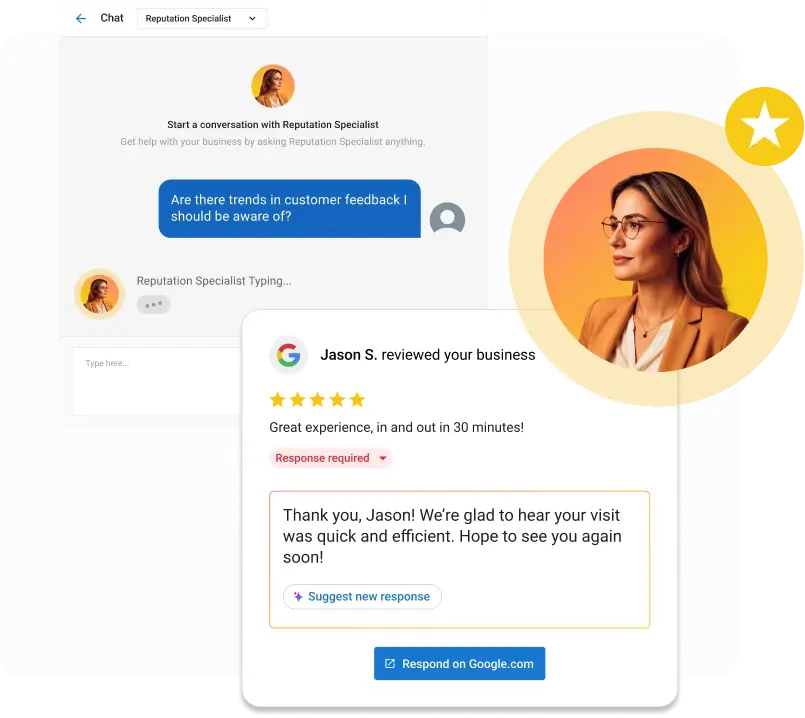
A 43-location heavy equipment dealership put this to work by configuring the AI Reputation Specialist to automatically respond to every five-star review across all locations, while routing anything below that to the marketing team for a personal response. The result was an average response window of 6 to 16 hours across every location, and several hours saved per week that used to go toward manually drafting replies. You can read the full success story for the complete breakdown.
Review requests get the same treatment. An auction house automated review requests to trigger immediately after each successful transaction and captured 21 new five-star reviews in 30 days, with 100% of them rating five stars. Full details are in the auction house case study.
What sets Vendasta apart from single-purpose review tools is that reputation data lives alongside CRM, listings, social, and advertising tools in one platform. Reviews don’t sit in a silo disconnected from the rest of the customer journey. This matters most for agencies, franchisors, and software vendors who need one team to manage review reputation for dozens of clients or locations without adding headcount, all from a single, rebrandable platform.
ReviewTrackers: Best for Customer Experience Analytics
ReviewTrackers aggregates reviews from more than 100 sources and applies natural language processing to surface sentiment trends and recurring themes. Its competitor-tracking module lets you benchmark your ratings and review volume against nearby competitors, which is useful for teams that want market context alongside their own performance data.
Yotpo: Best for Review and Loyalty Campaigns
Yotpo pairs review collection with a loyalty program, sharing customer data between the two so a photo review can trigger loyalty points and a dip in sentiment can trigger a recovery flow. It’s a strong fit for eCommerce brands that want reviews and retention working from the same customer profile.
Grade.us: Best for Agencies Managing Review Generation at Scale
Grade.us is built for agencies running review generation campaigns on behalf of clients. Its funnel-style request process filters out unhappy customers before they reach a public review site, directing them to private feedback instead, and the white-label option lets agencies present the tool under their own brand.
BrightLocal: Best for Local SEO Teams
BrightLocal bundles review monitoring with citation building and local rank tracking, which makes sense for teams who want reputation and local search visibility managed in the same place rather than as separate tools.
Synup: Best for Multi-Brand Listing and Review Management
Synup is built for agencies handling reviews and business listings across many client brands or locations. Bulk updates push changes like new hours or addresses to dozens of directories at once, which saves significant time for teams managing high volumes of locations.
How Review Management Software Works, Step by Step
Regardless of which platform you choose, the core workflow looks roughly the same.
- Connect your review sources. Link Google Business Profile, Facebook, and any relevant industry-specific sites to the software’s dashboard.
- Set up automated review requests. Configure triggers, such as post-purchase or post-appointment, so requests go out by email, text, or QR code when satisfaction is highest.
- Monitor incoming reviews in real time. New reviews land in a centralized dashboard, typically with alerts for anything negative or urgent.
- Configure response rules. Decide what gets an automated response, such as all five-star reviews, versus what gets routed to a person, such as anything below a set rating.
- Respond promptly. Aim for within 24 hours. Faster is better, both for customer trust and for how active your business looks to search engines.
- Analyze sentiment and trends. Use built-in reporting to catch recurring themes, whether that’s a specific issue to fix or a team member being praised repeatedly.
- Syndicate your best reviews. Publish top reviews as widgets on your website or social channels to turn social proof into new business.
How to Manage Google Reviews Specifically
Google remains the single most important review platform for most local businesses, even though BrightLocal’s 2026 data shows its share of review discovery slipping from 83% to 71% as consumers spread their research across more platforms. Managing Google reviews well starts with your Google Business Profile and builds from there.
Claim and Optimize Your Google Business Profile
Accurate business information, the right categories, and current photos all affect how your reviews and local search visibility work together. An outdated or incomplete profile undercuts even a strong review history.
Automate Google Review Requests
Send customers a direct link to leave a Google review immediately after a positive interaction. Avoid review-gating, the practice of only asking happy customers for public reviews while quietly redirecting unhappy ones elsewhere, since this violates Google’s policies and increasingly draws scrutiny under the FTC’s final rule on consumer reviews and testimonials.
Respond to Every Google Review, Positive or Negative
Responsiveness signals credibility to both prospective customers and Google’s own systems. This is where AI-assisted responses save the most time, especially across multiple locations.
Track Google-Specific Metrics
Keep an eye on your average rating, review velocity, and response rate specifically on Google Business Profile, since that’s often the first thing a prospective customer sees in local search results.
Online Review Management Best Practices
Software handles the mechanics, but a few habits determine whether review management actually moves the needle for your business.
- Respond within 24 hours whenever possible, and always respond to negative reviews, even briefly. BrightLocal found that 32% of consumers now expect a response by the following day, up from 18% the year before.
- Never use fake or incentivized reviews without proper disclosure. The FTC’s rule on consumer reviews makes buying reviews, or offering incentives tied to a specific sentiment, illegal, with real financial penalties attached.
- Personalize responses, even AI-assisted ones. Referencing specifics from the original review lands better than a generic template. BrightLocal’s research found generic responses put off half of consumers.
- Put review data to work operationally. If sentiment analysis flags a recurring complaint, route it to the team that can actually fix it, not just the person replying online.
- Ask consistently, not occasionally. The auction house case study above turned 21 new five-star reviews in a single month by automating requests right after each transaction, rather than asking sporadically.
How to Choose the Best Review Management Software for Your Business
With so many platforms competing for the “best review management software” label, the right pick depends less on features in isolation and more on how those features match your situation.
What Problem Are You Actually Solving?
Are you trying to increase review volume, speed up response time, manage reviews across many locations, or handle reputation on behalf of clients? The answer shapes everything else on this list.
How Many Locations or Client Accounts Do You Need to Manage?
Single-location tools and agency-grade platforms differ significantly in dashboard structure, permissions, and how well reporting rolls up across many accounts.
Does It Integrate With Your Existing Stack?
Review data is more useful when it connects to your CRM and marketing tools, rather than living in a separate silo you have to check on its own.
How Much Automation Do You Actually Want?
Full AI autonomy for routine responses versus AI-drafted suggestions a human approves should map to your risk tolerance and how protective your brand is of its voice.
What Does Support and Onboarding Look Like?
This matters most for agencies and franchisors managing reputation on behalf of others. White-label options and responsive support make a bigger difference at scale than most buyers expect going in.
Real-World Example: How One Business Automated Review Management Across 43 Locations
Before deploying an AI employee, a large heavy equipment dealership operating 43 locations managed reviews the way most multi-location businesses do: manually. One person on the marketing team drafted and posted responses for every location, and response times varied depending on how busy the team was on any given day. Maintaining a consistent brand voice across dozens of locations with that workload was nearly impossible.
The dealership deployed Vendasta’s AI Reputation Specialist and set clear rules: the AI automatically responds to every five-star review across all 43 locations, while anything below that gets a personal response from the marketing team. This kept a human in the loop exactly where judgment matters most, while removing the most repetitive part of the job entirely.
The results were immediate and measurable:
- Response time: An average window of 6 to 16 hours across all 43 locations, with automated five-star replies expected to push that number down further.
- Time saved: Several hours per week reclaimed from manual drafting and posting.
- Consistency at scale: Every location now gets a timely, professional response regardless of how busy the team is that day.
“The AI Reputation Specialist helps us stay on top of reviews across all of our locations without spending hours responding manually. It saves time, keeps responses consistent, and allows me to focus on the reviews that need more attention.”
That’s from the dealership’s Digital Marketing Specialist, and it captures the actual shift well: automation doesn’t remove the human from the process; it frees them up to focus where their judgment adds the most value.
Conclusion
Review management isn’t optional anymore. With 97% of consumers reading reviews before choosing a local business, and most expecting a response within a day, businesses that treat reviews as an occasional task are losing ground to competitors who’ve made it automatic. The businesses pulling ahead are the ones using AI to handle the routine work, so their teams can focus on the reviews, and the customers, that need real attention. A 43-location dealership proved this isn’t theoretical: a well-configured AI employee brought its review response time to a consistent 6 to 16 hours across every single location.
If your business, or the clients you serve, are ready to move from manual review management to something that actually scales, Vendasta’s AI Reputation Specialist is built to help. Book a demo with Vendasta today!
Review Management Software FAQs
1. What is review management software?
Review management software is a tool that helps businesses collect, monitor, and respond to customer reviews across platforms like Google and Facebook from one dashboard. The best tools, including Vendasta’s AI Reputation Specialist, also automate review requests and responses, so businesses aren’t managing reputation manually across a dozen browser tabs.
2. How does Google review management software work?
Google review management software connects directly to your Google Business Profile to monitor incoming reviews, automate request messages after a purchase or service, and centralize responses. Vendasta ties this to local SEO and listings management as well, so review activity and search visibility improve together rather than separately.
3. What is the best review management software for small businesses?
The right fit depends on how many locations you manage and how much automation you want. Vendasta stands out for SMBs and the agencies that support them, since its AI Reputation Specialist automates requests and responses inside a full customer acquisition platform, not as a standalone add-on.
4. Do I need review management software, or can I manage reviews manually?
You can manage reviews manually at very low volume, but it becomes unsustainable past a handful of locations or a steady stream of feedback. Automated requests and AI-assisted responses save real time. One Vendasta customer with 43 locations reclaimed several hours per week after automating routine responses.
5. How much does review management software cost?
Pricing varies widely, from around $30 a month for basic single-location tools to $250 or more monthly, or custom enterprise pricing, for multi-location platforms with advanced AI and reporting. Cost generally scales with the number of locations, users, and how much automation is included, so compare based on your actual scale.
6. Can AI really respond to customer reviews on its own?
Yes, within rules you set. Vendasta’s AI Reputation Specialist, for example, can be configured to automatically respond to reviews above a chosen star rating while routing anything below that threshold to a human. This keeps routine responses fast and consistent while preserving human judgment where it counts.
7. How quickly should a business respond to a negative review?
Aim to respond within 24 hours, faster whenever possible. According to BrightLocal, 19% of consumers now expect a response the same day. A prompt, thoughtful reply limits the damage of a negative review, and AI-drafted response suggestions make that turnaround realistic even at scale.
8. Can review management software handle multiple business locations or client accounts?
Yes, and this is one of the biggest differences between basic tools and platforms built for scale. Vendasta’s multi-location portal lets agencies, franchisors, and multi-location businesses monitor and respond to reviews across every location or client account from a single dashboard, rather than logging into each one separately.
9. Is it against the rules to ask customers for reviews?
No, asking for reviews is standard practice and encouraged by most platforms, including Google. What’s against the rules is review-gating, only asking happy customers, or offering undisclosed incentives tied to a review’s sentiment. Consistent, automated requests sent to all customers stay compliant while still increasing review volume.
10. What’s the difference between review management software and reputation management software?
Review management software focuses specifically on collecting, monitoring, and responding to customer reviews. Reputation management is the broader category, which can also include social listening, PR, and search-result monitoring. Most SMBs and agencies primarily need the review-focused capabilities, which is why platforms like Vendasta build reputation tools around reviews first.