About Us
 Careers
 Leadership
 Board
 Newsroom

An agency can build the full operating setup for a local business once, then place it in every new client account in seconds. An industry-specific CRM is a customer relationship management (CRM) system that arrives preconfigured for one trade, with the custom fields, pipelines, forms, automations, and AI Employees that trade’s customers and jobs require. Industry-specific CRM templates package that setup so you apply it to a new client account instead of building from an empty one.
For agencies serving local businesses across many trades, the empty account is the expensive part. Every new client means days of setup the client never sees: custom fields, pipelines, forms, campaigns, automations, and AI Employee configuration. When a client from an unfamiliar trade signs, that work starts with research before it starts with building. Vendasta, an AI customer acquisition and engagement platform for local businesses, removes that step for agencies that resell AI-powered software to local business clients under their own brand.
This guide explains what an industry-specific CRM includes, how the Vendasta Blueprints library in Partner Center applies one in a single step, how to test a trade-specific AI Receptionist, and how to roll templates out across clients and franchise locations. Watch the full walkthrough below.
Onboard new clients faster with ready-made setups for their trade
TL;DR
- A garage door template adds 217 pieces: Vendasta’s template preloads trade fields, smart lists, campaigns, automations, and AI Employees in one click.
- Fully set-up accounts keep clients longer: Vendasta reports one-year client retention of 92% for partners selling four or more solutions, compared with 55% for partners selling one.
- Your best account can become a template: Save a tuned client account as a blueprint in Partner Center and apply it to many clients at once, or start from Vendasta’s template library.
What Is an Industry-Specific CRM?
An industry-specific CRM is configured for one trade’s data, workflows, and customer questions before the first user logs in. A horizontal CRM gives every industry the same features and leaves you to build the trade layer yourself.
The trade layer is where most of the setup time goes. A plumber, a law firm, and a nonprofit all need contacts, pipelines, and follow-ups, but they track different details, move leads through different stages, and hear different questions from customers. An industry-specific setup handles those differences in advance, so the account matches how the business already works on its first day.
Industry-Specific CRM vs. Generic CRM
The difference shows up before the client’s first customer call:
| Criteria | Generic CRM | Industry-specific CRM template |
|---|---|---|
| Setup time | Hours to days per trade | One apply step per account |
| Custom fields | Built from scratch | Preloaded for the trade |
| Pipelines and job tracking | Generic sales stages | Trade stages, jobs, work orders |
| Forms | Blank builder | Estimates, bookings, sign-ups |
| Automations | Configured manually | Follow-ups and campaigns included |
| AI Receptionist knowledge | Configured per client, if available | Trade’s common questions |
| Consistency across clients and locations | Varies by builder | Identical wherever applied |
Which Parts of a CRM Change by Industry
Contacts, pipelines, tasks, and messaging stay the same across trades. The layer on top changes:
- Data model: Insurance agencies track carrier, policy, and renewal fields, while heating, ventilation, and air conditioning (HVAC) companies track installed equipment and service history.
- Pipeline stages: A Law Technology Today article on client intake recommends law firm intake stages such as “intake form pending,” and nonprofits move donors through cultivation, solicitation, and stewardship.
- Forms: Intake questions differ by practice area, line of business, or job type.
- Integrations: Law firm intake tools pass new client details to practice management software, and insurance agencies pair a CRM with an agency management system for policies and renewals.
- Consent and data rules: IRS Revenue Procedure 2013-14 requires a tax return preparer to get signed, affirmative taxpayer consent before disclosing or using tax return information, so an accounting firm’s intake forms and automations have to account for that step.
What Should Industry-Specific CRM Templates Include?
A CRM template is a saved account configuration that applies fields, pipelines, smart lists, forms, campaigns, automations, and AI Employees to a new account in one step. For a local business, that includes the marketing automation templates the trade needs from day one, such as follow-up campaigns and review requests.
In Vendasta, Blueprints build on Vendasta CRM AI, which handles contacts, companies, pipelines, custom objects, web forms, lists, tasks, scheduling, and automations. A blueprint configures those pieces for one trade and turns on the AI Employees that work inside the account, so the CRM, customer communication, and follow-up all start from the same setup.
Every blueprint lists what the business gets, how it works, and which products it needs before you apply it. Automations arrive switched off until you’re ready, so nothing reaches a client’s customers before you’ve reviewed the account.
Worked Example: A Garage Door CRM in One Click
Vendasta’s garage door template shows a full setup for a trade most agencies have never served. Before you apply it, the template description explains in plain language what the business gets, how the pieces work together, and which products it needs. Applying it to an account adds:
- 8 AI Employees
- 76 custom fields
- 44 smart lists
- 25 campaigns
- 17 automations
That comes to 217 pieces in total. The CRM gets places for jobs, work orders, commercial properties, and maintenance agreements, because garage door companies sell maintenance plans to warehouses and property managers as well as repairing doors for homeowners. Maintenance plans matter on the residential side too: an article in DASMA’s Door + Access Systems magazine notes that home service garage door companies rely on maintenance contracts, extended warranty programs, and annual service plans for regular business.
The template’s ready-made forms cover estimates, service bookings, maintenance sign-ups, and commercial accounts. Its AI Workforce includes an AI Receptionist built for a garage door company, running as both an AI Chat Receptionist and an AI Voice Receptionist. When evaluating garage door business software, you review the setup instead of building it.
Which Industries Have Ready-Made CRM Templates?
Vendasta builds Blueprints for home services, automotive, pet care, beauty, professional services, and travel businesses. Vendasta’s team tests each one on a live account, and each one explains in plain language what the business gets before you apply it.
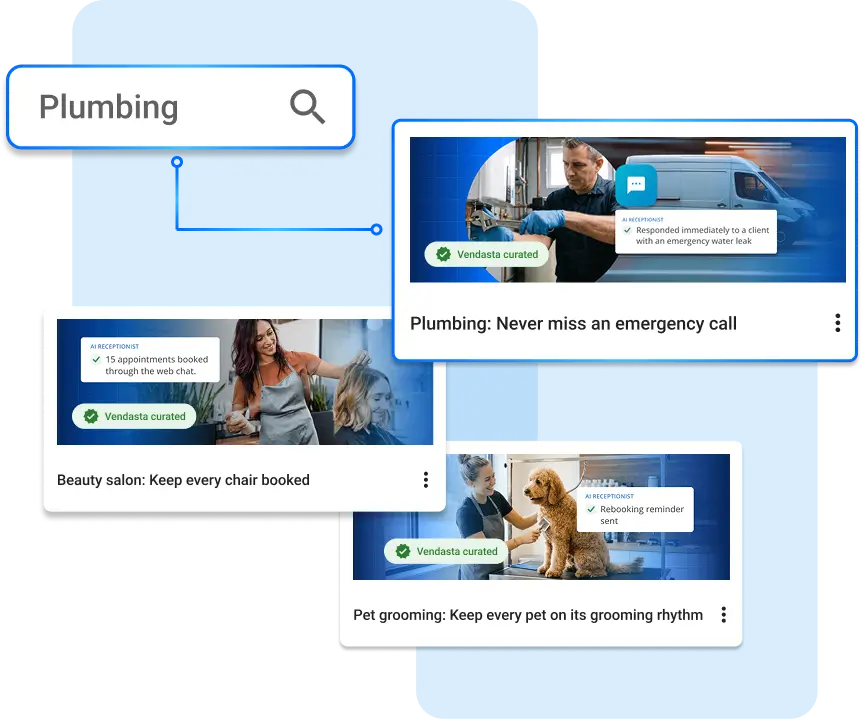
- Home services: Plumbing, HVAC, roofing, and electrical.
- Automotive: Auto repair and towing.
- Pet care and beauty: Vets and salons.
- Professional services and travel: Accountants, law firms, and travel agencies.
Vendasta’s Blueprints walkthrough also shows templates for garage doors, home cleaning, remodelers, insurance agents, pet boarding, pet grooming, and nonprofits. That makes the library a starting point whether a client needs a CRM for contractors, a CRM for auto repair shops, a CRM for salons, or a CRM for accountants.
If a client’s trade isn’t covered, you have two options. Copy an existing blueprint and trim what you don’t need, or set up one account the way you like and save it as your own blueprint.
When Is a Generic CRM Good Enough?
A generic CRM is enough when a business runs one simple sales pipeline and someone on staff has time to configure it. Agencies face a different calculation. Entering a new industry often means paying for a ready-made setup or spending your team’s time researching the trade and building one, then repeating that configuration for every client in the trade. A Vendasta blueprint applies the saved setup to each new account in one step instead.
A blank CRM resembles an empty house: the walls and wiring exist, but someone has to choose and carry in every piece of furniture. A trade template resembles a furnished house, where the agency only adds the client’s own details, such as service area, hours, and services. Every hour spent rebuilding the same rooms for the next client comes out of margin and away from billable client work.
How to Test an Industry-Specific AI Receptionist
Test an industry-specific AI Receptionist by role-playing the hardest realistic caller before any customer hears it. In Vendasta’s walkthrough, the tester plays a homeowner with a snapped garage door spring.
In that garage door test, the receptionist:
- No invented prices: Said the team reviews costs before work starts.
- Unprompted safety guidance: Warned not to open, lift, or force the door and to keep people, pets, and cars clear. DASMA’s technical data sheet likewise says not to operate a door with a broken spring until the spring is replaced.
- Contact capture: Asked for a phone number for follow-up.
- No false timing promises: Pushed for weekend service in the snow; it noted 24/7 emergency service but promised no time it couldn’t guarantee.
- Urgency flag: Marked the request as urgent.
- Dispatcher questions: Asked whether the home was exposed, for the address, and whether the door was stuck open, stuck closed, or hanging crooked, then advised securing the door between the garage and the house when told it was stuck open.
Write each trade’s worst-case call into a test script before you demo the account.
How to Sell an Industry-Specific CRM to Local Businesses
Sell the result owners buy: every call answered, and every quote chased. A garage door company owner cares about booked jobs, not a blueprint or a CRM, so lead with what the account does for their customers.
- Apply the trade template to a demo account before the sales call.
- Add the prospect’s details from their website, such as service area and hours.
- On the call, let the owner type questions their customers ask every day.
- Let them watch the receptionist answer like their own front desk.
The same demo account becomes the starting point once they sign, which these client onboarding tips build on.
Why Fully Set-Up Accounts Improve Client Retention
Fully set-up accounts keep clients longer because clients use more of what they bought. When setup takes hours, the basics get done and the deeper work, such as automations and follow-ups, gets skipped. The client ends up with a thin account, uses a fraction of what they paid for, sees little value, and cancels.
Vendasta’s own numbers show the cost of that gap. Partners selling four or more solutions see one-year client retention of 92%, compared with 55% for partners selling one. Vendasta’s client churn study also found that vertical-specialized providers retain clients 34% better at three years, which is the case for building your services around specific trades.
A blueprint sets up every product in an account in one step, AI Employees included, which shortens your agency client onboarding process and lets you grow monthly recurring revenue without adding headcount for setup work.
How to Scale Industry-Specific CRM Templates Across Clients
Blueprints scale a template across every client. With Vendasta Blueprints in Partner Center, agencies turn their best account into a blueprint, then apply it to one client, every client in an industry, or every location in a network.
It works the same whether you run a white-label CRM for agencies or a single-brand portfolio. Each account that receives a blueprint gets the same fields, pipelines, campaigns, and AI Employees, so your team supports one known setup per trade instead of dozens of one-off builds.

Save Your Best Account as a Blueprint
Save an account you’ve tuned and tested, such as a beauty salon:
- Go to Blueprints in Partner Center.
- Click Create.
- Choose the salon account as the source.
Vendasta’s walkthrough shows all 187 pieces coming with it. Your best account becomes a product you can sell again.
Apply to Many Clients and Multi-Location Groups
Search “salon” in Partner Center, select the matching clients, and apply the blueprint to all of them at once. For brands, switch to multi-location groups: one brand with four locations plus one with two means six locations get the same setup together, so customers get the same experience at whichever location they call.
Auto-Apply Templates to New Sign-Ups
In Partner Center, one small automation lets you automate client onboarding for a trade:
- Trigger the automation when a new account is created.
- Check whether the account is a beauty salon.
- If it is, apply the salon blueprint.
Every new salon gets the full setup, whether your team adds it or the owner signs up alone. Add the step to your client onboarding workflow.
Industry-Specific CRM for Franchises and Multi-Location Brands
With Vendasta Blueprints, a franchise CRM stays consistent because every location starts from the same versioned blueprint. For a franchise with 200 locations, set up the model location the way the franchisor wants, save it as a blueprint, and roll it out to every location, including its AI Receptionist, so corporate deploys the same setup centrally instead of one location at a time.
When you improve something later, such as the AI Receptionist instructions, update the blueprint to create a new version. The Applied Accounts tab lets you audit a multi-location CRM rollout before the next update by showing which locations are up to date and which are out of sync.
Do the Invisible Work Once
Do the setup work once, at the start. Every client after that begins from an account that already works with an industry-specific CRM template. Vendasta includes Blueprints in Partner Center at every partner tier at no extra cost; you pay only for the products a blueprint turns on, as you normally would.
That changes the cost of saying yes to a new trade. A garage door company, a law firm, or a 200-location franchise starts with its fields, pipelines, forms, campaigns, automations, and AI Employees in place. Your team can spend the hours it used to spend configuring each account on billable client work instead, so recurring revenue grows without adding headcount.
Become a Vendasta partner and explore Vendasta Blueprints in Partner Center.
To see a garage door or salon blueprint add a full trade setup and AI Receptionist to a live account in one click, book a Vendasta demo.
Industry-Specific CRM FAQs
1. What is an industry-specific CRM?
An industry-specific CRM is a customer relationship management system preconfigured for one trade. It includes the custom fields, pipeline stages, forms, automations, and AI Employees that trade needs, so the business can track its jobs and customers on day one instead of waiting for someone to build the setup.
2. What is a CRM template?
A CRM template is a saved account configuration you can apply to a new account in one step. In Vendasta Blueprints, a template includes custom fields, smart lists, forms, campaigns, automations, and AI Employees, so the account is ready to work with real customers as soon as it’s applied.
3. Is an industry-specific CRM better than a generic CRM?
It depends on how many trades you serve. A generic CRM works for one simple pipeline when someone has time to configure it. Agencies serving many industries save setup time on every client with templates, while the configurable CRM underneath keeps every field and automation editable.
4. Can a general CRM be configured for a specific industry?
Yes. Most CRMs support custom fields, pipelines, forms, and automations, so you can build a trade setup yourself. The cost is the time to research the trade and configure each piece, then repeat that work for every new industry and client account. A Vendasta blueprint saves the finished setup so you apply it to each new account in one step.
5. How long does it take to set up a CRM for a new client?
Manual setup takes time for every client, and more when the industry is new to your agency. Applying a Vendasta blueprint takes one step: the garage door template adds 217 pieces, including AI Employees, custom fields, campaigns, and automations, to an account in one click.
6. What does a CRM for home services companies include?
A CRM for home services companies tracks jobs and work orders, estimates, service bookings, and maintenance agreements. Vendasta’s garage door template also adds commercial properties, maintenance sign-up forms, campaigns, automations, and AI Employees from its AI Workforce, including an AI Receptionist that answers both web chats and phone calls.
7. Can I create my own CRM template for an industry that isn’t listed?
Yes. Set up one client account the way you want it, then go to Blueprints in Partner Center, click Create, and choose that account as the source. Every piece comes with it, so your best account becomes a template you can apply to future clients.
8. How do you keep CRM setups consistent across franchise locations?
Set up a model location, save it as a blueprint, and apply it to every location at once. When you improve the setup, update the blueprint to create a new version. The Applied Accounts tab shows which locations are current and which are out of sync.
9. Do industry CRM templates include AI Employees?
Vendasta Blueprints do. The garage door template adds eight AI Employees, including an AI Receptionist built for that trade that runs as both an AI Chat Receptionist and an AI Voice Receptionist. In Vendasta’s garage door test, the receptionist answered common customer questions, gave safety guidance, captured contact details, and flagged the request as urgent without promising prices or arrival times.
10. How much do Vendasta Blueprints cost?
Vendasta Blueprints are included in Partner Center at every partner tier with no extra charge. You pay for the products a blueprint turns on, billed the same way as if you had configured those products on the account by hand.