 About Us
 Careers
 Leadership
 Board
 Newsroom
At 11 a.m. on a Saturday, a homeowner spots a water stain spreading across the ceiling and hires the first business whose receptionist answers the phone.
In the AI Receptionist vs. human receptionist decision, an AI Receptionist wins on cost, availability, and lead capture. A human receptionist still wins on complex, emotional, and in-person work. For most local service businesses, a hybrid setup works best: the human answers first, and AI Employee catches every call that would otherwise go to voicemail.
For the video below, we called 60 businesses ranked on page one of Google Maps, and only 23% of those called on Saturday morning picked up.
Watch the full breakdown from Vendasta:
Below are our call test results, a side-by-side comparison, where a human still wins, and how a hybrid setup works.
Capture, qualify, and convert leads 24/7 without lifting a finger
TL;DR
- Most businesses miss calls at key times: In Vendasta’s test of 60 businesses on page one of Google Maps, 60% answered at Tuesday peak hours, 45% at lunch, and 23% on Saturday morning.
- Humans still win on complex calls: A human receptionist handles emotional conversations, judgment calls, and walk-ins better, while AI wins on cost, 24/7 availability, and simultaneous calls.
- A hybrid setup catches every missed call: Ring your receptionist first and send unanswered, after-hours, and weekend calls to Vendasta’s AI Receptionist, which books open slots and texts callers within seconds.
AI Receptionist vs. Human Receptionist at a Glance
The table compares both options on cost, coverage, and how they help you answer callers and book jobs:
| Criteria | Human receptionist | AI receptionist |
|---|---|---|
| Cost | $3,000–$5,000 a month, Vendasta’s estimate in its call test video | A fraction of a human salary |
| Hours of availability | Set shifts, minus breaks, holidays, and sick days | 24/7 |
| Simultaneous calls | One at a time | Multiple calls at once |
| After-hours and weekend coverage | Only when someone is scheduled | Every night and weekend |
| Response and follow-up speed | Depends on workload; 6 of our 34 voicemails got a callback in 72 hours | Answered every test call; texted 5 seconds after hang-up |
| Lead capture and CRM logging | Manual notes, when time allows | Every caller logged automatically |
| Appointment booking | Yes, with judgment on job fit | Yes, only into open calendar slots |
| Languages | Whatever that person speaks | Multiple languages |
| Complex or emotional calls | Strong: reads tone and adapts | Weak: should transfer to a person |
| In-person tasks | Greets walk-ins, handles paperwork | None |
What Happened When We Called 60 Local Businesses
Vendasta’s call test, documented in the video above, compared business answer rates across three time windows, tracked voicemail callbacks, and tested the AI Receptionist’s response.
How We Ran the Call Test
For the video, we called 60 local businesses, 10 each in heating, ventilation, and air conditioning (HVAC), pet services (groomers and vets), auto repair, salons, real estate and insurance, and dental. Every business came from page one of Google Maps, so each one was already paying to be found.
Calls went out in three windows of 20: Tuesday at 10 a.m., Tuesday at 12:30 p.m., and Saturday at 11 a.m. When no one answered, we left a voicemail with a real name and phone number, then waited 72 hours.
Call Answer Rates by Time of Day
The call answer rate fell with every window we tested:
| Time window | Answered | Call answer rate |
|---|---|---|
| Tuesday, 10 a.m. (peak hours) | 12 of 20 | 60% |
| Tuesday, 12:30 p.m. (lunch) | 9 of 20 | 45% |
| Saturday, 11 a.m. | Fewer than 1 in 4 | 23% |
Even at peak hours, 4 in 10 callers reached no one, and lunch was the worst weekday window.
Where Voicemail Leads Go to Die
In the filmed test, we left 34 voicemails. Six businesses called back within 72 hours, and the slowest took 51 hours, long after a homeowner with a leaking ceiling would have booked someone else.
The broader voicemail statistics are worse. Invoca’s platform data shows fewer than 3% of callers pushed to voicemail leave one, so a voicemail box catches almost none of the leads a business paid to generate. In our test, that left 28 callers with no reply: missed calls lost revenue the businesses had already paid to generate.
How Our Results Compare to Industry Missed Call Statistics
Invoca’s home services statistics put unanswered home services calls at 18% on weekdays and 41% on weekends.
Our peak-hour miss rate of 40% is more than double Invoca’s weekday figure, and our Saturday result, with 77% of calls unanswered, is worse than its weekend figure.
Then We Called the AI Receptionist
For the same video, we set up Vendasta’s AI Receptionist for a day spa with no after-hours coverage and called it at the same three times, plus 11 p.m. on a Saturday. It answered every call, captured each caller’s name and number in the CRM, booked each caller into the calendar, and texted a follow-up 5 seconds after hang-up.
What a Receptionist Does and What an AI Receptionist Is
A receptionist turns inbound contact into scheduled work by answering calls, booking appointments, routing callers, capturing lead details, and greeting visitors. An AI Receptionist is software that handles the phone and messaging side of that job using the business’s own information.
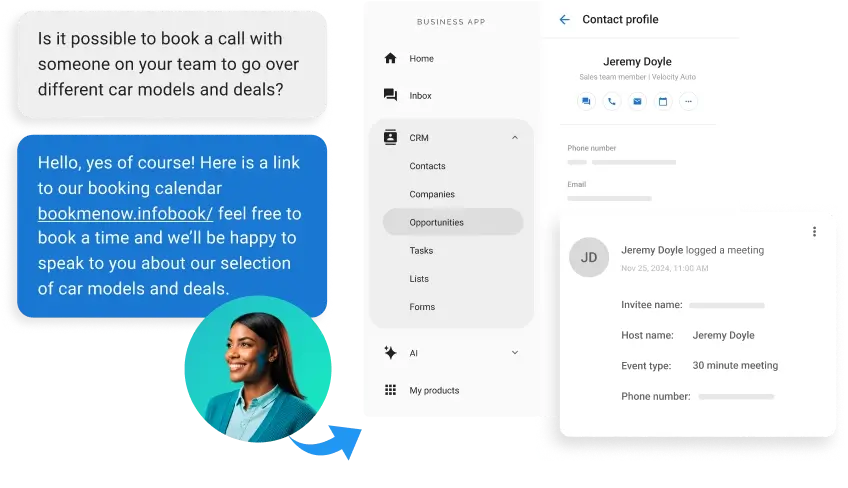
It speaks with callers in natural language, answers questions from the website and service documents, books into the calendar, and is set up to transfer urgent or out-of-scope calls to a person instead of guessing. For a deeper look, read our guide to AI Receptionists for local businesses.
How AI and Human Receptionists Compare
AI receptionists come out ahead on cost, availability, simultaneous calls, and follow-up speed. Humans keep the edge on warmth and judgment, and customer experience depends on how the AI is set up.
Cost
AI wins on cost. Vendasta estimates, in its call test video, that a human receptionist costs $3,000 to $5,000 a month once you count how the role works in practice: set hours, holidays, sick days, and calls missed while on another line. The Bureau of Labor Statistics (BLS) puts the median hourly wage for receptionists and information clerks at $18.27 as of May 2025.
Think of an AI Receptionist as digital labor: coverage available 24/7, at a fraction of a human salary.
Availability and After-Hours Coverage
AI wins on availability: a human works a shift, while an AI Receptionist answers 24/7. Our test showed the gaps shifts leave at lunch and on Saturday morning. Compare coverage options in this guide to after-hours answering service options.
Call Handling and Simultaneous Calls
A receptionist on one call sends the next caller to voicemail. Vendasta states in its call test video that the AI Receptionist can answer multiple calls at the same time. A Monday-morning rush or a storm-day surge doesn’t have to end in voicemail.
A person routes better when the call needs context about a specific job or customer. Vendasta says its AI Receptionist is set up to transfer urgent or out-of-scope calls to a person instead of guessing. On volume, AI wins.
Lead Capture and Follow-Up Speed
AI wins on lead capture and follow-up speed. You pay for missed calls twice: once through wasted ad spend and again through the job you lose to a competitor. Oldroyd’s Lead Response Management study found the odds of contacting a lead are 100 times higher at five minutes than at 30 minutes.
Most businesses we left voicemails with did not call back. In Vendasta’s test, the AI Receptionist logged every caller as proof of performance and texted within seconds. See lead response time benchmarks for more.
Customer Experience
Callers want a path to a person. Gartner’s customer service survey found 87% of customers say companies using generative AI for service must offer access to a human agent. A survey from AnswerConnect, which sells human answering services, found 31% of respondents would hang up on AI and 38% said it depends.
AI covers more languages at more hours. A skilled human still wins on warmth.
Where a Human Receptionist Still Wins
Humans keep a clear edge on work that depends on empathy, context, or physical presence:
- Complex, sensitive, or emotional conversations: A caller with a flooding basement, a pet owner with a sick dog, or a client disputing a bill needs someone who reads tone and slows down.
- Judgment calls and relationship building: A receptionist knows which regular gets squeezed in, when a quote request is a complaint in disguise, and how to keep a long-time customer loyal.
- In-person tasks: Greeting walk-ins, checking in patients or pets, and taking payments at the counter require someone in the building.
Where AI Receptionists Fall Short and How to Set Guardrails
AI receptionists make predictable mistakes, and most can be designed around. A Stanford study of five commercial speech recognition systems found an average word error rate of 0.35 for Black speakers versus 0.19 for white speakers. Speech research by Mishra and colleagues also found that errors in names, phone numbers, URLs, email addresses, and alphanumeric sequences contribute more to overall error than errors in function words.
These guardrails close most of the gap:
- Confirm the details: Have the AI read back names, numbers, and addresses before the call ends.
- Load the knowledge base: Give it your website, service menu, prices, and service area so it answers from facts.
- Set booking rules: Limit bookings to open slots and block job types that need a site visit first.
- Define the handoff: Send urgent, upset, or out-of-scope callers straight to a person.
- Disclose in the greeting: Tell callers they’re speaking with an AI and that the call is recorded; about a dozen states require every party’s consent to record, and Utah and Maine have AI disclosure rules.
The Hybrid Setup That Works for Most Local Businesses
A hybrid setup keeps your human receptionist on the front line and sends every missed call to AI. Calls ring the human first, then transfer to the AI Receptionist if no one answers, and the AI also covers lunch, overflow, after-hours, and weekends.
Elite Web Professionals, which works with Vendasta, built this setup for Choice Signature Luxury Car Rental in Atlanta. The AI Receptionist asked qualifying questions, such as whether a rideshare renter held a chauffeur’s license. As the Elite Web Professionals case study shows, it handled 1,017 calls, captured 778 qualified leads, and delivered a 76% conversion rate in four months.

Which Should You Choose?
Base the decision on where your contact comes from and when it arrives:
- Choose an AI receptionist if: You work in the field or chair-side, miss calls during jobs, get evening and weekend inquiries, and can’t justify a full-time salary.
- Choose a human receptionist if: Most customers walk in, calls run long and are sensitive, or the desk handles payments and paperwork all day.
- Choose a hybrid if: You already have front-desk staff but still lose calls at lunch, during rushes, and after closing.
Each industry in our test leans a different way:
- Home services: Weekend emergencies like the ceiling stain make AI coverage the first priority, with a person handling dispatch decisions.
- Professional services: Law firms, insurance agencies, and real estate teams fit a hybrid, with AI qualifying leads and people running consultations.
- Dental: Keep a human front desk and use AI for overflow and after-hours booking, with clinical questions routed to staff.
- Auto repair: AI books service and answers routine questions while advisors stay at the counter.
- Salons: AI books and reschedules around the clock for clients who plan in the evening.
- Pet services: AI suits grooming bookings, while vet triage calls go to a person.
If you’re weighing a staffed answering service as a third path, compare virtual receptionist costs and setup or see how a phone answering service compares to an AI Receptionist.
How Vendasta’s AI Receptionist Works as a Front Desk That Never Misses a Call
Vendasta built its AI Receptionist to close the gaps from our test, and describes it this way:
- Always on: It answers phone calls, web chats, texts, and messages 24/7, in multiple languages, as part of Vendasta’s Conversations AI.
- Knows the business: It learns from your website and uploaded documents, such as the service menu used in Vendasta’s demo, so it answers from your own information.
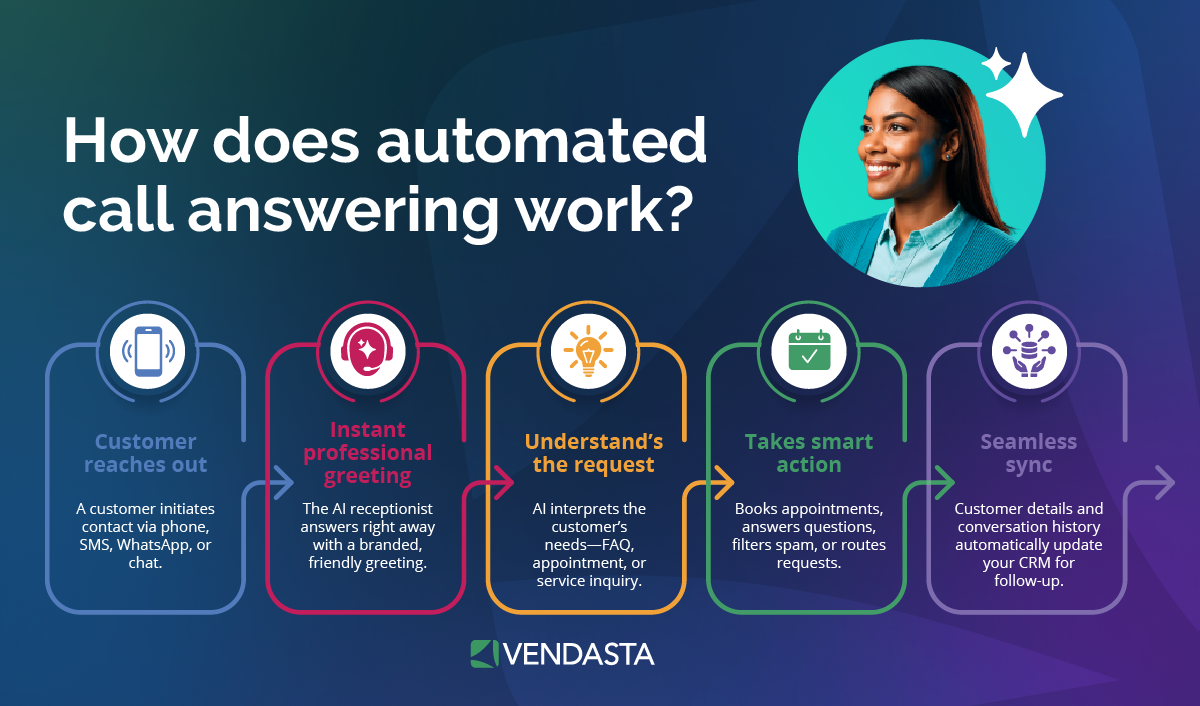
- Books real openings: It books only into slots that are open on your calendar, including Google Calendar and Microsoft 365 or Outlook.com.
- Hands off: It transfers urgent calls, or anything outside its instructions, to a person instead of guessing.
- Follows up: It texts the caller automatically after the call ends; in our test, the text arrived 5 seconds after hang-up.
- Logs everything: It logs every interaction to the CRM with a call summary, lead details, transcript, and audio recording, so your team starts the next morning with appointments already booked.
- Sets up fast: Most AI Employees deploy in under 30 minutes.
Vendasta reports that Live 360 Marketing cut lead response time from 24–48 hours to under 30 seconds after adding an AI Receptionist.
AI Receptionist vs. Human Receptionist: Hybrid Coverage Wins for Most Local Businesses
In Vendasta’s call test, fewer than one business in four answered on Saturday morning, while the AI Receptionist answered every call, including one at 11 p.m. on a Saturday.
For most local businesses, the answer is a hybrid: calls ring your human receptionist first, and the AI handles unanswered calls, lunch, overflow, after-hours, and weekends, while your person stays on the calls that need empathy and on the work at the counter.
To see how Vendasta’s AI Receptionist can pick up every call your front desk misses, from the lunch rush to 11 p.m. on a Saturday, book a Vendasta demo.
AI Receptionist vs. Human Receptionist FAQs
1. What is an AI receptionist?
An AI Receptionist is software that answers a business’s calls, chats, and texts using the business’s own information. It answers questions, captures caller details, books appointments, and is set up to transfer urgent or out-of-scope calls to your team instead of guessing. Because it runs 24/7, it covers lunch, overflow, nights, and weekends.
2. What is the role of a receptionist?
A receptionist turns inbound contact into scheduled work. Core duties include answering calls, booking appointments, routing callers to the right person, recording lead details, and greeting visitors. In a local service business, the receptionist is often the first and only contact a new customer has before a job gets booked.
3. How much does an AI receptionist cost compared to a human receptionist?
Vendasta estimates in its call test video that a human receptionist costs $3,000 to $5,000 a month once set hours, holidays, sick days, and missed calls are counted. BLS puts the median receptionist wage at $18.27 an hour, before benefits. An AI Receptionist costs a fraction of that salary and works every hour of the week.
4. When is a human receptionist still the better choice?
A human fits best for complex, sensitive, or emotional conversations, judgment calls about scheduling, and building relationships with regular customers. People also handle in-person work AI can’t do, like greeting walk-ins, checking in patients or pets, and taking payments at the counter. Walk-in-heavy businesses usually need a person at the desk.
5. Will customers hang up when they realize they are talking to an AI?
Some will: an AnswerConnect survey found 31% of respondents would hang up on AI, while 38% said it depends. Gartner found 87% of customers want a path to a human agent when companies use generative AI. Those numbers point to a clear setup rule: give callers a fast path to a person.
6. Can a hybrid AI and human receptionist setup work?
Yes. Calls ring the human first and roll to the AI Receptionist when nobody answers, and the AI covers lunch, overflow, after-hours, and weekends. Elite Web Professionals used this approach for a car rental client, handling 1,017 calls and capturing 778 qualified leads in four months, with a 76% conversion rate.
7. Can an AI receptionist book appointments into my calendar and route calls?
Yes. Vendasta’s AI Receptionist books only into open slots on the connected calendar, including Google Calendar and Microsoft 365 or Outlook.com. Vendasta sets it up to transfer urgent calls, or anything outside its instructions, to a person instead of guessing. Each booking and interaction is logged in the CRM as proof of performance for the team to review.
8. Do I have to tell callers they are speaking with an AI?
It depends on where you operate. Utah requires disclosure when a consumer asks about generative AI, and Maine requires clear notice when a consumer could be misled. About a dozen states require every party’s consent to record calls, and rules vary by state, so check the law where you and your callers are located before you write the greeting.
9. Can an AI receptionist handle after-hours and weekend calls?
Yes, and that is where it adds the most. In Vendasta’s filmed test, only 23% of businesses answered on Saturday morning, while the AI Receptionist answered every call, including one at 11 p.m. on a Saturday. It captured each caller’s details, booked the appointment, and sent a follow-up text within seconds.
10. Does an AI receptionist work with my existing scheduling software?
Often, yes. Vendasta’s AI Receptionist books into Google Calendar and Microsoft 365 or Outlook.com, and Vendasta integrates with ServiceTitan, Jobber, Housecall Pro, Dentrix, and Clio. Each booking is also logged in Vendasta’s CRM as proof of performance, so the team sees it alongside the scheduling platform. Confirm what each connection covers during setup.
