About Us
 Careers
 Leadership
 Board
Board Newsroom
AI for real estate agents answers sign calls and portal inquiries the moment they arrive, sorts buyers from sellers before the first meeting, and drafts the listing copy and follow-up messages that would otherwise take up an evening. The phone work pays off first, because many buyers hire the first agent they talk to.
That first conversation is hard to win when you’re showing a house, sitting at a closing table, or driving between appointments. Inquiries don’t wait for a free hour: they come in from yard signs, portals, and your website at night and on weekends, and a buyer who reaches voicemail often calls the next sign on the street. AI that answers calls and follows up on leads for you closes that gap by handling the first response and the routine questions, then passing a qualified lead to you with the details already captured.
This guide covers eight job-based workflows for solo agents, team leads, and small brokerage owners, from call answering and lead qualification to listing copy, reviews, comparative market analyses (CMAs), and transaction follow-up. It also includes a tool and cost comparison, setup steps with copyable prompts, and the Fair Housing, Telephone Consumer Protection Act (TCPA), disclosure, and data rules that apply to each workflow.
TL;DR
- Nearly half of buyers hire the first agent: Zillow’s 2025 consumer housing trends report found 47% of buyers hired the first agent they spoke with, and 59% of sellers did the same.
- Most web inquiries get no reply within 24 hours: A 2026 Pied Piper study, reported by Real Estate News, found 68% of web inquiries to 21 large real estate brands got no response within 24 hours.
- AI Receptionist answers when you can’t: Vendasta’s AI Receptionist, an AI Employee in Vendasta’s AI Workforce, answers calls, texts, and web chats 24/7, qualifies the lead, and books the appointment on your calendar.
What Makes AI Actually Useful for Real Estate Agents
A useful AI tool shortens the gap between an inquiry and a real conversation, and it fits the systems you already run. Apply the same checks to every tool before you pay for it:
- Speed-to-lead: The tool should reply while the buyer is still on the listing page. A 2024 secret-shopper study by Mike DelPrete found nearly half of online property inquiries went unanswered, and the ones that got a reply waited a median of 39 minutes.
- Customer relationship management (CRM) and multiple listing service (MLS) fit: Calls, transcripts, tags, and appointments should land in your CRM without anyone retyping them. Follow Up Boss lists AI follow-up tools such as Structurely and Ylopo in its integrations directory, and Lofty’s help center says its Zapier connection doesn’t support two-way sync.
- Human-sounding voice: Callers should hear a natural conversation and get a clean handoff to you. Margaret Nuckols of The Yeatman Group told HousingWire that some leads have “AI fatigue” and don’t want to engage with an AI call, so every conversation needs a path to a human.
- Setup time: In the National Association of Realtors (NAR) 2026 technology report, 63% of agents named the learning curve as their biggest challenge with new technology, and 59% named cost. Most Vendasta AI Employees deploy in under 30 minutes after learning from your website, business profile, and uploaded knowledge.
- Compliance controls: Look for consent records, opt-out handling, editable scripts, and a log of every action the AI takes. Accuracy is the top worry for agents: 63% of respondents to the Realtors Property Resource (RPR) 2026 AI adoption survey named the accuracy of outputs as their top concern.
The Best AI Workflows for Agents at a Glance
Each workflow below replaces a manual task. The first two change response time directly:
| Workflow | What It Replaces | Tool Type | Speed-to-Lead Impact |
|---|---|---|---|
| Answer sign calls and portal inquiries | Voicemail and callbacks hours later | AI voice and chat receptionist | Direct: first response while the lead is live |
| Qualify intent and book showings | Discovery calls and calendar back-and-forth | AI receptionist or AI inside sales tool | Direct: qualified appointment on first contact |
| Write listing and marketing copy | Drafting from a blank page | General AI assistant | Indirect: listings go live sooner |
| Stage and edit listing photos | Furniture rental and manual editing | AI virtual staging service | Indirect: photos ready at launch |
| Nurture past clients and cold leads | One-off texts and drip emails by hand | AI CRM follow-up | Direct for leads who re-engage |
| Request and answer reviews | Manual requests and typed replies | AI review response | Indirect: stronger profile before the first call |
| Prepare CMAs and market updates | Pulling comps by hand | Valuation models, AI CMA tools, predictive seller data | Direct for “what’s my home worth” leads |
| Handle transaction follow-up | Deadline tracking and status emails | Transaction management software with AI | Indirect: frees hours for new inquiries |
1. Answer Every Sign Call and Portal Inquiry in Seconds
An AI Receptionist picks up the calls and messages you can’t take, and many of them arrive while you are showing a house or sitting at a closing table. HousingWire reports that almost 44% of real estate leads inquire outside business hours.
Web inquiries fare worse. The Pied Piper study covered in a Real Estate News report found 68% of web inquiries to 21 large real estate brands got no response within 24 hours, and only 10% produced contact from an agent within an hour.
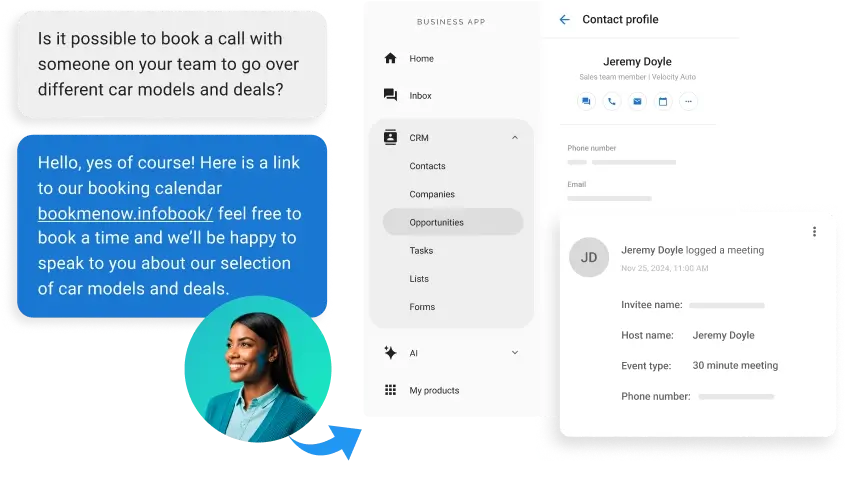
Vendasta, an AI customer acquisition and engagement platform for local businesses, built its AI Receptionist for this gap. It answers calls, web chats, and texts 24/7 from your business knowledge, captures the caller’s name, number, and reason for calling, and qualifies the lead before it reaches you. Every conversation is logged to the CRM, so you can see what was said before you call back.
Once it’s running, these tasks come off your list:
- Calling back voicemails after the buyer has already phoned the next sign
- Answering the same price, availability, and showing-time questions from your car
- Retyping caller details from your phone into the CRM
- Choosing between a listing appointment and an unknown number
After-hours coverage pays off outside real estate too. Vendasta partner Blue River Digital reports a $20,000 to $30,000 commission from a single AI-matched lead that came in at 11 p.m.
2. Qualify Buyer vs Seller Intent Before the First Meeting
The conversation that answers the call can also sort the caller. You can collect buyer or seller intent, timeline, price range, financing status, and target area during that first conversation, instead of on a discovery call you schedule for Thursday.
One team has run this at volume. In a Keller Williams post on Real Estate News, the co-owner of LKW Home Team in Columbus, Ohio, said its voice AI answered more than 900 inbound calls and collected each caller’s name, phone number, email, ideal neighborhood, and price range in less than two minutes. If the bot has less than 95% confidence in an answer, it transfers the call to a human.
Booking is the step that turns a qualified lead into revenue. Zillow’s Premier Agent conversion playbook says buyers and agents who confirm an appointment on the connection call are 3 times more likely to transact, though Zillow doesn’t publish the method behind the figure.
The window to confirm is short. Zillow’s Real-Time Touring gives the agent five minutes to review a tour request and commit to it or pass. Vendasta’s AI Receptionist books appointments against your connected calendar, so the confirmation can happen on the first call.
The AI handles these steps:
- Asking whether the caller is buying, selling, or both, and tagging the record
- Confirming preapproval or cash status before you drive to a showing
- Booking the showing or listing appointment into your calendar
- Logging the conversation summary to the CRM
Keep the script’s questions on timeline, budget, financing, location, and property needs. Questions about who will live in the home don’t belong in it, for the reasons covered in the compliance section.
3. Write Listing Descriptions and Marketing Copy
Listing copy is the most common AI task in real estate. NAR’s 2026 technology survey found 75% of agents who use AI write listing descriptions with it, and 56% use it for social media posts.
ChatGPT is the default tool: NAR found 91% of agents who use AI use ChatGPT. From one property fact sheet, an AI assistant can draft:
- MLS public remarks
- Three platform-specific social captions
- An open-house invitation email
- A short script for a listing walkthrough video
You no longer start from an empty remarks field, so you can publish the listing sooner and begin answering the portal inquiries in workflow 1 sooner too. For ongoing posting, Vendasta’s AI Social Media Manager learns your brand voice and visuals, then generates, schedules, and publishes platform-adapted posts across Google Business Profile, Facebook, Instagram, LinkedIn, and other networks.
Before you publish, check every fact against the listing sheet. NAR’s legal guidance on AI says that when you use AI to write listing content, you must make sure the information is correct.
Describe the property, not the buyer. NAR’s Fair Housing advertising guidance tells agents to focus on the property rather than the buyer or tenant, which rules out phrases like “ideal for empty nesters” and “perfect for young families.”
4. Stage and Enhance Listing Photos With AI
Virtual staging furnishes an empty room for a small fraction of a physical stager’s fee. NAR’s 2025 home staging report puts the median spent on a staging service at $1,500, compared with $500 when the seller’s agent stages the home personally.
Compare the subscription and per-image costs:
- Virtual Staging AI’s Standard plan lists 20 photos a month for $19 per month billed annually ($228 a year), about $0.95 a photo, with results in seconds.
- BoxBrownie charges US$30 per virtually staged image with delivery in under 48 hours, and US$2 per photo for image enhancement.
You can furnish vacant rooms in listing photos without booking furniture rentals, with turnaround depending on the service. General chatbots are a poor fit for this job: Troy Palmquist, founder of HomeCode Reviews, told HousingWire that ChatGPT “starts hallucinating with the photos.”
Disclose virtual staging and substantive AI alterations under applicable law and MLS rules. California now requires a link to the unaltered photo, and several MLSs require the original image beside the altered one, as the compliance section explains.
5. Nurture Past Clients and Cold Leads Automatically
Leads rarely convert on the first message, and most agents don’t have the hours to keep following up with a database of hundreds or thousands of contacts. Past clients and their referrals are some of the most valuable names in that database, and they’re the easiest to neglect when new inquiries keep coming in.
AI follow-up takes over that repetition, but few agents use it that way yet. NAR’s 2026 survey found 52% of agents who use AI create emails and follow-ups with it, but only 11% use it to improve lead generation and prioritization. Another 48% of respondents named AI-powered lead generation and follow-up as emerging tech they’re watching.
With AI follow-up, the agent stops doing these by hand:
- Writing one-off check-in texts to a database of thousands
- Guessing which cold leads to call first, since Follow Up Boss and Lofty both include AI lead prioritization
- Sending home-anniversary and market-update emails
- Logging every reply in the CRM
Vendasta’s Campaigns Pro runs multistep email and SMS campaigns segmented from Vendasta CRM AI, and the AI Receptionist picks up the conversation when a cold lead texts back.
A cadence keeps the follow-up consistent. The real estate “3-3-3 rule” is coaching shorthand with no official version. Coach Michael Hellickson of Club Wealth describes one version as contacting a lead three times a day for three days, three times a week for three weeks, three times a month for three months, and three times a year for three years.
A Mike Ferry Organization lead follow-up script uses the same name for a different rule: let the phone ring only three times, call a lead only three times, and talk to a lead only three times.
Texting a cold database also requires consent records, covered under TCPA below.
6. Keep Up With Review Requests and Responses
Reviews sit on the profile a shopper checks before deciding whose number to call.
Vendasta’s AI Reputation Specialist, an AI Employee in Vendasta’s AI Workforce, automatically responds to Google and Facebook reviews in the reviewer’s language under rules you set, such as rating thresholds, delays, and approval steps.
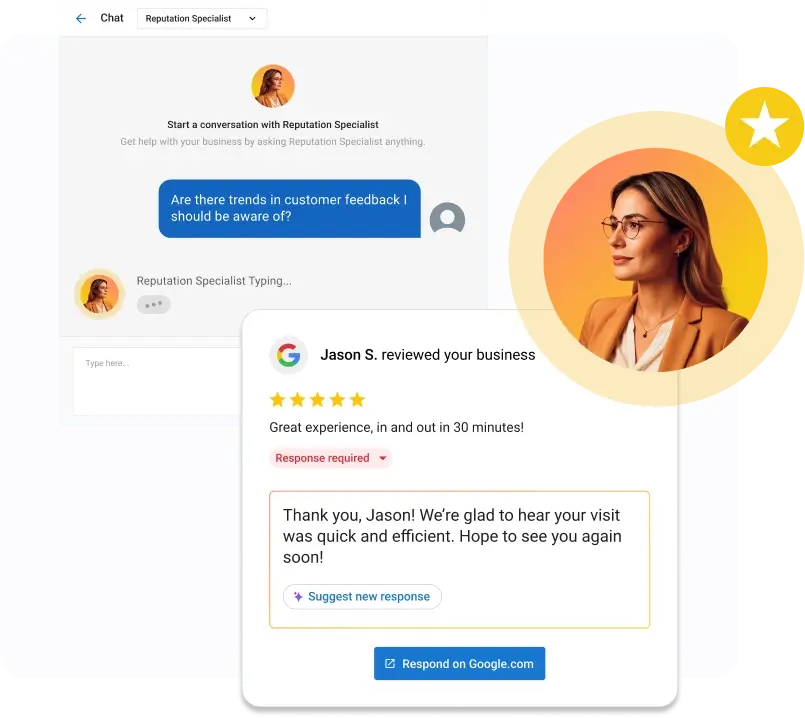
It suggests responses for 100+ other review sources and sends review requests.
It runs inside Vendasta’s Reputation AI, which monitors reviews across those sources, with full automation in the Premium edition. With these in place, you stop:
- Logging in to Google Business Profile after hours to type replies
- Trying to remember to ask each closed client for a review
- Writing the same thank-you for the twentieth five-star review
Vendasta partner Blue River Digital used this approach to help an auction house collect 21 five-star reviews in 30 days.
Google’s Maps contribution policy bans offering incentives for reviews, asking only happy clients, pressuring people to review on the spot, and asking staff to get reviews with specific content, including content that names a staff member. Ask every closed client the same way.
The penalties are visible to shoppers. When Google detects fake engagement, its Business Profile help center says it can block new reviews for a set period, unpublish existing reviews, and display a warning telling consumers that fake reviews were removed.
The Federal Trade Commission (FTC) consumer review rule bans incentives conditioned on a particular sentiment, positive or negative, as well as fake and undisclosed insider reviews. The FTC’s December 2025 warning release puts civil penalties at up to $53,088 per violation.
7. Prepare CMAs and Market Updates Faster
A seller lead asking what a home is worth is a live listing opportunity, and the first agent to respond has the edge: Zillow’s 2025 report found 59% of sellers hired the first agent they spoke with. AI shortens the first pass, with valuation models supplying a starting number and AI CMA tools pulling and scoring comps.
Valuation models are close on listed homes and much less precise on homes that aren’t listed. As of October 2026, Redfin’s estimate accuracy page reports a median error of about 1.9% for homes on the market and about 7.5% for off-market homes.
Independent testing shows the same gap. An AEI Housing Center evaluation of five unnamed valuation providers found only 27% to 35% of estimates fell within 5% of the eventual sale price when measured four months before the sale.
AI takes these tasks off the CMA:
- Pulling and filtering comps by hand
- Formatting the monthly market update for your database
- Drafting the summary paragraph that explains the price range
RPR’s AI CMA in the RPR Mobile app scores each comp from 0 to 100, offers up to 25 ranked by score, and the agent picks up to 20. NAR’s 2026 survey found 23% of agents who use AI apply it to pricing insights or comps support, and 30% use it for market summaries.
Predictive seller tools target farm areas, but most of their accuracy claims come from the vendors. Offrs says its algorithm predicts which homes are most likely to sell in the next 12 months.
Independent checks are rarer. A study by Altos Research, published in Revaluate’s white paper, found a 19.5% success rate for Revaluate’s likely-mover predictions within six months in a 2017 sample, counting only homes sold through an MLS listing.
8. Automate Repetitive Transaction Follow-Up
Transaction platforms already automate most deadline chasing, and AI now reads the contract too. Paperless Pipeline’s AI Create reads a signed contract, fills in the transaction form, and converts deadlines written as rules, such as “inspection 10 days from acceptance,” into calendar dates that account for the company’s business holidays. You review and save the transaction yourself.
Checklist reminders handle much of the rest. SkySlope emails agents daily about a flagged checklist item until the document is uploaded.
Some platforms text clients too. Open To Close task triggers can text the buyer when an earnest money delivery task isn’t completed by its due date. The agent offloads these tasks and gets the time back for new inquiries:
- Entering contract dates into a calendar
- Chasing signatures, since SkySlope DigiSign sends an automatic reminder to signers who haven’t finished within 24 hours
- Sending status updates to buyers, sellers, lenders, and title
- Reminding the buyer about earnest money, appraisal, and inspection deadlines
Adoption is still thin. NAR’s 2026 survey lists automatic client update or status reports and recommendations for next steps in a transaction timeline among the least common AI uses, each at 10% or less.
For routine “where are we on closing” questions, you can build a Vendasta Custom AI Employee such as an AI Support Agent without code, using your checklists and rules. It’s one form of AI workflow automation that answers from your knowledge base and escalates to you with context.
Best AI Tools for Real Estate Agents (With Costs)
The tools below fall into three groups: voice and lead-response tools that answer or place calls and texts, AI CRMs that build follow-up and prioritization into your database, and marketing tools for copy and listing photos. Most agents need one tool from the first group before anything else, because a missed call can’t be recovered later.
Prices were listed on vendor pages in October 2026, and every tool is described against the same columns. Vendor pricing changes often, so confirm the current price and contract terms before you sign up.
Vendasta’s AI Receptionist is listed with the voice tools. For Vendasta pricing, book a demo through the link at the end of this guide.
Voice and Lead-Response Tools
These tools answer or place calls and texts to new leads:
| Tool | Intended User | Primary Strength | Limitation | Verified Pricing | Best Fit |
|---|---|---|---|---|---|
| Vendasta’s AI Receptionist | Solo agents, teams, small brokerages | Answers inbound calls, texts, and web chat 24/7; books on connected calendars; logs every conversation to the CRM | No native Follow Up Boss or Lofty integration; connects through Zapier or developer APIs | Quoted in a Vendasta demo | Agents losing inbound sign and portal calls |
| Smith.ai AI Receptionist | Small businesses across industries | AI answers first, with live North America-based receptionist escalation | Billed per call; its documented Follow Up Boss connection is for Outreach Campaigns, not the receptionist | Free: 25 calls/mo, then $3.00/call; Pro $150/mo (75 calls); Enterprise $500/mo (300 calls) | Agents who want human backup on calls |
| Structurely | Teams with high lead volume | AI call center across voice, SMS, and email with live transfers and appointment scheduling | Platform fee not published | Platform fee plus usage: voice as low as $0.07/min; SMS as low as $0.02/message | Teams wanting usage-based AI follow-up |
AI CRMs
These CRMs build AI into follow-up and prioritization:
| Tool | Intended User | Primary Strength | Limitation | Verified Pricing | Best Fit |
|---|---|---|---|---|---|
| Follow Up Boss | Solo agents to large teams | AI features included; call transcripts, summaries, predictive lead prioritization | Several AI features rely on FUB Calling, a paid add-on on Grow; Smart Summary is still in beta | Grow $69/user/mo; Pro $499/mo (10 users); Platform $1,000/mo (30 users); Calling $39/user/mo on Grow | Teams built around Zillow leads |
| Lofty | Agents, teams, brokerages | AI Sales Agent follows up by website chat, SMS, email, and Facebook Messenger; AI lead scoring in all plans | Sales Agent doesn’t answer inbound calls; platform prices not published | Platform: request pricing; AI Sales Agent Pro $60/mo (200 leads), Max $150/mo (500 leads) | Agents wanting AI text and chat follow-up inside the CRM |
| CINC | Teams buying leads | CINC AI add-on and built-in dialer | Base plan prices not published | Request pricing; CINC AI from $200/mo; dialer $75/mo for 3 lines | Teams buying CINC lead generation |
| Real Geeks | Agents wanting site, CRM, and leads together | Geek AI Text included with lead packages | Geek AI Voice listed as coming soon | $399/mo plus $500 setup; Geek AI Text standalone $49/mo | Agents buying Real Geeks lead packages |
Marketing and Content Tools
These tools handle copy and listing photos:
| Tool | Intended User | Primary Strength | Limitation | Verified Pricing | Best Fit |
|---|---|---|---|---|---|
| ChatGPT | Any agent | Drafts listing copy, emails, captions, summaries | Free, Go, Plus, and Pro chats are used for training by default unless the setting is turned off | Go $8/mo; Plus $20/mo; Business $25/user/mo monthly or $20 annually, 2-user minimum | Listing and email drafts |
| Virtual Staging AI | Agents staging vacant listings often | AI staging in seconds, with furniture removal | Output still needs MLS disclosure | Standard $19/mo billed annually ($228/yr) for 20 photos | High-volume staging |
| BoxBrownie | Agents staging occasional listings | Pay-as-you-go staging and editing, no subscription | Staging delivery in under 48 hours | Virtual staging US$30/image; image enhancement US$2/image | Occasional listings |
Choose by the problem you’re fixing. Calls that ring out point to a receptionist tool, a cold database points to CRM follow-up, and copy and photos point to the marketing tools.
Step-by-Step Setup and Prompts to Start This Week
Set up call coverage first, then add the copy and follow-up prompts once calls are flowing. Calls are where the most leads slip away, and an AI receptionist works around the clock from the day you switch it on, while copy and follow-up prompts help only when you sit down to use them.
The prompts below use a sample agent, Jordan Lee of Northside Realty in Columbus, Ohio, and a sample listing. Swap in your own name, brokerage, service area, and property details before you use them, and keep client names and financial details out of public AI tools.
Set Up Call Answering First
These steps assume an AI receptionist like the one in workflow 1:
- Count last week’s missed calls, unanswered portal leads, and after-hours texts so you have a baseline.
- Forward calls to the AI receptionist number through your carrier. You can forward all calls, calls after a set number of rings, or after-hours calls only. Forwarding is set with your carrier, so it keeps running until you change it there.
- Load the knowledge base: your website, Google Business Profile, active listing sheets, service area, showing policy, and the ten questions callers ask most.
- Write the call script with this prompt, then place test calls as a buyer, a seller, and a renter. Prompt: “You answer calls for Jordan Lee, a real estate agent with Northside Realty serving Columbus, Ohio.” Follow these rules:
- Greet the caller and ask whether they want to buy, sell, or both.
- Buyers: ask timeline, price range, pre-approval or cash, target neighborhoods, and must-have features.
- Sellers: ask the property address, timeline, and whether they have spoken with another agent.
- Offer to book a showing or listing appointment.
- Ask only about timeline, budget, financing, location, and the property. Never ask about or comment on race, color, religion, national origin, sex, disability, familial status, or who will live in the home.
- If the caller asks for Jordan, or a question falls outside your knowledge, offer a callback from Jordan and take a message.
- Connect your calendar and CRM, then confirm that a test booking and conversation log appear where your team works.
Add Prompts for Copy and Follow-Up
Use generalized property details in public tools, never client names or financial information:
- Draft listing copy with this prompt, then check every fact against the listing sheet. Prompt: “Write a 150-word MLS public remarks description from these facts: 3 bedrooms, 2 bathrooms, 1,850 square feet, 0.2-acre lot, built 1998, kitchen updated in 2024, fenced backyard, two blocks from Schiller Park. Describe the property and its features only. Do not describe who the home is ideal for or the people who live nearby. Do not use ‘perfect for,’ ‘ideal for,’ or ‘exclusive.’ Do not invent features. Then write three social captions under 40 words each.”
- Draft a follow-up sequence for leads who have given consent to be texted. Prompt: “Write three text messages for a buyer lead who asked about a 3-bedroom home in German Village 10 days ago and has not replied. Message 1 goes today, message 2 in 3 days, message 3 in 3 weeks. Keep each under 300 characters, offer one specific next step, and end message 1 with ‘Reply STOP to opt out.'”
- Review the AI’s logs every Friday for missed handoffs, unanswered questions, and bookings, and add the unanswered questions to its knowledge base.
Staying Compliant: Fair Housing, TCPA, Disclosure and Data Privacy
Each AI workflow above carries a specific legal exposure, and the agent and broker own it, not the software vendor. A qualification script can drift into a Fair Housing problem, an outbound AI call or text can trigger TCPA liability, a staged photo can break MLS rules, and a prompt can expose client data.
The rules below are the ones that apply most directly to the eight workflows in this guide. State law and local MLS rules vary, so check them with your broker before you roll out a new tool.
Fair Housing in Qualification and Copy
The U.S. Department of Housing and Urban Development (HUD) withdrew its digital-platform advertising guidance effective September 17, 2025, in a Federal Register notice published in April 2026, but the binding rule stayed in place.
Federal regulation 24 CFR §100.75 still bars any advertisement or statement indicating a preference based on race, color, religion, sex, handicap, familial status, or national origin, and NAR’s Code of Ethics adds sexual orientation and gender identity.
Qualification scripts should ask about timeline, budget, financing, and location only, and listing prompts should describe features, not people. HUD’s 1995 advertising guidance, known as the Achtenberg memo, treated common property descriptions such as “master bedroom” as not discriminatory, though many associations now prefer “primary bedroom.” The risk lies in describing buyers, not floor plans.
TCPA Consent for Voice and Texting
In a declaratory ruling, the Federal Communications Commission (FCC) confirmed that AI-generated voices count as “artificial or prerecorded voice” under the TCPA. An AI call you place needs the called party’s prior express consent, and marketing calls need prior express written consent, so plan consent capture for every outbound AI call and follow-up text.
The one-to-one consent rule never took effect. The Eleventh Circuit vacated it, the court’s mandate issued April 30, 2025, and the FCC removed the rule that July.
Opt-outs have a deadline. Since April 11, 2025, the FCC’s revocation rule requires honoring an opt-out within a reasonable time of no more than 10 business days.
Scrubbing against the Do-Not-Call Registry is a monthly job. The safe harbor in the FTC’s Telemarketing Sales Rule requires calling lists to be checked against a version of the registry downloaded no more than 31 days before the call.
The settlements are large. Anywhere’s $20 million settlement in Bumpus v. Realogy, over Coldwell Banker-affiliated agents’ alleged calls to Do-Not-Call numbers, received final approval on March 18, 2026, and the defendants denied wrongdoing.
Individual agents are exposed too. A Nevada federal court certified a class action against a Las Vegas agent who sent ringless voicemails to expired listings without documented consent, an exposure TCPAWorld puts at just under $3 million.
AI Staging Disclosure
California’s Business and Professions Code §10140.8, effective January 1, 2026, requires a disclosure on or adjacent to any digitally altered listing image, plus a link, URL, or QR code to the unaltered original.
California Regional Multiple Listing Service (CRMLS) rules require the original photo immediately before or after the altered one and a label such as “Digitally Altered,” “Digitally Enhanced,” or “Virtually Staged,” with a $250 fine if a warning goes uncorrected.
Other MLSs have adopted similar rules. The Arizona Regional Multiple Listing Service (ARMLS) disclosure policy requires a “Digitally Altered” disclosure and the unaltered original directly before or after the altered photo, with $200-per-violation fines starting December 2026. Check your own MLS’s rules before you upload staged photos.
The national standard applies everywhere. NAR’s Standard of Practice 12-10 bars misleading consumers, including through misleading images, regardless of local MLS rules.
Client Data in Public AI Tools
OpenAI’s data controls page says ChatGPT Free, Go, Plus, and Pro conversations are used to train models by default, with an “Improve the model for everyone” setting to switch it off. ChatGPT Business, Enterprise, and API data is not used for training by default.
The North Carolina Real Estate Commission’s AI bulletin says client identifying or bank information entered into AI “poses a significant confidentiality risk and a potential breach of your fiduciary duty to your client.” Write prompts with city, bedroom count, and approximate square footage instead of client names and addresses.
Broker Supervision
California’s Department of Real Estate advisory says responsibility for inaccurate AI output rests with the licensee and their responsible broker, not the technology provider.
NAR’s brokerage AI policy guidance recommends an approved tool list, a named person overseeing AI use, agent training, and human review, adding that AI-generated content “should not go straight from prompt to publication.”
Which AI Workflow Should You Start With
Start with the workflow that loses the most leads this week, which for many agents is the phone that rings during showings. Match the first step to how you work:
- Solo agent: Forward missed and after-hours calls to an AI receptionist, then add a listing-description prompt.
- Team lead: Add AI qualification and showing booking so leads reach agents already tagged, then automate database follow-up for consented contacts.
- Small brokerage: Write the AI use policy first, approve tools for client data, then roll out call answering with lead qualification and review responses across the office.
Vendasta’s AI Receptionist covers the first step in each plan by answering calls, texts, and chats, qualifying intent, and booking appointments, and Vendasta’s AI Reputation Specialist handles review responses after closing.
To see how Vendasta can address this workflow in your business, book a Vendasta demo.
AI for Real Estate Agents FAQs
1. What is the best AI for real estate agents?
The best AI depends on where you lose deals. For missed sign calls and portal inquiries, an AI receptionist that answers, qualifies, and books appointments has the most direct effect on speed-to-lead. For listing copy, a general assistant like ChatGPT works. For a cold database, CRM-based follow-up from Follow Up Boss, Lofty, or Vendasta fits.
2. Can real estate agents use ChatGPT for their business?
Yes. NAR’s 2026 technology survey found 91% of agents who use AI use ChatGPT, most often for listing descriptions, social posts, and emails. Keep client names, addresses, and financial details out of your prompts, turn off model training on personal plans, and verify every fact before publishing.
3. Do AI voice agents work for real estate leads?
They work for capture and qualification when a human path exists. LKW Home Team’s voice AI answered more than 900 inbound calls and collected key details in under two minutes, transferring to a human below 95% confidence. Some leads show AI fatigue and refuse to engage, so every script should offer a callback or handoff.
4. How much do AI tools for real estate agents cost?
Costs vary widely by tool, from photo-editing fees of a few dollars per image to CRM platforms that run $69 to $1,000 a month, and the tools tables above list each verified price. Usage-based voice tools charge by the minute or message. For Vendasta pricing, book a demo.
5. Can AI-written listing descriptions violate Fair Housing rules?
Yes. Federal rules bar advertising that indicates a preference based on race, color, religion, sex, disability, familial status, or national origin, and a draft describing the ideal buyer instead of the home can cross that line. Tell the tool to describe features only, remove phrases like “perfect for,” and review every draft before it reaches the MLS.
6. Do I have to disclose AI virtual staging?
Yes. NAR’s Code of Ethics bars misleading images, and California law has required a disclosure and a link to the unaltered photo since January 1, 2026. MLSs including CRMLS and ARMLS require labels and the original image alongside the staged one, with fines of $250 at CRMLS and $200 at ARMLS starting December 2026.
7. Does AI integrate with Follow Up Boss and Lofty?
Many tools do, but the connection type varies. Follow Up Boss lists AI tools such as Structurely and Ylopo in its integrations directory. Lofty has its own AI Sales Agent, and its Zapier connection doesn’t support two-way sync. Vendasta has no native integration with either and connects through Zapier or developer APIs.
8. What is the 3-3-3 rule in real estate?
It’s informal coaching shorthand with no official version. Club Wealth’s version means contacting a lead three times a day for three days, three times a week for three weeks, and three times a month for three months. The Mike Ferry Organization uses the name for letting the phone ring three times, calling three times, and talking three times.
9. Is it safe to put client information into ChatGPT?
Avoid entering sensitive client information into unapproved tools: ChatGPT Free, Go, Plus, and Pro use conversations for training by default, though users can opt out. The North Carolina Real Estate Commission warns of confidentiality and fiduciary risks. Use generalized details and broker-approved tools; a business plan’s training exclusion doesn’t remove your privacy obligations.
10. Can an AI receptionist book showings into my calendar?
Yes, when it’s connected to your calendar. Vendasta’s AI Receptionist captures the caller’s details, asks your qualifying questions, and books the appointment against your connected calendar. Every conversation is logged to the CRM, so you can review what the buyer or seller said before the showing or listing appointment.