About Us
 Careers
 Leadership
 Board
Board Newsroom
Online reputation management for lawyers means auditing, earning, monitoring, and defending a firm’s reviews under bar ethics rules that a restaurant never faces. A lawyer may ask for reviews and reply to criticism, but client confidentiality under American Bar Association (ABA) Model Rule 1.6 still applies after a one-star review. Rules 7.1 and 7.2 limit how a firm asks for reviews, rewards clients, and advertises results.
Managing partners and solo practitioners at small firms usually own this work themselves, often between billable hours, and they compete in local search alongside firms with full-time marketers. Reviews affect both how Google ranks a firm and which of three names a prospect calls from the Local Pack. A repeatable process fixes most of the risk: ask every client the same way, publish only replies a lawyer has approved, and use small business software that keeps a lawyer in the approval loop.
This guide covers the ABA rules and where state bars differ, a six-step workflow from audit to monitoring, compliant reply templates, dispute steps for Google, Avvo, and Yelp, and how to automate requests and replies with lawyer approval.
Grow reviews, boost visibility, and uncover insights with AI
TL;DR
- Confidentiality survives every negative review: ABA Formal Opinion 496 bars replies that reveal anything about a client matter.
- Ask every client, never pay for reviews: Google bans incentives for any review and bans selectively asking happy clients. Rule 7.2(b) bars giving anything of value for a recommendation.
- AI Reputation Specialist drafts, a lawyer approves: Vendasta’s AI Reputation Specialist responds to reviews under approval rules the firm configures, and Vendasta’s Reputation AI monitors reviews. A lawyer checks each draft for confidentiality before it publishes.
Why Legal Reputation Management Is Different
A restaurant owner can answer a false one-star review with receipts and timestamps. A lawyer who answers the same way risks discipline.
ABA Formal Opinion 496 concludes that a lawyer’s online reply may not disclose information relating to a client’s representation, or information that could reasonably lead others to discover confidential information. The opinion cites a federal decision, Louima v. City of New York, holding that press reports about a lawyer’s conduct do not justify disclosing client confidences even when the reports are false.
Courts and disciplinary bodies have enforced this line:
- Georgia: In In re Skinner (2013), the Supreme Court of Georgia rejected a public reprimand as too lenient for a lawyer who disclosed confidential client information online in response to a client’s negative reviews.
- Illinois: In In re Tsamis (2014), a lawyer received a public reprimand for disclosing a former client’s confidential information in a reply to an Avvo review.
- Colorado: A 2025 order imposed a nine-month suspension, with sixty days served and the remainder stayed upon successful completion of a two-year probation with conditions, on a lawyer whose reply on her firm’s Facebook page attacked a former client’s parenting.
- Indiana: In In re Steele (2015), the Indiana Supreme Court disbarred a lawyer who, among other violations, monetarily incentivized positive Avvo reviews and publicly exposed negative reviewers’ confidential information.
Prospects still choose firms by reputation. Clio’s 2025 Legal Trends Report found that while most consumers would still look for a referral for a future legal problem, more than half would also turn to the internet, where firm websites and online reviews play strong roles.
Vendasta’s general reputation management guide covers the basics for any local business; this article covers what changes when the business is a law firm.
What the ABA Model Rules Require
Three ABA Model Rules shape online reputation work. Rule 1.6 governs what a lawyer can say in a reply, Rule 7.1 governs how results and testimonials are presented, and Rule 7.2 governs what a firm can give someone for a recommendation.
The Model Rules are a template, not binding law. Each state adopts its own version, sometimes with different wording, and its ethics opinions interpret that version. The version your state adopted is the one that binds you, which is why this section ends with how selected states differ.
Rule 1.6: Confidentiality Reaches Public Facts and Identities
Model Rule 1.6 bars a lawyer from revealing “information relating to the representation of a client” without informed consent, implied authorization, or an exception in paragraph (b). Opinion 496 cites Formal Opinion 480 for the point that this information stays confidential even when it appears in the public record. A client’s negative review does not create implied authorization, because a reply is not needed to carry out the representation.
The only candidate exception is the self-defense clause in Rule 1.6(b)(5), and Opinion 496 concludes that it does not cover online reviews:
- Online criticism is not a “proceeding” in any sense of the word.
- A negative review alone is not a “controversy between the lawyer and the client.”
- Even if a controversy existed, a public reply is not reasonably necessary to establish the lawyer’s claim or defense.
The fact of representation can itself be protected. D.C. Ethics Opinion 370 says the prudent lawyer will obtain client consent before sharing any information about a representation or disclosing a client’s identity. Opinion 496 also warns that even a general disclaimer that a post misstates events can reveal the lawyer’s involvement.
Rules 7.1 and 7.2: Truthful Claims and No Paid Recommendations
Rule 7.1 bars false or misleading communications about a lawyer’s services. The comment to Model Rule 7.1 says a truthful report of a lawyer’s achievements for clients can mislead if it leads a reasonable person to form an unjustified expectation that other clients could get the same results. The same comment says an appropriate disclaimer or qualifying language may preclude that finding.
Model Rule 7.2 bars giving or promising anything of value to a person for recommending the lawyer’s services. The rule’s comment defines a recommendation as a communication that endorses or vouches for a lawyer’s credentials, abilities, competence, character, or other professional qualities.
The nominal-gift exception in Rule 7.2(b)(5) covers token thanks that are neither intended nor reasonably expected to be a form of compensation. Paying for a review or trading a fee discount for one falls outside that exception.
Confirm Your State Bar’s Rules Before You Use Any Template
Opinion 496 says that each jurisdiction’s own rules and opinions control, and the states disagree on both reply content and thank-you gifts:
- Texas: Opinion 662 permits a reply that is “proportional and restrained” and reveals no confidential information.
- Colorado: Formal Opinion 136 says that if criticism rises to the level of a lawyer-client controversy, the lawyer may disclose only limited information reasonably necessary to respond. The ABA committee disagrees with that conclusion.
- District of Columbia: Opinion 370 permits limited disclosure in response to specific allegations by a client. Opinion 496 notes that it rests on a rule significantly different from Model Rule 1.6.
- New Jersey: In a March 2025 notice, the Supreme Court declined to amend Rules of Professional Conduct (RPCs) 1.6 and 7.1 to let lawyers disclose confidential information in reply to negative online reviews.
- New York: New York State Bar Association (NYSBA) Opinion 1286 allows a nominal gift to a former client for posting a Google review if the lawyer neither drafts the review nor conditions the gift on its content.
Read your own state bar’s opinions before adopting any wording in this guide.
Step 1: Audit Your Firm’s Current Online Standing
Start with what a prospect sees. Search for the firm and each attorney by name in a private browser window, then record each platform’s rating and review count. Note the date of the newest review.
Run the audit in this order:
- Search “[Firm name]”, “[Firm name] reviews”, each attorney’s name, and “[Attorney name] lawyer” on desktop and on a phone. Screenshot page one and the Local Pack.
- Record star rating, review count, newest review date, and owner reply rate on Google, Avvo, Martindale.com, Lawyers.com, Justia, FindLaw, Super Lawyers, Yelp, and Facebook.
- Compare firm name, address, phone, and practice-area wording across every listing, and note each mismatch.
- Read every reply the firm has ever posted. Flag any reply that names a client, describes a matter, or confirms representation so a lawyer can rewrite or remove it. These replies carry the same exposure as the disciplined posts above.
- List reviews that may break platform policy, such as posts from competitors, former employees, or people who were never clients.
- Record the review count and rating of the three firms in the Local Pack for your main practice-area search.
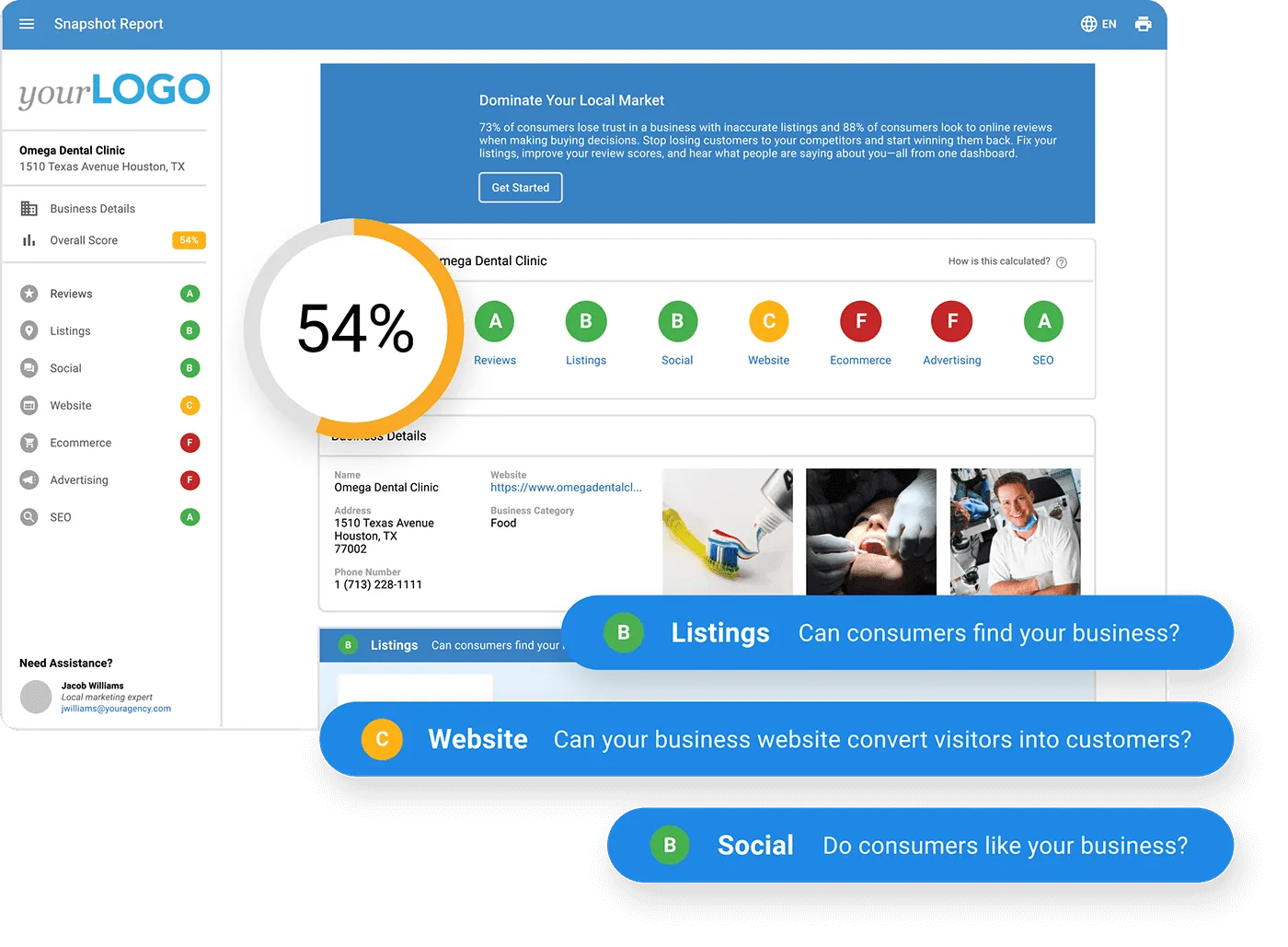
Vendasta’s Snapshot Report, an automated needs assessment that scans a business’s online presence across 70+ directories and 30+ review sites, gives a firm or the agency serving it a baseline for this audit.
Step 2: Claim and Optimize Your Profiles
Claim and optimize your Google Business Profile first, then complete the other directory profiles and check state-specific case-result disclaimers.
Google’s local ranking help page names relevance, distance, and prominence as the main local ranking factors. Google also says more reviews and positive ratings can help a business’s local ranking, and that there is no way to request or pay for a better local ranking.
An ABA Law Practice Today article on generative AI says one business directory profile matters more than all others: Google Business Profile. After a firm’s own website, it ranks Justia and the Internet Brands sites (Avvo, FindLaw, Lawyers.com, Martindale, and Super Lawyers) as the next most important profiles AI services draw on.
Work through the profiles in this order:
- Google Business Profile: Choose the most specific primary category for your main practice, display the office address, and complete hours and services. Add attorney photos.
- Avvo: Claiming is free, and identity verification runs through LinkedIn, Facebook, email, or phone. The Avvo Rating (1.0 to 10.0) weighs experience, recognition, and disciplinary history; client reviews are not a direct input.
- Martindale-Hubbell and Lawyers.com: Martindale says adding client reviews to Martindale.com and Lawyers.com profiles is free.
- Justia: Justia’s lawyer directory profiles are free and can be claimed by email, text message, phone, or a photo of your credentials and ID. List every practice area you handle so the profile matches the searches prospects run.
- Yelp: Claim the page and keep details current. Do not ask anyone for Yelp reviews; Step 3 explains why.
- FindLaw and Super Lawyers: FindLaw limits its review-request feature to paid profile owners. Super Lawyers says lawyers cannot nominate themselves.
Keep name, address, phone, and practice-area wording identical across every listing.
Case Results Need Disclaimers on Every Profile
Results and verdicts on a directory profile are communications about your services under Rule 7.1, and so are testimonials. Several states prescribe specific wording, and New Jersey’s Opinion 49 on testimonials, dated September 30, 2025, is among the newest. The table below summarizes what selected states add beyond the Model Rules:
| State | Results or testimonial requirement |
|---|---|
| Florida | Under Rule 4-7.13(b)(9), a testimonial must reflect the person’s actual experience and be representative of what clients generally experience; the lawyer may not write or draft it; nothing of value may be given for it; and it must state that the prospective client may not obtain the same or similar results. Rule 4-7.12(d) bars illegible or inconspicuous disclosures. |
| New Jersey | A testimonial mentioning past performance needs “Results may vary depending on your particular facts and legal circumstances.” Comparative terms such as “the best” are not permitted. |
| South Carolina | Under Rule 7.1(d), a testimonial must clearly and conspicuously state that one client’s result does not necessarily indicate similar results for other clients. |
| Texas | Under Comment 10 to Rule 7.01, an advertised verdict that was later reduced or reversed, or a case that settled for less, must disclose those facts and the amount the client actually received. |
| Nevada | Under Rule 7.2(b)(7), an advertisement with past results must state that past results do not guarantee, warrant, or predict future cases. |
Step 3: Earn Reviews Within Bar Rules
Ask every client when the matter closes, through the same channels each time, with no reward attached. Google, Yelp, and the Federal Trade Commission (FTC) each add rules on top of the bar’s, so check them before choosing request timing and using the copy-ready sequence.
ABA Law Technology Today’s coverage of the 2026 Legal CX Report found that three in four clients say they are satisfied, but just 29% would leave a review. Firms that use a client app, measure satisfaction, and ask for a review the moment a case resolves average 4.82 stars. Satisfaction alone does not produce reviews, so the ask at case resolution is what closes that gap.
The Rules Google, Yelp, and the FTC Add
Platform rules are stricter than most bar opinions, and a request has to satisfy both:
- No incentives on Google, for any review: Google’s review policy bans offering incentives such as payment, discounts, or free goods or services for reviews. That ban would likely cover the nominal gift New York permits.
- No selective asking: Google bars selectively soliciting positive reviews and bars discouraging negative ones. A funnel that sends only high internal ratings to the Google link breaks both rules.
- No scripts or staff quotas: Google bars asking staff to solicit reviews with specific content or a certain number of reviews. Ohio’s Board of Professional Conduct, in Advisory Opinion 2023-11, advises lawyers not to pay a nonlawyer employee a bonus based solely on receiving a positive online review.
- No Yelp requests: Yelp’s business guidance says not to ask anyone to review your business, and its automated software may not recommend reviews that seem prompted by the business.
- Federal backstop: The FTC’s consumer review rule bans fake reviews and incentives conditioned on a particular sentiment. The FTC’s December 2025 warning-letter announcement cited civil penalties of up to $53,088 per violation.
Asking is allowed. Texas Opinion 685 permits encouraging current and former clients to leave reviews as long as the lawyer does not encourage false, misleading, or unfounded statements.
Avvo gives attorneys the same advice: “Ask every client, not just the happy ones.”
When and How to Ask
Send the first request at matter close. Avoid asking mid-case, while the client still depends on the firm’s work and a request can feel like a condition of service.
Search Engine Land’s guide to Google reviews says a steady stream of reviews, instead of sudden bursts, helps local rankings. If the firm has a backlog of past clients, spread those requests over several weeks instead of sending them in one blast.
Automation fits this step when it follows fixed rules and sends one sequence to every client.
Copy-Ready Request Sequence
Send this sequence to every client after the matter closes, stop after the third message, and remove anyone who asks not to be contacted:
- Email at matter close: “Hi [First name], thank you for trusting [Firm] with your legal matter. If you are willing, an honest review on Google helps other people choosing a lawyer: [link]. Write whatever you think is fair. Reviews are public, so share only what you are comfortable making public. A review is optional and has no effect on our fees or our work for you.”
- Follow-ups: Send an SMS five days later: “Hi [First name], this is [Attorney] at [Firm]. If you have a minute, an honest Google review helps others choosing a lawyer: [link]. Reply STOP to opt out.” Send a final email 14 days after close: “Hi [First name], one last note from [Firm]. If you would like to share your experience, our Google review link is here: [link]. Either way, thank you for working with us.”
Step 4: Respond to Negative Reviews Without Breaching Confidentiality
A compliant reply is short and calm, says nothing about any matter, and moves the conversation offline. Use the checks and templates below for negative reviews, and apply the same confidentiality limits to positive replies.
Opinion 496 also says that, as a best practice, lawyers should consider not responding at all, because a reply may draw more attention to the post and invite further response from an already unhappy critic.
Vendasta’s review response templates show how most local businesses can answer criticism. The versions below are narrower, because every word a law firm posts falls under Rule 1.6.
What a Compliant Reply Never Includes
Check every draft against this list before it publishes:
- Confirmation that the reviewer is or was a client
- The matter type, court, opposing party, dates, outcome, or fee
- A point-by-point correction of the reviewer’s account
- A legal threat; the FTC’s final rule bars unfounded or groundless legal threats used to prevent or remove a negative review
Publish nothing a reviewing lawyer has not approved.
If the reviewer is a client or former client, Opinion 496 says a lawyer may, but is not required to, respond directly and offline, and may wish to consult counsel first. An invitation to talk offline, including an offer to refund or reduce fees, works only if the lawyer intends and is able to address the person’s concerns. If the matter is still open, San Francisco Bar Opinion 2014-1 says even a response that discloses no confidential information may be inappropriate.
Template 1: The Reviewer May Be a Client
Use this reply when you cannot rule out a client relationship:
Thank you for your feedback. Professional obligations prevent us from discussing any legal matter in a public forum. If you would like to talk, please call [Managing Attorney] at [phone].
It combines two responses Opinion 496 permits: an invitation to contact the lawyer privately, and a statement that professional considerations preclude a public reply. It confirms nothing about who the reviewer is.
Template 2: The Minimal Notice
Use this one-line reply when any longer response would restart an argument:
Professional obligations do not allow me to respond as I would wish.
Opinion 496 offers this sentence as permissible, including for a negative post by a client or former client.
Template 3: The Reviewer Was Never a Client
Before you use this reply, run a conflicts check covering current, former, and prospective clients. Opinion 496 allows a lawyer to state that the poster is not a client or former client. The NYSBA Attorney Professionalism Forum says you may make that statement if you know for sure the poster was never a client.
We have no record of representing the person who posted this review, and we have asked [platform] to review it under its content policies. Anyone with a question about our firm can reach us at [phone].
If the post describes a real matter, for example, a complaint from an opposing party or a client’s relative, Opinion 496 still bars disclosing information about the representation without client consent. Use Template 1 or 2 in that situation.
State-Endorsed Disagreement Language
Some states approve a brief statement of disagreement. Wisconsin Formal Opinion EF-23-01 offers this sample: “I do not believe the [post/comments] are fair or accurate. Professional obligations prevent me from commenting further.” Texas Opinion 662 approved a similar sample drawn from Pennsylvania Bar Association Formal Opinion 2014-200.
Opinion 496 warns that even a general statement that events are misportrayed can reveal the lawyer’s involvement. Use disagreement language only where your state’s opinion endorses it.
Replies to Positive Reviews Carry the Same Risk
A thank-you that names the matter discloses the matter. “Glad we got your DUI charge dismissed” confirms the representation, the matter type, and the outcome, while “Thank you for taking the time to share this” confirms nothing. Vendasta’s examples of responding to positive reviews show how most businesses thank customers; a law firm’s version has to stay generic.
West Virginia Legal Ethics Opinion 2015-02 applies the confidentiality limit to responses to positive and negative reviews alike.
Step 5: Dispute Fake Reviews and Suppress Negative Results
Report a review only when it breaks the platform’s own policy; disagreement alone does not justify removal. Use the platform-specific steps below, then weigh legal remedies and owned assets if removal fails.
Opinion 496 says a lawyer may ask the website or search engine host to remove a post. Where the poster is pretending to be a client, the lawyer may state that the post is not accurate or that the lawyer has not represented the poster. The request still may not disclose anything about a client’s representation without consent.
Vendasta’s guide on how to dispute a Google review walks through Google’s process in more detail; the steps below cover what changes for a law firm.
Google’s review-removal help page gives this sequence:
- Open your Business Profile and select Read reviews.
- Select Report next to the review.
- Choose the policy reason that fits.
- Select Send report.
- Check the report’s status in Google’s review management tool. A status of “Report reviewed – no policy violation” makes the review eligible for a one-time appeal, and one appeal can cover up to 10 reviews.
Google says review evaluation typically takes several days. In October 2026, Google said in its Business Profile Help Community that a high volume of review-related appeals has extended processing times and that it cannot give a specific timeframe, as Search Engine Roundtable reported.
Google’s April 2026 update says its systems now stop attempts to demand payment in exchange for removing fake one-star reviews, and that it pauses new reviews on a profile hit by a sudden spike in spam reviews.
Avvo
Avvo removes reviews from staff, colleagues, family, or friends who aren’t clients. To dispute a review from someone who was never your client, contact Avvo Customer Care. Avvo then contacts the reviewer, and if the reviewer cannot confirm the relationship, the review comes down.
Avvo keeps a review up if it reflects a genuine client experience, even if the attorney sees the situation differently. Avvo applies the same moderation standards and dispute process to every attorney, whether the attorney has a free profile or a paid advertising relationship.
Yelp
Yelp does not let a business ask for reviews, so most Yelp problems come from unsolicited posts. If a review breaks Yelp’s Content Guidelines, report it through Yelp’s review-reporting option and name the specific guideline it breaks.
Keep the report factual and free of client information. The same Rule 1.6 limits that apply to a public reply apply to anything the firm tells the platform.
When to Escalate to Legal Remedies
Section 230 of the Communications Decency Act generally keeps a court from ordering a platform to remove a review. In Hassell v. Bird, a law firm won damages and costs of nearly $558,000 against a reviewer. The California Supreme Court still held that Section 230 barred the order directing Yelp, which was not a party, to remove the reviews.
Suing the reviewer is possible. Texas Opinion 662 notes that nothing in it suggests a lawyer may not seek judicial relief against a former client who commits defamation. Outcomes depend on whether the review states provable facts:
- A lawyer who won: In Blake v. Giustibelli (2016), a Florida appeals court upheld $350,000 in punitive damages for a lawyer after a former client and her ex-husband falsely claimed online that the lawyer falsified a fee contract.
- A lawyer who lost: In Shapiro v. Kushnick-Carr (2026), New York’s Appellate Division dismissed a lawyer’s suit over a Google review of his firm as nonactionable pure opinion and granted the reviewer attorney fees under the state’s anti-SLAPP (strategic lawsuit against public participation) law.
Keep gag clauses out of engagement letters. The Consumer Review Fairness Act voids form-contract terms that restrict consumers’ reviews.
The FTC’s guidance says the act does not apply to employment contracts or agreements with independent contractors and does not address attorney engagement agreements, so treat a gag clause in an engagement letter as a risk.
Push Results Down With Owned Assets
Fill page one for your firm’s name with pages you control: the completed profiles from Step 2, attorney bio pages, practice-area FAQ articles, LinkedIn profiles, and bar association and community listings.
Step 6: Monitor Reviews and Mentions Across Platforms
Set daily alerts and check each directory weekly. Repeat the Step 1 audit monthly.
A law firm’s reviews are spread across Google and the directories from Step 2. Relying on each platform’s own notifications means checking Google, Avvo, Martindale, Justia, and FindLaw separately, which makes it easy to miss a review.
Vendasta’s roundup of online review management tools covers the general options; for a law firm, set up these four layers:
- Google Alerts: Create alerts for the firm name and each attorney’s name in quotes. Add an alert for the firm name plus “review.”
- Private-window searches: Repeat the Step 1 searches monthly to catch new forum threads, complaint sites, and news mentions.
- One review feed: Vendasta’s Reputation AI monitors reviews across 100+ sources and analyzes sentiment in one feed; confirm which legal directories are covered for your firm.
- Triage rule: Send any review that mentions a matter or a threat to the managing partner the same day. Escalate bar complaints on the same schedule.
NYSBA Opinion 1032 notes that the material threat of a proceeding may change what a lawyer is permitted to disclose, and that judgment belongs with counsel.
Automating Requests and Responses Compliantly
Vendasta’s AI Reputation Specialist responds to Google and Facebook reviews in the reviewer’s language under configurable rules, including rating thresholds, delays, and approval workflows, and suggests responses for 100+ other review sources. Vendasta’s Reputation AI monitors reviews across those sources. For a law firm, the essential setting is lawyer approval before anything publishes.
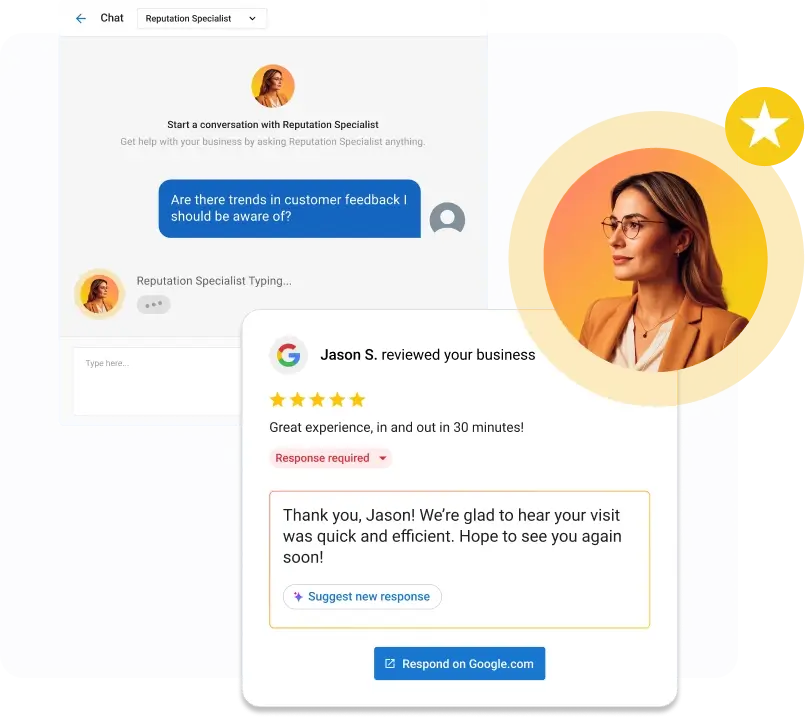
The AI Reputation Specialist is one of the AI Employees in Vendasta’s AI Workforce. Vendasta is an AI customer acquisition and engagement platform for local businesses, including small law firms, and for the agencies that serve them.
These are firm policies for a firm bound by Rule 1.6; apply them through the approval rules you configure:
| Policy | Law-firm rule |
|---|---|
| Approval | A lawyer approves every reply, positive and negative, before it is published. |
| Routing | 1–3 star drafts go to the managing partner; 4–5 star drafts go to the reviewing attorney. |
| Unfamiliar reviewers | No reply until a conflicts check is done. |
| Approved language | Templates 1–3 only; never client names, matter types, outcomes, or fees. |
| Request trigger | Matter marked closed; ask every client, with no rating filter. |
| Request delays | First email at matter close, SMS five days later, final email 14 days after close, then stop. |
| Timing | Hold every draft for lawyer review; nothing auto-publishes on a timer. |
Determining whether a reviewer was a client, and approving the reply, stays with a lawyer. Before approving, the lawyer confirms that the draft does not confirm a relationship, mention a matter, or dispute facts.
Most AI Employees deploy in under 30 minutes after learning from uploaded knowledge and the firm’s online presence (its website and business profile). Proof of performance logs and reports every AI action. Vendasta also integrates with Clio, and optional expert setup is available for firms that want help configuring rules.
What It Costs and How to Measure Results
Basic profiles on Google, Avvo, and Justia are free, and Martindale does not charge to add client reviews. Some directory providers publish starting prices for paid tiers; others supply quotes.
The real costs are software and attorney review time.
For software, Capterra’s category page puts typical reputation management entry plans around $131 per month, mid-tier systems around $248, and enterprise plans at $400 or more. Those figures cover the general market, not legal-specific tools. Pricing for Reputation AI and the AI Workforce is covered in a demo.
Plan for different timelines:
- Profiles and disputes: Claiming profiles and approving templates is a one-time project. Google says review evaluation typically takes several days, and appeals currently take longer.
- Rankings: Sterling Sky found a small Maps ranking gain when businesses went from 9 to 10 reviews and no repeat gain from 10 to 11. Ranking movement depends on local competition, so plan for several months in a competitive metro.
Track these key performance indicators (KPIs) monthly:
| KPI | What to measure |
|---|---|
| Review velocity | New reviews per month on each platform, aiming for a steady flow instead of bursts |
| Average rating | Star rating per platform, compared with the three Local Pack leaders |
| Recency | Days since the newest review on Google and each directory |
| Reply rate | Share of reviews with an approved owner reply, and days to reply |
| Local Pack visibility | Rank for your main practice-area searches across your service area |
| Profile actions | Calls and website clicks from Google Business Profile |
| Consultations by source | New clients who say they found the firm through reviews or directories |
| Compliance exceptions | Drafts a lawyer rejected or rewrote, and why |
Vendasta’s Reputation AI monitors reviews and analyzes sentiment, and Vendasta’s AI Reputation Specialist drafts responses, while a lawyer remains the final approver.
To see how Vendasta can address this workflow in your business, book a Vendasta demo.
Online Reputation Management for Lawyers FAQs
1. Can a lawyer ask clients for online reviews?
Yes. Model Rule 7.2 does not bar asking, and Texas Opinion 685 permits encouraging current and former clients to leave reviews. The limits come from platform and ethics rules: ask every client rather than only satisfied ones, never draft the review, never request specific content, and skip Yelp, which tells businesses not to ask.
2. Can a law firm offer a gift card or discount for a review?
Not for Google reviews. Google bans incentives such as payment, discounts, or free goods or services for reviews. Rule 7.2(b)(5) allows only nominal gifts that are not intended or expected as compensation, which rules out payments and fee discounts. A gift New York’s bar permits would likely still violate Google’s policy, so thank clients without rewards.
3. How should a lawyer reply to a negative review without breaching confidentiality?
Keep the reply short and generic. Thank the reviewer, state that professional obligations prevent discussing any matter publicly, and give a phone number for a private conversation. Never confirm the person was a client, describe the matter, or correct facts point by point. ABA Formal Opinion 496 also treats not replying as a reasonable choice.
4. What if the reviewer was never a client?
First run a conflicts check covering current, former, and prospective clients. If it finds no record, ABA Formal Opinion 496 allows a reply stating the poster is not a client, and you should also report the review to the platform. If the post describes a real matter, such as an opposing party’s complaint, use the generic professional-obligations reply instead.
5. Which legal directories matter most besides Google?
ABA Law Practice Today calls Google Business Profile the most important directory profile. It ranks Justia and the Internet Brands sites, including Avvo, FindLaw, Lawyers.com, Martindale, and Super Lawyers, as the next most important profiles for AI tools. Claim the free versions first, list every practice area, and keep firm details identical across all of them.
6. How do I dispute a fake review on Google, Avvo, or Yelp?
On Google, report the review from your Business Profile, check its status, and file a one-time appeal if Google finds no violation. Avvo’s Customer Care contacts the reviewer and removes the review if the client relationship cannot be confirmed. On Yelp, report only reviews that break its Content Guidelines, and keep client information out of every report.
7. Can I sue a reviewer for defamation?
Courts have upheld awards where reviews made provably false factual claims, including $350,000 in punitive damages for a Florida lawyer. In 2026, a New York appellate court dismissed a lawyer’s suit over a review it called pure opinion and awarded the reviewer anti-SLAPP attorney fees. Under Section 230, a court generally cannot order the platform to remove the review. Consult litigation counsel before filing.
8. Is it compliant to use AI to respond to client reviews?
It can be, provided a lawyer approves every reply before it publishes. Vendasta’s AI Reputation Specialist drafts responses under configurable rules, and proof of performance logs and reports every AI action. The approving lawyer stays responsible for confirming that no draft reveals a client relationship, matter detail, or outcome.
9. How long does online reputation management for lawyers take to show results?
Claiming profiles and approving reply templates is a one-time project, and Google review reports typically take several days, while appeals currently take longer. Ranking movement depends on local competition, so plan for several months in a competitive metro. Measure review velocity, average rating, reply rate, Local Pack visibility, and consultations by source to judge return.
10. Do case results on my profiles need a disclaimer?
Often, and some states require one. The comment to Model Rule 7.1 says truthful reports of a lawyer’s achievements can mislead if they suggest other clients will get the same results, and that an appropriate disclaimer may prevent this. Some states prescribe wording; New Jersey requires “Results may vary depending on your particular facts and legal circumstances” for testimonials describing past performance.