About Us
 Careers
 Leadership
 Board
Board Newsroom
Business voicemail greetings are the last chance to keep a missed caller on your side. A good one names the business, confirms the caller reached the right place, promises a callback window, and offers a second way in, all inside 30 seconds.
The caller usually does not wait. In a 2016 study of UK micro businesses, call-answering provider Moneypenny’s small business call report found 69% of callers sent to voicemail hung up without leaving a message. For a heating, ventilation, and air conditioning (HVAC) company, a plumber, or a dental office, each of those hang-ups is a job or a new patient that goes to the next listing.
The eight scripts below are written to be recorded today, with bracketed variables for your own name, hours, and contact numbers. The guide also covers how long a greeting should run, how to record it, how to set it up on iPhone, Android, and business phone systems, and when it makes more sense to put AI employees that answer calls live in front of voicemail.
Capture, qualify, and convert leads 24/7 without lifting a finger
TL;DR
- Business voicemail greetings keep missed callers warm: Each script below names the business, confirms the right place, promises a callback window, and offers a second path, in 15–30 seconds spoken.
- Most callers never leave a message: Moneypenny’s 2016 UK research found 69% of callers sent to voicemail hung up, and Invoca’s home-services platform data puts message-leavers under 3%.
- An AI Receptionist answers calls live instead: Vendasta’s AI Receptionist picks up calls 24/7, handles texts and web chats, qualifies the caller, and books the appointment.
What Makes the Best Business Voicemail Greeting
The best greeting answers four caller questions in under 30 seconds: who did I reach, am I in the right place, when will you call back, and what can I do right now. Each script in this guide was written against those criteria, and the table that follows scores them the same way.
- It names the business in the first three seconds: A caller who dialed three contractors in a row needs to hear “[Business Name]” before anything else, or they assume a wrong number and hang up.
- It confirms the right place: One phrase about the trade or service area removes the doubt that makes people bail: “[City]’s HVAC repair team.” A practice can use “the dental office of Dr. [Name]” instead.
- It states a callback window the team will hit: In Jobber’s 2026 home service trends report, a survey of 1,050 US home service business owners, 28% said customers expect an immediate response and another 28% said customers expect one within an hour.
- It offers a second path: A text number or online booking link gives the caller something to do instead of waiting. An on-call line is another option. Harvard Business Review’s study of online sales leads found firms that tried to reach a lead within an hour were nearly seven times as likely to qualify it as firms that tried even an hour later; that study measured web-form leads, not voicemail, but the same speed logic applies to a missed call.
- It runs 20–30 seconds: Roughly 50–75 words at a normal speaking pace, which leaves no room for a mission statement.
The Best Business Voicemail Greetings at a Glance
Pick the scenario that matches today, record it, and swap it when the situation changes:
| Scenario | Best For | Spoken Length | Key Element |
|---|---|---|---|
| Standard business hours | Any local business whose lines are busy during the day | 20–25 seconds | Callback window plus text or booking alternative |
| After-hours | Trades and practices that close at night | 25–30 seconds | Next open time plus an emergency path |
| Weekend and holiday | Dated closures of two days or more | 25 seconds | Specific return date |
| Closed for vacation | An owner or lead tech who is away | 20 seconds | Who to contact meanwhile |
| Busy or on another call | Small offices with one or two people on the phones | 20 seconds | Short, specific callback promise |
| Emergency trade | HVAC, plumbing, roofing | 25 seconds | Safety instruction, then emergency vs. routine routing |
| Professional practice | Medical, dental, legal | 25–30 seconds | Emergency line first, no sensitive details requested |
| Short personal mobile | A tradesperson’s own cell | 15 seconds | Name and callback promise |
Standard Business Hours Greeting
This is the greeting most callers hear, so it carries the callback promise and the alternate path. Record it once and leave it as the default.
Thanks for calling [Business Name], [City]’s [trade or service] team. We’re open [Monday through Friday, 8 a.m. to 5 p.m.], and every line is busy right now. Leave your name, number, and the service you need, and [Name] will call you back within [one hour]. If it’s faster, text this number or book online at [website]. Thanks, and we’ll talk soon.
That runs about 62 words, or 25 seconds at a normal pace. Only promise “within one hour” if someone in the office owns that callback; “by the end of the day” is a better promise than a broken one.
After-Hours Greeting
The after-hours greeting has two jobs the daytime version does not: say when you reopen, and route the caller who cannot wait until then.
You’ve reached [Business Name]. Our office is closed for the day and reopens [tomorrow at 8 a.m.]. Leave your name, number, and a short note about what you need, and we’ll return your call [first thing in the morning]. For a [plumbing or heating] emergency that can’t wait, press [1] or call [after-hours number] to reach our on-call technician. For everything else, text us at [number] or book at [website].
About 70 words, 28 seconds. If you have no on-call technician, cut that sentence rather than sending callers to a number nobody answers.
Weekend and Holiday Greeting
A holiday greeting needs dates, because “closed for the holiday” tells a caller on Saturday nothing about whether you are back Monday.
Thanks for calling [Business Name]. We’re closed for [Thanksgiving] from [Thursday, November 26] through [Sunday, November 29] and reopen [Monday, November 30] at [8 a.m.]. Leave your name and number and we’ll call you back [Monday morning]. If you need help before then, text [number] or email [address]; we check both daily over the break. Happy [holiday] from all of us at [Business Name].
About 65 words, 26 seconds. Put a reminder on the calendar for the reopening date; a Thanksgiving greeting still playing in December costs more leads than no holiday greeting at all.
Closed for Vacation Greeting
A vacation greeting works for a single person’s extension or mobile, and it hands the caller to a named colleague rather than a dead end.
Hi, you’ve reached [Name] at [Business Name]. I’m out of the office from [date] to [date] and will return [return date]. For scheduling or questions while I’m away, call [Colleague Name] at [number] or email [address]. If you’d rather wait, leave your name and number and I’ll call you back on [return date].
About 55 words, 22 seconds. The Oregon State Bar Professional Liability Fund’s voicemail practice guide tells lawyers to update the greeting whenever they expect to be unavailable and to give callers options, such as an alternate number or a colleague; the same habit applies to a plumber on a week off.
Busy or On Another Call Greeting
This greeting acknowledges that you are working, keeps the callback promise short, and gives the caller a text option so they can stop waiting.
Thanks for calling [Business Name]. We’re on another call right now, and we don’t want to rush you. Leave your name, number, and what you need, and someone will call you back within [30 minutes]. If you’d rather not wait, text [number] with your name and we’ll reply right away.
About 50 words, 20 seconds. A 30-minute promise is realistic for a two-person office that checks voicemail between calls; stretch it to “within the hour” if the whole crew is in the field.
Emergency Trade Greeting
For HVAC and plumbing businesses, the greeting should give the safety instruction first, then separate emergency calls from routine ones. Roofing businesses should follow the same order.
Thanks for calling [Business Name]. If you smell gas or a carbon monoxide alarm is sounding, leave the building now and call 911 from outside. For an emergency right now, press [1] to reach our on-call technician at [after-hours number]. For a routine repair, maintenance, or quote, leave your name, number, and address, and we’ll call you back within [one hour] during business hours.
About 62 words, 25 seconds, and the safety line follows published utility and regulator guidance. The American Gas Association tells people who suspect a leak to leave the building immediately and call 911 or the gas utility from a phone away from the area.
For carbon monoxide, the Consumer Product Safety Commission says to move outside to fresh air immediately and call 911 or the fire department when an alarm sounds.
Two trade-specific swaps:
- Plumbing: Add “If a pipe has burst, turn off the water at the main valve before you call.” The American Red Cross’s disaster recovery guide gives that instruction for damaged water pipes.
- Roofing: Add “Please stay off the roof; check the damage from the ground until we arrive.” The National Roofing Contractors Association advises property owners to inspect storm damage only from ground level.
Professional Practice Greeting
A medical or dental greeting puts the emergency instruction first. Legal greetings also need that priority; all three should request minimal information and tell callers what not to say.
You’ve reached [Practice Name]. If this is a medical emergency, hang up and dial 911. Our office is open [Monday through Friday, 8 a.m. to 5 p.m.]. Leave only your name, phone number, and the best time to reach you, and our team will call you back [within one business day]. Please don’t include medical details in your message. Current patients with an urgent after-hours concern can reach the on-call provider at [number].
About 70 words, 28 seconds. An article in the American Academy of Family Physicians’ Family Practice Management journal uses nearly identical opening wording: “If this is an emergency, please hang up and dial 911 or proceed to the nearest emergency room.”
The Health Insurance Portability and Accountability Act (HIPAA) angle is narrower than most practices assume.
- The US Department of Health and Human Services Office for Civil Rights says in a HIPAA FAQ that the Privacy Rule does not prohibit providers from leaving messages for patients, and suggests they consider leaving only their name and number and other information needed to confirm an appointment. The same minimal-information habit fits a greeting.
- The exposure runs the other way: a greeting that invites callers to describe symptoms or insurance collects that information. Requests for card numbers do the same. HIPAA Journal adds that practices offering substance use disorder, HIV/AIDS, or reproductive health services may find it a best practice to omit the nature of their services from the greeting.
For a dental office, the American Dental Association recommends an explicit line for patients of record: “If you are an existing patient and this is a dental emergency, please contact Dr. [Name] at [number].”
For a law firm, replace the medical-details sentence with: “Please leave only your name and number; information left in this mailbox is not confidential until we have spoken.” Virginia Legal Ethics Opinion 1842 found that a prospective client who leaves unsolicited details in a voicemail has no reasonable expectation of confidentiality, and that an outgoing greeting inviting detailed information is one factor that could change that analysis.
Set the callback window with legal clients’ expectations in mind. Lawyers Mutual’s client-relations guidance recommends a policy of responding to all client inquiries within 24 hours.
Clients expect that speed too: Clio’s 2019 Legal Trends Report found 79% of consumers expected a response from a law firm within 24 hours.
Short Personal Mobile Greeting
A tradesperson’s own cell needs a greeting that sounds like a person between jobs, in 15 seconds.
Hi, this is [Name] with [Business Name]. I’m with a customer right now. Leave your name and number and I’ll call you back within [the hour]. Or text me at this number and I’ll reply between jobs.
About 38 words, 15 seconds. The text option matters more on a mobile than anywhere else, because a reply from the truck takes ten seconds and a callback waits until the job is done.
What Every Business Voicemail Greeting Should Include
The five elements below go in this order, because callers decide whether to stay in the first few seconds and need the instruction before the beep.
- Business name, said first. “Thanks for calling [Business Name]” beats “Hello, you’ve reached the voicemail of” because the identifier arrives before the caller’s patience runs out.
- Confirmation of the right place. One clause of trade, service area, or practitioner name. Skip the slogan.
- Instructions for the message. Ask callers for their name and number. Then request the service or reason for calling. Nothing else, and never a card number or medical or legal detail.
- A callback timeframe with a number in it. “Within one hour,” “by the end of the day,” or “within one business day.” Match it to who checks the mailbox and when.
- An alternate contact. A text number, booking link, email, on-call line, or named colleague. Every script above carries at least one.
Leave out background music and a second phone number nobody staffs. Do not request information you could not protect if the message went astray; the Florida Bar’s electronic communication best practices warn that a voicemail can reach a wrong number.
How Long Should a Business Voicemail Greeting Be
Aim for 20–30 seconds, which is 50–75 words at a normal speaking pace. The National Center for Voice and Speech puts average American English speech at about 150 words per minute.
Baruch College’s speaking-rate guidance suggests slowing to about 140 words per minute so pace does not hurt intelligibility, which trims a 30-second greeting to about 70 words.
- Phone-system vendors agree on the range: RingCentral cites 10–30 seconds, Nextiva and Ooma 15–30, Zoom 20–30, and 8×8 under 25. Hello Voices, a UK voice-over studio, gives the only word count, 30–50 words. None of these ties a specific length to a measured hang-up rate, so treat the range as practitioner consensus rather than tested fact.
- Two hard limits matter when you record. Dialpad caps custom greetings at 45 seconds, and Verizon’s Mid-Atlantic business voicemail allows a 30-second greeting on a single mailbox.
- Bernhard Suhm’s 2008 chapter on interactive voice response (IVR) usability, published by Springer, reports that callers lose attention after 10–15 seconds of listening to a prompt. That is the argument for putting the business name and the callback promise before the hours.
Common Voicemail Greeting Mistakes to Avoid
Owners rarely see the leads they lose through these mistakes, because callers hang up and dial the next listing.
- The carrier’s default greeting: Moneypenny’s 2016 survey of UK micro businesses found 54% relied on the standard network greeting and only 33% used a tailored message. Callers hearing a robotic number readout cannot identify the business they reached.
- A dated greeting: Callers hearing a vacation or holiday greeting after you return may assume nobody is minding the phone.
- Background noise: Callers may hear chaos when a compressor or barking kennel interrupts the recording. An open shop floor can sound the same. Record in a closed room.
- A vague callback promise: “As soon as possible” is not a commitment. Callers hold you to a window only if you state one.
- No alternate contact: An impatient caller who hears no alternative before the beep has nothing to do but call a competitor.
- Inviting detail you cannot protect: Staff at practices and firms risk confidentiality and privacy problems when they ask for “as much detail as possible” in a greeting, as the Virginia opinion found.
- Relying on Live Voicemail’s stock message: When Apple introduced Live Voicemail in iOS 17, MacRumors reported that the stock message told callers “the person you’re calling may pick up,” and one caller sat in silence for two full minutes waiting for a pickup that never came. A custom greeting tells callers exactly what to do.
Recording Tips: Your Voice, a Voice Actor, or Text-to-Speech
Each option trades money for polish, and the right choice depends on how often the greeting changes:
| Option | Typical Cost | Trade-Off |
|---|---|---|
| Your own voice | Free beyond a USB microphone and a quiet room | Sounds like the person callers will meet; room noise and uneven pacing are the risks |
| Phone provider’s voice studio | Grasshopper’s Voice Studio records a greeting with a professional voice actor for $75 per order | Polished delivery inside the system you already use; every holiday change costs again |
| Professional voice studio | Snap Recordings charges $80 per 100-word increment | Studio quality and a choice of voices; every change is a new order |
| Text-to-speech in your phone system | Zoom Phone lets users create voicemail greetings with built-in text-to-speech | Changes in seconds; the voice sounds synthetic |
| AI voice service | ElevenLabs Starter costs $6 per month and, like all its paid plans, includes a commercial license, which the Free plan does not | Natural-sounding voices; you download the file and upload it to your phone system |
| Cloud text-to-speech | Google Cloud Text-to-Speech charges $4 per 1M characters for Standard voices and $160 for Studio voices, with a monthly free tier | Pennies per greeting, but it takes some technical setup |
If you record yourself, five habits separate a usable take from a redo:
- Read it aloud first: Sweetwater’s voice recording guide recommends reading the script aloud before recording to find the right volume, projection, and pacing. A USB mic plugged into a computer is enough.
- Keep the room dead: Closets with blankets or soft furniture absorb echo. Room ambience is hard to remove once it is in the recording.
- Stay 8–12 inches from the mic with a pop filter 4–6 inches in front: Those are Sweetwater’s starting distances.
- Watch the level: Sound on Sound recommends leaving plenty of headroom to avoid clipping. Record quieter than you think you need.
- Test on a real phone: Standard phone calls carry narrowband audio, sampled at 8 kHz and limited to roughly 300–3,400 Hz, so a file that sounds rich on headphones can sound muddy through a handset. Call your own number before you publish.
How to Set Up Your Greeting on iPhone, Android, and VoIP Systems
Where you record the greeting depends on where calls ring. A tradesperson whose business line is a personal cell records it in the phone’s voicemail settings, which are controlled partly by the phone maker and partly by the carrier. An office on a voice over internet protocol (VoIP) system records it in that platform’s app or admin portal, and can usually upload a studio file instead.
The steps below reflect Apple’s and Samsung’s current support pages and each VoIP vendor’s help documentation. Carrier menus vary, so the dial-in fallback is listed where one exists.
iPhone
Apple’s voicemail greeting guide for iOS 27 covers both Phone app layouts:
- Open the Phone app. Unified layout: tap Calls, tap the menu (filter) icon, choose Voicemail, then tap Edit and Edit Voicemail Greeting. Classic layout: tap Voicemail, then Greeting.
- Tap Custom, then Record. If your carrier does not support recording in the app, Verizon customers can dial *86, press 4 for Personal Options, and follow the prompts to record a personal greeting.
Default plays the carrier’s stock greeting, which Optimum Mobile describes as a standard greeting using your mobile number. Custom plays whatever you recorded.
Live Voicemail, introduced in iOS 17, is a separate feature that transcribes the caller in real time and lets you pick up mid-message.
Android
Google’s Phone app Help page covers voicemail settings but gives no greeting-recording steps. Pixel owners report this path: Phone app, Voicemail tab, three-dot menu, Settings, Voicemail, Voicemail Greeting, Record a Greeting. If that menu is missing, touch and hold 1 and follow the carrier prompts.
Samsung’s setup page uses the same dial-in route: open the Phone app, touch and hold 1, and follow the tutorial to create a password and record a greeting.
Carrier shortcuts: AT&T uses 4 for Personal Options, then 1 for the personal greeting. Verizon uses *86, then 4 for Personal Options. T-Mobile uses option 3 after holding 1.
VoIP Systems
Business phone platforms let you record in the app or upload a studio file:
| System | Record or Upload Path | File Limits |
|---|---|---|
| RingCentral (RingEX) | Settings > Voicemail > Voicemail greeting > Custom; or dial *86, enter your PIN, and press 2 | WAV or MP3 up to 20 MB |
| Google Voice | voice.google.com > Settings > Voicemail > Record a greeting | Up to 3 minutes in Chrome or Firefox; 1 minute in Safari |
| Grasshopper | Call management > Greetings > Add greeting, then record or upload (legacy portal: Settings > Greetings > Create new greeting) | MP3, MP4, or M4A up to 5 MB |
| Nextiva | NextivaONE: Initials > My Settings > Voicemail, then record a new greeting | Admin uploads use .wav files under 2 MB |
| Zoom Phone | Settings > Phone > Voicemail and forwarding; or dial *86, enter your PIN, and press 2 | MP3 or WAV up to 10 MB |
| Dialpad | Your Settings > Call Handling & Voicemail > Record a Greeting | MP3 up to 10 MB, 45 seconds maximum |
When Voicemail Falls Short: Answering Calls Live
A good greeting helps only the minority who stay on the line. Invoca’s home-services call data shows fewer than 3% of callers pushed to voicemail leave a message.
The rest are leads that need an answer while they are still on the phone, which is the same speed-to-lead problem behind AI lead generation for local businesses.
Vendasta’s AI Receptionist, one of the AI Employees in the AI Workforce, answers instead of recording.
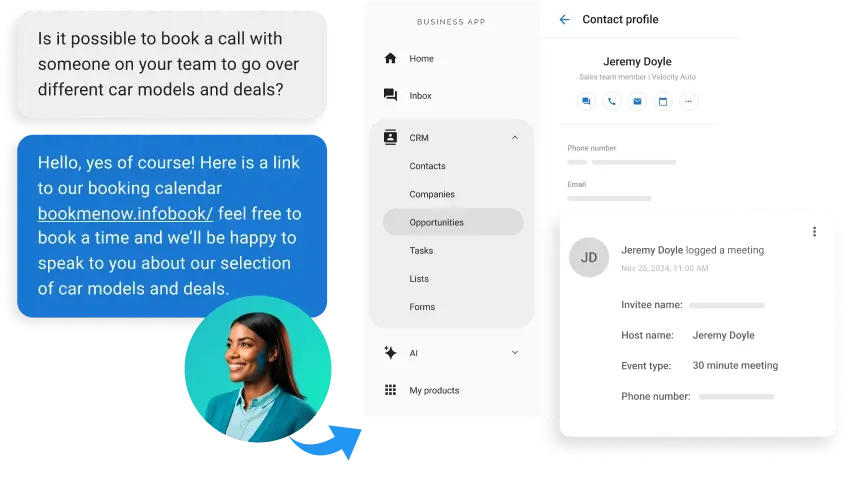
- It picks up calls 24/7 and handles texts and web chats. It answers from your own website and business profile. It qualifies the caller and books the appointment.
- Agency Elite Web Professionals deployed it for client Choice Signature Luxury Car Rental, where it handled 1,017 calls and captured 778 qualified leads, a 76% conversion rate over four months. Most AI Employees deploy in under 30 minutes.
Vendasta’s platform integrates with Jobber, Housecall Pro, and ServiceTitan, so booked jobs land in the tools a home service team already uses.
To see how Vendasta can answer every call for your business, book a Vendasta demo.
Business Voicemail Greetings FAQs
The questions below cover what to say, how long to talk, and how to keep a greeting current. A useful greeting sets a clear callback expectation and gives callers another way to reach you; setup and update routines keep that promise accurate.
The last answer covers the callers’ voicemail never reaches: the majority who hang up at the beep. For them, live answering by a staff member or an AI Receptionist is the alternative.
1. What should I say in a business voicemail greeting?
Say the business name first, confirm the trade or service area, ask for the caller’s name and number along with the reason for calling, state a callback window with a number in it, and give one alternate path such as a text number or booking link. Keep the whole recording to 20–30 seconds, which is roughly 50–75 words.
2. What are the essential elements of a business voicemail greeting?
Five elements, in order: business name, confirmation of the right place, instructions for what to leave, a specific callback timeframe, and an alternate contact. Leave out slogans, music, unstaffed phone numbers, and any request for card numbers, medical details, or legal case facts that you could not protect if the message reached the wrong person.
3. How long should a business voicemail greeting be?
Twenty to 30 seconds. At the roughly 150 words per minute the National Center for Voice and Speech cites for American English, that is 50–75 words. Phone vendors cluster between 15 and 30 seconds, and Dialpad caps greetings at 45 seconds. Research on phone prompts finds callers lose attention after 10–15 seconds, so put the name and callback promise first.
4. What are the most common voicemail greeting mistakes?
Leaving the carrier’s default greeting in place, which 54% of UK micro businesses did in Moneypenny’s 2016 survey. Letting a holiday or vacation greeting run past its date. Recording with shop noise behind you. Promising a callback “as soon as possible” instead of a window. Ending at the beep with no text, booking, or on-call alternative.
5. How is an after-hours greeting different from a business-hours greeting?
A business-hours greeting promises a callback within the hour or by end of day and points to text or online booking. An after-hours greeting states when you reopen, promises a next-morning callback, and routes emergencies to an on-call number. Both name the business first; only the timing and the emergency path change.
6. Should a medical, dental, or legal greeting differ from a trade greeting?
Yes. Practices put the “hang up and dial 911” line first, ask for only name and number, and tell callers not to leave medical details. Law firms add that information left in the mailbox is not confidential until the firm has spoken with the caller, while trades put gas or carbon monoxide safety instructions first, and plumbing greetings can add water shutoff instructions.
7. How often should I update my voicemail greeting?
Change it for every planned closure, including vacations and holidays, and reset it the day you return. Review the standard greeting when hours or staff change, and check it when the callback owner changes too. Law-practice site Attorney at Work advises that a greeting announcing daily availability must be current every day; for most local businesses, a monthly check plus calendar reminders for reopening dates is enough.
8. Why does my iPhone show two greeting options?
Apple’s Phone app offers Default and Custom. Default plays the carrier’s stock greeting, which carriers such as Optimum Mobile describe as a standard greeting using your mobile number, while Custom plays the greeting you recorded. Live Voicemail is a separate feature that transcribes callers in real time and lets you pick up mid-message.
9. Can I use text-to-speech for a business voicemail greeting?
Yes. Zoom Phone includes text-to-speech for voicemail greetings, and AI voice services such as ElevenLabs produce a file you can upload to most business phone systems. Test the result by calling your own number before publishing it, and change it as often as you like.
10. What happens to the callers who don’t leave a voicemail?
Most never leave a message: Invoca’s home-services data puts message-leavers under 3% of callers sent to voicemail, and those callers are free to dial a competitor. A live answer, whether from a staff member or Vendasta’s AI Receptionist, which picks up calls 24/7, handles texts and chats, and books the appointment, is an option for that group.