About Us
 Careers
 Leadership
 Board
 Newsroom

Social media marketing for home services works on a steady schedule. Post before-and-after job photos, reviews, and seasonal tips on Google Business Profile at least weekly and on Facebook and Instagram three to five times a week, adding Nextdoor, YouTube, or TikTok as capacity allows. Batch captions in one weekly hour or automate posting so the feed never goes quiet.
This guide covers platforms, content, frequency, scheduling, measurement, and a real-world social media marketing success story for a home services business using Vendasta Social AI.
Create, schedule, and publish social posts and blogs on autopilot
TL;DR
- Post consistently to stay visible to homeowners: Jeff Pierce, Founder of Crosshair Digital Marketing, describes home services posts that stay consistent for a week or two, then go dark. A steady weekly cadence beats an elaborate plan you abandon.
- Original local photos outperform generic stock: Nielsen Norman Group eyetracking research shows users skip generic stock images. Job-site photos prove you did the work. Choose imagery that matches your market for other posts.
- Daily posting tripled one gutter company’s impressions: A Vendasta case study reports that automated posting kept a Florida company active seven days a week with no owner involvement, using Vendasta Social AI.
Why Social Media Matters for Home Services Visibility and Trust
Homeowners check whether a contractor is active and does good work before they call. In a Clear Seas Research survey reported by ACHR News, 91% of homeowners rated online reviews as important when choosing a heating, ventilation, and air conditioning (HVAC) contractor, and 56% would look for reviews on Google and 36% on Facebook.
That makes your Google Business Profile and Facebook page the first proof many homeowners see. As part of getting found by local customers, social posts add recent, visible work alongside local SEO and reviews. Businesses that post regularly also build brand awareness, so homeowners already know the name when a pipe bursts or a storm hits.
Social media is one channel in a broader home services marketing mix. Local SEO brings in homeowners searching right now, PPC and Local Services Ads capture urgent jobs, email brings past customers back for maintenance, and reviews help close the decision.
Social supports each of those channels. It gives searchers a recent feed to check, gives your emails and ads fresh content to reuse, and keeps your name in front of homeowners between jobs.
The Real Problem Is Consistency, Not Strategy
Most home services feeds stall because posting depends on the owner remembering. A rhythm lasts a week or two, then a busy stretch of jobs takes over, and the page goes silent.
Jeff Pierce, Founder of Crosshair Digital Marketing, described the pattern this way: “Posts are consistent for a week or two, then they go dark for a week, and the cycle repeats.”
Stock photos are the second problem. When a roofer, a plumber, and a gutter installer all post the same generic images, nothing in the feed shows which company did the work. Vendasta’s AI Social Media Manager answers this with AI-generated images trained on the local market, as the gutter company’s feed shows.
Fixing both problems produced measurable results for one client. Our recent success story on home services visibility shows how a Florida gutter and exteriors company working with Vendasta AI Certified Partner Crosshair Digital Marketing tripled its online impressions year over year, reaching 42,373 over 12 months, after switching to daily automated posting. The business runs its social presence without the owner’s involvement.

“Now every one of our clients has a post going out every day, seven days a week, without exception. And once we train the agent on the client’s local geography, climate, and what houses look like in that market, the images the AI Social Media Manager generates are spectacular, better than stock photos by a long shot.”
— Jeff Pierce, Founder of Crosshair Digital Marketing
Which Platforms Should Home Services Businesses Prioritize?
Start with Google Business Profile, Facebook, and Instagram, then add Nextdoor or a video platform when you have capacity. Usage figures below come from Pew Research Center’s 2026 social media fact sheet:
| Platform | Local audience | Best content type | Effort |
|---|---|---|---|
| Google Business Profile | Homeowners searching Google and Maps | Updates, offers, job photos | Low |
| 70% of U.S. adults; 78% of ages 30–49 | Reviews, before-and-afters, local updates | Low to medium | |
| 51% of U.S. adults; 79% of ages 18–29 | Reels, carousels, project photos | Medium | |
| Nextdoor | 18% of U.S. adults | Service updates, seasonal tips | Low |
| YouTube | 84% of U.S. adults | How-to videos, project walkthroughs | High |
| TikTok | 37% of U.S. adults; 65% of ages 18–29 | Short jobsite clips, transformations | High |
Google Business Profile, Facebook, and Instagram
These three cover the moment a homeowner decides who to call. Google’s Business Profile help says posts older than six months are archived unless a date range is set. For a contractor, Facebook is the stronger channel for older homeowners, while Instagram suits short video and carousels aimed at a younger audience.
When Nextdoor, YouTube, and TikTok Make Sense
Add these by trade and capacity. Consider testing Nextdoor for lawn care, cleaning, and exterior work. YouTube suits trades with explainable jobs, such as a water heater flush, and TikTok suits crews who are comfortable on camera and can film several clips a week.
What to Post: Home Improvement Social Media Ideas That Build Trust
Every post should help a homeowner decide whether your crew belongs in their house. These categories cover that decision.
Project Photos and Before-and-Afters
Have technicians take before, during, and after photos at every job from the same angle. Caption each with the neighborhood and service, such as “Replaced a 15-year-old condenser in [neighborhood] this morning,” so neighbors see you work on their street.
Seasonal Tips and Local Content
Seasonal posts can borrow authority from official guidance. ENERGY STAR’s maintenance checklist advises checking cooling systems in spring and heating systems in fall, timed to the clock changes, which gives HVAC companies two campaign dates a year.
Ready.gov advises clearing gutters and drains before hurricanes, and its winter storm guide adds repairing roof leaks. Pair these posts with local forecasts and community events.
Reviews, Team, and Day-in-the-Life Posts
Share new reviews as graphics with the customer’s first name and service, with permission. Review posts double as reputation management, since prospects see how past customers rate you.
Reply to every comment and message within a day, because public replies show how you treat customers. That organic social engagement also builds community: answer questions in local Facebook groups, thank customers who tag you, and run quick polls on seasonal topics.
Introduce one technician a month, or post a day in the life of a crew, so homeowners know who will knock on the door.
Trade-Specific Ideas, Including Social Media for Roofing Companies
Each trade has its own trust signals:
- Roofing: The National Roofing Contractors Association recommends inspections every spring and fall and after severe storms, so post inspection reminders after hail or wind events.
- Plumbing: Post freeze-prevention checklists before cold snaps, along with short clips explaining common repairs.
- Landscaping: Show seasonal cleanups and plantings suited to your local climate.
- Cleaning: Post move-out transformations and short spring cleaning checklists.
- Gutters: Post clogged-gutter before-and-afters ahead of storm season, since FEMA training materials say downspouts should carry water away from the foundation.
How Often Should a Small Business Post on Social Media?
A home services business should post at least once a week on Google Business Profile and three to five times a week on Facebook and Instagram. Set TikTok and YouTube frequency by how much video your crew can film, and plan YouTube around the how-to and walkthrough videos you have time to record.
Google publishes no recommended Business Profile frequency, so a weekly post is a practical floor that keeps the Updates section current well inside the six-month archive window. The TikTok for Business blog reports that verified Business Accounts average 2.8 posts per week, while the top 100 by engagement rate average 4.2. Use those averages as context for setting your TikTok cadence.
Daily posting works when it doesn’t depend on your evenings. The Florida gutter company posts every day, seven days a week, because its posting is automated.
Building a Social Media Posting Schedule for Small Business
A schedule you keep beats an ambitious one you abandon, so build it around photos your crew already takes and one weekly planning block.
Sample Weekly Content Calendar
This calendar fills seven days from three or four jobs:
| Day | Post type | Platform | Example topic |
|---|---|---|---|
| Monday | Seasonal tip | Google Business Profile, Facebook | Spring AC check-up reminder |
| Tuesday | Before-and-after | Instagram, Facebook | Gutter guard install |
| Wednesday | Short video | Instagram Reels, TikTok | 30-second drain clearing clip |
| Thursday | Review share | Facebook, Google Business Profile | Five-star review with crew photo |
| Friday | Offer | Google Business Profile | Fall furnace tune-up with an end date |
| Saturday | Team spotlight | Facebook, Instagram | Meet the technician |
| Sunday | Local content | Nextdoor, Facebook | Storm-prep checklist for the weekend forecast |
Batching, Technician Capture, and Scheduling Tools
Four habits turn the calendar into routine:
- Capture on every job: Technicians shoot before, during, and after photos plus one short clip, saved to a shared folder by job address.
- Batch weekly: Set aside one hour to pick photos and write captions for the next seven days.
- Schedule ahead: Use Google Business Profile’s scheduling and repeating post options or a scheduling tool so posts publish while you work.
- Repurpose one job into several posts: A roof replacement yields a before-and-after, a reel, a review share, and a shingle care tip.
If one hour a week is unrealistic, automation can write and schedule the posts.
Why Local, Original Imagery Beats Stock Photos
Homeowners skip generic images. Eyetracking studies from Nielsen Norman Group found users ignore stock photos of generic people, while photos of real people and products often register as content.
A separate Sterling Sky analysis of more than 1,000 Google Posts found that posts without stock photos earned 5.6x more clicks. For a contractor, each click can lead to a website visit, call, or direction request.
Real job photos come first, and Google’s Business Profile photo guidelines ask for images that represent reality, without significant alterations or excessive filters. For social posts, the next best option is imagery that matches your market. The case study reports that Crosshair trained the AI on the Florida market, so the gutter company’s generated images show Florida-style homes and vegetation.
Jeff Pierce, Founder of Crosshair Digital Marketing, called the approach “better than stock photos by a long shot.”
Label realistic AI images where platforms require it: TikTok requires disclosure of realistic AI-generated content, and Meta applies an “AI info” label when it detects AI imagery.
Repurposing Blog Content Into a Week of Social Posts
One FAQ-style blog article can feed a week of posts. Answer a question homeowners search locally, such as how often to clean gutters in a rainy climate, then split it up:
- A Google Business Profile update linking to the article
- A Facebook post with the answer and a job photo
- An Instagram carousel of the steps
- A short video of a technician giving the answer on site
- A Nextdoor tip for your service area
Each post links back to the article, so homeowners who search that question land on your company’s page.
How to Measure Social Media Results
Track exposure first, then engagement, then actions, and judge social as a lead generation channel by the calls and booked jobs it contributes:
- Impressions/views: Facebook and Instagram count each display as a View, including repeat displays.
- Reach: Reach counts unique people who saw content at least once.
- Engagement: Comments, shares, and reactions show which posts homeowners respond to.
- Profile actions: Google’s performance guide defines calls as call button clicks and also reports website clicks and direction requests.
- Booked jobs: Tag your Business Profile website link with UTM parameters, use a call tracking number, and record lead source in your CRM.
Vendasta’s case study reports 42,373 total impressions over 12 months for the Florida gutter company, total engagement of 2,771, and social posts that reached 36,000+ people. Those are one company’s figures, not benchmarks, so compare your own numbers with the same period last year.
In-House, Agency, or AI: Who Should Run Your Social Media?
Who runs your social media matters less than whether posts keep going out. Most home services businesses choose from three options:
- In-house: An owner, office manager, or technician handles posting. It costs the least and keeps the voice authentic, but posting stalls as soon as the job schedule fills up.
- Agency or outsourced social media management: A marketing agency plans, writes, publishes, and reports on posts. It frees up your team and adds strategy, but you still need to send job photos, and a fully managed service may not fit a smaller shop’s budget.
- AI-assisted: AI writes and publishes posts on a set schedule, with your team or agency approving them or letting them run on autopilot. It solves the consistency problem without adding headcount.
How Vendasta Social AI Solves the Consistency Problem
Vendasta Social AI takes the owner out of the posting loop by pairing two AI Employees, the AI Social Media Manager and the AI Blogger.
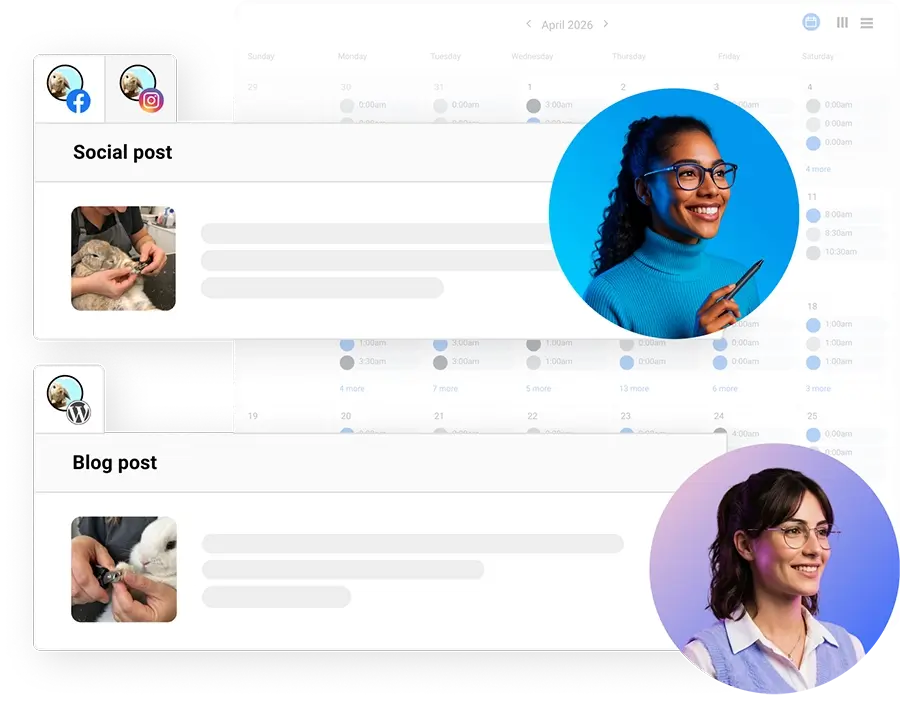
Together, they solve the four problems that usually stall a local business’s social presence:
- Going dark: The AI Social Media Manager creates and publishes on-brand posts every day, adapted for each platform.
- Stock photos: It pairs posts with AI-generated images, which Crosshair trained on the Florida market for the gutter company.
- Running out of ideas: The AI Blogger publishes SEO-optimized articles that you can repurpose for the week’s social posts.
- Strategy and approvals: Crosshair adjusts topics and cadence through chat, and teams choose between approval workflows and full autopilot.
Vendasta’s case study reports that the Florida gutter company saw roughly 3x impressions and 2x engagement year over year, 1,871 social comments, shares, and reactions, and posts published seven days a week. For an owner whose feed goes dark after a week or two, those figures show what a steady daily presence can produce.
You can run Social AI yourself or have a Vendasta AI Certified Partner run it for you.
Agencies can deliver Social AI to their own clients under their brand through the Vendasta partner program, so every client posts daily without adding staff.
To see how Vendasta Social AI keeps your posts going out every day instead of going dark after two weeks, book a Vendasta demo.
Social Media Marketing for Home Services FAQs
1. Which social media platforms bring local customers to a home services business?
Start with Google Business Profile, Facebook, and Instagram: homeowners use Google and Facebook to check reviews, and Facebook reaches 78% of U.S. adults ages 30–49. Add Nextdoor for suburban service areas, and YouTube or TikTok only when your crew can film regularly.
2. What should a plumber or HVAC company post on social media?
Post job photos captioned with the neighborhood and service, seasonal maintenance reminders, review shares, and technician introductions. HVAC companies can follow ENERGY STAR’s spring cooling and fall heating check-up timing. Plumbers can post freeze-prevention checklists before cold snaps and short repair clips.
3. What is the 5 5 5 rule for social media?
There’s no single official 5 5 5 rule. One common version splits every 15 posts into five educational, five entertaining, and five promotional posts. Another is a daily habit of liking, commenting on, and replying to five posts each. Either way, mix helpful tips with proof of your work and keep promotion to about a third.
4. Are AI-generated images better than stock photos for local businesses?
For social posts, AI images trained on your local market can look more relevant than stock because they show homes and plants customers recognize. Real job photos still come first, and Google’s Business Profile photo guidelines ask for images that represent reality. Label realistic AI content where platforms like TikTok require it.
5. Can AI handle social media posting for a home services business?
Yes. Vendasta’s AI Social Media Manager generates, schedules, and publishes platform-adapted posts, with an approval step or full autopilot. The Florida gutter company runs its social presence this way without the owner’s involvement. Your team can still supply job photos, and adjust topics and cadence through chat.
6. How do I keep posting consistently when I’m on job sites all day?
Separate capture from posting. Technicians photograph every job, then someone spends one hour a week writing and scheduling the next seven days of posts. Google Business Profile’s scheduling and repeating options help, or automation can write and publish posts while the crew stays on site.
7. How do I measure whether social media brings in booked jobs?
Use UTM parameters on links, a call tracking number, and a lead source field in your CRM, and ask every new customer how they heard about you. Review booked jobs by source monthly, and treat likes and views as early signals that need confirming through calls.
8. Should I do social media in-house or hire an agency?
Keep it in-house if someone can capture photos and spend an hour a week scheduling. Hire an agency if posting keeps stalling or you want strategy and reporting handled. Crosshair Digital Marketing uses Vendasta Social AI to keep its Florida gutter client posting on a daily schedule.
9. Should I run paid social ads or just post organically?
Start with organic posting. A steady organic feed gives paid social media advertising something credible to point to, since homeowners who click an ad will check your page first. Once posting is consistent, test small Meta ads targeted to your service area for seasonal offers, and track the calls and booked jobs they produce.
10. Can I turn blog posts into social media posts?
Yes. Turn one FAQ-style article into a Google Business Profile update, a Facebook post, an Instagram carousel, a short video, and a Nextdoor tip, each linking back to the article. Vendasta’s AI Blogger publishes SEO-optimized articles that provide material for the AI Social Media Manager’s posts throughout the week.