About Us
 Careers
 Leadership
 Board
 Newsroom

AI prompts for social media feed the most common marketing use of AI: The CMO Survey found that 73.9% of U.S. marketing leaders use AI for content creation, ahead of every other use case.
AI prompts for social media are structured instructions that hand a generative AI model five things: a persona to write as, the client’s context, one specific task, hard constraints such as character and hashtag limits, and an output format.
Those parts give the model enough direction to produce platform-native social content in the client’s voice with less first-pass rewriting. A prompt missing those parts returns copy your team rewrites.
This blog covers everything you need to know about AI prompts for social media: prompt anatomy, copy-paste templates by platform, voice and calendar prompts, research and community workflows, which model fits which task, and where one-off prompting ends and Vendasta AI Social Media Manager takes over.
Turn hours of work into minutes with AI-powered workflows
TL;DR
- AI prompts for social media give models five inputs for better content: A persona, client context, one specific task, hard constraints, and an output format help produce platform-native copy with less rewriting.
- Platform limits belong in the prompt as hard constraints: Instagram and TikTok cap hashtags at five, X recommends no more than two, and LinkedIn posts can be up to 3,000 characters.
- AI Social Media Manager publishes social content across seven platforms: Vendasta’s AI Social Media Manager learns each client’s voice, generates posts, and publishes them on schedule so your team reviews output instead of prompting post by post.
What Makes an Effective AI Prompt for Social Media
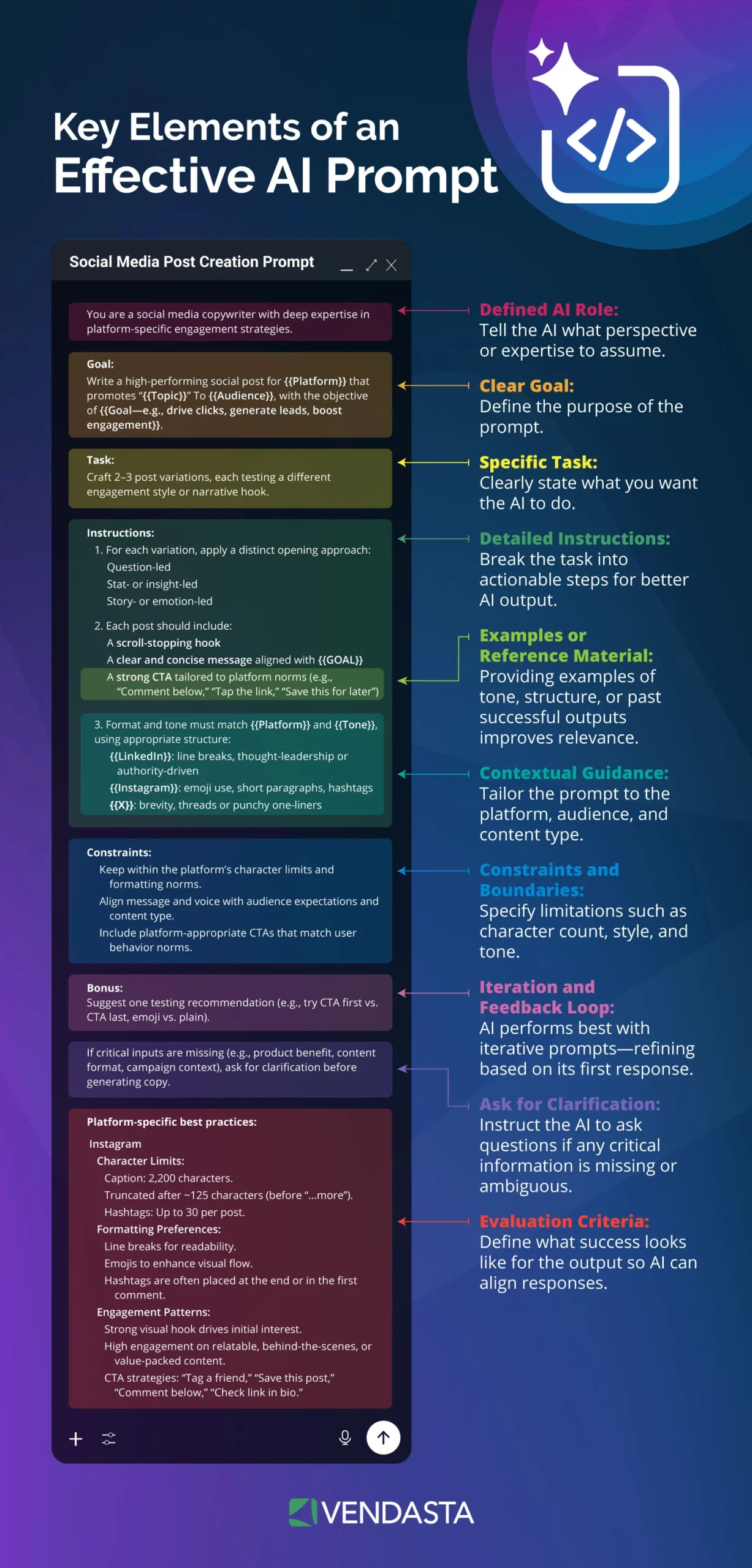
Effective AI prompts for social media name who the model writes as, what it knows about the client, exactly what to produce, what to avoid, and how to lay out the answer. Google’s Persona, Task, Context, Format and GovTech Singapore’s CO-STAR rearrange the same parts, as do most AI prompt engineering frameworks.
Each part closes a gap the model would otherwise fill with an average:
- Persona: “You are the social media lead for a 12-location HVAC company” tells the model whose vocabulary to borrow.
- Context: Paste the service list, the offer, the audience, and two past posts that performed.
- Task: One deliverable per prompt; Google Cloud’s prompt design guidance recommends splitting distinct requests.
- Constraints: State character caps, hashtag limits, banned phrases, and off-limits claims such as pricing.
- Format: Specify variant count, labeled sections, and plain text ready to paste.
AI prompts for social media usually fail on one of these five parts. When you omit constraints, the model fills them with generic defaults. Vague or contradictory instructions cost more on current models: the OpenAI GPT-5 prompting guide says GPT-5 spends reasoning tokens reconciling them.
Prompt engineers using reasoning models also drop “think step by step”: current AI prompting guidance from OpenAI and Google says these models reason internally and do best with brief instructions.
The Best AI Prompt Categories at a Glance
Each category of AI prompts for social media pairs one source input with one platform-native output, and the best AI tools change with the task:
| Category | Best platform | Source input | Output | Best tool for the task |
|---|---|---|---|---|
| Captions and hooks | Instagram, X | Offer, audience, two past winners | Five caption variants with hooks and CTAs | ChatGPT |
| Carousels and documents | Instagram, LinkedIn | Blog post or FAQ page | Slide-by-slide copy, up to 20 slides on Instagram | Claude |
| Reels and TikTok scripts | Instagram, TikTok | One customer question | 30–60 second script with on-screen text | ChatGPT |
| Thought leadership | Founder anecdote plus a data point | Narrative post under 3,000 characters | Claude | |
| 30-day calendar | All | Content pillars, promos, local events | Dated schedule with formats and hooks | AI Social Media Manager |
| Repurposing chain | All | One blog or video transcript | 6–10 platform-native posts | Claude |
| Research and competitor analysis | All | Review text, competitor posts | Pain-point themes and content gaps | Gemini Deep Research |
Note that most of these are one-prompt-at-a-time tools. When you’re producing this across 50 client accounts every week, that’s a staffing problem, not a prompting problem. An AI agent like Vendasta’s AI Social Media Manager solves this by researching, drafting, and publishing on its own every week across every major platform.
Best AI Prompts for Platform-Specific Content
The best AI prompts for social media carry platform limits inside them as constraints, and the templates below use the current caps.
Instagram Captions and Visual Content
Instagram’s current caps:
- Hashtags: The Instagram Help Center sets a limit of five per post
- Carousels: up to 20 photos and videos
- Reels: Instagram does not recommend those over three minutes to new audiences
- Aspect ratio: 3:4 supported natively
This caption prompt breaks out the hook and CTA:
Act as the social media manager for [client], a [service] business in [city] serving [audience]. Write 5 Instagram captions about [topic] using only facts from this text: [paste]. Each caption: a hook under 10 words on line one, one concrete detail, then a CTA on the last line. Mix CTAs: 2 soft, 2 direct, 1 question. Max 5 niche hashtags. No emoji. Plain text.
Use this prompt for carousels:
Turn this [blog/FAQ page]: [paste] into a 7-slide Instagram carousel. Slide 1: hook under 8 words. Slides 2–6: one point each under 25 words, 4:5 or 3:4 layout note. Slide 7: CTA to [action]. Caption under 125 words that restates the hook.
This prompt returns a shootable Reel script:
Write a 45-second Reel script for [client] answering "[customer question]". Each beat: a spoken line with on-screen text, followed by a b-roll note. First 3 seconds name the viewer's problem. Close with [CTA]. Vertical 9:16.
LinkedIn Thought Leadership and Storytelling
AI prompts for social media aimed at LinkedIn work inside a 3,000-character ceiling. LinkedIn’s Help Center warns that low-effort, likely-AI content lacking a clear point of view is distributed less widely, so requiring a specific moment and a measurable decision gives the post the perspective it needs to reach an audience.
You are ghostwriting for [name], [title] at [company]. Write a LinkedIn post under 1,500 characters using this arc: a specific moment (date, place, number), the tension, the decision, the measurable result, one lesson. Source: [paste anecdote and data]. Tone: first person, direct, one idea per paragraph, no hype words, no hashtags. End with a question aimed at [audience].
X, TikTok, and Facebook
The caps differ by platform:
- X: 280 characters on a standard account; the X Help Center recommends no more than two hashtags
- TikTok: Search Engine Land reported a five-hashtag limit starting August 18, 2025. TikTok photo post documentation sets a 4,000-character limit for photo captions
- Facebook: Meta’s newsroom says every video is a Reel with no length restriction since September 2025
TikTok creator guidance says completion rate outweighs hashtags in its recommendation system.
The three prompts below produce a five-post X set, a 30-second TikTok script, and a Facebook post built on a neighborhood detail.
Write 5 posts under 280 characters each announcing [topic] for [client]. One claim per post, a number in at least 3, max 2 hashtags across the set. Vary the opener: statement, question, stat, contrast, quote.
Write a 30-second TikTok script for [client] on "[topic]". Hook in the first 2 seconds, spoken lines plus on-screen text, one payoff the viewer must stay to see. Caption under 150 characters with 3 niche hashtags. No #fyp.
Write a Facebook post of 80–120 words for [client] about [topic] in a conversational, neighborly voice. Open with a local detail and ask one question.
Best AI Prompts for Brand Voice and Consistency
AI prompts for social media should embed brand voice directly in the prompt rather than having it edited into the output afterward, which burns the staff hours the prompt saved. Anthropic’s prompting best practices recommend separating instructions, context, and examples with XML tags and supplying three to five diverse examples.
<voice>
Brand: [client]. Sounds like: [3 adjectives]. Never sounds like: [3 adjectives].
Sentences mostly under 15 words. Calls customers "[patients/guests/homeowners]".
Banned words: [list]. Mentions [city/neighborhood] once per post.
</voice>
<examples>[paste 3 approved posts]</examples>
Match this voice in everything you write in this project. Flag any line you cannot make sound like the examples.
When you compare a human-versus-AI comparison, voice drift is the clearest difference.
Best AI Prompts for Content Planning and Repurposing
The next two workflows apply AI prompts for social media to monthly planning and to source-based repurposing across platforms.
30-Day Content Calendar Prompts
A model can draft a full month when the prompt includes the content pillars, promotions, local events, and rotation rule. Vendasta’s services team reported that a social calendar took about 2.25 hours to build by hand. The team now produces and delivers a full month of multi-platform posts within 24 hours of onboarding, with delivery margins up 10–12%.
Using the <voice> block, build a 30-day content calendar for [client] starting [date] across Instagram, Facebook, LinkedIn, and Google Business Profile. Rotate 4 pillars: educational, proof (reviews and results), offer, behind-the-scenes. Never run the same pillar twice in a row on one platform. Include [promo] on [dates] and [local event] on [date]. Output a table: date, platform, pillar, format, hook, CTA, image note.
Repurposing One Idea Into Many Posts
Repurposing works better when you chain short AI prompts for social media, because you can check each step. The Unilever case study reports roughly 20 creative assets per campaign becoming an average of 400 per product, 30% faster. That is the difference between one campaign per retainer and a month of always-on posting.
Run the chain in three prompts:
- “Extract the 5 strongest claims, 3 quotable lines, and every number from this [blog/transcript]: [paste]. Note which cite a source.”
- “From those claims, write one LinkedIn post using the narrative arc, one 7-slide Instagram carousel, three X posts, and one Google Business Profile update. Apply the <voice> block and each platform’s caps.”
- “Check every output against the voice block and platform constraints, fix violations, and mark any claim absent from the source as UNSUPPORTED.”
Best AI Prompts for Hooks, CTAs, and Hashtags
Hooks come cheap in bulk: ask for ten, keep two:
Write 10 hooks under 8 words for a post about [topic] for [audience]: 3 that name a number, 3 that name a mistake, 2 questions, 2 contrarian claims. Rank them by specificity.
Then rewrite the CTA to fit the offer:
Rewrite this CTA three ways: soft (save, share, follow), direct (book, call, order by [date]), and question (ask what the reader would do). Keep each under 12 words and tie it to [offer].
The Instagram and TikTok caps above make the old 20–30 tag advice obsolete, and Social Media Today reported in 2025 that LinkedIn is phasing out hashtag-based feeds. Prompt for a mix: “Suggest 5 hashtags for this post: 3 niche tags a [audience] in [city] would follow, 2 broad category tags.” Then check volume in platform search.
For templates beyond social, download the AI prompt guide.
Best AI Prompts for Strategy and Research
Research-focused AI prompts for social media work only when you hand the model real inputs: reviews, competitor posts, your own analytics. The 2025 RAMP study of marketing agents found that adding memory and retrieval over real data raised audience-curation accuracy by 28 percentage points across 88 queries. Pick a niche and those inputs get sharper.
- Pain-point ideation: “Here are 40 reviews for [client] and 40 for competitors: [paste]. Cluster the complaints and praise into 8 themes and propose one post per theme.”
- Competitor reverse-engineering: “Here are [competitor]’s 20 highest-engagement posts from the last 90 days: [paste]. Identify recurring creative patterns and calls to action, then list 5 gaps they leave open for [client].”
- UGC campaign brief: “Write a user-generated content brief for [client]: campaign goal, the moment to capture, 3 sample captions, one hashtag, and rights and disclosure language.”
- A/B variants: “Write 2 versions of this post that differ only in the hook. Hold body, CTA, and hashtags constant.”
Best AI Prompts for Community Management
A comment asking whether the shop is open Saturday lands at 9 p.m., and staff cannot use a reply bank until someone opens the app. That delay causes staff to miss customer expectations on response time.
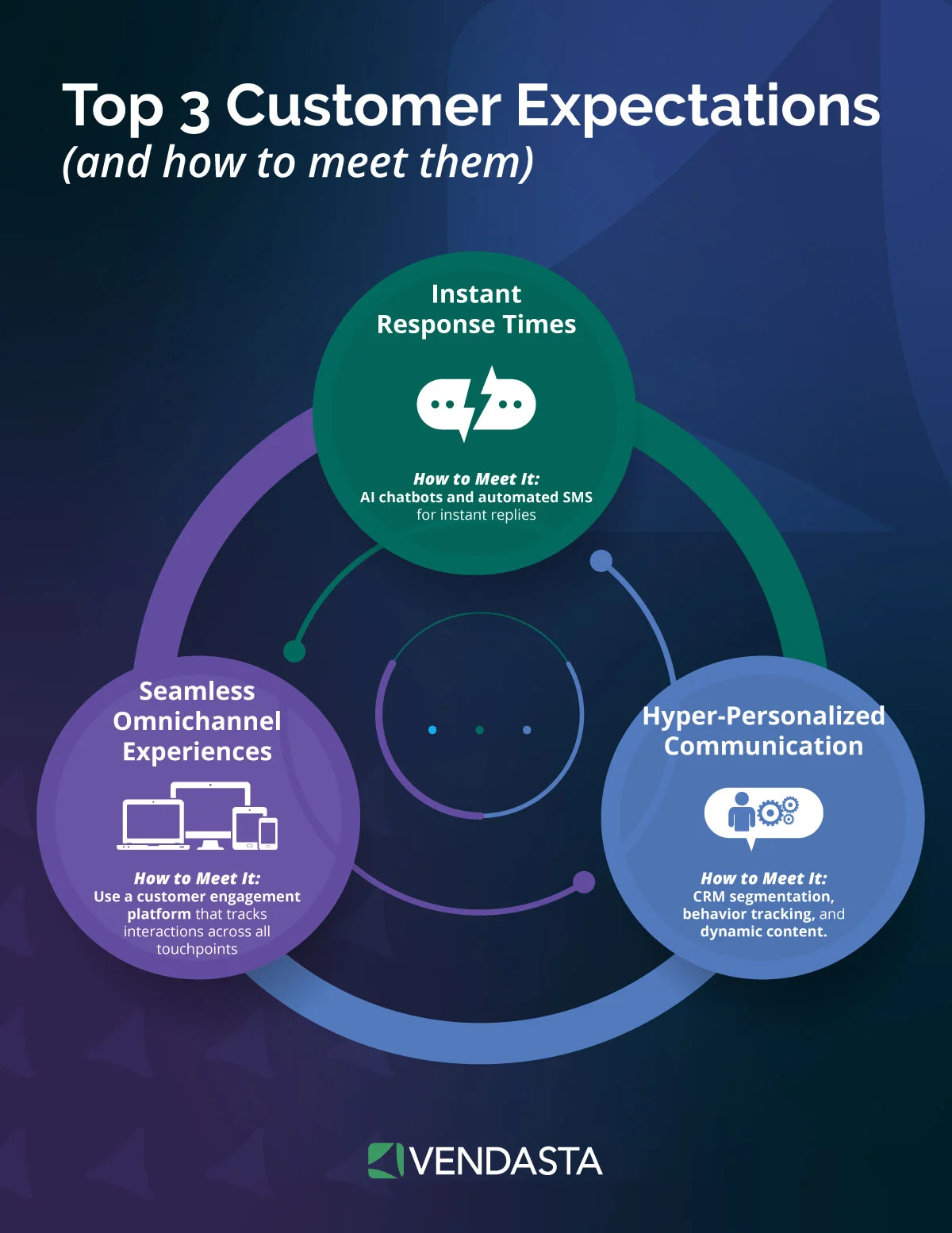
AI prompts for social media can also streamline your inbox, so build the reply bank with this prompt:
For [client], write reply templates for comments in 5 categories: praise, pricing question, complaint, spam, and "is this available?". 3 variants each, under 40 words, in the <voice> block. Complaints move to DM with an apology and a named next step. Never quote prices; direct to [link].
For UGC outreach, run this:
Write 3 DM messages to a customer who posted about [client]: ask permission to reshare, offer [thank-you], and state how we will credit them. Under 60 words each, no sales pitch.
Digiday reported a 430% year-over-year rise in social engagements at Tree Hut using AI-powered community management. Agency managers handling that reply volume across a 50-client book must treat inbox coverage as a staffing requirement rather than a prompting problem. Vendasta AI Social Media Manager pairs the reply bank with a human in the inbox today, with automated replies on the roadmap, and slow after-hours replies can strain client relationships.
Other AI Prompt Use Cases Worth Trying
When crafting AI prompts for social media visuals, image prompts follow the same anatomy: subject, setting, style, brand colors, aspect ratio, and any text to render in quotation marks. Google released Gemini’s Nano Banana 2 (Gemini 3.1 Flash Image) on February 26, 2026. It supports 1:1, 4:5, and 9:16, with SynthID watermarking.
Generate a 4:5 image for [client]: [subject] in [setting], [style], brand colors [hex codes], natural light, no text overlay except "[headline]" rendered in the lower third.
Meta requires creators to disclose organic content with photorealistic video or realistic-sounding audio that AI created or altered. TikTok requires labels on AI-generated or significantly edited content showing realistic-looking scenes or people. LinkedIn requires clear disclosure when synthetic or manipulated media depicts a person saying or doing something they did not do, so review each generated client asset against the applicable platform rule before publishing.
Two more items earn a place in the library:
- Library organization: Keep one Project or Gem per client holding the voice block, name saved prompts by platform and format (ig-carousel-v3), and version the voice block whenever the client’s offer changes.
- Fact-checking and audit trails: The NP Digital report found 36.5% of marketers have already had hallucinated content go live and only 23% feel comfortable using AI output without human review. Run this before publishing: “List every factual claim in this draft. For each, quote the supporting line in the source material or mark UNSUPPORTED.” Require logged actions from any AI Employee, Vendasta’s term for a purpose-built AI role, that posts on a client account.
Step-by-Step Guide: How to Use AI Prompts for Social Media
AI prompts for social media work best when they’re structured, intentional, and tested over time. Here’s how to make the most of them.
1. Choose the Right AI Tool
When evaluating AI tools for social media, run through this checklist to make sure you’re selecting one that fits your workflow and goals:
- Does it integrate with your content calendar, CRM, or publishing platform?
- Can you adjust tone, style, and voice for different audiences?
- Does it provide platform-specific features (e.g., hashtags for Instagram, threads for X)?
- Can it generate both short-form content (captions, ads) and long-form content (blogs, LinkedIn posts)?
- Is there an option to test or trial the tool before committing?
- Does it offer analytics or insights to improve future content?
- Is the interface user-friendly enough for your team to adopt quickly?
Choosing the right tool is the foundation of success. Check off these boxes before you dive into prompt writing.
2. Define Your Goal
AI works best when you know what you want. Align goals with metrics and strategy.
Goal: Increase reach
- Metrics to track: impressions, follower growth, hashtag performance, post shares, video views.
- Prompt strategy: ask AI to generate captions with trending hashtags, create shareable content ideas, or draft hooks designed to capture attention quickly.
Goal: Boost engagement
- Metrics to track: likes, comments, shares, saves, click-through rates on posts.
- Prompt strategy: instruct AI to create posts that include questions, polls, or calls for user participation.
Goal: Drive website traffic
- Metrics to track: link clicks, landing page sessions from social, bounce rate, and average time on page.
- Prompt strategy: prompt AI to write compelling CTAs, teaser captions, or headline variations that encourage clicks.
Goal: Generate leads
- Metrics to track: form fills, newsletter sign-ups, gated content downloads, and demo requests.
- Prompt strategy: use prompts that highlight offers, emphasize urgency, or position the brand as a trusted authority.
Goal: Increase conversions
- Metrics to track: purchases, add-to-carts, conversion rate, cost per acquisition.
- Prompt strategy: craft prompts that generate persuasive ad copy, emphasize benefits, or reduce buyer hesitation with FAQs and testimonials.
Goal: Strengthen brand loyalty
- Metrics to track: repeat engagement from existing followers, branded hashtag usage, customer testimonials, sentiment analysis.
- Prompt strategy: ask AI to generate appreciation posts, spotlight loyal customers, or create behind-the-scenes content that builds trust.
Goal: Position as a thought leader
- Metrics to track: shares of educational content, mentions in industry discussions, follower growth among professionals.
- Prompt strategy: instruct AI to draft insights, create mini case studies, or generate tips that showcase expertise.
3. Add Context to Your Prompt
AI thrives on details:
- Always include the platform and audience in your prompt. Example: “Write a playful Instagram caption for Gen Z.”
- Add campaign context: launches, seasonal events, or promotions help the AI tailor content.
- Think about pain points or desires your audience has, and build them into the prompt for relevance.
4. Specify Tone and Style
The same message can land differently depending on tone:
- Define tone with adjectives (witty, professional, inspirational, bold).
- Keep your brand voice guide handy and translate it into prompt instructions.
- For multi-platform strategies, adapt tone per channel: professional on LinkedIn, casual on TikTok, inspiring on Instagram.
5. Refine with Details
Adding specifics prevents generic results:
- Include product names, discount details, or hashtags in your prompt.
- Ask for examples, lists, or frameworks instead of broad answers.
- Use modifiers like “limit caption to 15 words” or “include 2 emojis” to get tighter results.
6. Generate Multiple Variations
AI can create dozens of ideas in seconds—use that advantage:
- Request 3–5 variations of each prompt to compare.
- Use one version for organic posting and another for ads.
- Keep the best-performing variations in a swipe file for future inspiration.
7. Edit and Humanize
AI gets you 80% of the way—your job is the final 20%:
- Infuse personal anecdotes, inside jokes, or niche industry language.
- Adjust phrasing so it feels natural to your brand voice.
- Always fact-check: AI may invent stats or misinterpret context.
8. Test and Analyze
Strong prompts evolve through iteration:
- Track engagement metrics like comments, saves, shares, and click-throughs.
- Compare AI-generated posts against human-written ones for performance insights.
- Refine prompts based on data. For instance, if posts with questions drive more engagement, start prompting AI to generate question-based captions.
100+ Free AI Prompts for Social Media Marketers
If you’re ready to take the guesswork out of content creation, we’ve put together a resource designed specifically for you.
Our free ebook, 100+ AI Prompts Every Marketer Needs, is packed with ready-to-use prompts that help you generate scroll-stopping content in seconds.
Inside, you’ll find prompts tailored for:
- Post creation with multiple variations and engagement styles.
- Social media contest promotion posts with clear CTAs and tone options.
- Hashtag suggestion frameworks grouped by primary, secondary, and branded categories.
- Comment engagement and reply templates to keep conversations authentic.
- Audience interaction prompts for polls, questions, and challenges.
- Promotional post prompts designed to drive conversions across platforms.
Whether you’re struggling with creative blocks or simply want to speed up your workflow, this guide gives you plug-and-play prompts you can adapt instantly to your brand voice.
Download the free ebook here: 100+ AI Prompts Every Marketer Needs
Which AI Tool Should You Use for Social Media Prompts?
No single model wins every task, so match the tool to the job when you run AI prompts for social media:
- ChatGPT for caption iteration: Strong at caption variants and hooks, with Characteristics settings that fix warmth and formatting. The Ars Technica comparison of an earlier ChatGPT release caught it inventing a book subtitle and a job start date, so check any output carrying names or dates.
- Claude for long-form and documents: Anthropic models held the top two spots on the LMArena creative writing leaderboard (claude-fable-5 and claude-opus-4-6-high), and Sonnet 5 is the default on Free and Pro plans. It handles LinkedIn narratives, calendars, and repurposing chains; route research and visuals elsewhere.
- Gemini for research and images: Deep Research comes with the paid AI Pro and Ultra tiers, and Nano Banana Pro handles image generation. Use it for competitor briefs and post visuals, then hand caption work back to ChatGPT or Claude.
How Vendasta Automates Social Media Marketing With AI
Keeping up with social media demands can feel endless—from ideation and scheduling to engagement and analysis.
Vendasta simplifies the process by combining automation with AI-driven creativity, helping businesses scale content without sacrificing quality.
At the center of this is Vendasta’s Social AI tool, built to generate high-performing social media posts in seconds.
With the help of an AI Social Media Manager, instead of starting with a blank page, you can:
- Input a topic, product, or campaign goal.
- Generate multiple caption variations tailored to each platform.
- Automatically adapt tone and format for LinkedIn, Instagram, Facebook, TikTok, and X.
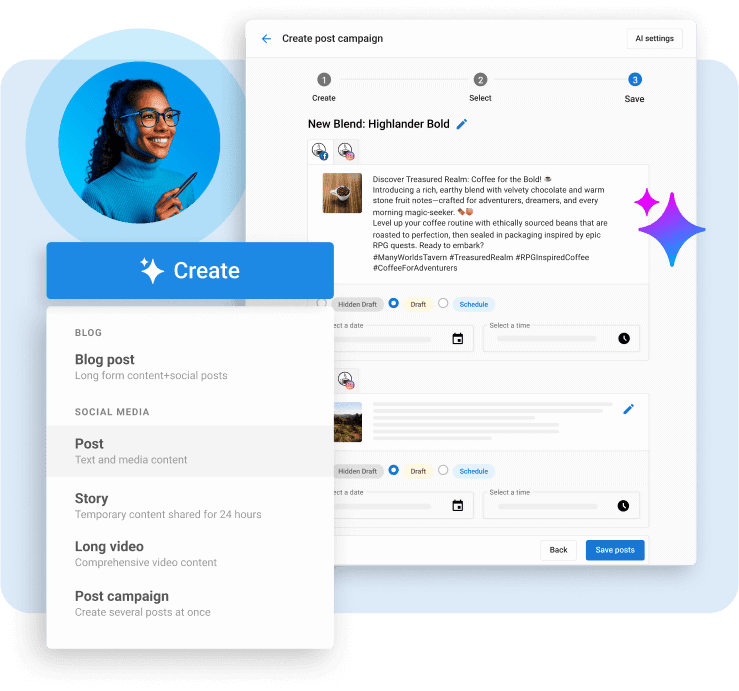
This ensures that every post is consistent with your brand voice while still optimized for platform-specific engagement.
Vendasta’s social media management software streamlines the entire social marketing cycle:
- Scheduling & Publishing: Auto-schedule AI-generated posts to go live at the right times.
- Engagement: Monitor and respond to comments, reviews, and messages in one dashboard.
- Analytics & Optimization: Track what’s working and refine prompts or strategies based on real-time performance data.
Vendasta’s AI-powered automation removes repetitive tasks so you can focus on building client relationships, testing new strategies, and scaling campaigns confidently.
Where AI Prompts Fit Into an Always-On Social Workflow
AI prompts for social media save minutes per post and leave the per-client handoff intact: 50 clients, seven platforms each, and a specialist copying outputs into a scheduler every week.
Vendasta’s AI Social Media Manager runs the workflow instead. It learns each client’s voice and visuals from their website and profile, then generates and publishes platform-native posts on schedule across Google Business Profile, Facebook, Instagram, LinkedIn, X, TikTok, and YouTube.
AI Social Media Manager logs every post, so your Social Marketing reporting shows clients what ran and how it performed. Your team reviews instead of retyping, which reduces manual scheduling work and increases service capacity without requiring headcount to grow in direct proportion to client count.
The recurring calendar belongs to AI Employees working under your brand. That model replaces repeated one-off prompts with scheduled production, approval controls, publishing, and proof of performance across client accounts. To see it run social across your client portfolio, book a demo today!.
AI Prompts for Social Media FAQs
1. How do I write AI prompts for Instagram captions?
Give the model a persona, the client’s offer and audience, source text to draw facts from, and constraints: a hook under 10 words, one concrete detail, a CTA on the last line, and no more than five hashtags. Ask for five variants with mixed CTAs.
2. What is the best AI prompt for LinkedIn posts?
Use a narrative arc prompt: a specific moment with a date or number, the tension, the decision, the measurable result, and one lesson, in first person under 1,500 characters. LinkedIn says polished content without a clear point of view gets less distribution, so paste a real anecdote.
3. How do I prompt AI to write a carousel?
Paste a blog post or FAQ page and ask for a fixed slide count, typically seven. Slide one is a hook under eight words, slides two through six carry one point each under 25 words, and the last slide holds the CTA. Instagram allows up to 20 slides.
4. How do I keep brand voice consistent with AI prompts?
Write a voice block inside XML tags: three adjectives the brand sounds like, three it never sounds like, sentence length, the word it uses for customers, banned terms, and three approved example posts. Save it in a per-client Project or Gem so every prompt loads it.
5. Can AI create a 30-day social media content calendar?
Yes, if you supply the pillars, promotions, local events, platforms, and a rotation rule such as never repeating a pillar twice in a row. Vendasta’s services team reported replacing a roughly 2.25-hour manual calendar build with a full month of multi-platform posts delivered within 24 hours of onboarding.
6. How do I repurpose one piece of content into multiple social posts with AI?
Run a three-prompt chain. First, extract the strongest claims, quotable lines, and numbers from the source. Second, write platform-native versions for LinkedIn, Instagram, X, and Google Business Profile using your voice block and each platform’s caps. Third, have the model mark any unsupported claim.
7. What is the best prompt framework for social media?
When structuring AI prompts for social media, persona, context, task, constraints, and format covers what social work needs. Google’s Persona, Task, Context, Format and GovTech Singapore’s CO-STAR are close variants. For reasoning models, skip step-by-step instructions; OpenAI and Google both say the models reason internally and work best with brief, direct requests.
8. Is ChatGPT, Claude, or Gemini better for social media content?
Each leads at a different task. ChatGPT is a strong fit for caption variants but hallucinated facts in Ars Technica’s test. Claude topped LMArena’s creative writing and long-query leaderboards, which suits LinkedIn narratives and calendars. Gemini pairs Deep Research with native image generation for competitor briefs and visuals.
9. How can AI prompts help with competitor research and content ideas?
Paste real inputs: 40 recent reviews for the client and competitors, or a competitor’s 20 top posts from the last 90 days. Ask the model to cluster themes, quote evidence, identify recurring hooks, and list gaps the client can fill. Without real inputs, models invent audiences.
10. Can AI write comment replies and DMs for community management?
AI drafts reply banks well: templates by sentiment category, three variants each, with complaints routed to DM and no pricing quoted. It does not monitor the inbox. Someone still has to be present at 9 p.m., which is why reply banks pair with an AI Employee that publishes and logs.
This article was originally published in September 2025 and was updated in September 2026 to include the latest information and insights.